Wednesday, December 19, 2018

Factors Behind Successfully and Repeatedly Executing Digital Transformation Programs at a Lightning Pace

Gone are the days when a typical technology transformation program took a year or more. The pace of technology and business changes are influencing and at times complimenting each other. Executives want results in weeks rather than months or longer. Cloud based SaaS (software as a service) platforms that provide a solid foundational capability coupled with elasticity, scalability, ease of configuration and customizations have become the choice of the day. Organizations that shied away from doing transformational changes, are now forced by external factors to undertake such programs. Such programs, though transformational in nature, typically do not last beyond six months. Even though organizations are constantly under cost pressure, they are willing to pay top dollars to partners who have proven success to lead such transformation programs – time and again in a compressed timeline with superior quality.

This article focuses on factors behind successfully executing such programs at a lightning pace – again and again. Such a program will have following four distinctive steps.

Step 1: Current State Analysis

Current State Analysis requires understanding current business and technology challenges; helping the customer choose the right technology platform and helping the customer understand how the technology platform will resolve business challenges. Experts run high performance and short exploration workshops to understand what is valuable to the customer and which problems the business is trying to solve. By talking to diverse teams from different departments and people from different levels in the organization hierarchy, it also helps uncover bottlenecks, what matters to whom, system and process challenges, etc.

Step 2: Future State Technology Requirements

During this phase, use cases from all user groups are collected and validated. Business architects and analysts create process maps, journey maps with personas. Interaction flows are validated with users through storyboarding, wireframes and mockups. The team also defines the KPIs that will determine the success of the program at the end. An implementation roadmap with use cases is prepared and reviewed with the customer which provides a high-level view to leaders. The implementation roadmap tells how the end goal is achieved and what are the steps involved. In this phase, KPIs are mapped to the use cases to ensure coverage. Quality and accuracy of this phase will be the foundation on which delivery will be based. Any slips in this phase will have major impacts on the next phases – which will mostly be irrecoverable.

Step 3: Technical Delivery

This is a no-brainer. The program should meet the objectives within budget, quality and timelines. But it is easier said than done. This is where everything that has been discovered in exploration workshops will be used, turned into epics and stories, designed, developed, tested and finally, presented to “pilot” users who matter during each sprint.

Step 4: Change Management and Roll Out

At times, change management and roll out strategies are not given due importance, but these are critical parts of transformation programs. Key points for implementing such a technology program require efforts from both the technology implementation partner and the customer. As a technology implementation partner, it is about your team and tasks that you can control, and how you can help your customer achieve change management goals.

As an implementation partner, the tasks you’re responsible for – mostly are in your control. There will be activities where you’re responsible but close collaboration is required from the customer.

What is in Your Control as a Technology Implementation Partner?

As an implementation partner, you can define the roles, team composition, team members’ skill set, and project planning activities. It is a good idea to create an activity RACI matrix and create detailed WBS along with dependencies. Afterwards, have agreement with your customer too during the planning stage.

Project Manager vs. Technology Manager

The partners who are repeatedly successful in executing such high-profile strategic programs have understood that “traditional” Project Manager roles are largely obsolete. Project Manager roles may still be useful for pure administration in multi-year / large programs that consist of large teams, but, other than that, in current agile environments such roles are considered only an overhead. If a leader does not understand current technology, platform capabilities, technology nuances, overall solution and functional domain – he or she can’t lead such a program.

Team Composition: Matching the Pace of Execution

Every day of such a program is critical. If there are team members who can’t match the fast pace, pace will be defined by the slowest team members. The choice of high performing team members – the A-Team1 is important. They must be people who are at top of their game, be it in functional, technical or leadership roles. While technology experts are expected to have depth and breadth of technical knowledge, the remaining team members must know technology to a good extent. Similarly, functional experts must know the impact of their work and decisions on downstream systems and other teams. Resource multi-skilling is a must – with one primary and multiple secondary skills. Team members should have team skills and should be willing to take additional activities to average out the workload. The key point to note here is that building the team should be done proactively.

Everyone is a Driver

It may seem strange, but all the team members in such a program are self-driven, proactive, focused on results and at the same time hands-on. It does not mean that they are ordering others around all the time – rather it means that they know the work in-and-out, do the work themselves proactively, and take mitigation and corrective actions constantly. It should not be confused with a Driver personality2. The personality will need to be balanced and flexible as the situation demands.

Overlapping Roles

Even though each member’s role in the project is defined, everyone will have to overlap (and sometimes fill shoes of the others) or stretch boundaries when the need arises. Skills, attitude and people acumen are key ingredients of high-performance teams. For example – a functional expert will start with the role of business expert, slowly wear the technology hat during design and development, get into quality assurance activities and sometimes even help in change management. Similarly, a technology expert undertakes many activities that are overreaching with leadership roles. He not only drives his own technology domain, he helps teams on which he has dependencies and makes sure they succeed, too.

Decision Making

At times, whether a decision is a right decision matters less than making a decision quickly without procrastination. Everyone should be empowered to make decisions. If the team composition is right, it will be rare to make a wrong decision in the first place: “it was more advantageous to make a decision quickly, even if wrong, than to suffer the delay required to make sure the decision was right”3.

Expect the Unexpected and Plan for It

Every day counts. Have a plan B, and even a plan C ready to keep the ship sailing to meet the end goals. Most of the customers today are willing to accept changes during execution as long project goals, timelines, quality and budget are not impacted. Though buffers are difficult to build in the plan, consider the project as a Lego building project. Make every day count. For example – swap epics/stories between sprints as the situation changes; smartly plan for stories that have dependency on other systems/resources with lesser control.

Plan for Additional Scope

This may sound like an unrealistic expectation, but during the sprint demo sessions to the business users, you will identify new stories which will be important or even critical for program’s success. Most of these stories will be around system usability, and rest around enhanced features and (supposedly) missed requirements. Even though Transformation projects tend to have fixed scope and use cases, it will make complete sense to develop and deliver the additional stories. To make time for these, load initial sprints heavily and complete all foundational work within those sprints. Idea behind this is twofold. Foremost is – any changes to foundation design should be known early. Second is – once foundation stories are working, end users will get find hand experience of the working product and you will get constructive feedback.

Decide Collaboration Tools

Use a collaboration tool that can be used by all teams without challenges. This will be an important success factor given that execution will be at fast pace. Processing story changes, informing teams of their actions, issues tracking, and reporting should take least administrative effort. In absence of such a tool, effort will be wasted on unproductive work and potential delays. Today, all top of the line ALM tools5 have minimum feature capabilities for collaboration.

How to Make the Customer Work with You at Your Pace

Getting the customer to work at your pace can be tricky. Every customer is different, and one learns something new with every customer. Some of the pointers are nevertheless common.

Work as a Team with the Customer

Keep your focus on the big picture and work closely with your customer. Try to make a difference, support your customer as far as practically possible. Be empathetic and have respect for the customer’s challenges. If a challenge can’t be resolved even, with your and your customer’s best efforts, it’s important to identify this situation and prepare the customer team for the eventuality. In most of the cases, you will be able to mitigate the risk. Even if the risk eventually becomes an issue, you will not find yourself at receiving end. Make use of regular customer connect and keep customer abreast of your progress.

Listen Well and Communicate

Listen attentively and ask questions. This will help you appreciate the challenges your customer is facing. Take time to understand the issues and how they affect the program and customer’s business. This will help you make right decisions at the right time. In tough situations, put yourself in the customer’s shoes. Show empathy. That’s the least you can do if you can’t resolve a customer’s issue. Not only will the customer appreciate it, it will be your differentiator. “By listening well — in other words, through active listening — we discover the best way to deliver the message we need our audience to hear.”4

Consult Honestly

You can only be successful if your customer is successful. Hence, provide honest consultation. When customers know you value their needs, they will work with you collaboratively and may be willing to go extra mile. Encourage your team to do the same at all levels. Share feedback openly and don’t hide things. If you do the right thing for customer, it will win you an advocate. You should paint the picture in advance and provide technical direction throughout the journey.

Match Working Style

Identify the working style of your customer’s team – the earlier the better. Some members could be introverted and some extroverted. Some may like emails, and others may prefer verbal communication. Match the working style to make the best of it, at your desired pace.

Keep a Daily Sync Call at Leaders Level

Having a daily sync with the customer at lead level works wonders. Even if the daily connect is for as short as five minutes, it will make a difference between successful execution versus the rest. This open dialogue should be used for mind sharing, and resolving items in time before they cause a snowball effect. The agenda for this sync meeting should include review of activity status covering both the teams, risk reviews, mitigations and look-ahead items.

Customer Experience Matters

Provide friendly and personable customer service. Since your work is the service you provide to your customer, their experience matters. Personalizing the experience at all levels throughout the journey at all customer touchpoints is imperative. Be it emails or in person meetings, your professionalism should stand out.

Conclusion

Serve your customer well and make the journey enjoyable for them. As in any other industry today, customers choose a company based on overall experience. Nobody wants a partner that induces work-stress or impacts work-life balance. This will win you internal promoters when you go for repeat business. By providing amazing execution experience, you can retain and grow your business. Customers do not mind paying a premium for better quality and superior experience.

References

1. Do You Have An A-Team? https://www.forbes.com/sites/davelavinsky/2013/05/09/do-you-have-an-a-team/#5835f4436975

2. Pardon me–your personality is showing! https://www.pmi.org/learning/library/personality-influences-way-address-challenges-6674

3. The Time Paradigm. https://www.forbes.com/asap/1998/1130/213_2.html

4. To Communicate Well, Listen First. https://www.forbes.com/sites/forbescoachescouncil/2018/01/03/to-communicate-well-listen-first/

5. Providing the Necessary Tools and Reports for Very Large IT Projects. https://www.red-gate.com/simple-talk/opinion/opinion-pieces/providing-necessary-tools-reports-large-projects/

The post Factors Behind Successfully and Repeatedly Executing Digital Transformation Programs at a Lightning Pace appeared first on Simple Talk.


from Simple Talk https://ift.tt/2CllyS4
via

SSRS Reporting Basics: When is SSRS the Right Tool?

SQL Server Reporting Services (SSRS) is a server-based reporting tool, ideal for paginated reports. It represents a centralized approached to data governance, with all of your report files located on a central server. However, there are some self-service features available, such as users being able to fill in parameters, run reports on demand, and even create their own reports.

By default, reports in SSRS are displayed using the HTML 5 rendering engine, which Microsoft added back in 2016. Despite the rendering being web-based, you can export reports to a number of file formats, including PDF, CSV, Word, and Excel. These files can be scheduled to go out in a regular email or to be saved to a file share.

Future articles will cover topics like how to build and format your reports, visual controls, advanced features, security, and deployment. Before talking about how to use SSRS, I’ll spend some time reviewing the Microsoft reporting landscape, which has changed dramatically over the past four years. Deciding which tool to use has become a more complex proposition.

Microsoft Reporting Landscape

Currently, there are four primary tools for rendering reports within the Microsoft ecosystem:

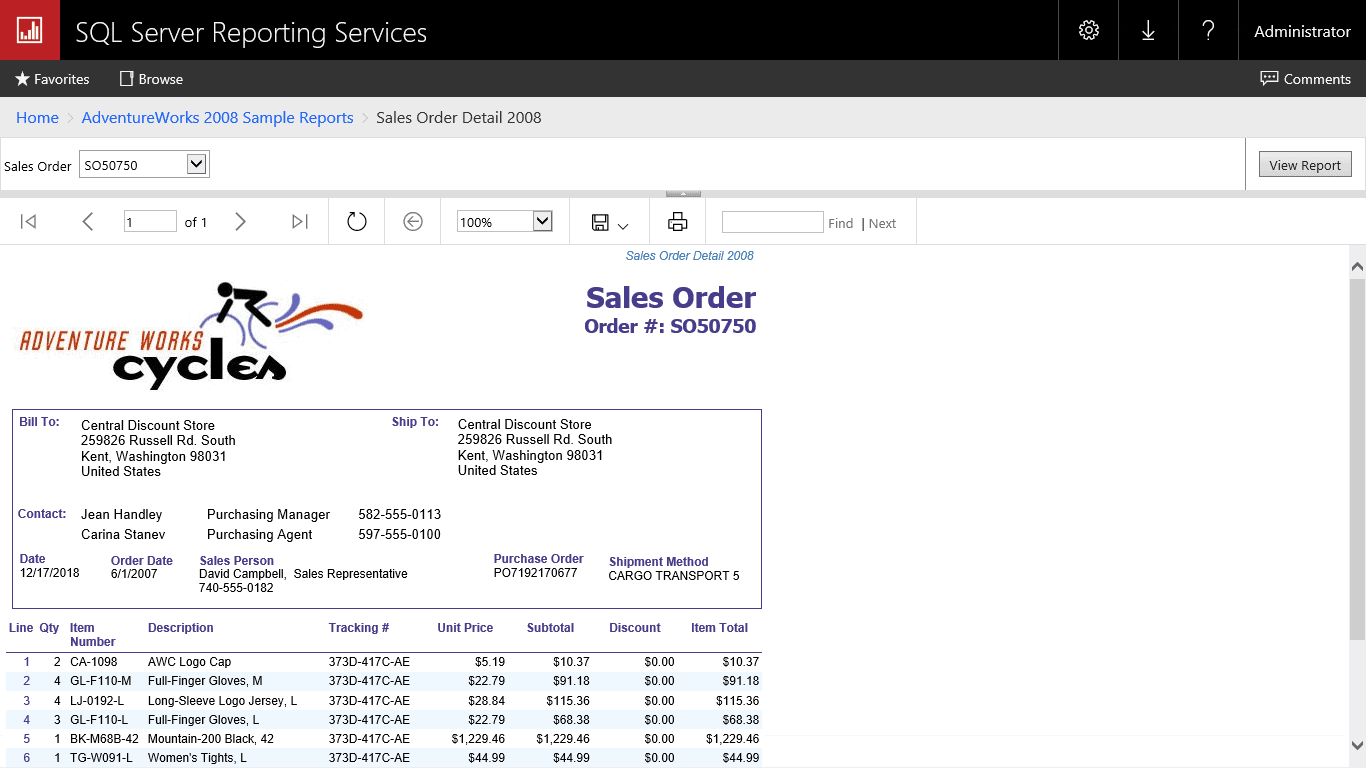
  • SSRS
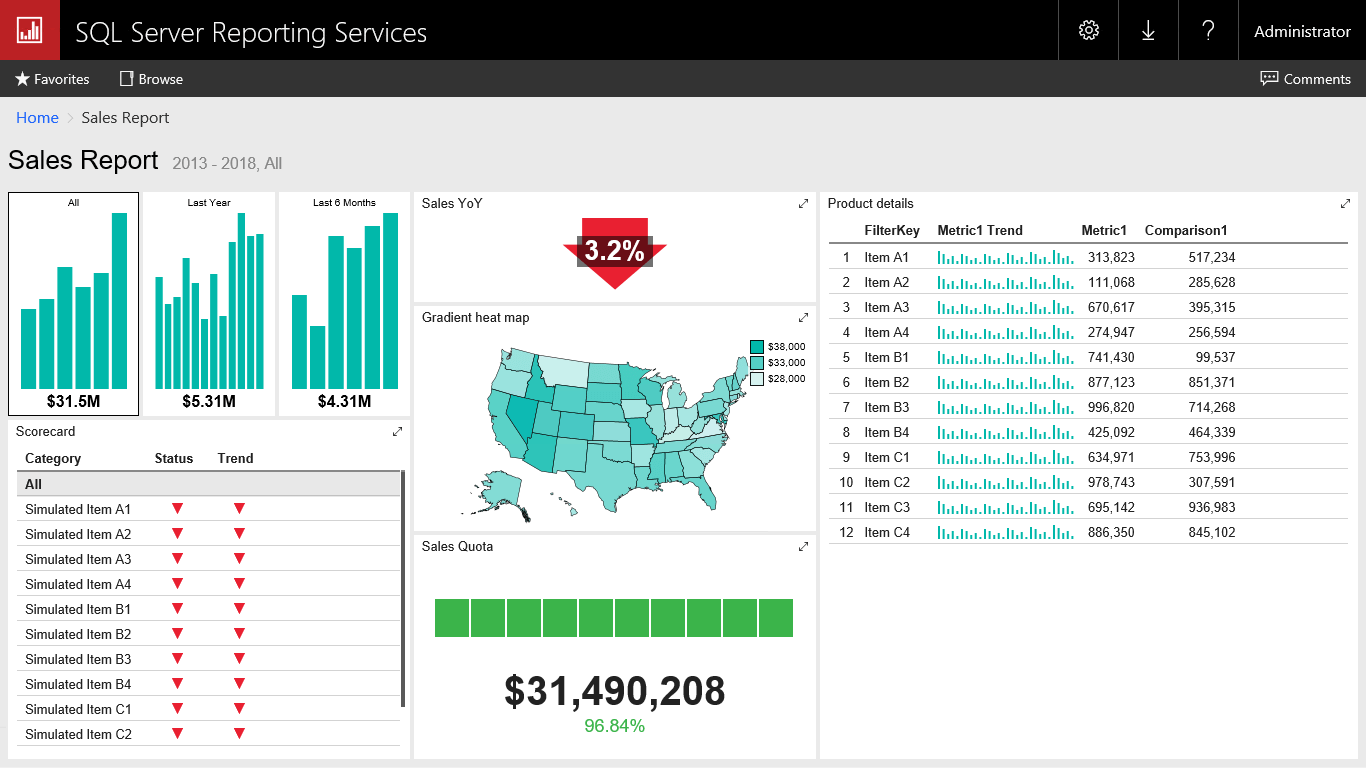
  • SSRS Mobile Reports (formerly Datazen)
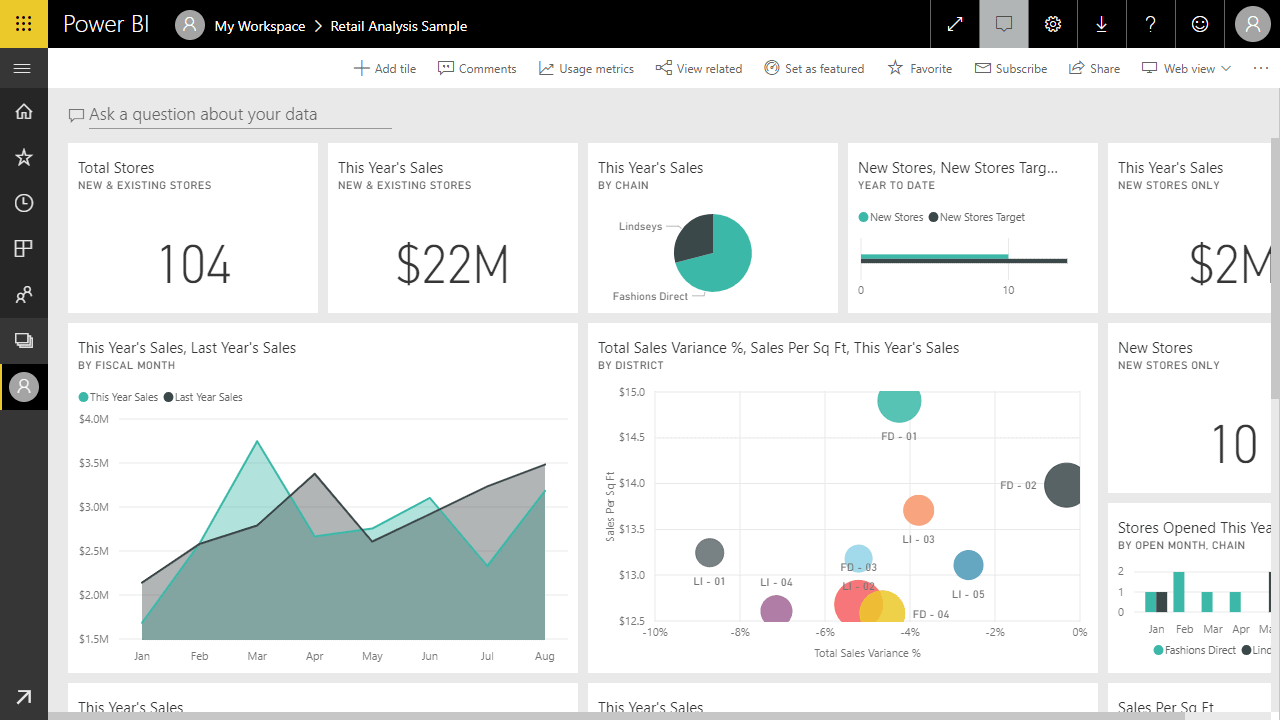
  • Power BI
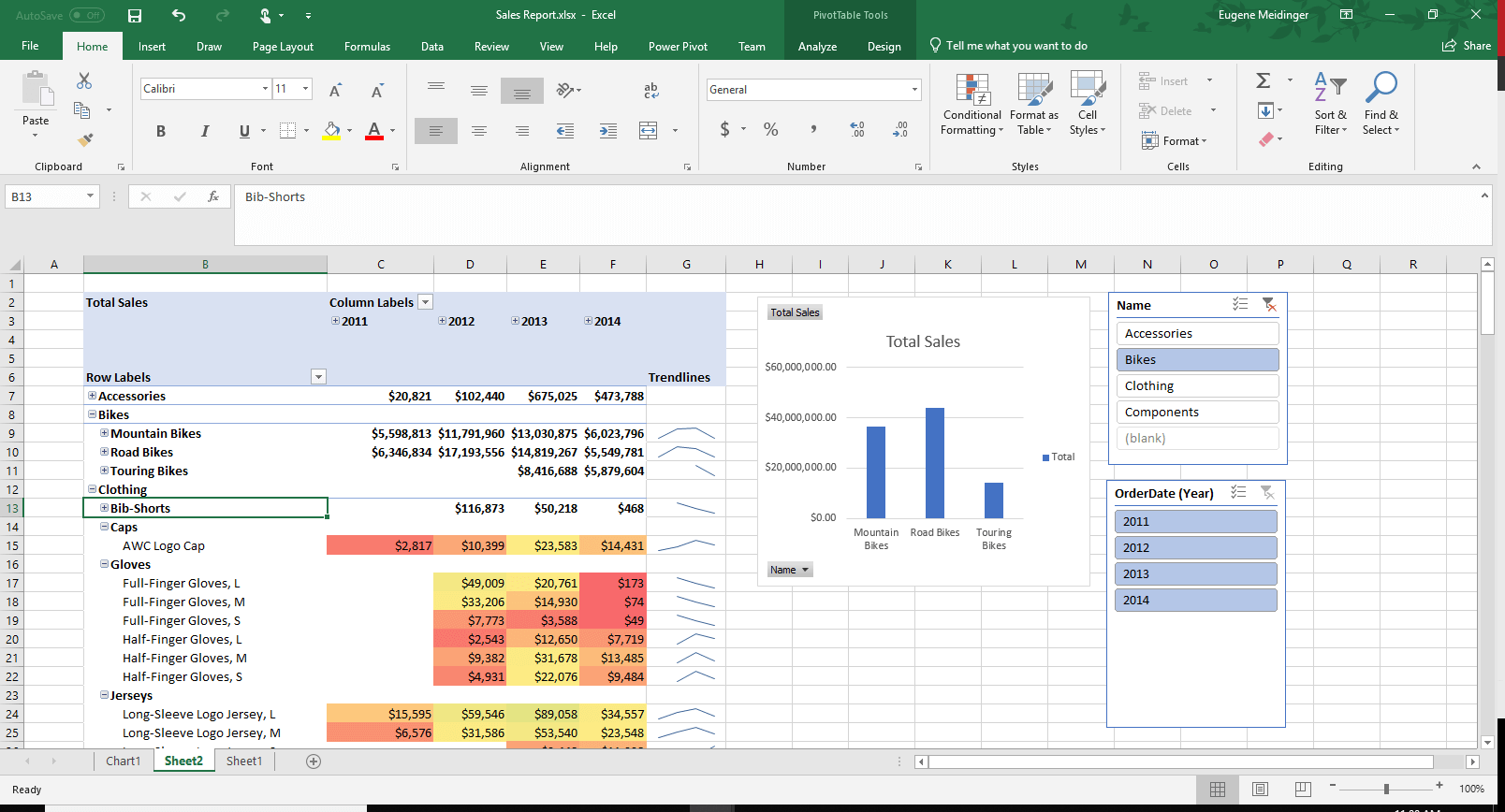
  • Excel

Each of these tools has an ideal use case, but there is significant overlap in capabilities
among all of them. Your choice in a reporting tool is going to depend on your existing
skillset, the type of users you are supporting, and how those users wish to consume the reports.

As a simple example, more and more users are consuming reports outside of the office or on their mobile devices. That trend is going to impact which solution you choose. Here is a review of the options available.

SSRS

SSRS was originally released in 2004 as an add-on for SQL Server 2000. Since then it has gone through many changes and enhancements. Fundamentally, however, it is the same product at its core. SSRS is a canvas-based reporting tool where you add reporting objects (tables, charts, text, images) to a blank canvas until you have your final report.

SSRS reports are traditionally accessed via a central web portal. Permissions can be specified on a site-wide level, folder level or even on individual reports. This allows for a granular set of permissions, which can be important if you are dealing with financial data or audited reports.

SSRS Mobile Reports

Even though SSRS Mobile Reports are ostensibly part of SSRS, I think of them as a different product. Partly because they serve a completely different use case and because they initially were a different product! SSRS Mobile Reports were originally a product called Datazen. In 2015, Microsoft acquired the product from ComponentArt and rolled the software into SSRS.

The primary use case of SSRS Mobile Reports is self-explanatory. Optimizing SSRS reports, which are rigid and document-oriented, for mobile devices can be quite the challenge. Instead, SSRS Mobile Reports takes a grid-based approach with charts that are fluid and work at a variety of sizes.  

Power BI

If SSRS is now entering its teenage years, Power BI is practically a toddler. Power BI was initially a loosely related set of Excel add-ins: Power Pivot, Power Query, Power View, and Power Map. However, in 2014 the tool was combined and rebranded as a cloud-based product. While the underlying data engines are the same, Power BI today is an entirely different product from the Excel 2010 add-ins.

It can be a struggle at times to explain what use case Power BI was designed to solve. That’s because it was not so much designed and as it was rapidly iterated. Power BI represents a new Microsoft, releasing changes every single month and responding directly to customer feedback. Gone are the days of releasing a new version of a product every 2 years.

If I were forced to explain what Power BI is about, I would say this: Power BI is a full reporting pipeline, aimed at business users and BI developers alike. It is a cloud-first SaaS (software as a service) product designed to cheaply support business intelligence throughout the organization. It excels at analytic, interactive reporting.  

Excel

Excel is an incredibly popular spreadsheet tool included in the Microsoft Office suite. If your business users work with data, there is a good chance that they use Excel. Excel is perfect for manipulating and organizing numbers in a spreadsheet and has a powerful formula language behind it. It also has robust charting and graphing capabilities.

If SSRS represents a centralized approach to reporting, Excel represents the opposite. Excel is file-based, and those files have a tendency to proliferate. Sometimes, these files are pejoratively referred to as “spreadmarts,” when company data is stuck in flat files instead of a relational database. That being said, it is quite possible to centralize your Excel reports using SharePoint or OneDrive.

What are the Benefits of SSRS?

I’m going to ask you a dumb question: could you use a fork to spread butter on toast? In my mind, the answer is “Maybe? Sort of?”

It’s important to make sure that you pick the right tool for the right job. SSRS has a specific set of things it is very good at and a specific set of things it isn’t. First, take a look at the areas where SSRS shines.

Pixel Perfect Control

More than any other Microsoft reporting tool, SSRS gives you a significant amount of fine-grained control over your report outputs. You have control over exactly where each report component is located. You can also control formatting details such as font, size, color and background color.

If you need something to print just right, SSRS is an ideal solution. This lends it to
operational documents such as invoices, workorders, and anything else that might get mailed out to a customer.

Extracting Data

SSRS makes it very easy for you to get data out to your end users. If you have a line-of-business application with limited built-in reporting, you can get a report running against it in minutes. Once you’ve created the report, users can extract the data to whatever format they need (Word, Excel, PDF, etc.). I should note that in large-scale operations, running reports directly against an OLTP system is not advisable for performance reasons.

Data Governance

SSRS makes it easy to control who has access to your reports and data. It is possible to specify permissions on the whole server, specific folders of reports or on a single report. Permissions inherit down, like a regular file system, unless you explicitly break inheritance to specify custom permissions.

In addition to permissions, you have a central server to house and control your reports. This is critical when you need an authoritative source of truth for your reporting. Users can trust that they are reading the latest version of any given report.

In addition to the administrative side of things, SSRS provides a powerful development environment with SSDT. SQL Server Data Tools (SSDT) is based on Visual Studio, a very popular Integrated Developer Environment or IDE. SSDT makes it incredibly easy to store your reports in source control since your reporting artefacts are just XML files. Source control makes it possible to collaborate on a team or rollback to earlier versions of a report. This is a capability that is not available with Excel or Power BI reports.  

What are the Downsides of Using SSRS?

At my prior employer, we used SSRS exclusively for a long time. It is a mature tool capable of covering a large number of needs. That being said, it’s not a one-size-fits-all tool. Now take a look at some areas where SSRS is a bit weaker.

Interactivity and Data Exploration

SSRS is much better at printing or exporting than it is at direct interactivity. There are some ways to get around this by using parameters, drill-through reports or action links; however, your options are still quite limited. Compare this to Power BI, where, by default, if you click on a visual, all of the other visuals automatically cross-highlight or cross-filter.

Because of the limited interactivity, SSRS is not ideal for data exploration. You have limited options for slicing and dicing the data. SSRS makes more sense when you know what you want the end result to look like. If you to play around with the data, you are much better off with Excel or Power BI.

Learning Curve

While SSRS isn’t difficult to learn, it can be a bit unintuitive. Getting started is very easy, with a wizard guiding you through each step. After that, it’s not difficult to drag and drop new objects and change properties to existing objects. Going beyond the basics can be a struggle, however.

What I found most challenging when learning SSRS was dealing with container objects and grouping. For example, it took me quite a while to understand how to add summary rows versus detail rows. As another example, where something is placed on the report dramatically affects which dataset it is pulling from or if you are displaying detail information or summary information.

Initial Pricing

Whether SSRS’s pricing is a strength or a weakness depends a lot on context. Compared to tools like Qlikview or Tableau, SSRS can be quite cheap. Instead of paying per user, you are paying per core just like SQL Server. SQL Server 2017 costs $1,859 per core for Standard or $7,128 per core for Enterprise edition.

If you have a lot of low-frequency users or can reuse an existing SQL Server, then this can be the way to go. That being said, most organizations will host SSRS on its own server for performance reasons. This means you can easily be paying $7,500 just for SSRS licensing.

If you are looking to start small and grow out organically, Power BI might be a better fit. Power BI is licensed by user at $10 per user, per month. Even Excel is pretty affordable with an Office 365 E3 license costing $25 per user per month, which is often already paid for by organizations.

When Should You Use SSRS?

Given these pros and cons, when does it make sense to use SSRS? As I said before, you can’t just look at what the tool can do. You also must consider if it is a good fit for your organization.

Printed Documents

If you need to print something out, SSRS is a no-brainer. While I’ve seen people use Excel for creating invoices, I wouldn’t advise it. For anything that requires branding, strong formatting control, or printing control, SSRS comes out on top.

SSRS has support for more advanced printing features as well, such as footers, headers, watermarks, and page numbers. You can easily configure the margins and layout of your report to get it exactly the way you want.

Detail Heavy Reporting

SSRS is excellent for displaying lots of textual and numerical data. You can format information to be quite readable. SSRS is an ideal fit for any operational reporting. Think anything that needs printed on a daily basis: workorders, invoices, purchase orders, etc.

Excel, by contrast, is great for displaying lots of numbers but the formatting and layout piece can get messy quickly. Finally, Power BI just wasn’t designed for this kind of work. While it does have table and matrix controls, it is optimized for displaying charts and for interactive reporting.

Strong SQL Skills

If your organization has strong T-SQL and SQL Server skills, SSRS is a good fit. This is because SSRS is licensed the same as SQL Server and is administered as a SQL Server component. Additionally, there is an active SQL community and plenty of resources to learn more about it.

Simple Mobile Reports

Up until 2016, SSRS was a poor choice for mobile reports. While it was always possible to expose the web portal to the outside internet, trying to read SSRS reports on a small mobile browser was a pain.

With the acquisition of Datazen, that changed. Now it is easy to quickly take a shared dataset and create something that looks good on a phone or tablet. Additionally, the SSRS Mobile tooling provides dummy data so you can start with your report design and work your way backwards.

Summary

This article briefly reviewed the reporting tools available in the Microsoft space. It covered the strengths and weaknesses of SSRS and wrapped up with ideal use cases for it.

Ultimately, SSRS is great if you need to get data out of your system or need to have fine-grained control over your reporting documents. If you are looking to create interactive reporting, or to start cheap, Excel or Power BI are a better fit.

In the next article, I will show you how to get up and running with SSRS as quickly as possible.

The post SSRS Reporting Basics: When is SSRS the Right Tool? appeared first on Simple Talk.


from Simple Talk https://ift.tt/2STPqKM
via

Tuesday, December 18, 2018

Constraining and checking JSON Data in SQL Server Tables

So you have a database with JSON in it. Can you validate it? I don’t mean just to ensure that it is valid JSON, but ensure that the JSON contains values that are legitimate. Are NI values, postcodes or bank codes valid? Can the dates or GUIDs be successfully parsed? Are those integers really integers? Are any of those dates of birth possible for a person who could be alive today? Are those part numbers valid?

The short answer is that if the JSON document represents a list or a table, then it is easy: But if it is a complex hierarchy, you are better off doing it in PowerShell using JSON Schema. In this article we’ll be showing how it is possible to use a mixture of ordinary constraints and table variables to achieve clean data.

Document columns

In relational databases, each column holds an ‘atomic’ value, meaning that it isn’t a collection of data items such as a list of values. A geographic location may considered to be a collection of coordinate values but from the data perspective, it is just a location: nobody is ordinarily interested in latitude or longitude or anything else, so from the perspective of the database users, the geographic location can be treated as ‘atomic’. You check it as such.

Putting a data document into a column is a slippery slope. By ‘data document’, I’m referring to a structured string from which more than one data element can be stored or extracted. A list is a simple example. An XML document or fragment is another one, and so is JSON. Whereas, with an ordinary relation column you can enforce constraints on what can get stored there, or on an XML document with an XML schema, this isn’t so with a JSON document or a list. If circumstances force you to store JSON Data in a table and it is not ‘atomic’, it is your responsibility to check that the data within it is clean. In other words, If you have to store such a thing, then you have to know what sort of data is in there, and must prevent other data being stored in there. You must, in fact, ‘constrain’ the data.

Why the need to constrain values?

Why? This is because the data is very easily presented in a relational format in views. There is no ‘chinese wall’ between JSON Data and your well-checked and disciplined relational data. It is there and it might be wrong. If you fail to enforce the rules that underlie any datatype, then you can get errors in all sorts of places, including, heaven help us, financial reporting. To take a silly example, if someone slips a new weekday into your innocuous list of days of the week, your daily revenues will be wrong. An inadvertent negative value in revenue figures can cause executives to run up and down corridors shouting. It is not only financial data that has to be checked. If your organisation gets a request to remove someone’s data, you can remove their record and the associated rows in the associated tables. How do you know if their data hasn’t leaked into other tables? Maybe you have a data document that is saved whenever an employee interacts with that customer? What if you decide to mask your data for development work and it turns out that a customer can be identified from a data document containing ‘associated details’ in an address table.

The managers of any organisation are legally obliged to know where personal data is stored, and that it is held responsibly and securely. They must allow customers, members, clients or whatever to inspect, amend and have it deleted. The organisation relies on you to ensure that this corresponds to reality.

Constraints in databases aren’t a luxury. Your job, and the health of the organisation that employs you, depends on ensuring that your date is as clean as automation can manage.

Validating a data-document column

Leaving JSON to one side for a moment, let’s take the simplest sort of data document: a list.

Let’s imagine that you have a list of postcodes. You want to insert it in the table to represent a delivery route for the route of a carrier’s van. (we leave out all the other columns because they’re unlikely to be relevant.)

CREATE TABLE deliveryRoutes (
  routeid INT IDENTITY,
  Driverid int,
  DriverRoute varchar(2000))
;

You can check a postcode such as 'CB4 0WZ' like this

SELECT 
  CASE 
   WHEN 'CB4 0WZ' LIKE '[A-Z][A-Z0-9] [0-9][ABD-HJLNP-UW-Z][ABD-HJLNP-UW-Z]'
     OR 'CB4 0WZ' LIKE '[A-Z][A-Z0-9]_ [0-9][ABD-HJLNP-UW-Z][ABD-HJLNP-UW-Z]'
     OR 'CB4 0WZ' LIKE '[A-Z][A-Z0-9]__ [0-9][ABD-HJLNP-UW-Z][ABD-HJLNP-UW-Z]'
   THEN 1 ELSE 0 END;

You can create a function to test a list of these postcodes like this:

Select dbo.IsValidPostcodelist (
  'SK1 3AU,BN27 3D,BT7 3GQ,NR1 3SR,SE9 5LB,PO4 0PX,BT78 5LU,W1F 7JR,B46 2QP,BL8 4AA,NR2 4AZ,CM 96G')

Here is the code. I’m using the new string_split() function but you can do one of the older techniques

CREATE FUNCTION [dbo].[IsValidPostcodeList]
/**
Summary: >
  this routine takes a list of postcodes, comma-delimited and rerturns 0 if any 
  of them is invalid. It returns 1 if the entire list of postcodes is valid
Author: phil factor
Date: 14/12/2018
Examples:
   - Select dbo.IsValidPostcodelist ('SK1 3AU,BN27 3D,BT7 3GQ,NR1 3SR,SE9 5LB,PO4 0PX,BT78 5LU,W1F 7JR,B46 2QP,BL8 4AA,NR2 4AZ,CM 96G')
   - Select dbo.IsValidPostcodelist ('SK1 3AU,BT7 3GQ,NR1 3SR,SE9 5LB,PO4 0PX,BT78 5LU,W1F 7JR,B46 2QP,BL8 4AA,NR2 4AZ')
Returns: >
  an integer returns 1 if the entire list of postcodes is valid
**/
(
    @postcodes Varchar(2000)
)
RETURNS INT
AS
BEGIN
IF EXISTS( SELECT * FROM STRING_SPLIT(@postcodes, ',')  
WHERE CASE WHEN value LIKE '[A-Z][A-Z0-9] [0-9][ABD-HJLNP-UW-Z][ABD-HJLNP-UW-Z]'
             OR value  LIKE '[A-Z][A-Z0-9]_ [0-9][ABD-HJLNP-UW-Z][ABD-HJLNP-UW-Z]'
             OR value  LIKE '[A-Z][A-Z0-9]__ [0-9][ABD-HJLNP-UW-Z][ABD-HJLNP-UW-Z]'
               THEN 1 ELSE 0 END=0)
   RETURN 0
RETURN 1
END

With this function, we can now add a constraint to our table that checks the postcode. If you insert a drivers route that contains an invalid postcode, you get an error. We try it out.

/* create a test table that uses this constraint */
IF Object_Id('dbo.deliveryRoutes') IS NOT NULL
        DROP TABLE deliveryRoutes
CREATE TABLE deliveryRoutes (
  routeid INt IDENTITY,
  Driverid int,
  DriverRoute varchar(2000) 
  CONSTRAINT for_Valid_Postcodes_In_List CHECK (dbo.IsValidPostcodelist(DriverRoute)=1),
  TheDate Date DEFAULT getdate());

-- this won't go in because a couple of these    
INSERT INTO DeliveryRoutes (Driverid, driverroute) 
 SELECT 354,'SK1 3AU,BN27 3D,BT7 3GQ,NR1 3SR,SE9 5LB,PO4 0PX,BT78 5LU,W1F 7JR,B46 2QP,BL8 4AA,NR2 4AZ,CM 96G'
/*
Msg 547, Level 16, State 0, Line 78
The INSERT statement conflicted with the CHECK constraint "for_Valid_Postcodes_In_List". 
The conflict occurred in database "business", table "dbo.deliveryRoutes", column 'DriverRoute'.
The statement has been terminated.
*/
INSERT INTO DeliveryRoutes (Driverid, driverroute) 
 SELECT 354,'SK1 3AU,BT7 3GQ,NR1 3SR,SE9 5LB,PO4 0PX,BT78 5LU,W1F 7JR,B46 2QP,BL8 4AA,NR2 4AZ'
--that second one worked well

Try these out, altering the postcodes slightly and you’ll see when one or more becomes invalid.

Now, With this function, we can check the list to make sure that every member of the list is a valid postcode.

What if your developers are storing such a thing in a JSON string rather than a list? Doing this is probably better as a JSON String because you can store null values in it and the parsing is quicker.

We can check it just as easily. Firstly we create the function to do it.

CREATE OR ALTER FUNCTION [dbo].[IsValidPostcodeJSONList]
/**
Summary: >
  this routine takes a JSON list of postcodes, and rerturns 0 if any 
  of them is invalid. It returns 1 if the entire list of postcodes is valid
Author: phil factor
Date: 14/12/2018
Examples:
   - Select dbo.IsValidPostcodeJSONlist ('
      ["SK1 3AU","BN27 3D","BT7 3GQ","NR1 3SR","SE9 5LB","PO4 0PX",
      "BT78 5LU","W1F 7JR","B46 2QP","BL8 4AA","NR2 4AZ","CM 96G"]')
   - Select dbo.IsValidPostcodeJSONlist ('
      ["SK1 3AU","BT7 3GQ","NR1 3SR","SE9 5LB","PO4 0PX","BT78 5LU",
      "W1F 7JR","B46 2QP","BL8 4AA","NR2 4AZ"]')
Returns: >
  an integer returns 1 if the entire list of postcodes is valid
**/
(
    @postcodes Varchar(2000)
)
RETURNS INT
AS
BEGIN

IF IsJson(@postcodes)=0 return -1
IF EXISTS (SELECT * FROM OPENJSON(@postcodes)
      WHERE CASE WHEN value LIKE '[A-Z][A-Z0-9] [0-9][ABD-HJLNP-UW-Z][ABD-HJLNP-UW-Z]'
             OR value  LIKE '[A-Z][A-Z0-9]_ [0-9][ABD-HJLNP-UW-Z][ABD-HJLNP-UW-Z]'
             OR value  LIKE '[A-Z][A-Z0-9]__ [0-9][ABD-HJLNP-UW-Z][ABD-HJLNP-UW-Z]'
               THEN 1 ELSE 0 END=0)return 0
RETURN 1
END

Now we have the function, we can use this in an almost identical table

/* create a test table that uses this constraint */
IF Object_Id('dbo.deliveryRoutesJSON') IS NOT NULL
        DROP TABLE deliveryRoutesJSON

CREATE TABLE deliveryRoutesJSON (
  routeid INt IDENTITY,
  Driverid int,
  DriverRoute NVARCHAR(MAX) 
  CONSTRAINT for_Valid_JSON_Postcodes_In_List CHECK (dbo.IsValidPostcodeJSONList(DriverRoute)=1),
  TheDate Date DEFAULT getdate());

INSERT INTO DeliveryRoutesJSON (Driverid, driverroute) 
 SELECT 354,'["SK1 3AU","BT7 3GQ","NR1 3SR","SE9 5LB","PO4 0PX","BT78 5LU",
      "W1F 7JR","B46 2QP","BL8 4AA","NR2 4AZ"]'
 --this first one worked well
 
 -- this won't go in because a couple of these are wrong   
INSERT INTO DeliveryRoutesJSON (Driverid, driverroute) 
 SELECT 354,'["SK1 3AU","BN27 3D","BT7 3GQ","NR1 3SR","SE9 5LB","PO4 0PX",
      "BT78 5LU","W1F 7JR","B46 2QP","BL8 4AA","NR2 4AZ","CM 96G"]'
/*
Msg 547, Level 16, State 0, Line 108
The INSERT statement conflicted with the CHECK constraint "for_Valid_JSON_Postcodes_In_List".
The conflict occurred in database "business", table "dbo.deliveryRoutesJSON", column 'DriverRoute'.
The statement has been terminated.
*/

All we are doing is to iterate through the values checking each in turn

We’re still coping as we get to more complex examples than a simple list. However, the JSON could be anything. If it is representing tabular data, then it is easy.

Imagine we have to validate the JSON before we insert it. Imagine, too, that you have JSON consisting of a name, a birthdate, a guid and a modification-date,

[{"SalesPerson":"Suroor R Fatima","birthdate":"1978-02-25","Gender":"M","rowguid":"14010B0E-C101-4E41-B788-21923399E512","ModifiedDate":"2014-06-30T00:00:00"},{"SalesPerson":"John T Campbell","birthdate":"1956-08-07","Gender":"M","rowguid":"D4ED1F78-7C28-479B-BFEF-A73228BA2AAA","ModifiedDate":"2014-06-30T00:00:00"},{"SalesPerson":"Lori A Kane","birthdate":"1980-07-18","Gender":"F","rowguid":"23D436FC-08F7-4988-8B4D-490AA4E8B7E7","ModifiedDate":"2014-06-30T00:00:00"},{"SalesPerson":"Karen A Berg","birthdate":"1978-05-19","Gender":"F","rowguid":"45C3D0F5-3332-419D-AD40-A98996BB5531","ModifiedDate":"2014-06-30T00:00:00"},{"SalesPerson":"Alice O Ciccu","birthdate":"1978-01-26","Gender":"F","rowguid":"7E632B21-0D11-4BBA-8A68-8CAE14C20AE6","ModifiedDate":"2014-06-30T00:00:00"},{"SalesPerson":"Sandeep P Kaliyath","birthdate":"1970-12-03","Gender":"M","rowguid":"606C21E2-3EC0-48A6-A9FE-6BC8123AC786","ModifiedDate":"2014-06-30T00:00:00"},{"SalesPerson":"David M Bradley","birthdate":"1975-03-19","Gender":"M","rowguid":"E87029AA-2CBA-4C03-B948-D83AF0313E28","ModifiedDate":"2014-06-30T00:00:00"},{"SalesPerson":"Don L Hall","birthdate":"1971-06-13","Gender":"M","rowguid":"E720053D-922E-4C91-B81A-A1CA4EF8BB0E","ModifiedDate":"2014-06-30T00:00:00"},{"SalesPerson":"Tom M Vande Velde","birthdate":"1986-10-01","Gender":"M","rowguid":"B3BF7FC5-2014-48CE-B7BB-76124FA8446C","ModifiedDate":"2014-06-30T00:00:00"},{"SalesPerson":"Tengiz N Kharatishvili","birthdate":"1990-04-28","Gender":"M","rowguid":"C609B3B2-7969-410C-934C-62C34B63C4EE","ModifiedDate":"2014-06-30T00:00:00"},{"SalesPerson":"Mikael Q Sandberg","birthdate":"1984-08-17","Gender":"M","rowguid":"D0FD55FF-42FA-491E-8B3B-AB3316018909","ModifiedDate":"2014-06-30T00:00:00"},{"SalesPerson":"Ben T Miller","birthdate":"1973-06-03","Gender":"M","rowguid":"B9641CAE-765C-4662-B760-C167A1F2B8B5","ModifiedDate":"2014-06-30T00:00:00"}]

We can check this lot out easily enough, though the code might raise a few eyebrows. First we create a function. It starts by checking, just as the previous one did, for a valid JSON Document. Then it makes sure that there are the correct number of key/value pairs in each object of the array, to correspond with the number of columns in a relational table. It  then creates a table variable with all the SQL Server constraints, including NULL/NOT NULL in it that you would apply if the JSON table were a relational table, along with the correct SQL Server datatype. If one of these fire, then the error will appear at the point at which the JSON was inserted into the table. Also, if the JSON couldn’t be coerced into that datatype the function will once again ‘error-out’ and abort the data insertion. Finally, the table variable runs the constraints. That insertion will then ‘error out’ and cause the insertion into the table to fail.

In effect, you’ve done a dress rehearsal of inserting that data into a relational table, with all the constraints that are available to you.

CREATE OR ALTER FUNCTION [dbo].[IsSalesPeopleJSONValid]
/**
Summary: >
  this routine takes a JSON document of sales peole, and returns 0 if any 
  of them is invalid. It returns 1 if the entire document is valid
Author: phil factor
Date: 14/12/2018
Examples:
   - Select dbo.IsSalesPeopleJSONValid('
     [{"SalesPerson":"Suroor R Fatima","birthdate":"1978-02-25",
         "Gender":"M","rowguid":"14010B0E-C101-4E41-B788-21923399E512",
         "ModifiedDate":"2014-06-30T00:00:00"}]')
   - Select dbo.IsSalesPeopleJSONValid('
     [{"SalesPerson":"Suroor R Fatima","birthdate":"1878-02-25",
         "Gender":"M","rowguid":"14010B0E-C101-4E41-B788-21923399E512",
         "ModifiedDate":"2014-06-30T00:00:00"}]')
Returns: >
  an integer returns 1 if the json document of sales people  is valid
**/
(
    @SalesPeopleJSON NVARCHAR(MAX)
)
RETURNS INT
AS
BEGIN
IF IsJson(@SalesPeopleJSON)=0 return -1 --is this valid JSON?
--Does it have extra key value pairs squirelled away anywhere?
IF EXISTS (SELECT Count(*), doc.[key] FROM OpenJson(@SalesPeopleJSON) doc
CROSS APPLY OpenJson([value] ) row
GROUP BY doc.[key]
HAVING Count(*)<>5) RETURN 0 --go to be just one per column, fivwe in all

DECLARE @SalesPeople TABLE ( --create a table variable with check constraints
        SalesPerson NVARCHAR(40) NOT NULL,
        BirthDate DATE NOT NULL  CHECK (Year(BirthDate) BETWEEN 1900 AND YEAR(GETDATE())-16),
        Gender  CHAR(1) NOT null CHECK  ((Gender LIKE '[MFZmfz]')),
        RowGUID  UNIQUEIDENTIFIER NOT null,
        ModifiedDate DATETIME2 NOT null)
-- now insert a tabular version of the JSON document into the table variable
INSERT INTO @SalesPeople(SalesPerson,BirthDate, Gender, Rowguid, ModifiedDate)
SELECT SalesPerson,BirthDate, Gender,RowGUID,ModifiedDate from OPENJSON(@SalesPeopleJSON)
WITH( SalesPerson NVARCHAR(40),birthdate date, Gender CHAR(1),rowguid UNIQUEIDENTIFIER, ModifiedDate Datetime2)
--if you got here without an error you've succeeded
RETURN 1
END

With this function, we can now insert JSON data into the table without cringing, because it will all be checked. It is now up to us to get those constraint definitions right! First we create the test table. We’ll leave out everything except that which is relevant to the demonstration.

/* create a test table that uses this constraint */
IF Object_Id('Notes') IS NOT NULL
        DROP TABLE Notes
CREATE TABLE  Notes (
   Note_id INt IDENTITY,
  Customer INT NOT null,
  Note NVARCHAR(MAX),
  SalesPeopleInvolved NVARCHAR(MAX)
  CONSTRAINT for_Valid_SalesPeopleList CHECK (dbo.IsSalesPeopleJSONValid(SalesPeopleInvolved)=1),
  TheDate Date NULL DEFAULT getdate());

Now we insert a row

INSERT INTO Notes(customer,Note,SalesPeopleInvolved)
SELECT 354, 'Did not reply to our second payment request',
'[{"SalesPerson":"John T Campbell","birthdate":"1956-08-07",
"Gender":"M","rowguid":"D4ED1F78-7C28-479B-BFEF-A73228BA2AAA",
"ModifiedDate":"2014-06-30T00:00:00"}]'

OK. That went well

INSERT INTO Notes(customer,Note,SalesPeopleInvolved)
SELECT 3234, 'Now happy with our product',
'[{"SalesPerson":"Ben T Miller","birthdate":"1973-06-03",
"Gender":"B","rowguid":"B9641CAE-765C-4662-B760-C167A1F2B8B5",
"ModifiedDate":"2014-06-30T00:00:00"}]'

Oooh! An error! It has spotted that Ben Miller has a gender (__Gende__) of ‘B’

/*
Msg 547, Level 16, State 0, Line 229
The INSERT statement conflicted with the CHECK constraint "CK__#A23D3581__Gende__A4257DF3". 
The conflict occurred in database "tempdb", table "@SalesPeople".
*/

So lets try again, but getting the gender right but the GUID (Uniqueidentifier) wrong

INSERT INTO Notes(customer,Note,SalesPeopleInvolved)
SELECT 3234, 'Now happy with our product',
'[{"SalesPerson":"Ben T Miller","birthdate":"1973-06-03",
"Gender":"M","rowguid":"B964-765C-4662-B760-C167A1F2B8B5",
"ModifiedDate":"2014-06-30T00:00:00"}]'

/* Msg 8169, Level 16, State 2, Line 235
Conversion failed when converting from a character string to uniqueidentifier.*/

Right. Now we get a larger JSON document into the table

INSERT INTO Notes(customer,Note,SalesPeopleInvolved)
SELECT 334, 'This customer has phoned the entire office up and reduced them to tears',
'[{"SalesPerson":"Suroor R Fatima","birthdate":"1976-02-25","Gender":"Z","rowguid":"14010B0E-C101-4E41-B788-21923399E512","ModifiedDate":"2014-06-30T00:00:00"},{"SalesPerson":"John T Campbell","birthdate":"1956-08-07","Gender":"M","rowguid":"D4ED1F78-7C28-479B-BFEF-A73228BA2AAA","ModifiedDate":"2014-06-30T00:00:00"},{"SalesPerson":"Lori A Kane","birthdate":"1980-07-18","Gender":"F","rowguid":"23D436FC-08F7-4988-8B4D-490AA4E8B7E7","ModifiedDate":"2014-06-30T00:00:00"},{"SalesPerson":"Karen A Berg","birthdate":"1978-05-19","Gender":"F","rowguid":"45C3D0F5-3332-419D-AD40-A98996BB5531","ModifiedDate":"2014-06-30T00:00:00"},{"SalesPerson":"Alice O Ciccu","birthdate":"1978-01-26","Gender":"F","rowguid":"7E632B21-0D11-4BBA-8A68-8CAE14C20AE6","ModifiedDate":"2014-06-30T00:00:00"},{"SalesPerson":"Sandeep P Kaliyath","birthdate":"1970-12-03","Gender":"M","rowguid":"606C21E2-3EC0-48A6-A9FE-6BC8123AC786","ModifiedDate":"2014-06-30T00:00:00"},{"SalesPerson":"David M Bradley","birthdate":"1975-03-19","Gender":"M","rowguid":"E87029AA-2CBA-4C03-B948-D83AF0313E28","ModifiedDate":"2014-06-30T00:00:00"},{"SalesPerson":"Don L Hall","birthdate":"1971-06-13","Gender":"M","rowguid":"E720053D-922E-4C91-B81A-A1CA4EF8BB0E","ModifiedDate":"2014-06-30T00:00:00"},{"SalesPerson":"Tom M Vande Velde","birthdate":"1986-10-01","Gender":"M","rowguid":"B3BF7FC5-2014-48CE-B7BB-76124FA8446C","ModifiedDate":"2014-06-30T00:00:00"},{"SalesPerson":"Tengiz N Kharatishvili","birthdate":"1990-04-28","Gender":"M","rowguid":"C609B3B2-7969-410C-934C-62C34B63C4EE","ModifiedDate":"2014-06-30T00:00:00"},{"SalesPerson":"Mikael Q Sandberg","birthdate":"1984-08-17","Gender":"M","rowguid":"D0FD55FF-42FA-491E-8B3B-AB3316018909","ModifiedDate":"2014-06-30T00:00:00"},{"SalesPerson":"Ben T Miller","birthdate":"1973-06-03","Gender":"M","rowguid":"B9641CAE-765C-4662-B760-C167A1F2B8B5","ModifiedDate":"2014-06-30T00:00:00"}]'

Good. All went well.

Without that test in the function to make sure there were just five key/value pairs in each document, someone could slip extra data into the database. This could perhaps be data that should never go in there such as customer personal data. We have prevented this from happening

INSERT INTO Notes(customer,Note,SalesPeopleInvolved)
SELECT 3234, 'Now happy with our product',
'[{"SalesPerson":"Ben T Miller","birthdate":"1973-06-03",
"Gender":"M","rowguid":"B9641CAE-765C-4662-B760-C167A1F2B8B5",
"credit card":"4657-6758-4538-0987", "ModifiedDate":"2014-06-30T00:00:00"}]'

…which gives the result …

/*
Msg 547, Level 16, State 0, Line 298
The INSERT statement conflicted with the CHECK constraint "for_Valid_SalesPeopleList". The conflict occurred in database "business", table "dbo.Notes", column 'SalesPeopleInvolved'.
The statement has been terminated.
*/

Conclusion

As long as the JSON document being stored in a table is tabular in nature rather than hierarchical, we can deal with it in SQL Server. An array-in-array JSON document needs just light editing of the OPENJSON function call to access array elements rather than specifying the key. I’ve explained how to do this in another article.

There are a lot of advantages in using the weapons you know, and have to hand, when dealing with bad data. Constraints and coercion are good simple ways of ensuring that the data is correct.

If the JSON is hierarchical, then we are generally forced to deal with it by checking against the JSON Schema. I do this via PowerShell, so it can’t be done at the point of insertion. It also requires the developers to be organized enough to provide you an up-to-date JSON Schema. I’ve explained in another article how one can open up a hierarchical JSON document and investigate the values. This method can be used if you need to keep the checks ‘in-house’, but it is slow to debug and will need to be maintained if the JSON Schema changes as a development process.

The post Constraining and checking JSON Data in SQL Server Tables appeared first on Simple Talk.


from Simple Talk https://ift.tt/2Er0Txo
via

Monday, December 17, 2018

Bootstrap 4 and Self-validating Forms

In a previous article, I covered the first step toward building a minimal but effective vanilla-JS framework for dealing with HTML forms. The sample framework (named ybq-forms.js) was based on only a couple of files—a JavaScript file and a companion CSS file. In this article, I’ll just take the code one step further adding the undo capability, field validation and Ajax posting to the server. As emphatic as it may sound, it is not much different from what you get out of the Angular ad hoc modules and from other far larger and popular frameworks. The sample pages are built using ASP.NET Core but that’s not a requirement at all as the core of the solution is made of pure JavaScript and Bootstrap 4 native styles.

A brief recap of the previous article is in order only to give a bit of context. The FORM element is decorated with a custom CSS style that has no other purpose in life than making the FORM easily selectable via code.

<form class="ybq-form" action="..." method="post">

The JavaScript file bound to the host page will hook up all form elements decorated with the matching class and perform some work on contained elements.

$(".ybq-form").each(function () {
   ...
});

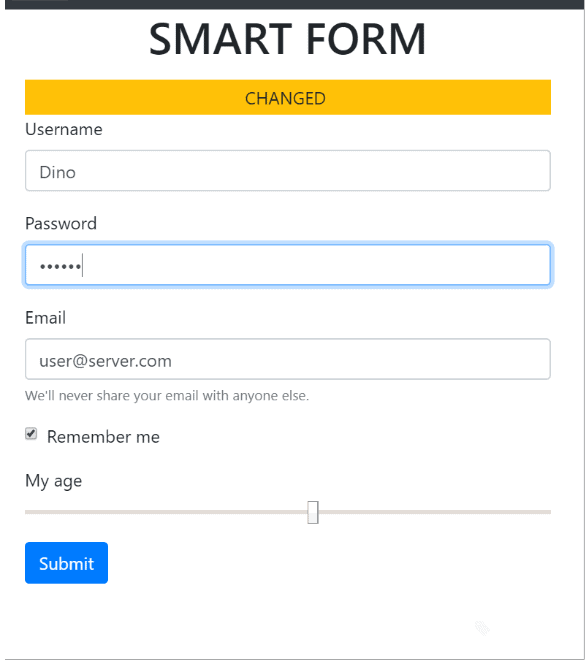
In particular, the code will save to a newly created data-orig attribute the original value of each field. Original values are used to detect if the form has changed values and, in this article, will also be the foundation to enable the undo functionality. Aside from the automatic detection of pending changes and injection of some ad hoc user interface to give feedback to users, the code coming with the previous article didn’t perform other significant tasks. (See figure.)

Let’s add some more power!

Extending the User Interface

To enable the UNDO functionality, you need a button to click, and the framework can create one for you. Most of the graphical settings are hardcoded, but the source code is available for you to make all the changes you may desire.

$(".ybq-form").each(function() {
    // Some existing code here 
     ...

     // Add UNDO button
})

The UNDO button consists of some static markup as below.

<button onclick='__undo(this)' type='button' 
        class='btn btn-secondary'>
    <i class='fa fa-undo'></i>
</button>

The __undo function, instead, is a new addition to the framework. Here’s the related code.

function __undo(elem) {
    var form = $(elem).parents('form:first');
    form.find("input").each(function () {
        var orig = $(this).data("orig");
        $(this).val(orig);
    });
    $(elem).blur();
}

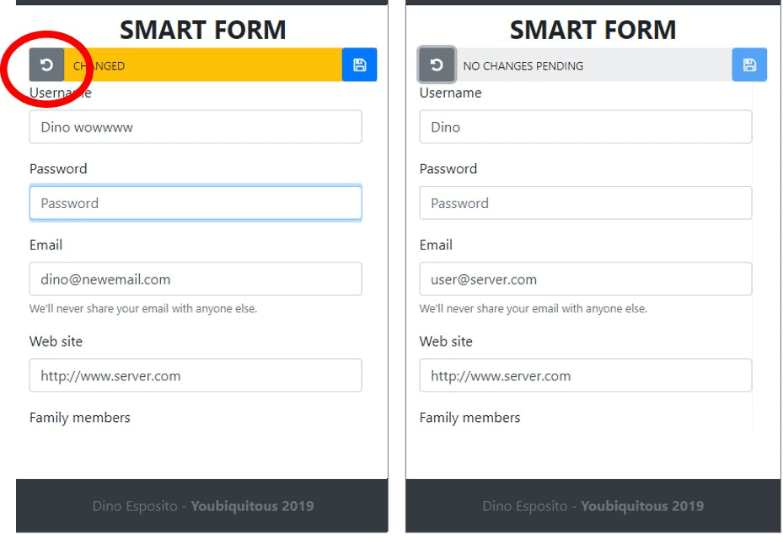
The code loops through the input fields of the form, and for each field, it restores the value previously saved in the data-orig attribute. The figure below shows the effect of the dynamically created UNDO button.

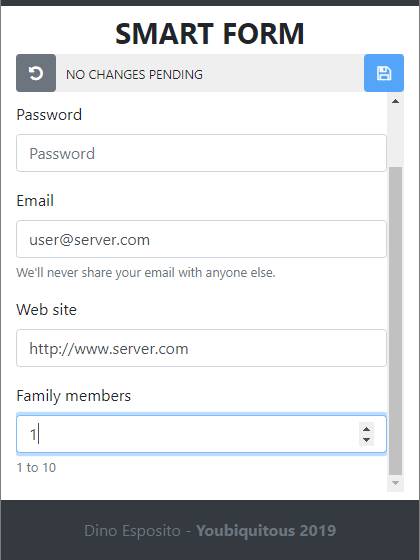
As you may see in the user interface, the JavaScript framework also added a submit button. It does that at the same time it adds the UNDO button. It may look like a weird behavior that a framework adds a submit button to a form. The rationale for such a choice is twofold. One reason is automating all repetitive and boilerplate tasks as much as possible and, at the same time, achieving a consistent design across all forms of the application. Second, having a control bar at the top of the form will let you wrap the rest of the form in a scrollable area of the desired height. This will guarantee that users can scroll the input fields while having the operational buttons easily reachable and visible all the time. (See Figure.)

To make the body of the form scrollable, you need to wrap the list of input fields with an additional DIV element of the desired fixed height.

<div class="col-12"
     style="height: 400px; padding: 0; overflow-y: auto;">
       <!-- List of the form input fields   -->  
</div>

The next step is finding a way to automate the validation of input fields.

Input Field Validation

There are thousands of different approaches to validate the content of an input field before and after it is posted to the server. All possible solutions have pros and cons, no one is perfect, and no one is patently out of place. In the ASP.NET space, some love data annotations to unify as much as possible the validation experience on the client and the server. Also jquery.validation is fairly popular and Angular has its own components. Last but not least, vanilla JavaScript is still an option, and probably the most flexible of all and the most verbose.

The purpose of the code discussed in this article is to keep every aspect of the code to a minimum level of complexity and a good level of abstraction. Here’s an idea to write as little code and markup as possible while covering at least the most common validation scenarios.

<input type="text" 
       class="form-control" 
       id="username" name="username"
       data-rule="{val}.length > 0"
       placeholder="User name" 
       value="Dino" />

Most of the time, validation consists in checking that a given field is not left empty, that the entered value falls in a given range of numbers or dates and that the typed text matches some patterns, such as telephone numbers, emails, and URLs. Another relatively common situation is when two or more fields must be validated together, for example, to ensure that pickup and drop-off locations of a transportation request do not match or that the new password is repeated correctly in the second input field.

The sample INPUT element above features a custom data-rule attribute set to string expression. Although a bit cryptic, the validation rule indicates that the value of the username field is expected to not null. It goes without saying that the data rule is not executable code and that some built-in JavaScript library will take care of that. At the same time, for a developer, indicating a text-based rule is much faster than linking a distinct JavaScript file or populating some inline SCRIPT tag. The data-rule attribute doesn’t handle complex validation scenarios but works just fine for simple and most common cases. On the other hand, also bear in mind that ASP.NET data annotations are not that easy to handle if you want to do cross-field validation. Have a look at how the ybq-forms library handles validation rules expressed through the data-rule attribute.

Validation of the inline rules takes place on the blur event so that users can have immediate feedback as they tab out of each field. Note that this approach doesn’t prevent you from applying some further overall client-side validation upon submission of the form. Performing validation on individual blur events also maintains the validity state of the form constantly updated. The next step, therefore, is using the valid-state information to enable or disable the submit button. Why should you ever attempt to post a form that is patently violating the rules? Have a look at the source code for data-rule processing.

function __attachValidationHandler(input) {
    var rule = input.data("rule");
    if (typeof rule !== 'undefined' && rule.length > 0) {
        input.on("blur",
            function () {
                var current = __getCurrentValue($(this));
                var code = rule.replace("{val}", "'" +
                           current + "'");
                var result = __eval(code);
                if (result)
                    $(this).removeClass("is-invalid");
                else
                    $(this).addClass("is-invalid");
            });
    }
}

The previous chunk of JavaScript code attaches an onblur event handler to every input field within the form. The structure of the code is easy to figure out. If the rule expression is defined, then a handler is created for the blur event that expands the {val} placeholder of the rule to the current value of the input field and executes the expression. For example, if the username field contains Dino, then the expression evaluated by the blur event is the following:

"Dino".length > 0

Some further explanation deserves the __eval internal function. As you may know, JavaScript features the embedded eval function whose purpose is exactly to take a string of text and treat it as if it were executable code. In other words, if the string passed to eval is made of executable code, the interpreter can understand then the code executes. This is a potential security issue especially when the code has no control over the string that could be passed. The following code is a more secure way to execute dynamic JavaScript code.

function __eval(code) {
    return Function('"use strict";return (' + code + ')')();
}

The next problem to face is how to let users know about the outcome of the validation. If the validation succeeded, there might be no need to show anything (some forms, however, presents a nice green checkmark to confirm). For sure, instead, there will be the need to show feedback if the validation fails. Here’s where Bootstrap 4 makes the difference.

var result = __eval(code);
if (result)
    $(this).removeClass("is-invalid");
else
    $(this).addClass("is-invalid");

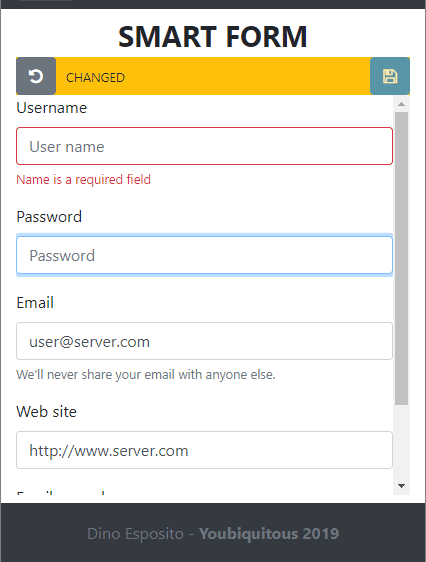
By simply adding to the input field the new style is-invalid (or is-valid) you instruct the Bootstrap library to visually mark the control with a red border. Also, if you have a sibling DIV marked with the class invalid-feedback, then that content is automatically displayed. (See figure.)

<div class="form-group">
    <label for="username">Username</label>
    <input type="text" class="form-control" 
           id="username" name="username"
           data-rule="{val>}.length > 0"
           placeholder="User name" value="Dino">
    <div class="invalid-feedback">
        Name is a required field
    </div>
</div>

To clear the visual state of the element, it is sufficient that you remove the is-invalid CSS class programmatically. If you intend to confirm that the value typed is acceptable, you can also have a DIV flagged with the valid-feedback CSS style.

Submitting the Form

The final step is automating the upload of the form to the extent that it is possible. The JavaScript library that comes with the article adds a free submit button and gives it a standard CSS class that makes it easier to hide or delete it programmatically. The button doesn’t have any click handler but, being a submit button, it triggers a form-level submit event. The library adds a default submit handler.

form.on("submit",
    function () {
        var valid = (form.find("input.is-invalid").length === 0);
        if (!valid) {
           return false;
        }
        var formData = new FormData(form);
        $.ajax({
            cache: false,
            url: form.attr("action"),
            type: form.attr("method"),
            dataType: "html",
            data: formData,
            success: function (data) {
                (__eval(successCallback))(data);
            },
            error: function (data) {
                (__eval(errorCallback))(data);
            }
        });
        return false;
    });

As you can see, the code uses Ajax and jQuery to post the content of the form to the server. Debugging any ASP.NET server-side code works as expected and, at the end of the day, the library saves you a lot of boilerplate code. The only exception is the behavior expected once the content of the form has been processed on the server. This code is specific of each form and can hardly be automated and generalized by any framework.

<form action="/demo/form2" method="post" 
     class="ybq-form" 
     data-successcallback="__successForm" 
     data-errorcallback="__errorForm">
...
</form>

By adding a couple of ad hoc attributes, however, you can limit the writing of this handling code to the absolute minimum. The data-successcallback attribute points to the name of the JavaScript that will handle the success of the submission. The data-errorcallback attribute, instead, takes the name of the function to invoke in case of a status code different from 200. As in the code snippet above, the __eval helper function is used again to transform a plain string into runnable JavaScript code. The view that defines the form can handle the post form operation as below.

<script>
    function __successForm(data) {
        alert("RESULT IS: " + data);
    }
</script>
<script>
    function __errorForm(data) {
        alert("DIDN'T WORK");
    }
</script>

The success callback function receives the value returned by the controller method; the error callback function, instead, takes a value that refers to the exception occurred. Finally, if you need to do some form-wide, cross-field validation, you can add your own submit button and do your checks.

<script>
    $("#submitBtn").click(function() {
        if ($("#password").val().length < 5) {
            $("#password").addClass("is-invalid");
            return false;
        }
    });
</script>

Alternatively, if you don’t want to have an additional submit button then you can hook up the form’s submit event and perform the script-based validation.

Summary

The purpose of this article and the previous on automatic management of HTML forms was to significantly minimize the amount of code to be written for such a common task like posting a form. Validation, detection of changes, submission and display of feedback are all tasks that can be largely automated. Angular, for example, does just that. Now you have a starting point for a lightweight vanilla-JS library. The full source of ybq-forms can be found at https://bit.ly/2znGhVP.

The post Bootstrap 4 and Self-validating Forms appeared first on Simple Talk.


from Simple Talk https://ift.tt/2EBQtw3
via

Wednesday, December 12, 2018

Where’s the Bottleneck?

Delta Airlines recently announced that they have implemented the first fully biometric terminal in the US, at Hartsfield–Jackson Atlanta International Airport F Terminal with plans for Detroit late 2019. This means that, instead of scanning boarding passes and looking at passports for international flights at the checkpoints, the airline can just scan each passenger’s face and match it to a passport photo in their system and subsequently to a reservation.

While biometric scans are already used for many things, this facial scan seems a bit Orwellian. Maybe we are just not ready for this, but Delta has a good reason – this will save their passengers precious minutes at the airport. The passengers won’t need to present boarding passes or passports once Delta has the passport in their systems. There are up to four scans per passenger with the traditional system. Customers will save two seconds at the gate during boarding, for example. The airline says that this could cut up to nine minutes off the boarding process per flight. Of course, shaving off nine minutes would help a lot, especially to cut down on late departures.

As I write this, I happen to be sitting on a Delta aircraft on the way to the UK from the US. (No, I didn’t fly out of Atlanta, so I didn’t get to take advantage of the new process.) As the passengers boarded the aircraft, each had to have a paper or mobile boarding pass ready. They also had to present their passports for the gate agent to quickly check. So, maybe just scanning the faces would be a bit faster per passenger.

The problem, I realized, is that the gate check is not the bottleneck slowing down boarding. The real bottleneck can be found in the aisles where people are standing and trying to fit their roller bags, backpacks, and coats into the overhead bins. Even if you don’t have anything to put into that storage, it could take a few minutes to finally make it to your seat.

Getting through security is another spot that takes time. After being scanned in security by the TSA agent, the bottleneck can be found at the conveyer belt as jackets and shoes are removed, pockets are emptied, little bags of liquids are pulled out, and bottled water is thrown away.

Delta says that leaving the documents in bags or pockets saves customers time, but most people retrieve the documents while waiting in the queue. As long as the documents are in the hands of the passengers as they approach the checkpoints, things typically run quickly and smoothly.

In my opinion, the fully biometric terminal will not speed up the process much because the bottlenecks are not being addressed. I expect that, in a few years, we will no longer remember the old way of travel with paper boarding passes and will be more concerned about those itchy RFID implants.

Commentary Competition

Enjoyed the topic? Have a relevant anecdote? Disagree with the author? Leave your two cents on this post in the comments below, and our favourite response will win a $50 Amazon gift card. The competition closes two weeks from the date of publication, and the winner will be announced in the next Simple Talk newsletter.

The post Where’s the Bottleneck? appeared first on Simple Talk.


from Simple Talk https://ift.tt/2EdEVho
via

Tuesday, December 11, 2018

Technique and Simple Utility to Determine the Datatype of a Scalar T-SQL Expression

The other day, I was working with a query where someone had put together an expression that had something along the lines of:

CASE WHEN Value = 'X' THEN NULL
       ELSE CAST(SomeOtherValue as numeric(18,2) / 12.0 
     END AS AnnualisedSomeOtherValue

And I thought to myself… “Self, what will the datatype of this be? Will it fit what the programmer wanted it to be? Is it weird I addressed myself as self?”  Instinctively, I wanted to believe it would be a numeric(18,2) because 12.0 should be less precise than the 18,2 numeric… But I had to know. (If you try this yourself, see what happens as you add zeros to the end, like 12.0000!) So, I went and coded a few statements using a sql_variant datatype to hold the expression value and SQL_VARIANT_PROPERTY to interrogate its properties:

DECLARE @switch char(1) = 'Y';
DECLARE @value sql_variant = CASE WHEN @switch = 'X'
                                      THEN NULL
                                  ELSE CAST('100.20' AS numeric(18, 2)) 
                                                                 / 12.0
                             END;
SELECT @value,
       SQL_VARIANT_PROPERTY(@value, 'BaseType') AS DataType,
       SQL_VARIANT_PROPERTY(@value, 'Precision') AS NumericPrecision,
       SQL_VARIANT_PROPERTY(@value, 'Scale') AS NumericScale;

Since X <> Y, this returns the 100.20 / 12.0 value, which is output into a numeric(23,6). Interesting:

Value         DataType       NumericPrecision   NumericScale
------------- -------------- ------------------ -------------
8.350000      numeric        23                 6

Now, what would the value of NULL be output into?

DECLARE @switch char(1) = 'X';
DECLARE @value sql_variant = CASE WHEN @switch = 'X' THEN NULL
                                  ELSE CAST('100.20' AS numeric(18,2)) 
                                                            / 12.0 END

This just returns NULLs when evaluating the sql_variant value:

Value         DataType       NumericPrecision   NumericScale
------------- -------------- ------------------ --------------
NULL          NULL           NULL               NULL

Even if you cast the NULL value

DECLARE @switch char(1) = 'X';
DECLARE @value sql_variant = CASE WHEN @switch = 'X' 
                                       THEN CAST(NULL as numeric(18,2))
                                  ELSE CAST('100.20' AS numeric(18,2)) 
                                                            / 12.0 END

The sql_variant with the NULL output will not register a type, which makes some sense, as a NULL is generally typeless on its own, without a type coming from the container, like a variable or column.

Now, I wanted to build something to make this easy the next time. So, the following utility is a simple T-SQL batch, which uses SQLCMD variables in Management Studio, will give me the characteristics of an expression from a table expression in context of the table. Basically, put this code in SSMS, turn on SQLCMD mode, and fill in the blanks with the bits of code in the variables (they should be self-explanatory with the comments/example), and you will see the datatype of your expression:

--expression to check the resultant datatype of, Can't reference
--variables, but can be any valid expression
:setvar expressionToTest "case when invoiceId = 1 then 2.0 else 1 end"

--comma delimited list of additional columns or expressions
:setvar additionalColumns "UnitPrice,InvoiceId"

--everything starting with FROM in a query. No need for anything 
--but a blank if the expression doesn't reference a table. (can be 
--multiline, will turn off syntax coloring in SSMS)
:setvar expressionFROM "FROM Sales.InvoiceLines ORDER BY InvoiceLineId"

--all rows will have the same datatype, but you may want to see 
--that for yourself
:setvar numRowsToTest 1

SELECT TOP($(numRowsToTest))
       $(expressionToTest) AS EvaluatedExpressionValue,
       SQL_VARIANT_PROPERTY(CAST($(expressionToTest) AS sql_variant), 
                                                'BaseType') AS DataType,

       --Numeric data
       SQL_VARIANT_PROPERTY(
           CAST($(expressionToTest) AS sql_variant), 'Precision') 
                                                 AS NumericPrecision,

       SQL_VARIANT_PROPERTY(CAST($(expressionToTest) AS sql_variant), 
                                            'Scale') AS NumericScale,

       --Note: Unicode sizes may vary now, and will change in 2019 
       --with UTF-8, but 2 bytes is generally true for most collations
       CASE WHEN SQL_VARIANT_PROPERTY(
                     CAST($(expressionToTest) AS sql_variant), 'BaseType') 
                                      IN ('nchar', 'nvarchar')
            THEN CAST(SQL_VARIANT_PROPERTY(
                              CAST($(expressionToTest) AS sql_variant),
                              'MaxLength') AS int) / 2
            WHEN SQL_VARIANT_PROPERTY(
                     CAST($(expressionToTest) AS sql_variant), 'BaseType') 
                                      IN ('varbinary', 'varchar', 'char' )
                THEN CAST(SQL_VARIANT_PROPERTY(
                              CAST($(expressionToTest) AS sql_variant),
                              'MaxLength') AS int) 
       END AS MaxLength,
       SQL_VARIANT_PROPERTY(
           CAST($(expressionToTest) AS sql_variant), 'Collation') 
                                     AS StringCollation,
       SQL_VARIANT_PROPERTY(
           CAST($(expressionToTest) AS sql_variant), 'TotalBytes') 
                                     AS TotalBytesOfStorageInclOverhead,
       '--' AS [--],
       $(additionalColumns) 
       $(expressionFROM);

Now, we can see that the expression “CASE WHEN UnitPrice < 10 THEN NULL ELSE CAST(UnitPrice AS numeric(18,2)) / 12 END” will return an expression of type numeric(22,6):

EvaluatedExpressionValue   DataType        NumericPrecision                
19.166666                       numeric         22                      

… NumericScale  MaxLength
… 6             NULL

… StringCollation       TotalBytesOfStorageInclOverhead --      UnitPrice       InvoiceId
… NULL                  9                               --      230.00          1

Hope you find this useful.  Also, if you were wondering, the expression N’Merry Christmas! Happy Holidays!’ is nvarchar(32), and it requires 72 bytes to store. If you were wondering, which I wasn’t.


The post Technique and Simple Utility to Determine the Datatype of a Scalar T-SQL Expression appeared first on Simple Talk.


from Simple Talk https://ift.tt/2RKpAZn
via

Sunday, December 9, 2018

Graph Edge Constraints and a Crystal Ball

When I read the list of new features in SQL Server 2019 I became very proud of my crystal ball powers. In July 2017 I published an article about Graph Database feature in SQL Server 2017. In this article, besides showing the improvements and benefits I also highlighted one problem: the lack of graph edge constraints.

That’s exactly one of the new features in SQL Server 2019, edge constraints for graph databases.

On the article, I gave an example of three problems:

  • No Referential integrity
  • No control over which relations the edges can accept
  • No control of unicity of the relation (on the example, one forum post could be replying to many others – this should not be accepted).

The new constraints are able to solve two of the three problems. Let’s see an example on the edge “Likes” used in the article from last year. Forum members can like other forum members and can like posts on the forum, so, two different connections are possible on the same edge.

A single constraint can control many different kinds of relations, like on this situation, controlling the relation between members and members and members and forum posts. The T-SQL to create the constraint will be this:

ALTER TABLE Likes ADD CONSTRAINT validLikes CONNECTION
(
     ForumMembers TO ForumMembers,
     ForumMembers TO ForumPosts
)GO

Two problems are solved. First, different connections will not be accepted on this edge. For example, a post can’t like another post. This exact example in the article is now blocked by the constraint:

INSERT Likes ($to_id,$from_id) VALUES
   ((SELECT $node_id FROM dbo.ForumPosts WHERE PostID = 8),
      (SELECT $node_id FROM dbo.ForumPosts WHERE PostID = 7))


graph edge constraints blocking insert

The constraint also creates a referential integrity, a forum member with like can’t be deleted and leave orphan likes behind. The following statement will also be blocked by the constraint:

delete forummembers where memberid=1


grah edge constraints blocking delete

Next step: Lottery numbers. Who knows?

You can find more about the new constraints on these links:


The post Graph Edge Constraints and a Crystal Ball appeared first on Simple Talk.


from Simple Talk https://ift.tt/2rrSh1V
via