Monday, March 8, 2021

The Game Changed: Power BI Premium per User

Until now, one common knowledge about Power BI was how Power BI Premium subscription is expensive. We, regular mortals, could only dream with the full set of features offered by Power BI Premium.

The new announcement is a complete game changing for the enterprise self-service BI technology: Power BI Premium per User will be available on April 2nd . It will cost only additional us$10,00/month for the users who already have the PRO subscription.

Let’s review what great features we will have available once we subscribe for the Premium per user:


Conclusion

Everyday Power BI gets more features, proving why Microsoft is a leader on Gartner Quadrant. The Power BI Premium per user is more than a simple new feature, is a totally gaming change news, because it brings very powerful features to small and medium size companies.


The post The Game Changed: Power BI Premium per User appeared first on Simple Talk.


from Simple Talk https://ift.tt/3el7340
via

Friday, March 5, 2021

Translating Index/Key Errors from Graph Tables in SQL Server

As I am working with graph tables, I find some quirks exist that make them interesting to work with. One of them is how the values show up in some error messages (in particular from unique indexes). Instead of the details you expect\hope (Something like the JSON value you find in the id columns in the edge and node tables like: {“type”:”node”,”schema”:”dbo”,”table”:”Node”,”id”:0}), you get a pair of numbers that you need to decode.

For example, take the following set of tables:

CREATE TABLE dbo.Node(Name varchar(20)) AS NODE;
CREATE TABLE dbo.Edge AS EDGE;

ALTER TABLE dbo.Edge ADD CONSTRAINT AKEdge UNIQUE($from_id, $to_id);

INSERT INTO dbo.Node (Name) VALUES ('Fred');
INSERT INTO dbo.Node (Name) VALUES ('Barney');

INSERT INTO dbo.Edge ($From_id, $to_id)
SELECT  (SELECT $node_id FROM dbo.Node WHERE name = 'Fred'),
                (SELECT $node_id FROM dbo.Node WHERE name = 'Barney');

Now, insert a duplicate node using the same code as the previous:

INSERT INTO dbo.Edge ($From_id, $to_id)
SELECT  (SELECT $node_id FROM dbo.Node WHERE name = 'Fred'),
                (SELECT $node_id FROM dbo.Node WHERE name = 'Barney')

This causes the following error message:

Msg 2627, Level 14, State 1, Line 14
Violation of UNIQUE KEY constraint 'AKEdge'. Cannot insert duplicate key 
in object 'dbo.Edge'. The duplicate key value is (455672671, 0, 455672671, 1).

So what is this: (455672671, 0, 455672671, 1)? If you look at the $node_id value from the following query:

SELECT $node_id FROM dbo.Node WHERE name = 'Fred';

This returns:

$node_id_F1ECB5498FC747CFBC24EF390EBCBCC9
---------------------------------------------------------
{"type":"node","schema":"dbo","table":"Node","id":0}

The 0 for the id maps to the 0 in the error message (455672671, 0, 455672671, 1), and if you check the row for Barney, you will see that it has a 1 for the id.

But what about the other number? This is the object_id for the table. You can see in this sample data it is duplicated but they could be different, but that value can be different (and will be for things like edge constraints where you are disallowing connection from two different node types in an edge.)

To see this, execute:

SELECT OBJECT_SCHEMA_NAME(object_id) AS schema_name, name AS ObjectName
FROM   sys.tables
WHERE  tables.object_id = 455672671

This returns:

schema_name      ObjectName
---------------- --------------------------
dbo              Node

To make this whole process a little easier, I created the following function (download here: https://github.com/drsqlgithub/DRSQL_ORG-Uploads/blob/main/Tools/ in a file named GraphError.sql):

CREATE OR ALTER PROCEDURE Tools.GraphDB$LookupItem
(
        @ObjectId int,
        @Id int 
)
AS
BEGIN
        SET NOCOUNT ON;
        DECLARE @SchemaName sysname = OBJECT_SCHEMA_NAME(@ObjectId),
                    @TableName sysname = OBJECT_NAME(@ObjectId),
                @SQLStatement nvarchar(MAX)
        SET @SQLStatement = CONCAT('SELECT * FROM ', 
            QUOTENAME(@SchemaName),'.',QUOTENAME(@TableName),
            ' WHERE JSON_VALUE(CAST($node_id AS nvarchar(1000)),''$.id'') = ',@Id)
        EXECUTE (@SQLStatement)
END;

Using this, you can simply paste the values from the error message and execute the stored procedure to see the row that is offending. Execute this next query and get the two rows that represent the errored row, without knowing what table the object is from:

EXEC Tools.GraphDB$LookupItem 455672671, 0;
EXEC Tools.GraphDB$LookupItem 455672671, 1;

This returns:

$node_id_F1ECB5498FC747CFBC24EF390EBCBCC9                Name
-------------------------------------------------------- --------------------
{"type":"node","schema":"dbo","table":"Node","id":0}     Fred

$node_id_F1ECB5498FC747CFBC24EF390EBCBCC9                Name
-------------------------------------------------------- --------------------
{"type":"node","schema":"dbo","table":"Node","id":1}     Barney

I kept the code simple and just returned all columns, but it could easily be extended for whatever you need with a few additional tables of metadata…With a little work you could use the metadata from the objects related to the errored object and produce cleaner output… Something I may attempt later.


The post Translating Index/Key Errors from Graph Tables in SQL Server appeared first on Simple Talk.


from Simple Talk https://ift.tt/2MTNAMM
via

How SQL Server synonyms help database DevOps

Synonyms inside SQL Server are one of those useful but forgotten features. A synonym is a database level object that allows you to provide an alternative name for another database object such as a view, user defined table, scalar function, stored procedure, inline table valued function (tvf), or extended stored procedure. They can also be used for CLR Assembly related stored procedures, CLR tvf, CLR scalar functions or even CLR aggregate functions. There are many practical uses for synonyms, and I’ll explain how to create them and some use cases.

You can create a synonym using the GUI in SSMS or via a script. Here’s a sample script:

USE [AdventureWorks2014]
GO
CREATE SYNONYM [dbo].[EmployeeDemo] 
FOR [MRSurfacePro].[AdventureWorks2014].[HumanResources].[Employee]
GO

The example creates an alternate name for the HumanResources.Employee table. Note that creating the synonym requires a four-part name, including the server. Here’s an example of how to use the new synonym:

SELECT * from dbo.[EmployeeDemo]

If you also query the original table, you’ll see that it returns the same rows. You can reference the new name in code, linked servers, applications, and more. In situations where you would need to use a three- or four-part name, you can just use the synonym without having to use the multipart naming which greatly reduces the need for code changes.

There are a few caveats to this to keep in mind. Synonyms cannot be referenced things like CHECK constraints, computed columns, default expressions, rules expressions, schema bound views or functions. They also cannot be used in DDL (Data Definition Language) statements, to make changes to the underlying schema the synonym represents, you must reference the actual object name within any DDL statement.

We all know when developing objects, the naming that was used at the beginning of a project can change and get better over time. Using synonyms can be a real project time saver. You can continue to be agile and not have a huge need to back port changes. Synonyms can also help with database migrations from one server to another. How many times have you had to migrate to a server with a new name? This simplifies the process. All you would have to do is change the synonym definition four-part name; no other changes would be required.

Imagine how easy this can make DevOps. Say you have a cross-database view and database names are different on the development server or servers in the pipeline. If you use synonyms, no additional code changes are needed when referencing the view, and a post-deployment script could just change the synonym definition depending on the environment.

Synonyms simplify and remove the need for code changes. It’s definitely something to consider. I am always cautious as a DBA to recommend things like this as it tends to make it more difficult to track down issues and troubleshoot back to the original table or source, so be sure to document them. There are times, however, in which we need to accomplish things as I explained above, and synonyms are a great avenue to do so.

The post How SQL Server synonyms help database DevOps appeared first on Simple Talk.


from Simple Talk https://ift.tt/3ec9qWW
via

Monday, March 1, 2021

Parameter Sniffing or not sniffing: The Mindset change for new technologies

Parameter sniffing is a common challenge for query tuning. The usual solution we recommend is to apply a recompile option, rather to a stored procedure or a query. If the development team gets used to this, suddenly you will see recompile options all around.

Query Tuning 101

The parameter sniffing problem appears when the data is uneven distributed on one column used as predicate. As a result, the perfect plan for the query will be different according to the value used on the predicate. Applying a recompile option solves the parameter sniffing problem because the query will be recompiled for each set of parameters, ensuring the best query plan possible.

Here are some examples about how the plan can be affected:

  • A pair of headphones Description automatically generated with medium confidence A key lookup can be applied if the number of rows returned is small or an index scan will be applied if the number of rows returned is too big.
  • A join can be made using nested join or hash join, according to the number of rows returned.
  • The memory allocated can become too much, or to low, and if it’s too low, it will cause spills to tempdb and performance problems, and this will be terrible for performance.

In order to ensure the plan will be recompiled on every execution, we have some different options:

  • We can apply the clause ‘With Recompile’ to a stored procedure. It will make the procedure be recompiled on every execution.
  • We can apply the ‘With Recompile’ clause to the ‘Execute’ statement when executing the stored procedure. This will cause the procedure to be recompiled before the execution.
  • We can apply the clause ‘Option (Recompile)’ to a query, even if the query is inside a stored procedure.

However, the solution has a price: We are losing the power of the query plan cache, forcing a recompilation on every execution, what affects performance. We are only choosing the cheaper option.

New Solutions for Parameter Sniffing

Microsoft is aware of this and SQL Server created many features to help us solve the parameter sniffing problem. These are three of them:

  • Query Store can identify queries suffering with parameter sniffing
  • Memory Grant Feedback can solve some memory allocation problems caused by parameter sniffing
  • Adaptive joins can solve problems with join selection caused by parameter sniffing
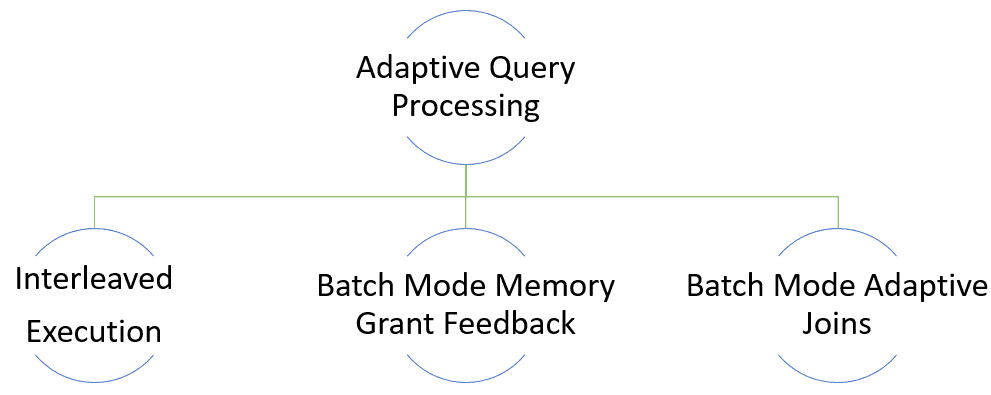
  • Batch mode over row store allows adaptive joins to be applied over row mode queries

Diagram, timeline Description automatically generated

That’s great! We can continue solving our problem with the recompile options but now these great new features will jump in and make our queries even better, right?

Wrong!

Memory Grant Feedback and Adaptive Joins are part of the Adaptive Query Processing while Batch mode over row store is part of its big brother, Intelligent Query Processing.

So, what?

Adaptive Query Processing is based on the idea of changing some behaviours of the query plan during the execution, without a new query compilation. This is in some ways the opposite of our traditional solution, the recompile options. We can choose always to recompile the plan or we can use the new Adaptive Query Processing features, but we can’t use both, they will be, at most, useless.

We need to analyse each one of them to understand.

Adaptive Joins

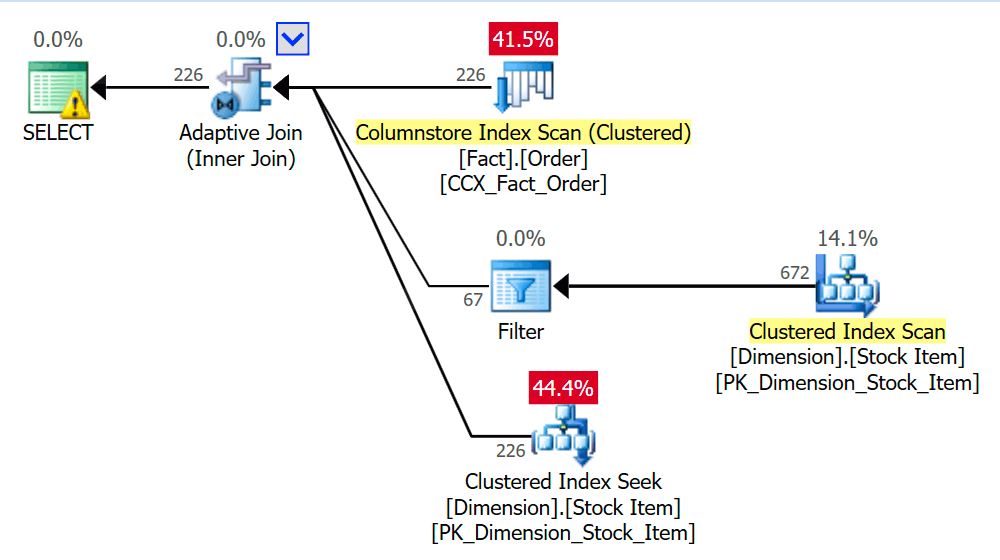
Adaptive Join is a query plan operator capable to create alternate paths inside the execution plan. These alternate paths allow SQL Server to choose the best join option according to the number of rows returned on each execution. In other words, a different behaviour on each execution according to the number of rows returned.

This solution handles the parameter sniffing problem for join selection in a great way: The decision of what type of join will be used is made during each execution, according to the number of rows returned. Parameter sniffing will not affect join type decision anymore.

Diagram Description automatically generated with low confidence

However, if we apply any recompile option, the adaptive join loses its meaning. Each compilation can decide what type of join is best for the plan, there is no need of the adaptive join at all.

Adaptive Joins and Recompiles

This creates some resulting scenarios not so good for us:

  • The widespread use of recompile options will prevent you from enjoying the benefits of this new feature. This means your queries could be better, they could avoid paying the recompile price, but having the recompile mindset spread among developers will prevent deeper analysis.
  • Besides the recompilation price, you will still have the adaptive join in your query plan. Probably the cost is meaningless, but it still creates some extra steps during compilation and execution.
  • There is, indeed, one chance that even using recompilations, the adaptive join will still improve the query. How? The compilations are based on existing statistics, while adaptive join is based on the actual rows during the execution. If the statistics were not updated, the plan without adaptive join could be wrong, while the adaptive join would not be affected (unless the statistics are so bad you end up without the adaptive join at all). This creates a hide-and-seek game: Your performance improved, cool! But it’s hiding the fact it could be better, because you could get rid of the recompilations, that’s bad. It’s also hiding the fact you are not making a good statistics maintenance and that is very bad.
  • Who will fully enjoy the new features without many concerns are exactly the ones who were not taking much care of the query performance and haven’t used recompile options to solve parameter sniffing. The most careful ones will need to deal with mindset change in the DBA and development team leading to many strange scenarios.

Memory Grant Feedback

Parameter sniffing can make the amount of memory needed by one query vary too much. This variation will create spills to tempdb, making the query way slower.

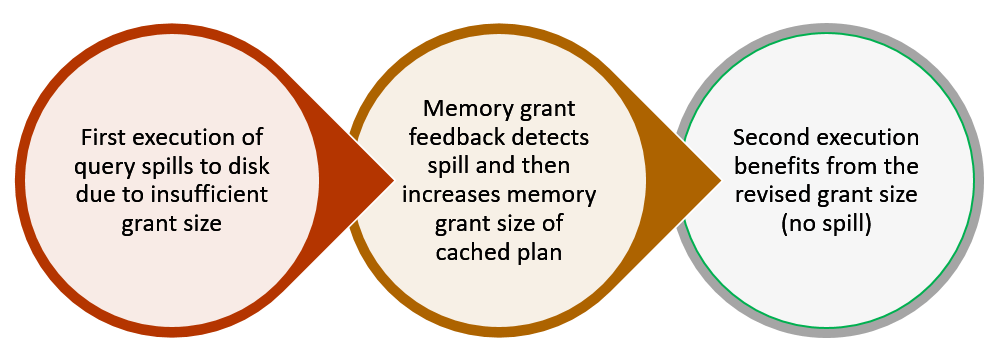
Memory Grant Feedback can solve this problem in some situations. It’s simple: If a difference is found between the memory needed and the memory allocated, this feature changes the query plan directly in the cache for the next execution. As a result, while one execution goes bad with a wrong amount of memory allocated, the next one will be fixed.

Diagram Description automatically generated

The Effect over Sniffing

The effect over parameter sniffing is only partial. Let’s imagine the variation of the parameter values generate two different plans according to the value. If each plan is executed a considerable number of times before a different plan is needed, the Memory Grant Feedback will improve the query.

However, if different plans are needed on a very high frequency, such as on each execution, the Memory Grant Feedback will not be useful. This feature identifies the problem, change the plan and the improvement will happen on the next execution. If the next execution needs a different plan or different set of resources, the change was useless. After 32 useless changes caused by the Memory Grant Feedback, the query optimizer disables this feature for the query plan.

Recompile

The use of recompile option turns the feature completely useless. This feature is based on the same plan executed multiple times. Recompiling the plan on every execution invalidates the feature.

Conclusion

It doesn’t matter how simple new features are, the technology evolves way faster than company and department procedures. In order to fully enjoy new features, you may need some mindset change.


The post Parameter Sniffing or not sniffing: The Mindset change for new technologies appeared first on Simple Talk.


from Simple Talk https://ift.tt/3dUpQDj
via

HOW CAN SQL SERVER DEVELOPERS GET STARTED WITH POSTGRE SQL?

WHAT IS SQL SERVER?

SQL server is a relational database management system. It is offered by Microsoft and is one of the most popular relational database management systems which are being utilized by several companies for their database requirements. There are numerous USPs of Microsoft SQL Server which makes it a popular choice. Some of them include: online analytical processing, data mining, interactive GUI and database performance enhancers and analyzers.

WHAT IS POSTGRE SQL?

PostgreSQL on the other hand is not offered by one specific company but is rather an open-source tool. When a piece of technology falls into the open-source category, it suggests that the code is being read and reviewed by numerous developers around the world. The worldwide developer community is capable of making significant contributions to the open-source projects which automatically increases the chances of quick bug fixes and more enhancements. PostgreSQL is extremely popular in terms of open-source relational database management systems. Developers are attracted to PostgreSQL because there is no fee to use PostgreSQL in its full capacity, it can be integrated with several other languages like C++ and Java and performs all the functionalities that are offered by any paid modern relational database management system.

WHAT CHANGES CAN YOU EXPECT WITH THE GUI?

In SQL server, the views and schemas are displayed in the Microsoft SQL Server Management Studio where the developer is able to see the connections between the relations, observe the structure of the table, write queries and see the output of those queries. In addition to this, SQL Server developers are also used to proper indenting and colored syntax highlighting while running their SQL queries in the studio, getting readymade templates for basic SQL functionalities and statistics regarding the time and the resources utilized when their queries are run.

On the other hand, in PostgreSQL, the views and schemas are displayed in the Data Architect which is the GUI offered by PostgreSQL for developers to visualize the structure and relationship of the entities and relations in their database. The number of tools available in Data Architect might overwhelm a SQL Server developer first but since the basic structure – visualization of schema, query running console, query output window etc. is similar, it won’t be long when the developer starts getting comfortable with PostgreSQL’s GUI.

WHAT VARIATIONS WILL YOU OBSERVE WITH COMMAND LINE UTILITIES?

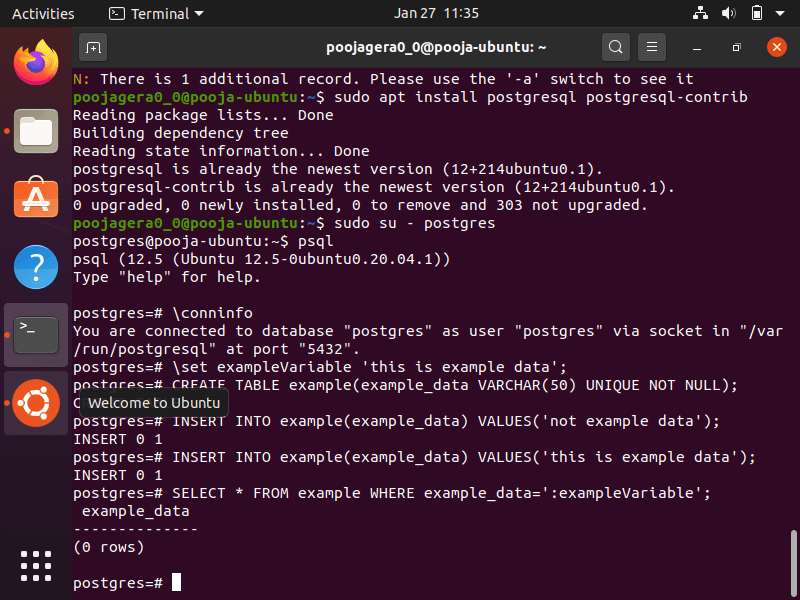
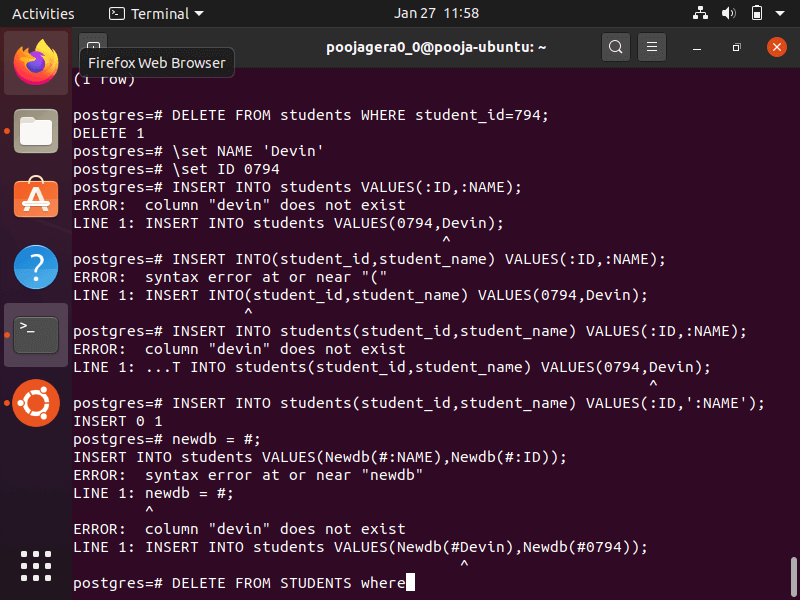
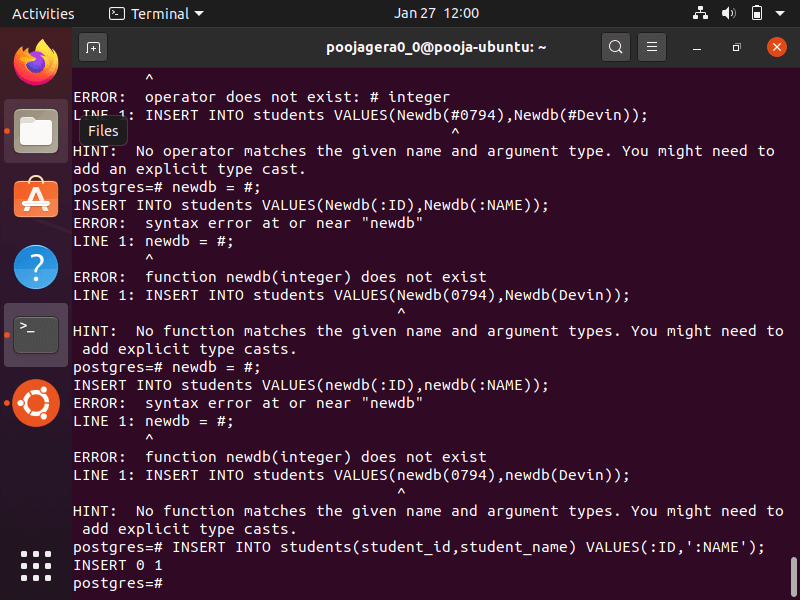
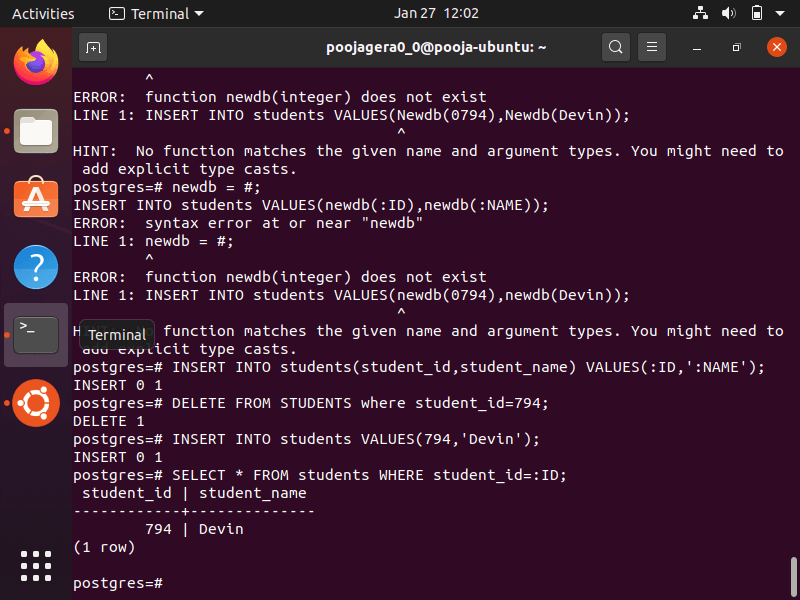
For SQL Server developers sqlcmd utility is no brainer. Similarly, in PostgreSQL psql is the command line utility. Below mentioned are few examples and commands which the developer can perform in PostgreSQL using the psql utility:

  1. Variable Substitutions
    1. Set a variable:
    2. Create a list of variables:
    3. Using the defined variables as data to be inserted in the table:

  1. SQL Interpolation

WHAT CHANGES YOU SHOULD EXPECT IN THE SYNTAX OF SQL QUERIES?

Microsoft SQL Server utilises T-SQL or Transact SQL. T-SQL has all the features and functionalities of a language required for managing databases. It contains DDL, DML, user defined variables, functions and procedures. However, developers are also used to using several relational operators and table expressions while using the SQL Server. PostgreSQL supports all the basic functionalities of entry-level SQL. It was PostgreSQL which contributed in the development of several object-relational features. While PostgreSQL does not have inbuilt OLAP features, being open source, it can easily be connected with external OLAP offering servers.

WHAT VARIATIONS WILL YOU OBSERVE FROM SQL SERVER TO POSTGRESQL TAKING DATATYPES INTO CONSIDERATION?

SQL Server supports the following datatypes:

  1. Basic Datatypes: character, binary string, text, images.
  2. XML Type: This is used to store XML data.
  3. Sql_variant Type: It contains information about SQL scalar types with filter, join and sort functionalities being offered for columns which are of sql_variant datatypes.
  4. Table Type: This is a type which cannot be assigned to a column. This can only be assigned to variables which are being used in the structure. While creating functions and procedures, it is not advisable to use the table directly and hence a table type variable is used for performing various tasks related to a function or a procedure.
  5. Cursor Type: Cursor Type, like Table Type is a datatype which cannot be assigned to columns and can only be assigned to variables. It is used to refer to cursor objects.

On the other hand, you will observe some more advanced (or different) data types when you are starting with PostgreSQL. Make sure you have familiarized yourself with the use cases of these data types to work with them smoothy.

  1. Base Types: These are abstract data types which include basic data types like int, complex etc.
  2. Composite Types: These datatypes are created automatically by PostgreSQL whenever a new table is created. It contains information about the rows of the table. They can be declared by the developer as well.
  3. Domains: Domains are another kind of base types.
  4. Pseudo Types: Pseudo types are data types which cannot be assigned to a column. They can be used either as arguments or function return types.
  5. Polymorphic Types: anyelement and anyarray are two pseudo types which are known as polymorphic types.
  6. Geometric Data Type: This datatype is used to represent 2D shapes on which different in-built geometric functions can be performed.
  7. Storage of network addresses: PostgreSQL also offers a datatype wherein network addresses can be stored. Pretty handy if you are making an application which requires geo-tracking and geolocation services and also has support to perform operations on these addresses.
  8. Bit type: For storage of data in binary and perform operations on it.

TABULAR COMPARISON BETWEEN THE SYNTAX AND FEATURES OF POSTGRE SQL AND MS SQL SERVER FOR REFERENCE

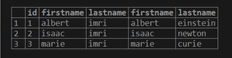
Given below are some common parameters which have been used to draw a comparison between the structural query languages used by both PostgreSQL and MS SQL Server. The rows highlighted in green indicate that there is no difference between the SQL syntax of PostgreSQL and MS SQL Server.

Parameter

PostgreSQL

MS SQL Server

NATURAL JOIN

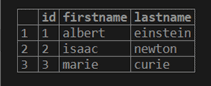
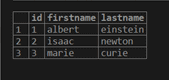
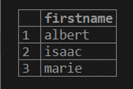
select firstname from scientist natural left join not_scientist;

No support.

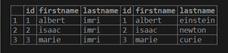
USING keyword

select * from scientist inner join not_scientist using(id);

No support.

FULL JOIN

select * from scientist full join not_scientist on scientist.id = not_scientist.id;

select firstname from scientist full outer join not_scientist on scientist.id=not_scientist.id;

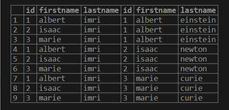
CROSS JOIN / CARTESIAN PRODUCT

select * from scientist cross join not_scientist;

SELECT item_name FROM items CROSS JOIN market;

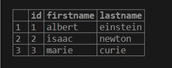
COPY TABLE

create table copycat_scientist as select * from scientist where false;

insert into copycat_scientist (id, firstname, lastname) values (1, ‘albert’, ‘einstein’);

insert into copycat_scientist (id, firstname, lastname) values (2, ‘isaac’, ‘newton’);

insert into copycat_scientist (id, firstname, lastname) values (3, ‘marie’, ‘curie’);

select * from copycat_scientist;

select * into copy_scientist from scientist where 1<>1;

insert into copy_scientist (id, firstname, lastname) values (1, ‘albert’, ‘einstein’);

insert into copy_scientist (id, firstname, lastname) values (2, ‘isaac’, ‘newton’);

insert into copy_scientist (id, firstname, lastname) values (3, ‘marie’, ‘curie’);

select * from copy_scientist;

ORDERING OUTPUT

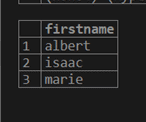
select firstname from scientist order by firstname;

select firstname from not_scientist order by firstname;

LIMIT

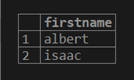
select firstname from scientist order by firstname limit 2;

SELECT TOP 5 item_name FROM items ORDER BY item_id ASC;

INSERT

insert into not_scientist (id, firstname, lastname) values (3, ‘marie’, ‘curie’);


insert into not_scientist (id, firstname, lastname) values (3, ‘marie’, ‘curie’);

BOOLEAN DATATYPE

Supports.

Supports as BIT Datatype

CHAR DATATYPE

Supports.

Supports.

TIMESTAMP

Supports.

Supports but not exactly timestamp, it supports datetime.

CHARACTER_LENGTH FUNCTION

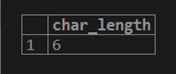
select char_length(‘albert’);

Does not support character length.
Instead:
Len(‘Dior’) and DATALENGTH(‘Dior’s Handbag’) are used.

SUBSTRING

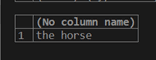
select substring(‘the horse and the grass and the stable’ from 10 for 20);

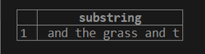
select substring(‘the horse and the grass and the stable’, 0, 10);

REPLACE

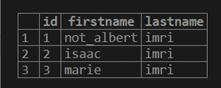
update scientist set firstname = replace(firstname,’albert’,’not_albert’);

select * from scientist;

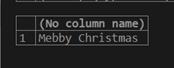
select REPLACE(‘Merry Christmas’,’rr’,’bb’);

TRIM

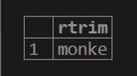
select trim(trailing ‘y’ from ‘monkey’);

select LTRIM(‘ Merry’);

CONCATENATION

select concat(‘goofy’,’ ‘,’monkey’);

select concat(‘The Goofy’, ‘Monkey’) as nickname;

UNIQUE CONSTRAINT

CREATE TABLE nicknames ( nickname_no integer UNIQUE,

Nickname text

);

CREATE TABLE nicknames ( nickname_no INT UNIQUE,

Nickname VARCHAR(50)

);

TRUNCATE TABLE

TRUNCATE nicknames;

TRUNCATE TABLE nicknames;

CONCLUSION

As a MS SQL Server developer, you already understand the intricacies of databases, relational databases, database management systems and their use cases. The only milestone you have to achieve now is to get familiarized with the GUI of PostgreSQL and practice the commands a bit. Start with a blank slate in your mind keeping in consideration the syntax of the language and since you already are well versed with the conceptual aspect of SQL and RDBMS, you will be able to draw an analogy between both the tools and hence, you will start using PostgreSQL for your applications in no time!

Here are some resources for you to kickstart your journey in learning PostgreSQL:

  1. “The Complete Python/PostgreSQL Course 2.0 by Codestars by Rob Percival, Jose Salvatierra, Teclado by Jose Salvatierra available at Udemy”
    Description: This course will not only walk you through the syntax of PostgreSQL but also guide you in creating 9 real-world projects.
    Language: English
    Link: https://www.udemy.com/course/complete-python-postgresql-database-course/?altsc=781502
  2. “PostgreSQL by FreeCodeCamp”
    Description: FreeCodeCamp is well known for their free and amazingly curated content. This course is a 4 hour, no break, no Ad course which will take you from the basics to advanced with tonnes of examples and practice queries.
    Language: English
    Link: https://www.youtube.com/watch?reload=9&v=qw–VYLpxG4
  3. “PostgreSQL: Advanced SQL Queries by Pinal Dave Available at PluralSight”
    Description: This course contains advanced concepts of PostgreSQL, perfectly suitable for a developer well versed in MS SQL Server.
    Language: English
    Link: https://www.pluralsight.com/courses/postgresql-advanced-sql-queries?clickid=WsGxLk1WsxyLW7fwUx0Mo3QBUkEUMJy9%3AWyb1s0&irgwc=1&mpid=1193463&aid=7010a000001xAKZAA2&utm_medium=digital_affiliate&utm_campaign=1193463&utm_source=impactradius
  4. PostgreSQL Tutorial
    This is an online bible for the explanation of all the commands, concepts and queries.
    Here is the link: https://www.postgresqltutorial.com/
  5. Books
    1. Practical PostgreSQL by O’Reilly
    2. PostgreSQL Up and Running by O’Reilly
    3. Mastering PostgreSQL 12: Advanced Techniques to Build and Administer Scalable and Reliable PostgreSQL Database Applications, 3rd Edition
  6. Official Documentation of PostgreSQL
    There is nothing better than the official documentation to learn about a new piece of technology. It can be hard to go through sometimes, but one thing that is certain is that you will get all the information you need under one hood.
    Link: https://www.postgresql.org/docs/

Happy Learning!


The post HOW CAN SQL SERVER DEVELOPERS GET STARTED WITH POSTGRE SQL? appeared first on Simple Talk.


from Simple Talk https://ift.tt/3uQBS6P
via

Thursday, February 25, 2021

Business value of lean software development and DevOps

Organizations are under greater pressure than ever to deliver applications faster and more efficiently. One approach they’ve taken to improve delivery is lean software development, an application delivery methodology that focuses on minimizing waste and increasing efficiency. Another approach is DevOps, which bridges the gap between development and operations in order to deliver software faster, more frequently, and more reliably. DevOps is often considered both a philosophy and practice that includes the tools necessary for application delivery.

DevOps has been described as an evolution of Agile methodology, an approach similar in many ways to lean software development. DevOps has also been portrayed as a type of lean development system that merges development and operations into a unified effort.

The relationship between DevOps and lean software development has been explained in other ways as well, but the two remain separate disciplines (just like Agile). However, DevOps and lean development share similar goals and can effectively complement each other. In fact, when used together, DevOps and lean software development can provide an organization with many important business benefits.

Lean software development

Lean software development has its roots in the Toyota Production System, an approach to automobile manufacturing that focused on minimizing waste, optimizing production, and increasing customer value. In 1993, Dr. Robert Charette co-opted the Toyota approach by introducing the concept of lean software development, focusing on risk reduction and building solutions for customer use.

Ten years later, Mary Poppendieck and Tom Poppendieck published their seminal book Lean Software Development: An Agile Toolkit. The book further formalized the concept of lean application delivery, adopting the same philosophy that revolutionized manufacturing. In their book, the authors outlined seven key principles for how to approach lean software development:

  • Eliminate waste. Waste includes anything that doesn’t directly add customer value or add knowledge about how to more effectively deliver that value. Waste can refer to unnecessary features, duplicate efforts, inefficient processes or other unproductive practices.
  • Amplify learning. Software development should be treated as an ongoing learning process that’s available to all team members. Learning can take many forms, such as training, code reviews, project documentation, pair programming, or knowledge sharing.
  • Decide as late as possible. Software development requires a flexible mindset that encourages team members to keep their options open until they’ve gathered the data necessary to make proper decisions. And the longer they wait, the more informed those decisions. Deciding late also makes it easier to accommodate new and evolving circumstances.
  • Deliver as fast as possible. Development teams should release software as often as they can, with short deployment cycles that provide them with continuous feedback. Not only does this improve the product faster, but it also provides development teams with more information for making informed decisions. And it helps eliminate waste.
  • Empower the team. The development team should be able to make technical decisions about the product without being bogged down by external approval processes. The team needs to be treated with respect and have the freedom to make the choices necessary to deliver software as fast and effectively as possible. Ongoing learning is an essential component of team empowerment.
  • Build integrity in. Accelerated application delivery should not come at the expense of the application’s integrity or quality. Fast does not mean sloppy. Customers should get an application that’s easy to use, works as it’s supposed to work, and includes the features they expect. The right tools can help ensure integrity by automating repetitive tasks, implementing comprehensive testing, and providing ongoing monitoring and feedback.
  • See the whole. Software development is immersed in endless detail. Even so, development teams should also understand the big picture. They should be familiar with the project’s goals, the application’s users, the value that the application provides, and any other information that offers insights into what they’re trying to achieve as a team and organization.

The lean approach to software development has much in common with Agile methodology. In fact, the two are sometimes treated as one and the same, even though they came about in different ways. Agile got its official start in 2001 when a group of developers published the Manifesto for Agile Software Development, which is built on four core values:

  • Individuals and interactions over processes and tools
  • Working software over comprehensive documentation
  • Customer collaboration over contract negotiation
  • Responding to change over following a plan

The group of developers also published a set of twelve principles, which stand behind the Manifesto:

  • Our highest priority is to satisfy the customer through early and continuous delivery of valuable software.
  • Welcome changing requirements, even late in development. Agile processes harness change for the customer’s competitive advantage.
  • Deliver working software frequently, from a couple of weeks to a couple of months, with a preference for the shorter timescale.
  • Business people and developers must work together daily throughout the project.
  • Build projects around motivated individuals. Give them the environment and support they need, and trust them to get the job done.
  • The most efficient and effective method of conveying information to and within a development team is face-to-face conversation.
  • Working software is the primary measure of progress.
  • Agile processes promote sustainable development. The sponsors, developers, and users should be able to maintain a constant pace indefinitely.
  • Continuous attention to technical excellence and good design enhances agility.
  • Simplicity—the art of maximizing the amount of work not done—is essential.
  • The best architectures, requirements, and designs emerge from self-organizing teams.
  • At regular intervals, the team reflects on how to become more effective, then tunes and adjusts its behavior accordingly.

From these principles, it’s easy to see how lean software development and Agile are similar in many ways. For example, they both embrace changing requirements and more frequent software delivery. In fact, one could argue that Agile is an expression of lean software development principles. They certainly share similar goals, even if they emphasize different aspects of application delivery.

DevOps and lean software development

As with Agile, it could be argued that lean software development principles lie at the core of DevOps. It could also be said that DevOps is the next step in the evolution of lean and agile software development. Certainly, a symbiotic relationship exists between these methodologies, even if they can each stand on their own. Consider Amazon’s description of DevOps:

DevOps is the combination of cultural philosophies, practices, and tools that increases an organization’s ability to deliver applications and services at high velocity: evolving and improving products at a faster pace than organizations using traditional software development and infrastructure management processes. This speed enables organizations to better serve their customers and compete more effectively in the market.

DevOps enables development and operation teams to collaborate in order to deliver software more effectively. Together, the teams employ continuous integration and delivery practices that automate and standardize release cycles while optimizing application lifecycles and accelerating deployments.

One of the most popular books on DevOps is Accelerate: The Science of Lean Software and DevOps: Building and Scaling High Performing Technology Organizations, written by Dr. Nicole Forsgren, Jez Humble, and Gene Kim. When working on their book, the authors used rigorous statistical methods to determine the best way to measure software delivery performance. They discovered that high-performance delivery can be predicted by four key metrics:

  • Lead time. The time from code commit to running the application in production; the shorter the time, the better.
  • Deployment frequency. The number of times the application is deployed during a specified time period; the higher the rate the better.
  • Mean time to restore. The average time it takes to recover from an incident; the shorter the time, the better.
  • Change fail percentage. The percentage of changes to production that fail; the lower the rate, the better.

These four metrics dovetail nicely with lean software development and its emphasis on faster deployments, reduced waste and building integrity into application delivery. Both lean software and DevOps seek to remove any barriers that might prevent teams from delivering applications as quickly and smoothly as possible while maximizing customer value. Because the two share many of the same goals, DevOps can effectively encompass lean software development principles while adding the benefits of integrated development and operations.

DevOps provides an efficient mechanism for applying lean development principles on a consistent and ongoing basis. Lean software development emphasizes the importance of minimizing waste, optimizing production, and increasing customer value—all characteristics integral to an effective DevOps operation. A DevOps team that embraces lean development principles recognizes the importance of prioritizing customer value, while continuously improving and optimizing their operations, which means eliminating waste wherever possible.

Business value of lean DevOps

Many DevOps teams already incorporate lean development principles into their operations, treating the application delivery process as a natural extension of those principles. Other teams might need to take specific steps to create an environment more friendly to lean software development, such as stepping up their efforts to reduce waste or emphasizing customer value over other priorities.

Regardless of how they approach lean DevOps, organizations stand to benefit in a number of important ways. For example, incorporating lean principles into DevOps can lead to more streamlined operations and increased productivity. Lean DevOps calls for ongoing feedback and optimization, coupled with team collaboration and participation. As a result, operations continuously improve and become more efficient, providing team members with the time they need to focus on important tasks, learn new skills and bring innovation to the table, which in turn help to improve operations even further.

Along with greater efficiency, organizations also benefit from less waste. Lean DevOps attempts to eliminate any activities, features, processes or other practices that do not contribute directly to application delivery. This also includes reducing duplicate efforts and automating repetitive manual tasks by deploying proper tools and processes. Plus, eliminating waste can help streamline operations and increase productivity.

Lean DevOps also means faster and more frequent deployments. Not only do customers benefit from regular updates, but developers get more immediate feedback on their changes. At the same time, these changes are deployed in smaller chunks, making it easier to address issues when they arise. Not only does this shorten the time-to-market, but it also results in greater customer satisfaction, giving organizations an edge over their competition. In addition, because deployments are broken down into small chunks, rollbacks and resolutions can be carried out more quickly, reducing the overall risks to the project.

Lean DevOps also results in greater agility, making it easier for team members to respond to changing business strategies and customer requests. The team can react more quickly to new regulations, changes in the competitive landscape, technological concerns, and other challenges. This flexibility goes hand-in-hand with more frequent deployments, leading to an even greater competitive edge.

Another advantage of lean DevOps is increased job satisfaction. An effective DevOps team relies on open communication and collaboration, along with ongoing learning. These can help create a more conducive and inviting work environment. In addition, because team members are empowered to make decisions and innovate, they experience less of the frustration that comes from being at the mercy of a bureaucratic chain of command. In addition, repetitive, manual tasks are automated, and feedback is quick and ongoing. This enables team members to perform their jobs more effectively, while being able to see immediate results for their efforts, adding to the overall satisfaction.

When taken together, these benefits translate to greater profitability. Software is delivered faster and more efficiently, without the waste the comes with traditional development methodologies. This can help reduce overall development costs and increase productivity. At the same time, organizations can respond more quickly to shifting trends and customer expectations, improving the bottom line even further, especially if organizations can deliver products and features faster than their competition. Plus, greater job satisfaction can lead to lower turnover, which itself can represent a significant saving.

Making DevOps leaner

Lean software development has its roots in automobile manufacturing. DevOps doesn’t go back nearly as far, emerging more recently as a way to improve the application delivery process. Even so, both approaches can benefit software development in numerous ways, and together they can offer even greater business value. Not only can they help improve operations and reduce waste, but they can also lead to faster deployments, increased agility, and fewer risks—all of which translate to greater profitability and the organization’s long-term stability.


The post Business value of lean software development and DevOps appeared first on Simple Talk.


from Simple Talk https://ift.tt/3uucofi
via

Tuesday, February 23, 2021

Do something that scares you

Recently, the editor of SQLServerCentral.com, Steve Jones, shared a video in our team Slack channel that talked about how you shouldn’t feel like an imposter when you get out of your comfort zone. It talked about how incredibly successful people didn’t know how to do what they eventually accomplished back when they started. For example, Jeff Bezos didn’t know how to run a trillion-dollar company when he began Amazon in his garage.

Discussions about imposter syndrome remind me of a book I read several years ago, The Confidence Code. The main thing I learned from the book is that doing things that seem daunting or downright scary can build confidence. One of the most frightening activities for most people is public speaking — feared more than death! That’s why I recommend it to women in tech to build their confidence and to boost their careers. I don’t mean to scare them, but I’ve seen many folks’ careers take off after they start presenting at events.

Another cool thing about doing scary things is that they get to be fun after a while. In my case, I love singing and participated in chorus in high school and college. I was too shy to get a solo and spent my time singing the background “oohs and aahs.” I discovered karaoke about 20 years ago, but it took me quite a long time before I was brave enough to go to a public event. Finally, I was singing the lead instead of the background, and I was hooked! Singing gave me so much confidence that I believe it led to me getting involved with presenting, writing, and teaching.

Other people have said that coaching a team, mastering photography, or leading a user group, for example, is that thing that scared them at first but that ultimately boosted confidence. Once you try something new that seems difficult but succeed, you wire your brain to believe you can do the next item on your list according to the Confidence Code authors.

Did the video Steve that shared cure my imposter syndrome? Not really. I know that there is so much to learn, and the opposite, thinking you know everything, is much worse.

Commentary Competition

Enjoyed the topic? Have a relevant anecdote? Disagree with the author? Leave your two cents on this post in the comments below, and our favourite response will win a $50 Amazon gift card. The competition closes two weeks from the date of publication, and the winner will be announced in the next Simple Talk newsletter.

The post Do something that scares you appeared first on Simple Talk.


from Simple Talk https://ift.tt/2MnUHNe
via