Tuesday, November 16, 2021

Dependency Hell: Past and Future

Saying that I’m from the time of the MDAC would be to break the main rule of never reveal our age. However, who really remembers Microsoft Data Access ComponentsMDAC – today ?

Microsoft had ODBC and it was good. Out of the blue came Borland with a thing called BDE that was way faster and came with Delphi, a direct competitor of Visual Basic at that time. Microsoft had to be fast creating a new technology. That’s when MDAC was created.

Things were a bit crazy considering how fast MDAC was created. Windows brought one version of MDAC, lets suppose it was 2.1. Office and Access brought a different one, let’s suppose 2.3. SQL Server had 2.6 and Visual Basic 2.8. Of course the version numbers are not correct, this happened about 30 years ago, but you got the idea. It was craziness to understand what version was where.

Don’t know what was MDAC? What if I call it ADO, is it more familiar to you? Yes, I’m talking about ADO and it’s that old.


That was also the time of the big conferences. I was living in Rio and that was the first time I was getting a plane to attend Microsoft TechEd in São Paulo.

It’s difficult to compare that time with today. The speaker told us he was creating the demo scenario for the conference in the plane and noticed how difficult it was to update COM classes. He created an addIn for Visual Basic – still in the plane – unregister, compile and register the COM class again, that was a huge improvement in COM+ development and became part of the product less than a year later.

This same speaker addressed on the stage the problem of the multiple MDAC versions attached to different products. His sentence was something similar to this:

“We know the pain this caused to you, we know it was a mess. We will never release new versions this way again. New versions will only be released with the entire product”

After Some Years

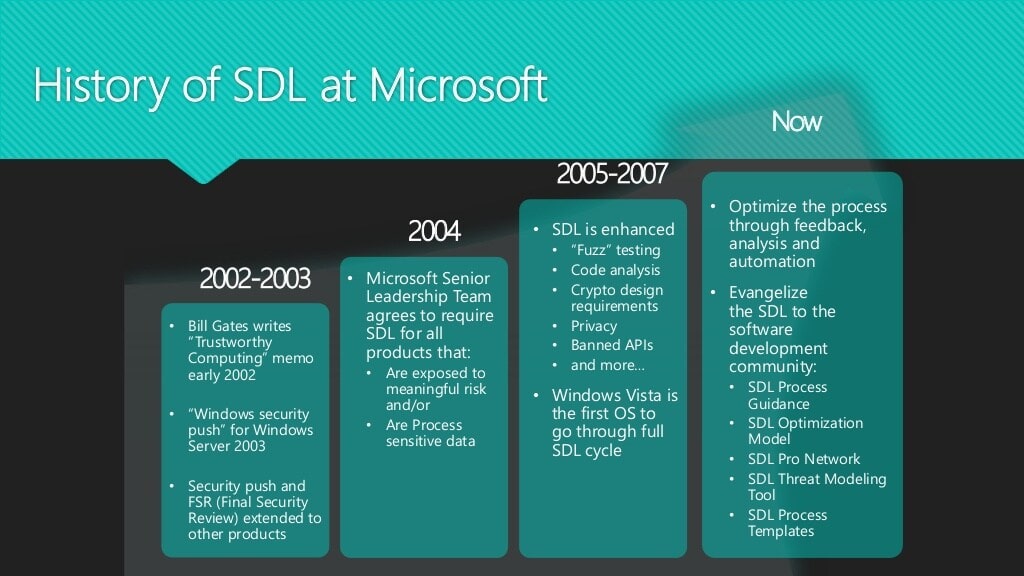
At some point in the end of 2001 and beginning of 2002 Microsoft suffered from some severe security problems on its products. The problem was so severe and exposed that Microsoft stopped all the software development during the entire month of February 2002, making every developer focus on security check of the code.

I hope not be mixing dates, but it was around this time I remember about a video explaining some pieces of the software development process in Microsoft. What most impressed me was the explanation that after a day of development, all the software was integrated, expend the entire night being tested and the developers had access to the result of the tests in the morning.

Having this level of automated tests, the possibility to leave small bugs behind would be low. Only hard to find ones would pass.

The image below, of course, is from many years ago.

The today World

Let’s talk about the today world based on examples.

LocationMode for Azure Storage access

LocationMode was a great property in the Azure Storage. The storage has replication by default and the LocationMode property allows you to use the replicated storage to balance workload with the primary storage, or other purposes.

You can see details about the LocationMode property on this page

The problem: The last version of the library with this property is the version 11 of the library. Version 12 of the library doesn’t have this property. A documentation page on Microsoft website says “We are working on producing documentation for this”, but the property is just no there.

Durable Functions

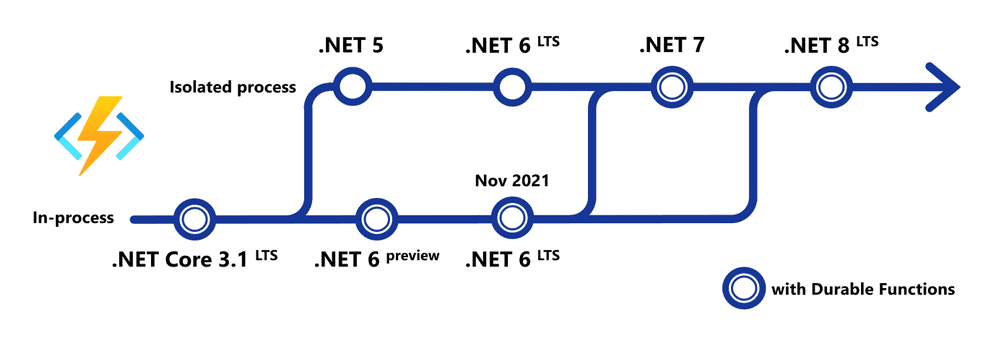
Durable functions allow us to create many different long running architectures using Azure Functions environment. The problem: only  .NET Core 3.1 LTS supports it. The .NET 5 or .NET 6 (until this month) don’t support it. There is one version of .NET 6 expected to become available this month that will make durable functions available again.

All this creates a problem: A version evolution is not a version evolution anymore. If we would like to enjoy the new version benefits we end up having to leave some feature behind. Is this something good?


It may worth read the following blog about LTS support and its meaning. I leave up to you to commend about the fact it resembles too much the name of Extended Support, becoming one more technical detail to learn and make everyone confuse.

System.Data.SqlClient and Microsoft.Data.SqlClient

Microsoft.Data.SqlClient is replacing System.Data.SqlClient, but it’s being made in a way that both live together, side by side. What are the chances for this to go wrong?

Microsoft.Data.SqlClient receives all new features implementations. For example, authentication with managed identities is supported only by this library. However, using this library isn’t the most straightforward process. A simple google query (sin! mortal sin!)  would show how easy it is to reach a dependency hell if you try to use it with .NET 5 in an Azure function. This blog is an example. Proposed solution? Downgrade .NET.

It’s not only about Development

SAS Policies on containers

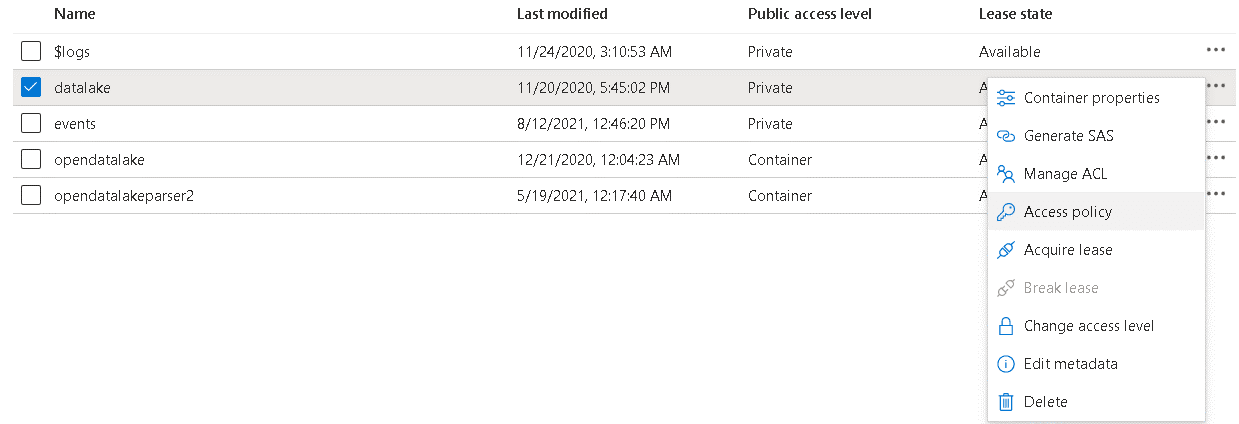
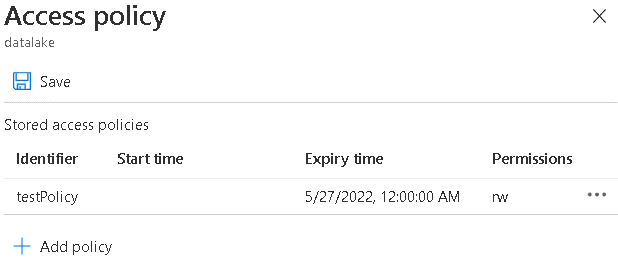
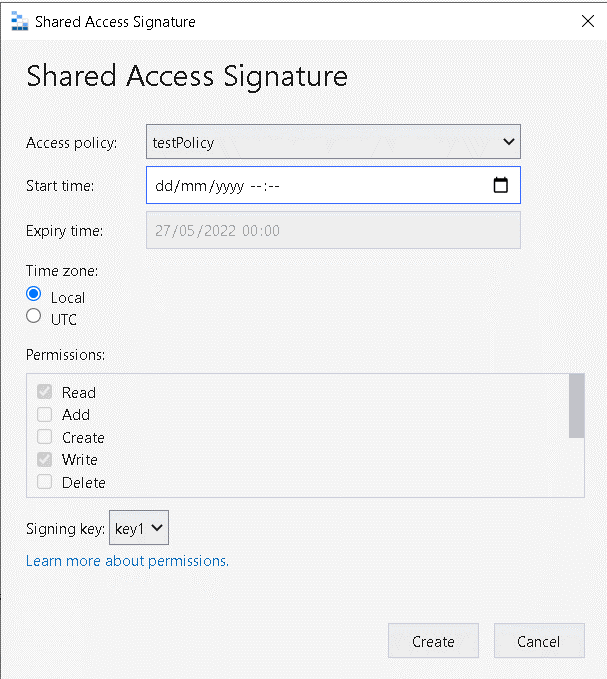
Do you know you can create a Shared Access Policy in an Azure container storage and this shared access policy should work as a guidance to produce SAS keys for the Azure Storage?


Yes, you can ! But no one knows, due to one simple reason: You can’t produce the SAS keys based on the SAS policy using the portal. Azure Storage Explorer can do this, but most people will miss and only look for the feature in the portal.


This plus the user being able to just ignore the SAS policy and create an SAS key in the way would like makes this feature… a bit strange.

The Hierarchical Namespace hell

In an Azure Storage account, we can enable Hierarchical Namespace or not. Can you correctly tell what features require Hierarchical Namespaces enabled and what features require it disable?


I know some features that require it disabled: Azure SQL Extended Events and temporary storage for backup restore are two of them. Things become even more strange when new features in Azure Storage, such as soft delete, only work with it disabled. What is this option for? Data Lakes. But Polybase and its flavors from Synapse and SQL can work well without this feature enabled. Confuse?

Conclusion

This list could be going and going. After finishing I may have thought about many more items that could figure here.

I don’t have answers, only questions. 30 years have passed, but does this justify that we go on the exactly opposite direction than the promised one in that conference in São Paulo? What about the night integration and tests, are they still happening ?

Young developers may hold pride for being able to walk through a dependency hell. Knowledge brings pride, but this knowledge shouldn’t, because in the end, it’s still a dependency hell.

Wouldn’t it be so easier if it just worked?

The post Dependency Hell: Past and Future appeared first on Simple Talk.


from Simple Talk https://ift.tt/3CnVtxn
via

Monday, November 8, 2021

SQL Elevated Configuration: The fail-safe for maintenance

Many years ago, in the company I was working for, one junior DBA started a reindex operation in a SQL Server Standard Edition on the most busy day of the month. Do I need to explain what happened next? It’s easy to use the imagination on this one.

What’s the option to solve this? Online index creation or rebuild. This would allow index maintenance to not block the database at all.

SQL Server 2019 and Azure SQL brought two database scoped configurations to work as a fail-safe for this kind of situation: Elevated_Online and Elavated_Resumable

Database Scoped Configurations are in some ways similar to server configurations, but we can set them on database level. On the beginning, they were server configurations we could set on the database level. After a while some configurations that work only as Database Scoped Configuration started to appear.

These two configuration options work as a fail-safe in case a junior DBA executes a statement that will block the server: When enabled, these configurations automatically convert the statements to online execution or resumable execution.

They are not enabled by default. I strongly recommend to enable them, avoiding blocking your production database when you less expect.

Managing the Configurations

You can check if these statements are enabled using the following query:

SELECT *
FROM   sys.database_scoped_configurations
WHERE  NAME IN ( ‘ELEVATE_ONLINE’, ‘ELEVATE_RESUMABLE’ ) 


These options are not a simple ON/OFF switch. They have 3 configuration options:

OFF: It’s the default. The configuration is disabled.

WHEN_SUPPORTED: It’s the one I most recommend. SQL Server will change the statement to online/resumable when possible, but if for some reason it’s not possible, the statement will be executed anyway.

FAIL_UNSUPPORTED: This is the most strict option. The execution will fail If for some reason the statement can’t run online. I recommend to be very careful when using this option. If we could set time windows for this option, defining when the statement can or can’t be executed, it would be way better.

Example to set these configurations:

ALTER DATABASE SCOPED CONFIGURATION SET ELEVATE_ONLINE = WHEN_SUPPORTED;
ALTER DATABASE SCOPED CONFIGURATION SET ELEVATE_RESUMABLE = WHEN_SUPPORTED;

Recommendation for Production Environments

In critical production environments, one option is to keep both configurations set with FAIL_UNSUPPORTED. Every maintenance requiring to execute something offline or not resumable would need to change the configuration first, make the execution and revert the change.

The first security blocking production issues is that someone who wants to execute a dangerous task for production will need to be aware about this configuration and really know what to do.

We can add one more security level using permission management. In order to change a database scoped configuration the user needs the ALTER ANY DATABASE SCOPED CONFIGURATION permission. The server administrator will need to manage permissions in such a way that only a limited set of administrators will have these permissions, while junior administrators will have limited permissions to manage the database.


The post SQL Elevated Configuration: The fail-safe for maintenance appeared first on Simple Talk.


from Simple Talk https://ift.tt/3mSEZZU
via

Wednesday, November 3, 2021

SQL Server 2022 is a game changer

Microsoft announced at the Ignite conference that SQL Server 2022 is on the way, and several significant new features should convince many organizations to upgrade soon after it’s available. It’s been three long years since SQL Server 2019 arrived, so these announcements are exciting to hear.

Microsoft will announce details and additional features over the next few months, but to see demos of the announcements from Ignite, take a look at this video from Bob Ward. Microsoft is also presenting deep dive sessions of all the features at the PASS Data Community Summit, November 8 – 12. If you register before the keynote on November 12th, you will receive exclusive access to the session recordings for six months, so don’t wait. Sign up today!

Here are the two features that I’m looking forward to trying:

Failover to Azure SQL Managed Instance

With just a couple of clicks, you can attach a database to the cloud. This action sets up an Availability Group (AG) between an on-premises SQL Server and Azure SQL Managed Instance (MI), which you can use for disaster recovery or offloading a read-only workload. You can then manually failover to the MI and back. It’s also possible to restore a backup from a MI to SQL Server 2022.

Instead of managing hardware or virtual machines in multiple data centers, you can let Microsoft do the work for you with Azure SQL Managed Instances saving money, effort, and time.

Parameter sensitive plan optimization

Beginning with SQL Server 2022, multiple plans can be cached for a query. If there are two possible plans for a query, the plan will switch between a scan and a seek depending on the number of rows processed. This new feature solves those pesky parameter sniffing issues that cause so many performance issues. I’ve been hoping to see this improvement for years and can’t wait to see what else is in store.

Microsoft also announced Azure Synapse Link with SQL Server for real-time analytics without ETL, Azure Purview Integration, SQL Server Ledger for data tampering protection, and much more. Don’t miss all of the announcements and demos of the new features at PASS Data Community Summit.

SQL Server is a game-changer with something for everyone. I can’t wait to get my hands on the preview!

Commentary Competition

Enjoyed the topic? Have a relevant anecdote? Disagree with the author? Leave your two cents on this post in the comments below, and our favourite response will win a $50 Amazon gift card. The competition closes two weeks from the date of publication, and the winner will be announced in the next Simple Talk newsletter.

The post SQL Server 2022 is a game changer appeared first on Simple Talk.


from Simple Talk https://ift.tt/2ZKp7PY
via

Tuesday, November 2, 2021

Ransomware: A world under threat

Ransomware represents one of the biggest security threats faced by today’s organizations. A ransomware attack can have a devastating impact on an organization, and few organizations are immune from the threat. It doesn’t matter the organization’s size, type, or location. It could be a university, city government, school district, small business, private corporation, or another type of institution. Any entity whose operations rely on computers and the flow of data is at risk from a ransomware attack, and if the attack is successful, it could cost the organization millions, whether or not the ransom is paid.

What is ransomware?

Ransomware is a form of malware that prevents organizations from accessing their data or systems. Threat actors who carry out ransomware attacks hold the data or systems hostage until a ransom is paid. Individuals can also be hit with ransomware, but most crooks are looking for bigger payoffs, and those come from public and private organizations, especially those that rely heavily on their data to carry out day-to-day operations. A ransomware attack can, in fact, bring an organization to its knees, preventing it from conducting business and often leading to the loss of critical data.

Ransomware attacks vary substantially from one to the next and are continuously evolving. They range in scope, types of targets, and amounts of ransoms they demand. Even so, they generally follow similar steps:

  1. Threat actors use an attack vector to gain access to a target system or network, where they introduce the ransomware. Common attack vectors include phishing, spear phishing, malvertising, malicious websites, stolen credentials, and social engineering campaigns. Ransomware can also be introduced through the use of other malware.
  2. After the ransomware penetrates a system, it carries out whatever operations it was designed to do, often spreading to other nodes on the network. Threat actors might introduce ransomware that exploits known vulnerabilities in order to gain access to restricted resources, or they might use social engineering techniques in conjunction with ransomware to get to these resources. Most ransomware either locks up computers or encrypts files. However, attacks against organizations commonly use encryption. In most cases, ransomware victims are not aware of an attack until it’s too late.
  3. Once the ransomware has taken control of the data or systems, the threat actors make their ransom demands known to the victim. For example, if the ransomware has encrypted sensitive data, the threat actors might demand that the victim make a payment in the form of cryptocurrency (such as Bitcoin). In exchange, the victim will receive the decryption key. If the victim does not make the payment within the deadline, the threat actors might demand a higher ransom. If the victim refuses to pay the ransom altogether, the data will never be decrypted.

When planning their ransomware attacks, threat actors often carry out extensive research on the target organizations, discovering what they can about their financial circumstances, the types of regulations that govern their data, what it could cost them to have their data locked, and any other information that might be useful when making their ransom demands. It cannot be overemphasized how sophisticated ransomware attacks have become and the planning and research that often go in them.

An image representing a phishing attack

Figure 1. Threat actors commonly use phishing to introduce ransomware into a target system (image by Mohamed Hassan).

In the early days of ransomware, attacks primarily targeted individual users, and although this still occurs, threat actors have come to realize that they can make a lot more money by going after organizations—disrupting their business and threatening their data.

Organizations large and small are at risk from ransomware. In some cases, threat actors might launch an attack against an organization because it appears easier to infiltrate and control, such as a school district with a limited IT budget, or they might take on organizations that seems more likely to pay, such a hospital that relies on continuous access to patient data. In recent years, universities, financial institutions, and healthcare organizations have been hit particularly hard by ransomware.

Ransomware’s insidious spread

A number of factors have helped fuel the rise in ransomware. One of the most important was the introduction of cryptocurrency, which facilitated anonymous payments and made it difficult to prosecute the criminals who launched the attacks. The dark web has also played an important role by providing threat actors with resources for carrying out their attacks. Would-be attackers can surf ransomware marketplaces, purchase malware kits, or find developers who sell ransomware as a service (RaaS), which offers ransomware for a cut of the take.

It’s no surprise that threat actors are drawn to ransomware, given the ease of getting into the business and the potential big pay-offs, and in such a climate, ransomware attacks are likely to grow more sophisticated and aggressive. According to the Sophos State of Ransomware 2021 report, which is based on the company’s annual ransomware survey, 37% of the surveyed organizations were hit by ransomware in the last year—over one-third of the 5,400 surveyed. The report also includes other notable findings:

  • Mid-sized organizations paid an average ransom of US$170,404.
  • The total costs of a ransomware attack averaged US$1.85 million, when taking into account ransom payments, downtime, personnel time, device and network costs, lost opportunity, and other factors.
  • Of those organizations that suffered a ransomware attack, 54% stated that the cybercriminals succeeded in encrypting their data in the most significant attack.
  • Of these organizations, 96% got their data back, but only 65% of the encrypted data was restored after the ransom was paid.
  • Extortion-style attacks more than doubled in the last year, up from 3% to 7%. In these attacks, cybercriminals threatened to publish the data, rather than encrypting it. It should also be noted, however, that threat actors have started to carry out double-extortion attacks in which they steal and encrypt the data and threaten to publish it online.

The rate of attacks is actually down from the previous year, when 51% of the surveyed organizations stated that they had been hit, but the drop might be due in part to evolving attack approaches, according to the Sophos report. “For instance, many attackers have moved from larger scale, generic, automated attacks to more targeted attacks that include human operated, hands-on-keyboard hacking. While the overall number of attacks is lower, our experience shows that the potential for damage from these targeted attacks is much higher.”

An image that represents ransomware

Figure 2. Ransomware attacks continue to grow more sophisticated, targeted, and aggressive (image by Katie White).

The first recognized instances of ransomware occurred in the 1980s, but it wasn’t until the 2000s that modern forms of ransomware started to appear. Initially, such attacks were confined mostly to Russia, but the picture changed dramatically by 2012, when ransomware attacks proliferated and spread across the globe. This was in large part because of the emergence of Bitcoin, which provided an anonymous platform for receiving ransom payments.

Since then, ransomware has become one of the most dominant forces in the threat landscape, producing a wide range of variants, including the following:

  • CryptoLocker. A highly powerful form of malware that first emerged in 2013 and set the stage for the type of ransomware that encrypts files on hard drives and connected devices, spreading much easier than earlier variants.
  • WannaCry. One of the most well-known and damaging types of ransomware to hit cyberspace. WannaCry leveraged EternalBlue, a Windows exploit allegedly developed by the US National Security Agency (NSA) and then stolen by a group of hackers known as Shadow Brokers. The NotPetya ransomware also used the EternalBlue exploit.
  • SamSam. Ransomware that exploits server vulnerabilities to gain access to a network, where it lingers undetected for long periods of time. Attackers have often used the Remote Desktop Protocol (RDP) in conjunction with SamSam to infiltrate the network and search for valuable targets. One of the most notable SamSam attacks occurred in 2018 against the city of Atlanta, Georgia, which spent over $2.6 million to recover from the incident.
  • Ryuk. Ransomware often used along with other malware (such as the TrickBot banking Trojan) to infect vulnerable or high-profile targets. Ryuk emerged in 2018 and has since wreaked havoc on news agencies, healthcare organizations, school systems, and other institutions. According to the CrowdStrike 2020 Global Threat Report, Ryuk accounted for three of the top seven ransom demands for that year: USD $5.3 million, $9.9 million, and $12.5 million.
  • Egregor. Malware first identified in September 2020 that was once considered a high-severity threat until US and Ukraine authorities worked together to stop operations. Despite its demise, Egregor represented two significant ransomware trends: RaaS and the double extortion attack.

There are plenty of other examples of ransomware out there, and there are a growing number of examples of its consequences. Earlier this year, for instance, Colonial Pipeline fell victim to a major ransomware attack, causing the company to shut down its fuel distribution operations. Not only did this lead to widespread fuel shortages, but it also resulted in personal information being compromised. Colonial Pipeline paid $4.4 million in ransom for the decryption key.

Protecting against ransomware

According to prevailing wisdom, the best way to protect against ransomware is to prevent it from happening in the first place. This is no doubt true enough, but implementing these protections can be a significant undertaking, even under the best circumstances. That said, IT and security teams have no choice. They must be aggressive in the steps they take to protect their systems and data while at the same time, prepare for how to respond to a ransomware attack if one occurs.

To protect against ransomware and other security risks, an organization needs to employ a defense-in-depth strategy that takes a multi-layer approach to security. Not only can this help to protect against different types of threats, including ransomware, but it can also minimize the impact of an attack if it should occur. Such an approach requires careful planning that takes into account ransomware protections. To this end, here are four general guidelines to consider when mapping out your security strategy:

  1. Create secure backups. Backups are your best protection against ransomware, but the backups themselves must also be safeguarded. They should be secured with the strictest protections, and at least one copy of each backup should be immutable and disconnected from the computers and networks that you’re backing up. You should also verify that your backups are complete and viable, and you should regularly test your restoration process.
  2. Secure your environment. This is a broad category that is typically part of a larger security strategy. It includes the use of security software that includes ransomware protection, and it incorporates other best practices, such as keeping all software updated and patched, controlling which applications users can install, performing regular vulnerability scans, maintaining strong access controls, using multi-factor authentication (MFA), implementing robust email security, running penetration tests, and continuously monitoring your environment for malicious activity.
  3. Train and educate personnel. An organization should have in place an awareness and training program that educates users in how to avoid ransomware and other threats. The better they understand the threat landscape, the less likely they’ll be to carry out risky behavior. For example, they should be trained in how to safely surf the web and what to do if they receive suspicious emails. IT and security teams should also receive the training they need to stay current on ransomware threats and what steps to take to best mitigate risks.
  4. Create an incident recovery plan. Regardless of how diligent an organization might be when it comes to security, no one is completely free from risk. The organization should implement an incident recovery plan that defines the roles, responsibilities, and procedures to follow when responding to a ransomware attack. The plan should also include a list of individuals and organizations to contact in the event of an attack. In addition, it should identify critical processes that need to continue uninterrupted if an attack occurs and what it will take to maintain operations without access to certain systems. IT and security teams should also practice their incident responses to ensure a smooth operation in the event of a real attack.

If a ransomware attack were to occur, an organization would immediately implement its incident recovery plan. In most cases, the first step would be to identify and isolate the infected devices to stop the spread as quickly as possible. If the devices can’t be disconnected from the network, they should be powered down, but this should be a last resort to avoid losing forensic evidence.

The response team should also report the incident to the appropriate law enforcement and regulatory agencies and to any key players that need to be informed of the attack. The team should then fully investigate the incident, taking such steps as identifying the ransomware and assessing the damage. Once they understand the full extent of the attack, they can take the steps necessary to recover their data from the backups.

The continuous threat of ransomware

When organizations are victims of ransomware attacks, the question always arises of whether they should pay the ransom. Law enforcement agencies such as the FBI generally advise against paying. One reason for this is that the attackers might never provide the decryption key. And even if organizations pay, they might be targeted again by the same attackers or gain a reputation as susceptible targets. Some would also argue that paying the ransom only encourages more such attacks. Even so, many organizations pay the ransom anyway, seeing it as a better option than losing all their data, especially if they cannot operate without that data.

Whether or not they pay, ransomware is here to stay. It will continue to evolve, and attacks will become more sophisticated and targeted. It might not be long before criminals move from computers and data to critical infrastructure, such as smart cities or industrial control systems, hijacking an entire ecosystem until the ransom is paid. Yet even in its current form, ransomware represents a significant threat to both public and private sectors, targeting organizations at all levels. Only by taking steps to protect against ransomware and to prepare for a possible attack can organizations hope to avoid or minimize the potential havoc that ransomware can wreak.


The post Ransomware: A world under threat appeared first on Simple Talk.


from Simple Talk https://ift.tt/3Bwf2mN
via

Monday, November 1, 2021

Data Factory: Use a SQL Query to create a Data Source

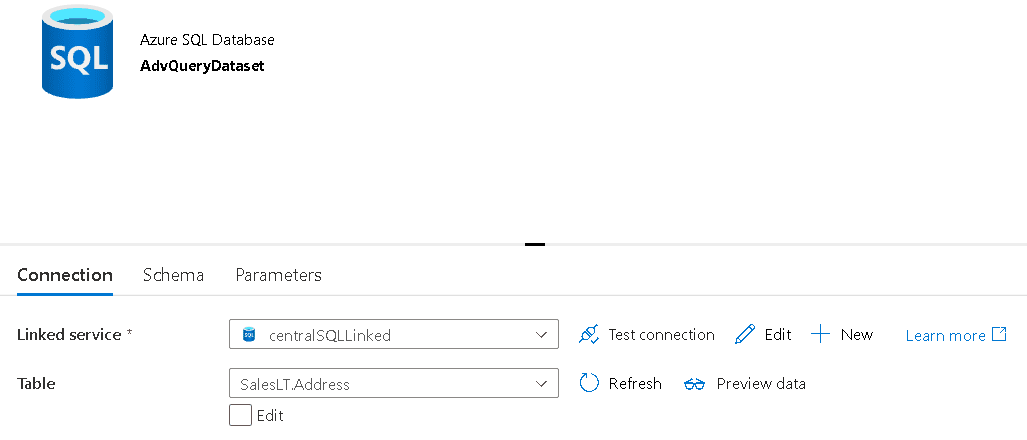
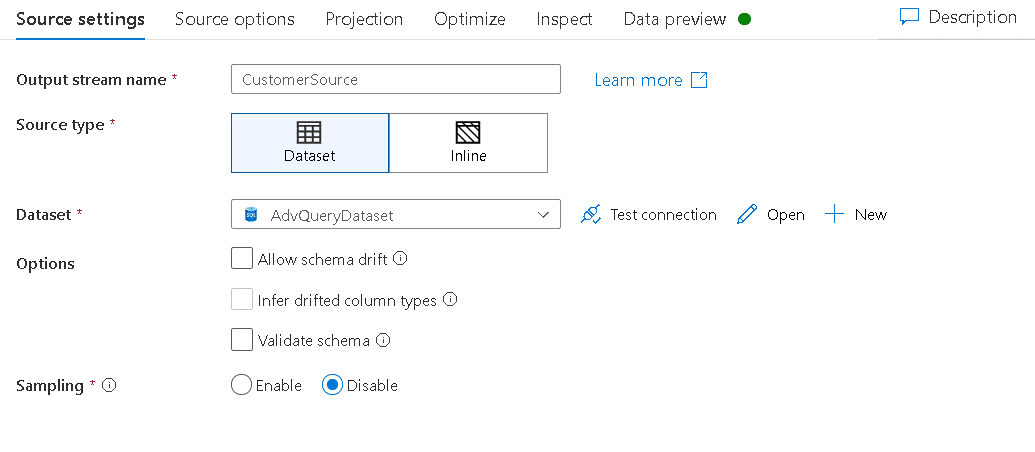
When we include a data source inside a data flow it always requests a dataset. The dataset, in turn, requires you to point to a table. A dataset can’t be defined over a query, it needs an object on the linked service, which may be a table or view as you may notice on the image below.


How can we work around this and use a query as a source for a data flow?

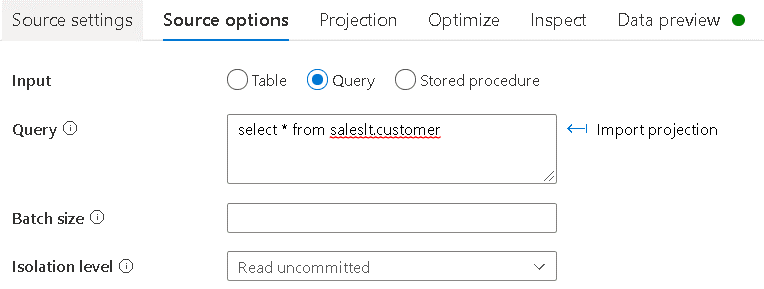
The secret is on the source object we use on the data flow. We need to select a dataset, as always. However, on the 2nd tab, Source Options, we can choose the input type as Query and define a SQL query. The source will ignore the table configuration in the dataset and get the data from the query.

This is how the 1st tab will look like when we select the dataset:

This is how the 2nd tab looks like with the query defined:


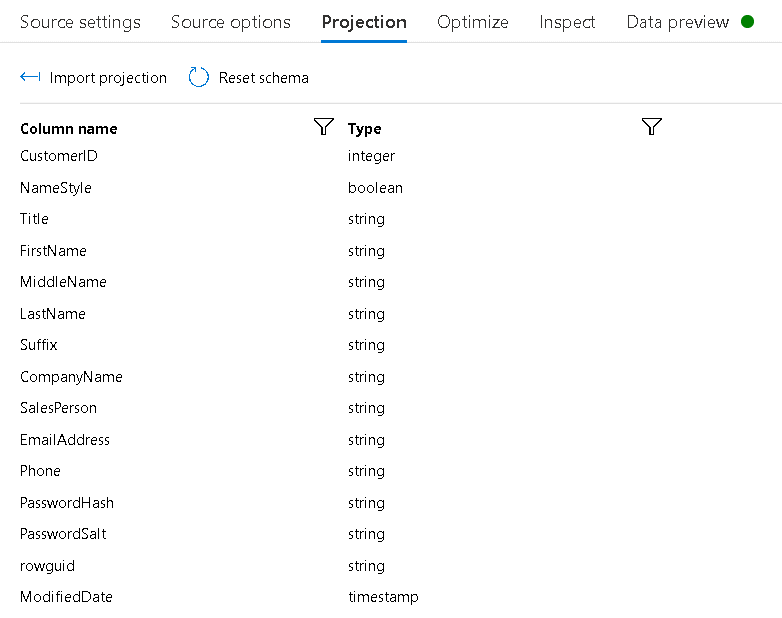
After defining the query, we can click the button Import Projection. Data Factory will need to initialize the Integration Runtime, so it can execute the import of the schema. Once the Integration Runtime is initialized, the Import Projection can proceed. Usually you will need to click the button again.

On the Projection tab we will not see anything related to the table at all, only the query results will be there.


The schema drift properties on this scenario are still optional. They will act completely over the query. We import the projection schema from the query. The dataflow will accept additional fields beyond the ones defined during development if the schema drift property is enabled, as it usually does.

The Dataflow Code

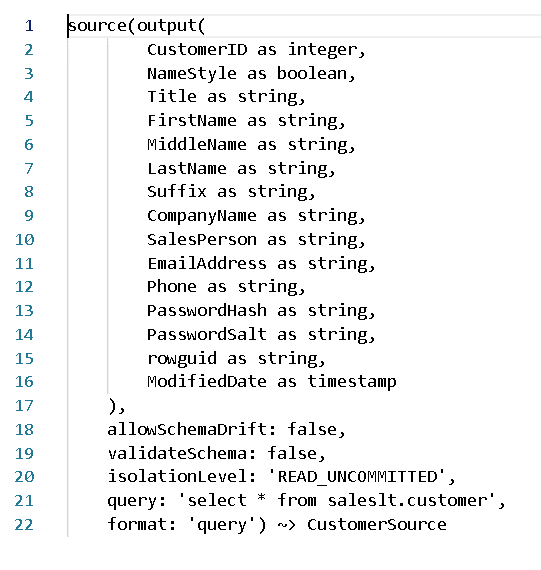
We can say in some ways the data factory data flows have two different languages: The Data Flow Script (DFS) and the json syntax. The two buttons on the top right of the Data Factory screen allow us to see the code.

The DFS from this script makes no reference to the dataset at all:

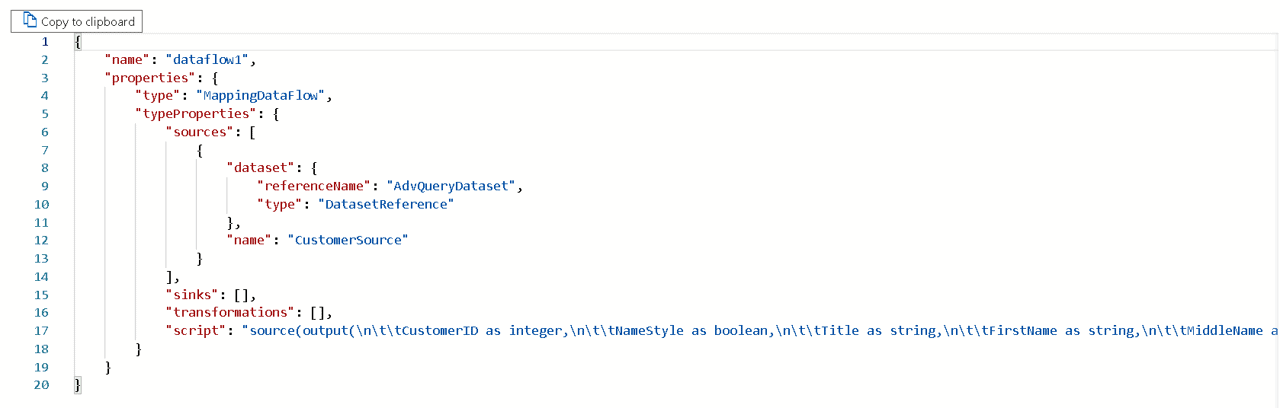
Data Factory converts the DFS to a single script line in the JSON file. The JSON file requires a source dataset specified, but many dataset definitions, such as the table, will be ignored. The resulting JSON will be like the image below.

The dataset, on this example, establishes a link between the data flow and the linked service, but only that.

The post Data Factory: Use a SQL Query to create a Data Source appeared first on Simple Talk.


from Simple Talk https://ift.tt/2ZHfCBC
via

Monday, October 25, 2021

Routing Access to Azure Services

Azure is part of the Microsoft Global Network. Applications in the Azure environment can receive access from the entire world. This world-wide access creates a dilemma about the routing to the Azure services. We face two options: routing through Microsoft Global Network or through public internet.

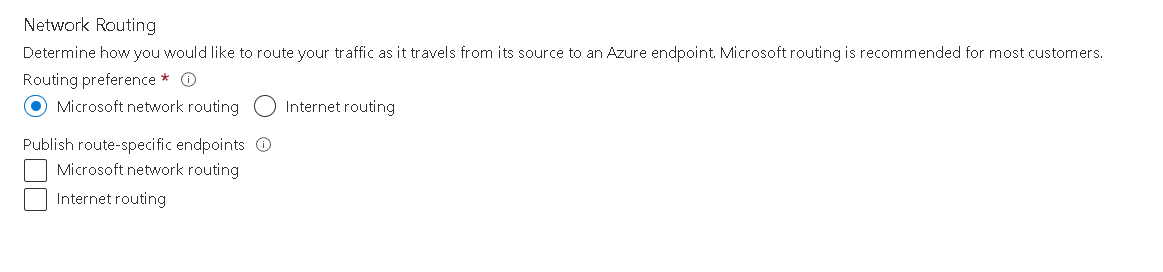
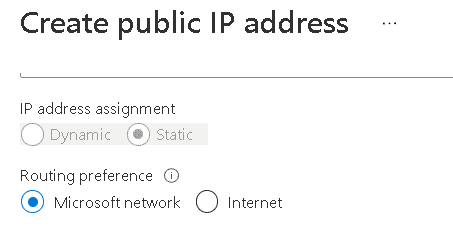
Initially only the Storage Accounts had a direct configuration about this routing access. Nowadays, we can configure the routing access in any Public Ip using Standard SKU.


This means that any service linked to a Public IP object defined in azure can have its routing preferences configured. This affects most IaaS features, such as virtual machines. However, load balancers and application gateways are also affected and they may be the front-end for PaaS services. Traffic Manager and Azure Front Door are some feature that allow us to manipulate these routing preference in an indirect way.

What the Routing Options mean

The routing options are called Microsoft Routing and Internet Routing. It’s about the way the access will be routed from the user to the Azure service.

When the communication starts on the user machine, the communication is starting outside Microsoft Global Network and will cross some ISPs hardware until it gets to the MS Global Network. How many routers outside Microsoft environment will be routing the packages of this communication?

That’s the difference the routing preference makes:

  • Internet Routing will make the package get into the Microsoft Global Network from the closest possible point to the resource. In this way, the package will flow on the public internet most of the way until the destination.

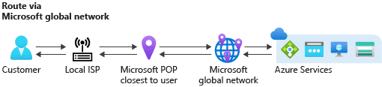
  • Microsoft Network will make the package get into the Microsoft Global Network from the closest possible point to the user. In this way, the package will flow inside Microsoft Global Network most of the way until the destination.

The Implications

The security implications are obvious. The most the package flows inside Microsoft Global Network, safer the package is. However, since we are given these options there must be something else to this choice.

There is: The networking price. There is a difference price for network packages that cross Azure regions and continents. This price will make the cost of the cloud higher.

The main question that everyone asks is: How higher?

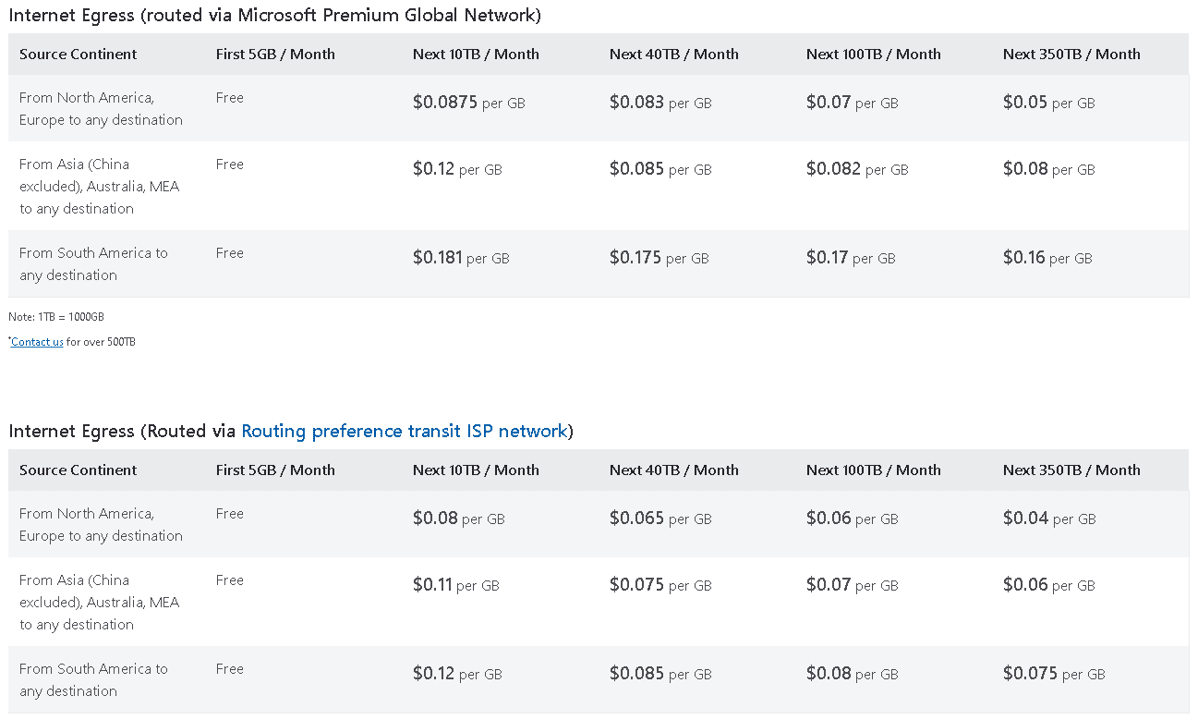
You can see details about the difference of traffic across regions and continents on this link: https://azure.microsoft.com/en-us/pricing/details/bandwidth/


A good way to summarize this link is by highlighting the difference of the traffic from South America to other regions when your service is located in South America. If you move 10 TB every month, it would cost you around us$ 1,200.00 if you are using internet routing but around us$ 1,800.00 if you are using Microsoft routing.

Mind these highlights about this example:

  •  South America is the most expensive region in relation to trafic and the one with the biggest difference between Internet and Microsoft routing
  • 10 TB is huge amount of data. Consider many ways your application may avoid such huge traffic, like using CDN and other cache features. Most solutions will not reach this amount of traffic.
  • The price drops after 10 TB/month

In my humble opinion, the price difference is insignificant to make someone choose internet routing instead of Microsoft routing.

Indirect routing Management

Besides services linked with public Ip and the Azure Storage, we can indirect manage this routing problem by using Azure Front Door or Azure Traffic Manager. These two load balancers are DNS based solutions distributed globally. Wherever the user is in the globe, it will reach the endpoints of these services from the closest Microsoft network endpoint possible. After that, the rules of these load balancers take place and decide what service in our company global virtual network will provide the end user service.

It’s a choice to use or not these load balancers and to distribute or not our services around the globe. If we choose not to, the user packages will need to reach the physical place of our application, whatever region we choose for it. Using these tools, on the other hand, we have the option to redirect the traffic to the application server we provisioned closest to the user.


References

https://docs.microsoft.com/en-us/azure/virtual-network/ip-services/routing-preference-overview

The post Routing Access to Azure Services appeared first on Simple Talk.


from Simple Talk https://ift.tt/3GiHpbL
via

Cache strategies in Redis

Redis is a cache database that stores documents in memory. The data store has a key-value pair lookup with O(1) time complexity. This makes the cache fast and convenient because it does not have to deal with complex execution plans to get data. The cache service can be trusted to find a cache entry with a value in almost no time.

When datasets in cache begin to grow, it can be surprising to realize that any latency is not a Redis issue. In this take, I will show you several strategies to cache Redis data structures then show what you can do to pick the best approach.

The sample code can be found on GitHub, and it is written in C# via .NET 5. If you already have LINQPad up and running, feel free to copy-paste code and follow along.

There are a few dependencies. You will need a Redis Windows service when running this on Windows 10. I recommend grabbing binaries from GitHub and setting up the server on your local machine. You can quickly have a server running by executing redis-server.exe. I will be hammering the service with lots of cache data, so I recommend setting the maxmemory to something high like 50MB. A full Redis installation on Windows should take no more than 6MB because it is lightweight. For the C# code, you will need two NuGet packages: protobuf-net and StackExchange.Redis, as well as ProtoBuf and StackExchange.Redis using statements.

These are the caching strategies:

  • Binary
  • XML
  • JSON
  • ProtoBuf

.NET serializers allow you to work with document data cached in Redis. On the server-side, all Redis does is store and retrieve arbitrary blob data. The key-value pair can be as big as it needs to be, assuming it can fit in-memory. It is up to the C# code to decide what to do with this data stream and determine which serialization strategy to use. Any performance issues you may stumble upon have to do with how long this serialization process takes. It is the client code, not the cache server, that does the actual work.

Connecting to Redis

First, put this skeleton app in place. It will need to instantiate a Redis connection, grab a Stopwatch, and declare DTOs.

const int N = 50000;
var redis = ConnectionMultiplexer.Connect("localhost");
var db = redis.GetDatabase();
var stopWatch = new Stopwatch();
// The rest of the code goes here
[Serializable]
record BinaryDto(
  string propertyA,
  string propertyB,
  string propertyC,
  Guid id);
public record XmlDto(
  [property: XmlElementAttribute()]
  string propertyA,
  [property: XmlElementAttribute()]
  string propertyB,
  [property: XmlElementAttribute()]
  string propertyC,
  [property: XmlAttribute()]
  Guid id)
{
  XmlDto() : this(
    string.Empty,
    string.Empty,
    string.Empty,
    Guid.Empty) {}
};
record JsonDto(
  string propertyA,
  string propertyB,
  string propertyC,
  Guid id);
  
[ProtoContract(SkipConstructor = true)]
record ProtoDto(
  [property: ProtoMember(1)]
  string propertyA,
  [property: ProtoMember(2)]
  string propertyB,
  [property: ProtoMember(3)]
  string propertyC,
  [property: ProtoMember(4)]
  Guid id);

The key code to look at here is the DTO records. I have declared a separate DTO per strategy. To serialize data in binary, it needs the Serializable attribute. For XML, it needs a default public constructor and property attributes. This is how the XML document takes shape; for example, the id property will go on the parent node as an attribute, and the rest of the XML properties will be declared as children. The JSON data object does not have any ceremonial code. ProtoBuf needs positional ordinals, which are set via an integer. It does not matter what the order is as long as the proto members are unique. Setting the proto contract to skip the constructor makes this serializer work with records.

There are no real performance benefits to using records here other than to keep the C# code nice and terse. These DTOs will be instantiated as lists and will live in the heap anyway.

I declared a constant N to set the size of the dataset that is going into Redis. This is set to fifty thousand records. Depending on the size of your specific cache, I recommend changing this value to fit your needs. ProtoBuf, for example, is not the best strategy for small payloads. This is because there are no one size fits all solutions.

One caveat for XML, the shape of element attributes will dictate the size of the payload. XML tends to be verbose, and setting more properties as attributes on the parent node will reduce its overall size. I opted to include both techniques mostly to show there are ways to change the payload without changing strategies altogether. Feel free to play around with the XML serializer to double-check how this impacts performance.

Binary serializer

To serialize data in binary, instantiate a list of records and set/get the cache entry in Redis.

var binaryDtoList = Enumerable.Range(1, N)
  .Select(i => new BinaryDto(
    "PropertyA" + i,
    "PropertyB" + i,
    "PropertyC" + i,
    Guid.NewGuid()))
   .ToList();
stopWatch.Start();
using (var binarySetStream = new MemoryStream())
{
  var binarySerializer = new BinaryFormatter();
  binarySerializer.Serialize(binarySetStream, binaryDtoList);
  db.StringSet(
    "binary-cache-key",
    binarySetStream.ToArray(),
    TimeSpan.FromMinutes(5));
}
stopWatch.Stop();
Console.WriteLine($"Binary write = {stopWatch.ElapsedMilliseconds} ms");
stopWatch.Restart();
var binaryCacheEntry = db.StringGet("binary-cache-key");
using (var binaryGetStream = new MemoryStream(binaryCacheEntry))
{
  var binaryDeserializer = new BinaryFormatter();
  binaryDeserializer.Deserialize(binaryGetStream);
}
stopWatch.Stop();
Console.WriteLine($"Binary read = {stopWatch.ElapsedMilliseconds} ms");
Console.WriteLine();

The StringSet sets data in Redis, and StringGet gets the data. These methods are a bit of a misnomer because the cache entry stored in Redis isn’t in string format but binary. It is not the same binary representation used by the serializer but one internal to Redis when it gets or sets its data. When setting a cache entry, be sure to specify a key. Retrieving the cache entry is as easy as getting the data stream via the same cache key. The TimeSpan argument allows the cache entry to expire after a certain time limit.

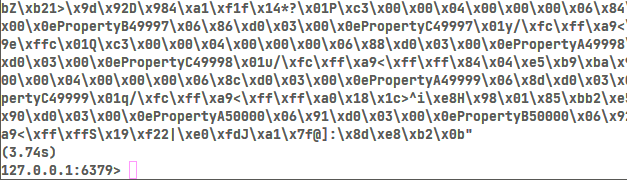
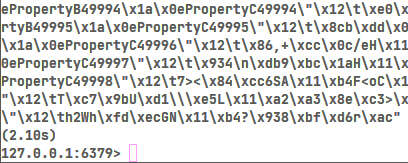
With your Redis server running , first, run the project. Then, run the redis-cli.exe executable in a command line and type in GET "binary-cache-key".

This is what you might see:

Text, letter Description automatically generated

The CLI tool shows a string representation of the underlying blob data. An important takeaway is that I can see bits and pieces of the underlying record like “PropertyA49999”. This took 3.74 seconds to deserialize this dataset which gives you a good indication of the performance. The C# client is much faster than this, but the sheer size of this payload can impact overall performance.

If you are on .NET 5, you may see a helpful build warning when working with the binary serializer. This warning points out the fact that the BinaryFormatter is obsolete. For security reasons, it is recommended to move away from this regardless of performance. I put this serializer here mainly to show how it stacks up against other alternatives.

XML serializer

Time to put the XML serializer to the test.

var xmlDtoList = Enumerable.Range(1, N)
  .Select(i => new XmlDto(
    "PropertyA" + i,
    "PropertyB" + i,
    "PropertyC" + i,
    Guid.NewGuid()))
   .ToList();
stopWatch.Start();
using (var xmlSetStream = new MemoryStream())
{
  var xmlSerializer = new XmlSerializer(xmlDtoList.GetType());
  xmlSerializer.Serialize(xmlSetStream, xmlDtoList);
  db.StringSet(
    "xml-cache-key",
    xmlSetStream.ToArray(),
    TimeSpan.FromMinutes(5));
}
stopWatch.Stop();
Console.WriteLine($"Xml write = {stopWatch.ElapsedMilliseconds} ms");
stopWatch.Restart();
var xmlCacheEntry = db.StringGet("xml-cache-key");
using (var xmlGetStream = new MemoryStream(xmlCacheEntry))
{
  var xmlDeserializer = new XmlSerializer(xmlDtoList.GetType());
  xmlDeserializer.Deserialize(xmlGetStream);
}
stopWatch.Stop();
Console.WriteLine($"Xml read = {stopWatch.ElapsedMilliseconds} ms");
Console.WriteLine();

Note that each strategy uses a separate cache key to be found in Redis via the GET command. The XmlSerializer requires a type, and GetType works well using the DTO list.

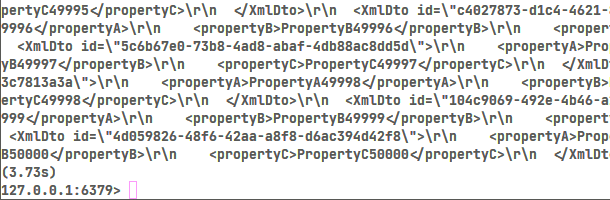
Run the project, then go to redis-cli.exe in the command line. Enter GET "xml-cache-key". Looking at what’s in Redis reveals this:

Text Description automatically generated

XML tends to be more verbose, but the deserialization time is roughly about the same as binary. The XmlDto parent has the id attribute declared in the record via a property attribute. When working with XML cache entries, always keep in mind the size of the payload. This serialization format does allow for more than one way to represent the data which affects its size.

JSON serializer

To implement JSON serialization.

var jsonDtoList = Enumerable.Range(1, N)
  .Select(i => new JsonDto(
    "PropertyA" + i,
    "PropertyB" + i,
    "PropertyC" + i,
    Guid.NewGuid()))
   .ToList();
stopWatch.Start();
var jsonSetStream = JsonSerializer.Serialize(jsonDtoList);
db.StringSet(
  "json-cache-key",
  jsonSetStream,
  TimeSpan.FromMinutes(5));
stopWatch.Stop();
Console.WriteLine($"Json write = {stopWatch.ElapsedMilliseconds} ms");
stopWatch.Restart();
var jsonCacheEntry = db.StringGet("json-cache-key");
JsonSerializer.Deserialize<List<JsonDto>>(jsonCacheEntry);
stopWatch.Stop();
Console.WriteLine($"Json read = {stopWatch.ElapsedMilliseconds} ms");
Console.WriteLine();

This caching strategy comes with less code because it does not need a MemoryStream instance. I used the recommended .NET 5 serializer that comes built in, which is found in the System.Text.Json namespace.

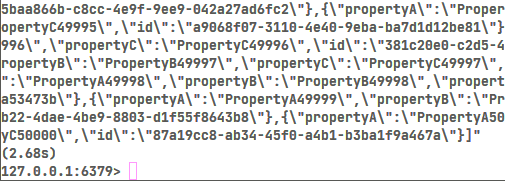
This time, you’ll use GET "json-cache-key". This is what Redis reveals:

Text Description automatically generated

As shown, a JSON blob is what gets stored in Redis. Because the payload is relatively smaller, this now takes less than 3 seconds. Note that the payload size is what changed, and Redis still stores an arbitrary blob of binary data.

ProtoBuf serializer

To use the ProtoBuf serializer in Redis.

var protoDtoList = Enumerable.Range(1, N)
  .Select(i => new ProtoDto(
    "PropertyA" + i,
    "PropertyB" + i,
    "PropertyC" + i,
    Guid.NewGuid()))
   .ToList();
stopWatch.Start();
using (var protoSetStream = new MemoryStream())
{
  Serializer.Serialize(protoSetStream, protoDtoList);
  db.StringSet(
    "proto-cache-key",
    protoSetStream.ToArray(),
    TimeSpan.FromMinutes(5));
}
stopWatch.Stop();
Console.WriteLine($"Proto write = {stopWatch.ElapsedMilliseconds} ms");
stopWatch.Restart();
var protoCacheEntry = db.StringGet("proto-cache-key");
using (var protoGetStream = new MemoryStream(protoCacheEntry))
{
  Serializer.Deserialize<List<ProtoDto>>(protoGetStream);
}
stopWatch.Stop();
Console.WriteLine($"Proto read = {stopWatch.ElapsedMilliseconds} ms");
Console.WriteLine();

The ToArray converts the data stream into a byte array before it gets set in Redis. The deserializer looks suspiciously close to the JSON implementation because it is also strongly typed. This ProtoBuf serializer requires a MemoryStream which matches the code found in the XML and binary serializers.

Run the command GET "proto-cache-key". This is what Redis shows:

Text Description automatically generated

The CLI tool is a bit faster this time than JSON. Because this Redis client is only one piece of the puzzle, I will now turn towards the C# code to tell me the rest of the story.

Performance results

With the Stopwatch put in place, it is possible to gather benchmarks on how long each strategy takes:

  • Binary: read 498ms, write 410ms
  • XML: read 311ms, write 792ms
  • JSON: read 174ms, write 446ms
  • ProtoBuf: read 88ms, write 373ms

ProtoBuf is the clear winner with large datasets, with JSON lagging in second by a factor of two to get cache data. The binary serializer is dead last, and there are reasons to avoid this, given all the security issues. Because XML is more verbose than JSON, performance gets dinged by almost a factor of two for a read. XML is also almost four times slower than ProtoBuf.

These results generally correlate with the payload size for each caching strategy:

  • Binary: 4.9MB
  • XML: 9.8MB
  • JSON: 6.6MB
  • ProtoBuf: 3.5MB

The Redis CLI tool has a flag, redis-cli.exe --bigkeys, to check for cache entry sizes. Interestingly, the binary serializer is the slowest even though the payload is smaller than JSON. I suspect the implementation hasn’t been touched in .NET 5 since it’s deprecated, so this lacks any performance enhancements. This shows, however, that it is the serializer in the client code that dictates how long caching takes.

Now, it’s time for some fun. Change the N constant to something much smaller, say fifty records. The goal is to check how each strategy performs with tiny datasets.

This is what I see on my machine:

  • Binary: read 6ms, write 16ms
  • XML: read 13ms, write 65ms
  • JSON: read 8ms, write 47ms
  • ProtoBuf: read 15ms, write 174ms

As shown, just because ProtoBuf performs well for large datasets does not mean it works well for small ones. This is important to keep in mind as you develop a solution that demands high performance. For small datasets, JSON is preferred. Binary serialization is not that much faster than JSON, and there are reasons to avoid this.

Cache strategies in Redis

Like most solutions in tech, coming up with the best cache strategy really comes down to your workload. If Redis performance starts to lag, the best place to start looking is in the serialization strategy.

In some cases, the DTO can work well with the JSON serializer, but as datasets continue to grow, it makes more sense to migrate over to ProtoBuf. Anything is possible, say the business is doing a great job acquiring more customers and that initial cache strategy no longer performs well.

One technique is to direct the cache serializer based on an attribute found on the DTO type:

CacheDto(jsonDtoList);
CacheDto(protoDtoList);

void CacheDto<T>(T obj)
{
  var type = typeof(T);
  if (type.IsGenericType &&
    type.GenericTypeArguments[0]
      .GetCustomAttribute(
        typeof(ProtoContractAttribute),
        false) != null)
  {
    Console.WriteLine($"Use the ProtoBuf serializer = {obj}");
  }
  else
  {
    Console.WriteLine($"Use the JSON serializer = {obj}");
  }
}

This allows the solution to naturally evolve as DTO datasets grow and mitigates the risk of bigger and riskier changes that impact the entire codebase.


The post Cache strategies in Redis appeared first on Simple Talk.


from Simple Talk https://ift.tt/3mcI8TP
via