Monday, May 23, 2022

Power BI: When a Power Query Native Query is not enough

In Power BI, when importing data with Power Query, one basic performance concept is the use of native queries. The transformations will perform better if they can be converted to a native query, especially a single native query for all transformations.

However, this is just a starting point for the optimizations. Sometimes, native queries for the transformations are not enough.

Test Environment

This will be the starting point:

  • An Azure SQL Database using the sample AdventureWorskLT
  • You need to execute the script Make_big_adventure.SQL adapted for the AdventureWorksLT. You can find it on https://github.com/DennesTorres/BigAdventureAndQSHints/blob/main/make_big_adventureLT.sql
  • Recommendation: The Azure SQL Database is recommended to have 10 DTU’s or more. Less than that and some slowness may be noticed
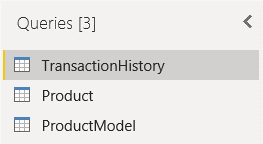
  • In Power BI we will import the tables BigProduct, BigTransactionHistory and SalesLT.ProductModel

Graphical user interface, text, application Description automatically generated

Transformations and a Date Dimension

A model needs a date dimension. Every fact happens on a date and the date is an important dimension to analyse the fact. In this example, the TransactionDate column is found in the TransactionHistory table.

Why is the TransactionDate field is not enough, you may ask.

When analysing the facts, it might be analysed by Year, Month, Day, Day of the week, and much more. If relying only on the TransactionDate field, you will need to create DAX measures, and this would impact the performance of your model.

Building a date dimension, you will not have the need to build so many DAX expressions and the model will have better performance.

We can build a dynamic date dimension, retrieving the minimum and maximum date from the TransactionHistory table for that. That’s where our problems start.

The Wrong way

1) On TransactionHistory table, select the column TransactionDate

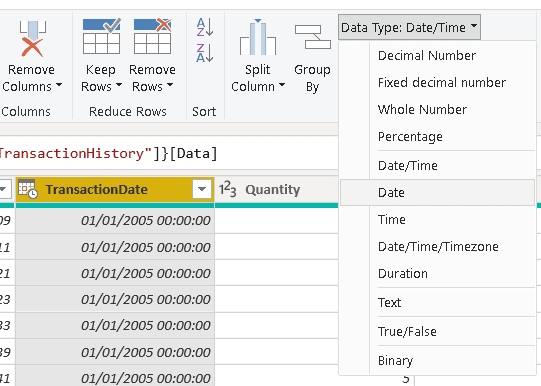
2) Change the Data Type of the column to Date

If you need to handle time in your model, date and time needs to be two different dimensions and two different fields in the fact table. A time dimension will have only 24 rows if built with hour granularity, 1440 if built with minute granularity and so on. On the other hand, if Date and Time were managed as a single dimension, we would have 1440 rows for each day, or something similar. That’s why date and time needs to be different dimensions.

In our example, we don’t really have time information. We will just ignore the time by changing the data type to date.

Table Description automatically generated

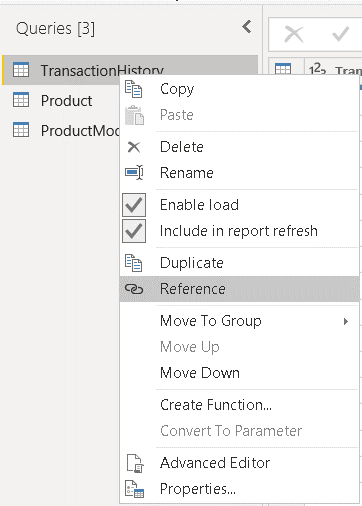
3) Righ-click the TransactionHistory table

4) Select the Reference menu item

We can duplicate the TransactionHistory query or make a reference to it. Let’s start with a reference and understand the consequences later.

Graphical user interface, application, Word Description automatically generated

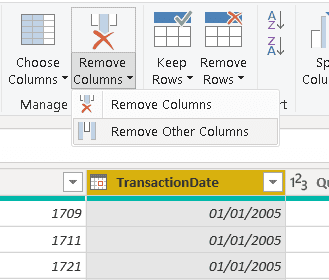
5) On the new query, select the TransactionDate column

6) Click the Remove Other Columns menu item

Graphical user interface, application, table Description automatically generated

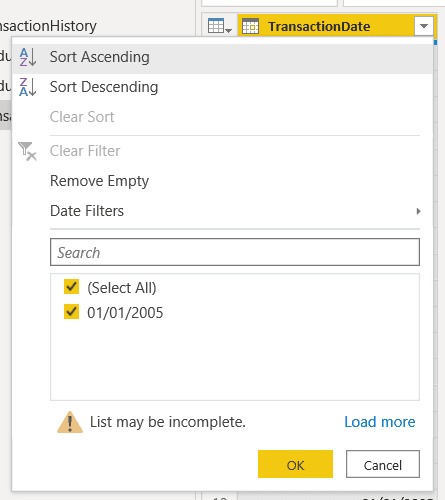
7) Click the button on the right side of the TransactionDate column header

8) Click the Sort Ascending menu item

Graphical user interface, application Description automatically generated

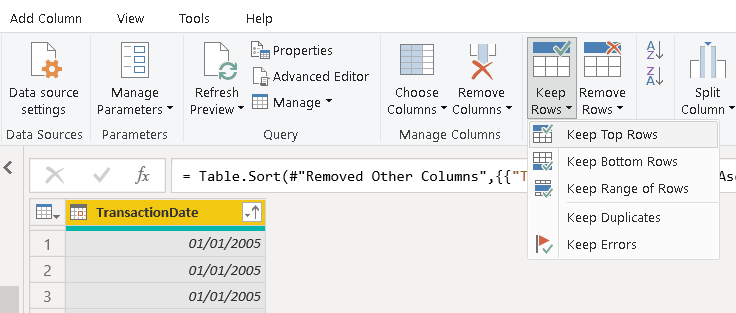
9) Click the menu option Keep Top Rows

Graphical user interface, application, Word Description automatically generated

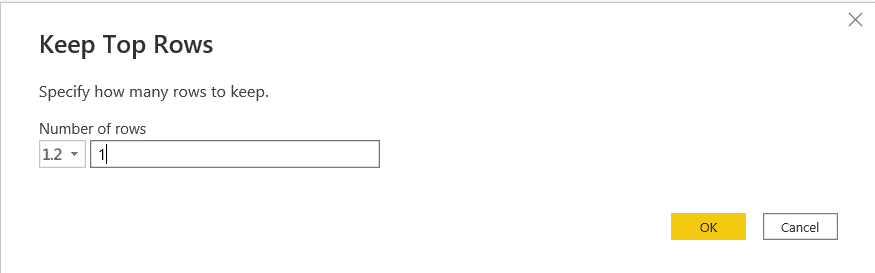
10) On the Keep Top Rows window, type “1” to keep only 1 row

Graphical user interface Description automatically generated

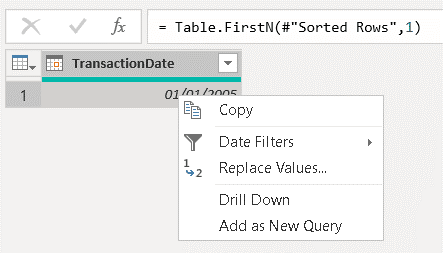
11) Right click the value of the row and click the menu item Drill down

Even with a single row and field, the result of the query is still a table. We need to transform it to a single value to use it as a parameter for the function we will build next.

Graphical user interface, text, application Description automatically generated

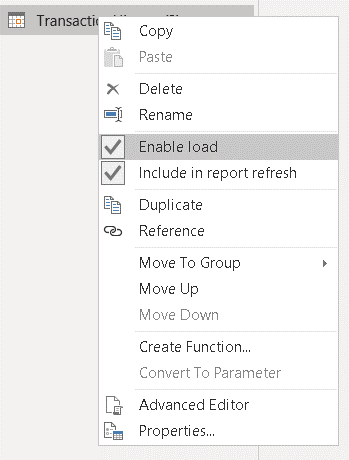
12) Right-click the “TransactionHistory (2)” table and disable the option Enable Load

We don’t need this value to be part of the model. But if we leave the load enabled, a new step will be created in the end of the query to transform it into a table, and it will end up failing.

Graphical user interface, application Description automatically generated

13) Rename the “TransactionHistory (2)” table to MinDate

Graphical user interface, application Description automatically generated

14) Repeat the steps 4-12, but now sorting in descending order

15) Rename the new table to MaxDate

Power Query: The Problem

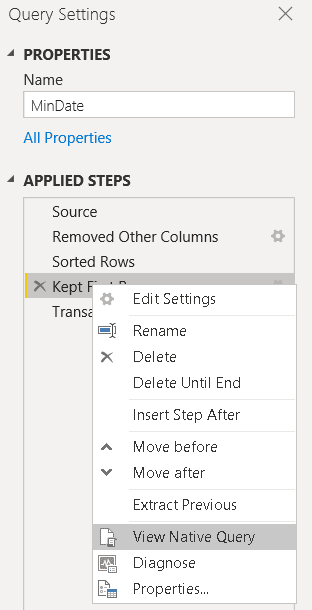
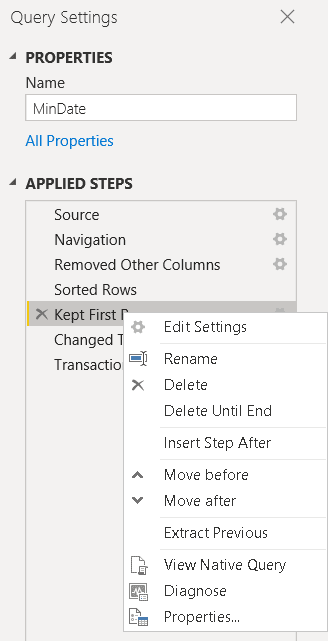
If you right click the Keep Top Rows step of the MinDate query, you may notice the View Native Query is active. This option is only disabled on the Drill Down to the TransactionDate field.

Graphical user interface, application Description automatically generated

All the most expensive steps were transformed into a native query. A superficial view would make us believe the transformations are as optimized as possible, but that’s not true at all.

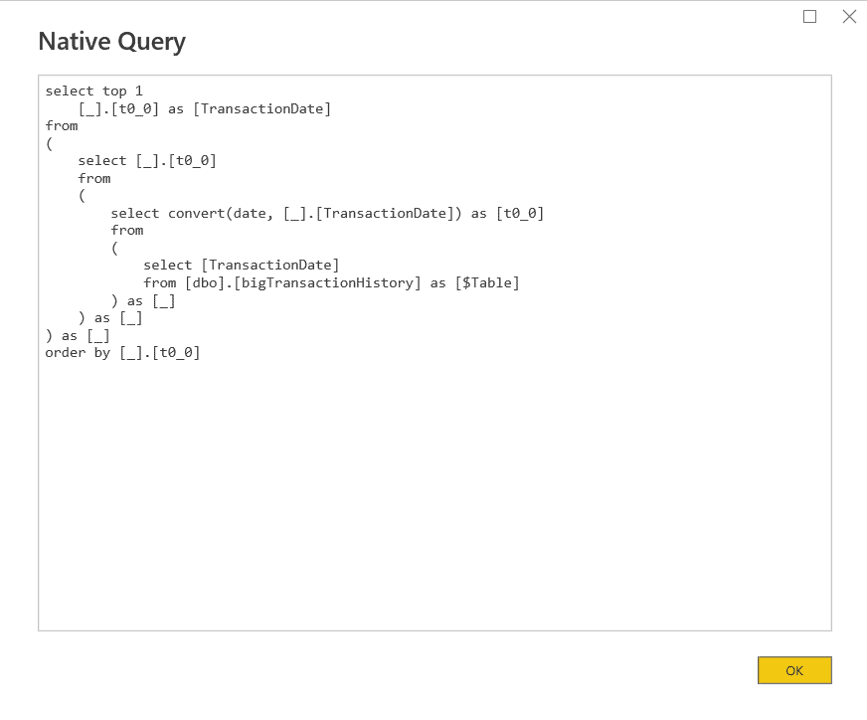
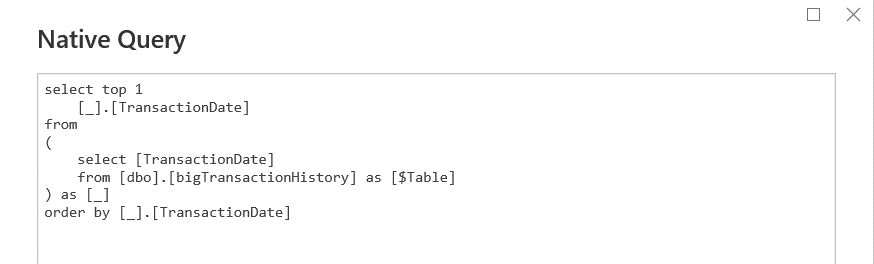
The query below is the native query built by Power BI.

Graphical user interface, text, application Description automatically generated

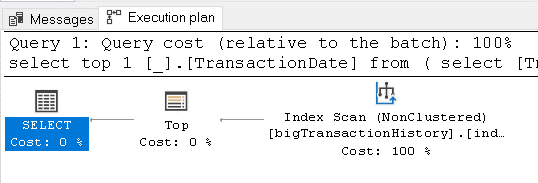
Let’s analyse the execution plan. We can copy the query from Power BI to SSMS and check the estimated execution plan. As you may notice, this execution plan is terrible:

A picture containing Word Description automatically generated

  • It’s using a table scan, there is no index for this execution plan
  • There is a Sort operation. Sort operations in execution plans are very heavy and should be avoided at all costs.

The first idea would be to create an index based on the TransactionDate, the column used in the transformations. The Create Index statement would be like this one:

CREATE NONCLUSTERED INDEX [inddate]
  ON [dbo].[bigTransactionHistory] ( [transactiondate] ASC )

go 

After creating the index, this will be the new query plan:

Graphical user interface, application Description automatically generated

The table scan was replaced by an Index Scan, but the Sort operation is still present, and you may notice it takes 95% of the query cost.

You may ask why the Sort was not solved by the index itself. If you check the query, you may notice the inner queries use a Convert function over the TransactionDate field to transform it to the Date type.

The Order By is executed over the result of the Convert, so it can’t use the index. The Convert function needs to be executed first and the result needs to be ordered.

In Summary: The order of the transformations is affecting the query performance. If the data type were one of the last transformations, the query plan could be better. But before reaching the solution, we will need to solve another problem.

Reference vs Duplicate

The data type transformation is located on the TransactionHistory table. The queries to calculate the MaxDate and MinDate have reference to the TransactionHistory query, so they all contain the data type conversion.

We could think about removing the data type conversion from the TransactionHistory query, but this would not work very well.

On the result, the TransactionHistory table will need to be linked with the date dimension. Both date fields will need to have the same data type, so the TransactionHistory query will need the data type transformation.

The solution for this problem is to use duplicate, instead of reference. If we duplicate the TransactitonHistory query before applying the data type transformation, we will have control of the data type transformation on the MinDate and MaxDate query and we will still be able to apply the same data type transformation on the TransactionHistory without affecting the other ones.

This is a very interesting example because we can clearly see the difference between Reference and Duplicate of a query and this example will only have good performance if we duplicate the query.

But when duplicating the query, aren’t we multiplying the execution time? If the queries are completely transformed in different native queries, the “duplication” of the execution time would happen anyway but isolating the queries with the Duplicate option we can optimize each one to make them faster.

In summary, on our example the secret is duplicate the TransactionHistory before changing the data type, implement each of the duplications, leaving the change of the data type for last and finally changing the data type of the TransactionDate field in the TransactionHistory query.

The Result

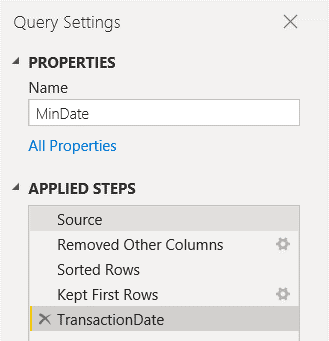
The sequence of the tasks is different, we leave the change data type and drill down for last. They will be executed over a single value and will not become part of the native query.

Graphical user interface, application Description automatically generated

The native query is simplified, without the type conversion.

Graphical user interface, text, application, email Description automatically generated

This makes a way better query plan, making a good use of the index for the transformations and making the result way faster

Text Description automatically generated with medium confidence

After Match

After analysing and solving these performance problems, let’s complete the example creating the date dimension.

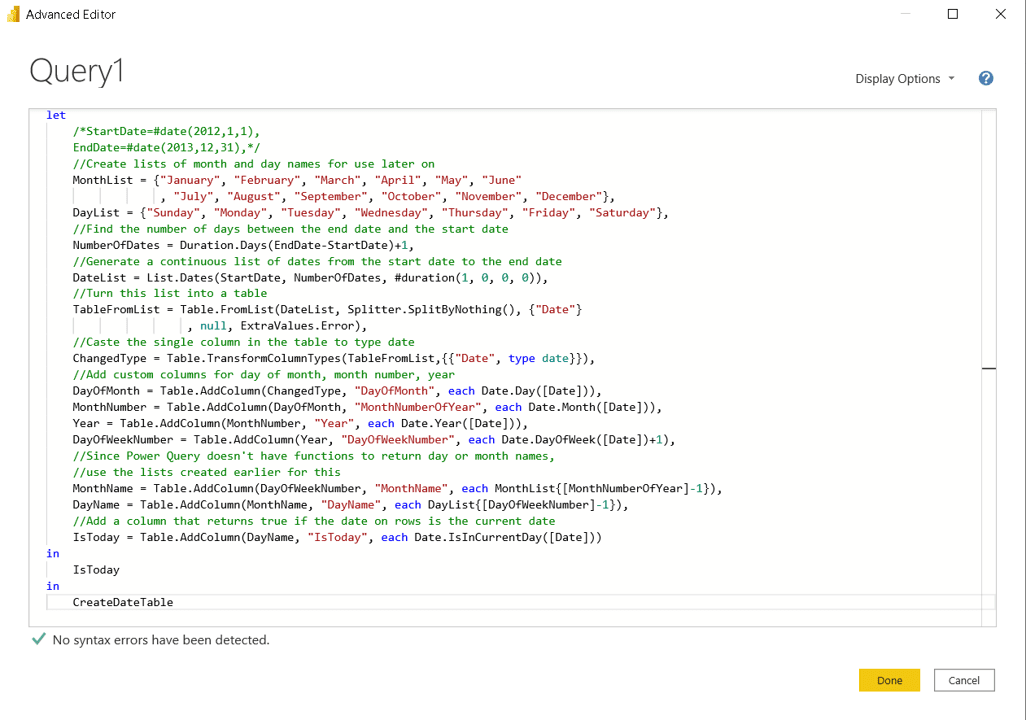
We can use a function written in M by Chris Web. You can find the function on this link https://blog.crossjoin.co.uk/2013/11/19/generating-a-date-dimension-table-in-power-query/

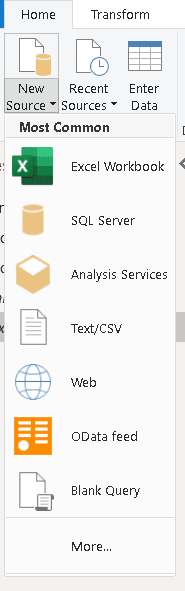
  1. On the top menu, click the button New Query-> Blank Query

Diagram Description automatically generated with medium confidence

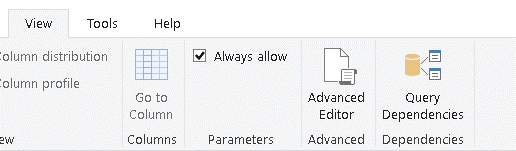
  1. Click on the menu View->Advanced Editor

Graphical user interface, application, table Description automatically generated

  1. In the Advanced Editor window, paste the query copies from the Chris Webb blog

Text Description automatically generated

  1. Click the Done button
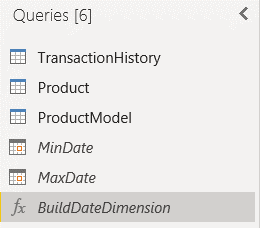
  2. Rename the function to BuildDateDimension

Graphical user interface, application Description automatically generated

  1. On the top menu, click the button New Query-> Blank Query
  2. Click on the menu View->Advanced Editor
  3. Add the following Query:

let
  Source = BuildDateDimension(MinDate,MaxDate)
in
  Source
  1. Click the Done button
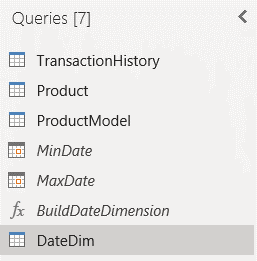
  2. Rename the query to DateDim

Graphical user interface, application, Word Description automatically generated

Lessons Learned

  • It’s important to know SQL Server and query optimization to work with Power BI
  • Sometimes the optimization is beyond Power BI, it’s on the source system
  • In Power bi ELT’s, if you make table level transformations and filters first and leave column level transformations for last, the native queries may be easier to optimize
  • You need to take care with the decision between Reference and Duplicate

The post Power BI: When a Power Query Native Query is not enough appeared first on Simple Talk.


from Simple Talk https://ift.tt/KMpgRCu
via

Inline PDF Viewer in an Angular App? Now you can

PDF and web have never been friends — so much so that most users always download a PDF before viewing it. This has changed a lot in recent years. Browsers do support the viewing of pdfs in separate tabs nowadays. For most use cases, downloading plus the ability to show a PDF in a tab would suffice.

But, developers have been hungry. They wanted to show the PDF inside their website so that users could view and sign them, read them like a book, and so on. In short, a better user experience was lacking when users were forced to download a PDF or open it in a separate tab/window. This created the need for a PDF viewer which can be easily integrated into Angular. There were a lot of small and partial solutions arising in this space, yet none was available for Angular developers.

Angular developers like myself have suffered greatly due to a lack of a quality library that can be used to show a pdf without losing the user experience.

Enter ng2-pdfjs-viewer, and the Angular developer’s fight with PDF is over!

The ng2-pdfjs-viewer component is built on top of Mozilla’s viewerjs and pdfjs, so its core is solid. It does have easy-to-use attributes along with the ability to customize anything which pdfjs supports. You can find the code demonstrated in this article here.

Usage can be as simple as

<ng2-pdfjs-viewer pdfSrc="sample.pdf"></ng2-pdfjs-viewer>

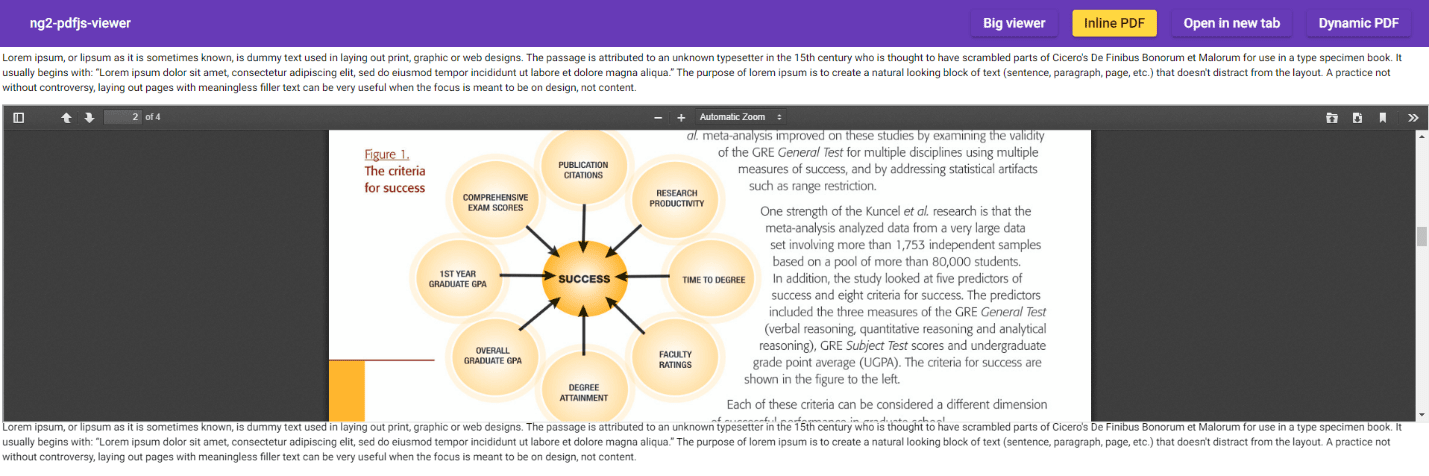
And viola, the PDF sits right inside the Angular application like this:

Diagram Description automatically generated

Now the question is – what else can I get out of it?

Here are some examples. Suppose you wanted to show two versions of the same document for comparison side by side in your web application. Now you can. Do you want to open the PDF in a separate browser window for traditional viewing? No problem. Do you like to show a print preview dialog automatically after opening the PDF in a new browser window? Piece of cake. Automatically download the pdf? Got it.

This pdf viewer supports tons of other features, and you have fine control of what to do with it.

Setup ng2-pdfjs-viewer in an Angular App

Follow these steps to set up the component:

1. Installation – Like any other package – get it from the npm registry

$ npm install ng2-pdfjs-viewer --save

This is a standard npm package installation command. Make sure it gets installed in dependencies using the --save parameter.

2. Configuration – Let your app know you would like to use it

Set it up in your angular AppModule:

import { BrowserModule } from '@angular/platform-browser';
import { NgModule } from '@angular/core';
import { AppComponent } from './app.component';
import { PdfJsViewerModule } from 'ng2-pdfjs-viewer'; // <-- Import PdfJsViewerModule module
@NgModule({
  declarations: [
        AppComponent,
  ],
  imports: [
        BrowserModule,
        PdfJsViewerModule // <-- Add to declarations
  ],
  providers: [],
  bootstrap: [AppComponent]
})
export class AppModule { }

As shown here, the module to be imported is PdfJsViewerModule; this is required as this is the module that makes sure ng2-pdfjs-viewer is ready to be used.

It is equally important to add the module PdfJsViewerModule into the imports section of @NgModule. With this step, you are almost ready to use the inline PDF viewer.

3. Build – Add a build step, so that your angular app has a copy of pdfjs

The ng2-pdfjs-viewer component is built on top of pdfjs, which also means that it’s needed for this angular component to work properly. There are several ways this can be achieved, from the manual process of copying relevant files to automated build scripts. Here are the two most popular mechanisms angular developers use when they need extra files to be copied as part of the build step.

Either add an angular build step into angular.json:

"assets": [
  { "glob": "**/*", "input": "node_modules/ng2-pdfjs-viewer/pdfjs", "output": "/assets/pdfjs" },
]

Or use webpack or similar bundlers (Hmm, are you still using webpack?)

var TransferWebpackPlugin = require('transfer-webpack-plugin');
...
plugins: [
  new TransferWebpackPlugin([
        { from: 'node_modules\ng2-pdfjs-viewer\pdfjs', to: path.join(__dirname, 'assets') }
  ])
]

PDF Loading Events

Often, you might like to tap into the PDF pipeline of printing or loading to execute a task. This could be to show a message to the user that the PDF is loaded for large PDFs or that the PDF is successfully printed, etc. The code found here provides several events hooks for that.

HTML

<!-- your.component.html -->
<ng2-pdfjs-viewer pdfSrc="gre_research_validity_data.pdf"
                viewerId="MyUniqueID"
                (onBeforePrint)="testBeforePrint()"
                (onAfterPrint)="testAfterPrint()"
                (onPagesLoaded)="testPagesLoaded($event)">
</ng2-pdfjs-viewer>

For events to work properly, you should set viewerId. This helps event routing understand which component the event is to be sent to, even if there is more than one ng2-pdfjs-viewer component on the page. viewerId should be a unique id (like a guid).

Angular component

Once capturing these events, developers can execute custom tasks/code to take action based on these events. Given below is an event which emits and displays a number of pages in PDF.

<!-- your.component.ts -->
public testBeforePrint() {
        console.log("testBeforePrint() successfully called");
}
public testAfterPrint() {
        console.log("testAfterPrint() successfully called");
}
public testPagesLoaded(count: number) {
        console.log("testPagesLoaded() successfully called. Total pages # : " + count);
}

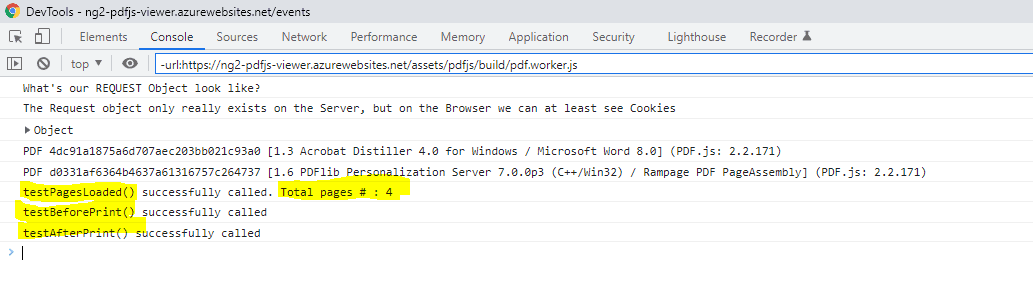
You can see the events that are emitted on the developer console as shown below.

Graphical user interface, text, application, email Description automatically generated

What about PDF files returned from an API?

The ng2-pdfjs-viewer component can also work with other server-side APIs to render returned PDFs. To get this going, you would convert the PDF into a byte[] array or blob and give it to the viewer.

A bit of HTML in an Angular component

<!-- your.component.html -->
<div style="height: 600px">
        <ng2-pdfjs-viewer #pdfViewer></ng2-pdfjs-viewer>
</div>

Notice the #pdfViewer. This is your reference.

Some download code

The downloadFile() function calls the API; you may use any HTTP querying mechanism here. The requirement is that the API endpoint returns the pdf as a byte array.

<!-- your.component.ts -->       
 @ViewChild('pdfViewer') public pdfViewer;
constructor(private http: HttpClient) {
        let url = "api/document/getmypdf";
        this.downloadFile(url).subscribe(
        (res) => {
                this.pdfViewer.pdfSrc = res; // pdfSrc can be Blob or Uint8Array
                this.pdfViewer.refresh(); // Ask pdf viewer to load/refresh pdf
        }
        );
}
private downloadFile(url: string): any {
        return this.http.get(url, { responseType: 'blob' })
        .pipe(
                map((result: any) => {
                return result;
                })
        );
}

A sample API using C# and ASP.NET Core

[HttpGet]
[Route("GetMyPdf")]
public IActionResult GetMyPdf()
{
        var pdfPath = Path.Combine(Directory.GetCurrentDirectory(),"sample.pdf");
        byte[] bytes = System.IO.File.ReadAllBytes(pdfPath);
        return File(bytes, "application/pdf");
}

I used ASP.NET Core and some C# here. Don’t worry; you can do this in Python or Ruby or whatever server-side technology you prefer, or any APIs supplying pdf through HTTP endpoints.

Wrap up

The ng2-pdfjs-viewer component is a powerful tool to display PDF files without losing the user experience. If you are a student programmer who is building a pdf book library angular app or an enterprise programmer who wants to display a PDF stored away somewhere in SharePoint, this library is useful. The ability to show more than one PDF on the same page also helps with the comparison of different versions of a document. More on that later!


The post Inline PDF Viewer in an Angular App? Now you can appeared first on Simple Talk.


from Simple Talk https://ift.tt/CBbOdpL
via

Friday, May 20, 2022

Security in MySQL: Part One

Security is a critical part of any infrastructure – it’s even more so in the database world, where one step in the wrong direction can be the cause of system disruptions and downtime, customer dissatisfaction, and in the worst-case scenario – deaths.

As MySQL is one of the primary relational database management systems being used in the world today, it’s critical to understand how to go about properly the database infrastructure to keep data breaches away from the organization’s websites or, if they’ve happened already, to become a thing of the past.

Why secure MySQL?

First, the basics – why should you secure your MySQL infrastructure in the first place?

You see, chances are that both you and people that use software developed by you, whether knowingly or not, provide the website with data that is then processed by a database. Regardless of what the website is about, data is still a critical part of any database-backed infrastructure. Users inside of the database mean more exposure to a specific project, blog posts probably mean marketing, and products and customers inside of it usually mean revenue to your business.

However, the sad fact is that people usually think about securing their most critical infrastructure only when it’s too late to do so; once a data breach happens, everyone’s scrambling to save themselves from identity theft by using data breach search engines and archives and putting efforts into research related to how they should go about protecting their database in the future. As sad as it would be to state it, such efforts are often futile; if you don’t put efforts into database security before a thief comes knocking on the door, the data taken from a MySQL database will be exploited for identity theft purposes, sold (then reused for identity theft attacks), twisted in other ways, and finally, archived somewhere in a dark alley of black-hat hackers evaluating the strength of the next database – their next upcoming victim. Doesn’t sound like a very promising scenario, does it?

How to secure MySQL?

The security of MySQL infrastructure can be conveniently split into multiple categories:

  • Access control.
  • User security.
  • The components and plugins that help keep MySQL safe.
  • Security considerations and general security guidelines.
  • Enterprise-level security controls.

In the list above, I have outlined seemingly few categories – however, if you think about it, the majority of security issues fall somewhere within their range from one side or another: improper access control is often the cause of SQL injection escalation, insecure user accounts might mean guessable passwords, missing security plugins mean missing out on the security features offered by MySQL which makes the job easier for an attacker.

I’m now going to go through these points one by one in detail. One article is probably not sufficient to cover all of these issues, though, so if something’s missing in this one, please head over to the following parts of this guide.

Access control in MySQL

Controlling access in MySQL is arguably the cornerstone of its security. After all, if access to every resource were so heavily restricted that nobody except the people who absolutely need it could access it, there would be many fewer issues related to data theft, right?

While there is a degree of truth in that statement because, with MySQL, everything gets a little more complex. In this RDBMS, access control usually entails several aspects, including, but not limited to the following:

  • Properly setting up privileges for every user.
  • Limiting a specific account.
  • Account locking and unlocking.
  • User activity control.
  • Password security.

Properly setting up privileges is one of the most important aspects of access control. Simple GRANT and REVOKE statements can either give or, as the name suggests, revoke privileges to and from users. The proper assignment of privileges is said to be crucial for the security of any infrastructure backed by MySQL; the stronger strategy of assigning the privileges is, the less chance the attacker has to penetrate the defenses.

Privileges span multiple categories: they can be either administrative (meaning that they can enable users to control what operations MySQL performs and how it does it), they can apply to a specific database, or span database objects (i.e., things that are stored inside a database.) Some of the privileges are as follows:

Privilege

Explanation

ALL

Granting this privilege would, as the privilege itself suggests, grant ALL privileges to a specific user. Dangerous from a security point of view, but can be used in a local environment when testing features and whatnot.

CREATE

Enables a specific user to create databases and tables within them.

ALTER

Enables a user to alter a specific table – in other words, enables a user to change table structure.

DELETE or DROP

Enables a user to delete rows or drop entire tables and databases.


Privileges in MySQL also have a couple of brothers named roles. Roles are collections of privileges, and granting a specific role to a user means granting all of the privileges assigned to that role; it’s all pretty self-explanatory. Find the full list of privileges here, and for a more thorough explanation of what privileges are and what they do, head over to this part of the documentation.

It can be very useful to limit specific accounts, but such a feature is often overlooked. It’s possible to set a limit on the number of queries that can be issued every hour by a specific account, how many times an account can connect to the server, how many connections can a specific account make to the server at one moment, etc. The MAX_USER_CONNECTIONS variable defines how many connections a given account can make at the same time; the MAX_CONNECTIONS_PER_HOUR variable will define how many connections per hour can be made; MAX_UPDATES_PER_HOUR will set boundaries on how many UPDATE queries can be run in an hour, and so on. The usage of such variables will look similar to the following query (replace YOUR_VARIABLE with the variable you want to set.) Also, keep in mind that all variables set by the client revert back to normal if they’re not specified inside of my.cnf.

ALTER USER ‘your_user’@’localhost’ WITH [YOUR_VARIABLE] 0;

Accounts can also easily be locked (that prohibits any further activity from originating from them) by issuing a simple ACCOUNT LOCK command. It works when creating or modifying the account:

[CREATE USER / ALTER USER] demo_account IDENTIFIED BY ‘verystrongpasswordhere’ ACCOUNT LOCK;

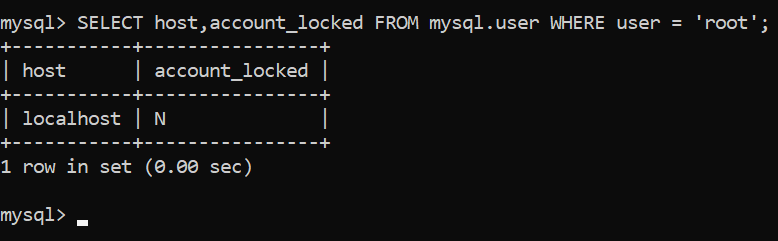
You can check if a specific account is locked by issuing a query such as the one below which also tells on which which host it resides):

Image with query SELECT host, account_locked FROM mysql.user where user = 'root'; and results localhost, N

You can unlock an account by specifying ACCOUNT UNLOCK instead of ACCOUNT LOCK. That’s it!

Password security comes down to a couple of simple things as well: MySQL allows password expiration. You can set a “lifetime” for passwords by using a default_password_lifetime variable in my.cnf. You can also impose password reuse restrictions through the use of password_history, which defines how many previous passwords need to be “blacklisted” before being allowed to be used again, and password_reuse_interval, which prohibits using any passwords that were used within the last X days.

User security

Another thing closely related to access control and password security is the security of MySQL users themselves. The majority of the recommendations within this sphere can seem pretty basic at first glance, but when combined with the things mentioned above, they all can create a powerful force of security within MySQL. To further user account security within MySQL, consider not sending passwords over plain text and send them using SSL instead (use the REQUIRE SSL option when creating a user once SSL is configured on your server), avoid running MySQL as root (the root user has the FILE privilege which can cause the server to create files), and, of course, require all users to have strong passwords. I will elaborate on this in the next part of this series, but completing the outlined steps should be a good preventative to ensure that your database stays secure whatever happens.

Summary

I hope that this article has widened your horizons in the MySQL space. Follow the advice outlined in this blog post by tightening up your users and using proper access controls, and your database will surely ride fast on the security highway. However, that’s not it. To properly secure your database, you will also need to take care of plugins that help keep MySQL safe from attacks, keep an eye on enterprise-level security control, and follow general security guidelines whenever you’re working with it.

I hope that this article has been informational, and you will share it (or at least the knowledge contained within this article) with your friends to help them secure their MySQL instances. My next article will cover more ways to secure MySQL. Until next time, be sure to put what you’ve learned in practice.


The post Security in MySQL: Part One appeared first on Simple Talk.


from Simple Talk https://www.red-gate.com/simple-talk/databases/mysql/security-in-mysql-part-one/
via

Friday, May 13, 2022

Creating unique datasets with managed code

Figuring out uniqueness in large datasets is somewhat trivial in SQL via the DISTINCT statement. This DISTINCT technique, however, puts a load on the SQL box to where it is more beneficial to scale out horizontally in managed code instead. Typically, it is much easier to spin more web boxes to handle traffic than it is to stand up a beefier database. Moving the work into managed code scales indefinitely to increase throughput and reduces SQL pressure.

In this take, I will show you some techniques when working with duplicate data in managed code. I will explore common gotchas and show you what to do about this.

The code will be written in C# in .NET 6, so be sure to install a copy on your local machine. If preferred, LinqPad can be used, and you will be able to copy-paste and execute code in this tool. Alternatively, feel free to clone the sample code from GitHub.

To begin, be sure to bring in the following using statements. I will use the stopwatch and write to the console often, so it is good to have these available.

Using System.Diagnostics;
using static System.Console;

I will use a timer to take performance snapshots for each technique. The goal here isn’t to be precise but to get a general feel for what is happening under the covers. I am running this code using a Debug build on an Intel 11th gen i7 1.4 GHz with 8 cores and 32GB of RAM. Your exact results may vary on your machine.

A simple example

A typical use case, and one you may already have experience with, is figuring out distinct numbers in a list of arbitrary numbers. C# makes this relatively painless via Distinct.

WriteLine("Simple Distinct");
new[] {1, 1, 2, 3, 4, 5}.Distinct()
  .ToList()
  .ForEach(n => Write(n + " ")); // 1 2 3 4 5
WriteLine();
WriteLine();

Because value types have good equality support, the built-in functionality works effortlessly. The underlying algorithm can distinguish between different numbers and find unique values in the set. However, a real issue starts to emerge with reference types.

Bare distinct

In the real world, complex data types dominate business applications. Say I have a bunch of lab rats, three million to be exact, and I need to figure out a distinct set without any duplicates.

In object-oriented fashion, a lab rat might look like this:

public class LabRatA
{
  public string Name { get; set; } = string.Empty;
  public int TrackingId { get; set; }
  public Color Color { get; set; }
}

public enum Color
{
  Black,
  White,
  Brown
};

This lab rat has a name, tracking id, and color. This is an anaemic type because it is just a collection of properties without any encapsulated logic.

To generate three million rats, an extension method like Times comes in handy:

const int uniqueEntries = 300;

var ratsA = 3000000.Times(x => new LabRatA
{
  Name = "LabRat_" + x % uniqueEntries,
  TrackingId = x % uniqueEntries,
  Color = (Color)(x % uniqueEntries)
}).ToList();

public static class EnumerableExtensions
{
  public static Ienumerable<T> Times<T>(
    this int count, Func<int, T> func)
  {
    for (var i = 1; i <= count; i++) yield return func(i);
  }
}

A modulus with uniqueEntries will generate duplicate data every three hundred entries. This makes the entries 300/3,000,000 unique or about 0.01 percent unique. A somewhat realistic scenario when you have a ton of duplicate records.

The extension method makes this a bit more fluent and easier to express in code. This method extends an integer like 3000000 and lets the code dot into a lambda expression that generates lab rats.

A way to figure out distinct entries can be done like this:

WriteLine("Bare Distinct");
stopWatch.Start();
WriteLine(ratsA.Distinct().Count()); // 3000000
stopWatch.Stop();
WriteLine($"{stopWatch.ElapsedMilliseconds} ms"); // 451 ms
WriteLine();

This, of course, does not work as intended and lacks good performance. This is because the algorithm has no choice but to check each instance, and every lab rat takes a unique reference in memory. There is quite a bit of churn here since every entry is considered unique.

To remedy this issue, it will need a way to do equality checks on complex types. Remember that without knowing the equality between lab rats, the algorithm is left with no choice but to do reference checks which is undesirable. Every complex type has a default comparer, and what is shown here is the bare behavior without explicitly defining equality.

Naïve distinct

One way to establish equality is via the EqualityComparer<T> interface. This requires two methods: Equals and GetHashCode. Figuring out equality is trivial but computing a hash code is optional.

public class LabRatANaiveComparer : EqualityComparer<LabRatA>
{
  public override bool Equals(LabRatA? x, LabRatA? y) =>
    x?.Name == y?.Name &&
    x?.TrackingId == y?.TrackingId &&
    x?.Color == y?.Color;

  public override int GetHashCode(LabRatA obj) => 1;
}

This implementation decided to skip computing the hash code by forcing a constant. This is a nice shortcut, and without knowing what this hash exactly does, it feels like the right choice.

To test what this does:

WriteLine("Naive Distinct");
stopWatch.Restart();
WriteLine(ratsA.Distinct(
    new LabRatANaiveComparer())
  .Count()); // 300
stopWatch.Stop();
WriteLine($"{stopWatch.ElapsedMilliseconds} ms"); // 4397 ms
WriteLine();

This returns the correct number of distinct lab rats, but the performance is a dismal 4.4 seconds. Ten times slower than the simple incorrect implementation, which puts this code in a precarious situation. Of course, the opposite might be true, but, oftentimes, correctness is preferable to better performance. Ideally, you want the code to give you both correctness and good performance.

Proper distinct

There is a way to compute a hash for multiple properties based on a tuple to put in a good hash code calculation. Say there is a name, tracking id, and color for a lab rat. A tuple with these three properties has a somewhat unique hash code.

public class LabRatAProperComparer : EqualityComparer<LabRatA>
{
  public override bool Equals(LabRatA? x, LabRatA? y) =>
    x?.Name == y?.Name &&
    x?.TrackingId == y?.TrackingId &&
    x?.Color == y?.Color;

  public override int GetHashCode(LabRatA obj) =>
    (obj.Name,
    obj.TrackingId,
    obj.Color) // tuple
    .GetHashCode();
}

The Equals method remains intact, and this uses the hash from the tuple instead of a dumb constant. With a properly computed hash code, check to see what this does:

WriteLine("Proper Distinct");
stopWatch.Restart();
WriteLine(ratsA.Distinct(
    new LabRatAProperComparer())
  .Count()); // 300
stopWatch.Stop();
WriteLine($"{stopWatch.ElapsedMilliseconds} ms"); // 252 ms
WriteLine();

This time the performance is even better than the bare distinct, about twice as fast, and this returns a correct result. The reasons for the performance gains are twofold: this no longer churns through millions of records, and there is something very interesting happening with this hash code.

Why is this happening?

To find out what is happening, I will need to F12 into the Distinct method and decompile the code. This is possible in LinqPad, and any IDE available today. The focus is .NET 6, so keep in mind that implementation details are likely to change in future releases.

This is what you might see, it is not the entire code but only a small chunk of it:

public class DistinctIterator
{
  private readonly LabRatA?[] _entries; // hash set
  private readonly IEqualityComparer<LabRatA> _comparer;
  public DistinctIterator()
  {
    _entries = new LabRatA[300]; // max 300 rats
    _comparer = new LabRatAProperComparer();
  }
  public IEnumerable<LabRatA> Distinct(List<LabRatA> rats) =>
    rats.Where(AddIfNotPresent); // loops
  private bool AddIfNotPresent(LabRatA rat)
  {
    var hashCode = _comparer.GetHashCode(rat);
    var bucket = GetBucketRef(hashCode);
    var i = (int)bucket;
    while (i >= 0)
    {
      var entry = _entries[i];
      if (entry != null &&
        _comparer.GetHashCode(entry) == hashCode &&
        _comparer.Equals(entry, rat))
      {
        return false;
      }
      i = -1; // churn
    }
    if (_entries[bucket] != null) return false; // collision
    _entries[bucket] = rat;
    return true;
  }
  private uint GetBucketRef(int hashCode) =>
    (uint)hashCode % (uint)_entries.Length;
}

These are the findings:

  • The DistinctIterator loops through the entire list at least once
  • The algorithm builds an internal hash set to nuke duplicate entries
  • The hash code optimizes the nested while loop via buckets
  • When the hash code causes collisions, the algorithm churns inside the nested loop

Please note that this code is far from complete and only focuses on the hash code. The nested while loop does not actually churn but escapes the loop, which means it can’t find all distinct values. This is mostly for the sake of brevity to avoid smacking you with a wall of code.

What is most interesting is this explains the poor performance seen in the naïve comparator. When the hash code collides for all entries, the algorithm must work harder. This spikes the complexity to a quadratic, or Big-O O(n^2) complexity. If the hash theoretically causes no collisions, expect linear or O(n) complexity.

In performance-sensitive code, it may make sense to do away with the built-in hash code entirely and switch to one that causes even fewer collisions, like murmur hash, for example.

Even though this implementation is far from complete, it is still possible to run the code:

WriteLine("Simple DistinctIterator");
stopWatch.Restart();
WriteLine(new DistinctIterator()
  .Distinct(ratsA)
  .Count()); // 194
stopWatch.Stop();
WriteLine($"{stopWatch.ElapsedMilliseconds} ms"); // 284 ms
WriteLine();

The Count does not find all distinct lab rats and this count changes per execution. This is because the built-in hash code changes per run, which means that the hash isn’t deterministic but dynamic.

Although the implementation of Distinct might be updated in the future, it is unlikely that this external hash code contract will change because it is a critical part of determining equality and optimizing internal algorithms in .NET.

A bit of asynchrony

Say there are two lists that need to be turned into a unique set and they are coming from asynchronous data sources. Unfortunately, the framework has nothing built-in to deal with this but this extension method can come in handy.

Public static async Task<Ienumerable<TR>> SelectManyAsync<T, TR>(
  this Ienumerable<T> enumeration,
  Func<T, Task<List<TR>>> func) =>
  (await Task.WhenAll(enumeration.Select(func))
      .ConfigureAwait(false))
    .SelectMany(s => s);

Be sure to put this inside the existing EnumerableExtensions static class.

This grabs a parameter list and feeds it to the lambda function. Then, runs everything in parallel and returns a combined list with all the duplicate records.

To get a unique set from the combined async list:

WriteLine("Async Distinct");
stopWatch.Restart();
WriteLine((await new []{"A", "B"} // parameter list
    .SelectManyAsync(GetLabRats))
  .Distinct(new LabRatAProperComparer())
  .Count()); // 300
stopWatch.Stop();
WriteLine($"{stopWatch.ElapsedMilliseconds} ms"); // 516 ms
WriteLine();

Task<List<LabRatA>> GetLabRats(string type) => type switch
{
  "A" => Task.FromResult(ratsA),
  "B" => Task.FromResult(ratsA),
  _ => throw new ArgumentException("Invalid rat type")
};

This technique remains performant because the elapsed time only grows linearly based on the number of records, which is now six million so double the records. This has linear complexity because the parameter list remains constant. If the parameters become a boundless list, each with millions of records, then the code will spike to a quadratic complexity.

Distinct with C# records

If you are already on .NET Core, C# +8 introduces records to the mix; these provide built-in functionality for encapsulating data. One of its core features is value equality. For record types, two records are equal is they have the same type and store the same values.

To play with records, fire up another lab rat:

public record LabRatB(string Name, int TrackingId, Color Color);

This has the same properties as before but expressed in less code. Because equality is built-in, it is possible to figure out distinct lab rats without implementing a comparer.

var ratsB = 3000000.Times(x => new LabRatB
(
  "LabRat_" + x % uniqueEntries,
  x % uniqueEntries,
  (Color)(x % uniqueEntries)
)).ToList();

WriteLine("Record Distinct");
stopWatch.Start();
WriteLine(ratsB.Distinct().Count()); // 300
stopWatch.Stop();
WriteLine($"{stopWatch.ElapsedMilliseconds} ms"); // 948 ms
WriteLine();

Notice the performance gets dinged a bit. This is because the built-in implementation does not use the tuple technique, which causes more collisions.

This code is equivalent to the following but using a class instead of a record:

public class LabRatC : IEquatable<LabRatC>
{
  protected virtual Type EqualityContract => typeof(LabRatC);

  public string Name { get; init; } = string.Empty;
  public int TrackingId { get; init; }
  public Color Color { get; init; }

  public override int GetHashCode() =>
    HashCode.Combine(
      EqualityComparer<Type>.Default
        .GetHashCode(EqualityContract),
      Name.GetHashCode(),
      TrackingId.GetHashCode(),
      Color.GetHashCode());

  public bool Equals(LabRatC? other) =>
    Name == other?.Name &&
    TrackingId == other.TrackingId &&
    Color == other.Color;
}

The biggest difference here is using the hash combine helper, which is what a C# record uses internally, and this can be overridden. Notice it is also possible to avoid defining a comparer by simply inheriting IEquatable in the target class. Records implement this equatable interface too to provide equality functionality.

Now to verify this code works:

var ratsC = 3000000.Times(x => new LabRatC
{
  Name = "LabRat_" + x % uniqueEntries,
  TrackingId = x % uniqueEntries,
  Color = (Color)(x % uniqueEntries)
}).ToList();

WriteLine("IEquatable Distinct");
stopWatch.Start();
WriteLine(ratsC.Distinct().Count()); // 300
stopWatch.Stop();
WriteLine($"{stopWatch.ElapsedMilliseconds} ms"); // 1092 ms
WriteLine();

The elapsed time is different here is because the built-in hash code calculation is dynamic. This is one tidbit to keep in mind, hash codes are more of a moving target so don’t expect consistency between different types.

Conclusion

Figuring out uniqueness in managed code can be useful in taking the load off the database. The hash code dictates the efficiency of the distinct algorithm, so the best approach is to avoid too many collisions.

If you like this article, you might also like Functional monads in C#

The post Creating unique datasets with managed code appeared first on Simple Talk.


from Simple Talk https://ift.tt/6q3cFtg
via

Thursday, May 12, 2022

Insights from the SSRS database

SQL Server Reporting Services is a convenient application for generating reports quickly and efficiently. Its back-end components are a bit more confusing to an unsuspecting administrator.

This article delves into the ReportServer database, revealing the tables and data that are used to power SSRS. In addition, the ability to alter data in these tables is presented as a way to avoid time-consuming migration or data modification processes.

Overview of SSRS Metadata

By default, the SSRS database is given the name ReportServer. This can be adjusted when the SSRS instance is installed or at a later time via the Report Server Configuration Manager. Within this database are a set of tables that describe every object in Reporting Services. The following is a brief overview of these tables and the data that resides in each.

A Warning About the ReportServer Database

Microsoft does not formally document the ReportServer database. It is an internal database to Reporting Services but is maintained in plain sight for administrators to use if needed. It can be freely read or written, and no internal process will stop us from doing so.

Because it is undocumented, take extra caution when making any changes to it! Always include this database in routine database backup processes and ensure it is backed up frequently enough to allow for meaningful recovery if it is ever needed. In addition, always perform a backup of this database prior to modifying any data stored within it. Forgetting a WHERE clause or accidentally deleting the wrong rows could result in reports becoming unavailable to end users, so always exercise caution and due diligence before making any changes to ReportServer data!

Catalog

This table contains all of the report objects that a user can interact with via the Web Portal UI, such as reports, data sources, and images. This data is stored as a hierarchy with a root/parent path and all other objects below it in a tree. The following query returns some basic data from this table:

SELECT
        CHILD_ITEM.Path AS Item_Path,
        CHILD_ITEM.Name AS Item_Name,
        CASE
                WHEN CHILD_ITEM.Type = 1 THEN 'Folder (1)'
                WHEN CHILD_ITEM.Type = 2 THEN 'Report (2)'
                WHEN CHILD_ITEM.Type = 3 THEN 'File (3)'
                WHEN CHILD_ITEM.Type = 4 THEN 'Linked Report (4)'
                WHEN CHILD_ITEM.Type = 5 THEN 'Data Source (5)'
                WHEN CHILD_ITEM.Type = 6 THEN 'Report Model (6)'
                WHEN CHILD_ITEM.Type = 7 THEN 'Report Part (7)'
                WHEN CHILD_ITEM.Type = 8 THEN 'Shared Data Set (8)'
                WHEN CHILD_ITEM.Type = 9 THEN 'Report Part (9)'
                WHEN CHILD_ITEM.Type = 11 THEN 'KPI (11)'
                WHEN CHILD_ITEM.Type = 12 THEN 
                        'Mobile Report Folder (12)'
                WHEN CHILD_ITEM.Type = 13 THEN 
                        'PowerBI Desktop Document (13)'
        END AS Item_Type,
        PARENT_ITEM.name AS Parent_Item_Name,
        CHILD_ITEM.Description AS Item_Description,
        CHILD_ITEM.Hidden AS Is_Hidden,
        CHILD_ITEM.CreationDate,
        CHILD_ITEM.ModifiedDate,
        CHILD_ITEM.ContentSize
FROM dbo.Catalog CHILD_ITEM
LEFT JOIN dbo.Catalog PARENT_ITEM
ON PARENT_ITEM.ItemID = CHILD_ITEM.ParentID;

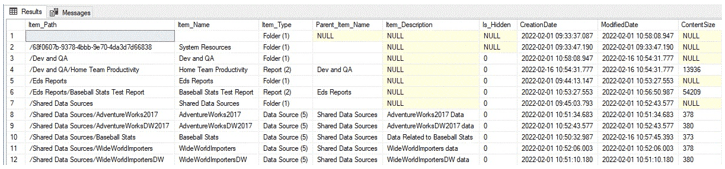
Only a small subset of available columns are returned, but they provide a solid overview of what is contained in the table and how it is formatted:

The results show part of the contents of my local SSRS test server, which includes some folders, reports, and data sources. In general, if detail on reports is needed, this is a good place to start. It can be difficult to get a complete view of the SSRS landscape from the hierarchical web interface, but here it is easy to get a list of objects and then filter accordingly.

Users

Within the site settings in SSRS, users/groups can be added, removed, or have their permissions adjusted. This security is separate from the logins and users that are maintained separately by SQL Server. Some high-level details about all users/groups defined in SSRS can be found in the Users table:

SELECT
        Users.UserID,
        Users.UserName,
        Users.UserType,
        Users.AuthType,
        Users.ModifiedDate
FROM dbo.Users;

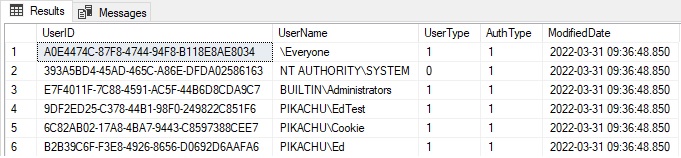
The results are as follows:

UserType indicates the source of the user, which typically will be 0 (a SQL Server user/login) or 1 (a domain user or group). AuthType indicates the type of authentication used for the user, which will often be 0/1 (Windows user/group) or 2 (SQL auth). See the references at the end of this article to get full lookups for these user properties.

Subscriptions

This table contains all subscriptions defined in SSRS. Some joins are needed to get info on the report that the subscription is attached to, who owns it, or who modified it last:

SELECT
        Subscriptions.Description,
        Subscriptions.LastStatus,
        Subscriptions.EventType,
        Subscriptions.LastRunTime,
        Subscriptions.Parameters,
        SUBSCRIPTION_OWNER.UserName AS SubscriptionOwner,
        Catalog.Name AS ReportName,
        MODIFIED_BY.UserName AS LastModifiedBy,
        Subscriptions.ModifiedDate
FROM dbo.Subscriptions
INNER JOIN dbo.Users SUBSCRIPTION_OWNER
ON SUBSCRIPTION_OWNER.UserID = Subscriptions.OwnerID
INNER JOIN dbo.Catalog
ON Catalog.ItemID = Subscriptions.Report_OID
INNER JOIN dbo.Users MODIFIED_BY
ON MODIFIED_BY.UserID = Subscriptions.ModifiedByID;

This is some exceptionally useful information! There is no central way to manage subscriptions in SSRS, and therefore, getting a complete view in one place is quite helpful. The results for a few test subscriptions I have created are as follows:

A busy SSRS server could have dozens or even hundreds of subscriptions. A common use of this data is for security audits. Knowing who has access to a report can be exceptionally valuable as the login that accesses data may not be the same as the person that reviews the report. Therefore, a simple audit of SQL Server access may not provide a complete enough picture of who can access a given data set. Subscriptions can be automatically sent to email addresses or files, thereby allowing data to be made available under other security contexts that the SQL auth or domain login a user typically uses.

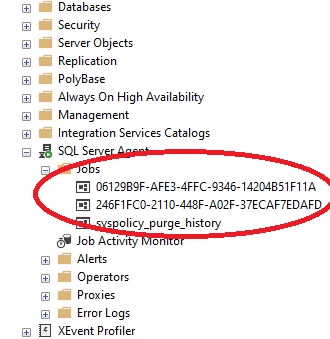
A SQL Server Agent is created with every subscription to that is used to trigger the report to run at the specified time. The job names, though, are at first glance meaningless:

Typically, when I name a job, I provide something a bit more descriptive than that 😊 These guids that are represented internally in SSRS as the ID of the report schedule. This data can be viewed by adding an additional join onto the previous query, like this:

SELECT
        ReportSchedule.ScheduleID AS AgentJobName,
        Subscriptions.Description,
        Subscriptions.LastStatus,
        Subscriptions.EventType,
        Subscriptions.LastRunTime,
        Subscriptions.Parameters,
        REPLACE(SUBSCRIPTION_OWNER.UserName, 'Datto', 'PIKACHU') 
                  AS SubscriptionOwner,
        Catalog.Name AS ReportName,
        REPLACE(MODIFIED_BY.UserName, 'Datto', 'PIKACHU') AS LastModifiedBy,
        Subscriptions.ModifiedDate
FROM dbo.Subscriptions
INNER JOIN dbo.Users SUBSCRIPTION_OWNER
ON SUBSCRIPTION_OWNER.UserID = Subscriptions.OwnerID
INNER JOIN dbo.Catalog
ON Catalog.ItemID = Subscriptions.Report_OID
INNER JOIN dbo.Users MODIFIED_BY
ON MODIFIED_BY.UserID = Subscriptions.ModifiedByID
INNER JOIN dbo.ReportSchedule
ON ReportSchedule.SubscriptionID = Subscriptions.SubscriptionID
AND ReportSchedule.ReportID = Catalog.ItemID;
The results show the added column of AgentJobName (aka: ScheduleID):

This allows us to see which SQL Server Agent job corresponds to each report subscription. In a pinch, a job could be disabled, executed manually, or adjusted as needed. Note that when a subscription is modified, the job is recreated. Therefore, making extensive changes to these SQL Server Agent jobs is not a good permanent solution. This helps to demystify what the poorly named jobs correspond to, and which subscriptions and reports correspond to which jobs.

Execution logs

There is a central execution log table called ExecutionLogStorage, as well as three preconfigured views that provide some additional details as to what various encoded column values mean. This data is quite valuable as it can be used to audit report executions, successes, and failures. The latter is especially useful as it allows for a customized response to scenarios when reports fail to execute. Responses could vary from automatically rerunning a subscription or emailing an operator with the details of the failure.

The view ExecutionLog cleans up a bit of the execution log data but mostly keeps it in a somewhat cryptic and challenging to read format. The following results are for a straight SELECT * from the view:

The most important columns require no modifications: Start and end times, byte count, row count, and the time spent processing and rendering can assist in troubleshooting reports that are failing or taking a long time to complete. Like any reporting or analytics application, if SSRS gets stuck trying to render a billion rows or a terabyte of data directly to a web browser or file, it’s unlikely to end well. The parameter details are also valuable when trying to reproduce a problem, as well as determine the best solution.

Microsoft later added two more creatively named execution logs: ExecutionLog2 and ExecutionLog3. These provide more detail as well as lookups for some of the available dimensions. The following is a sample of the output from selecting all columns from dbo.ExecutionLog2:

There are more columns that didn’t fit on the screen, including the Source (was the report run live or via a subscription), the status (was it successful?), and a variable XML field with additional info that does not fit into any of the preconstructed columns. This view is a worthwhile expansion on the original execution log. ExecutionLog3 is similar to ExecutionLog2, with only a few tweaks to column names and contents.

A common use of this data is to automatically report on report failures. By default, Reporting Services has no mechanism to let you know when a report fails. Report failures can be indicative of anything from a query error to a timeout to a network outage. Therefore, having reliable reporting on them can improve troubleshooting production issues (on top of allowing us to fix broken reports faster). The following query will return a data set containing any reports that failed in the past hour:

SELECT *
FROM ReportServer.dbo.ExecutionLog2
WHERE DATEDIFF(MINUTE, TimeStart, GETDATE()) <= 60
AND Status <> 'rsSuccess'
AND ReportPath <> ''
AND status <> 'rsHttpRuntimeClientDisconnectionError'
ORDER BY TimeStart ASC;

The filters here are quite useful, as they:

  1. Return reports from the past 60 minutes. Data in ReportServer is stored in the local server time zone, therefore GETDATE() or an equivalent should be used to interrogate this data.
  2. Only return reports that are unsuccessful.
  3. Exclude reports that are run directly from Report Builder (these will have a blank path).
  4. The additional status filter removes reports that failed because the user’s web browser closed.

Here is a sample of some of the results:

A simple SQL Server Agent job or some other scheduled task could run this query hourly and send an alert/report out when any rows are returned. For those looking to minimize work needed on alerting, an SSRS (or some other type of) report could be created that conditionally emails the details based on the contents of this result set.

An important key here is that SQL Server does NOT automatically report on SSRS failures, whether ad-hoc or scheduled via subscriptions. The details of failures are logged, but it is up to the report server owner or another administrator to manage this data and alert appropriately on failures. This provides a head-start on troubleshooting and is far more comfortable than getting the uncomfortable question from somebody important: “Where is my report?”.

Permissions

Reporting Services manages granular permissions for each object in the catalog, such as reports, folders, or data sources. For a large report server, this can be an exceptionally long list of who has access to what – and which specific permissions are granted. The predefined roles have specific actions that are granted by each. The details of these roles are beyond the scope of this article, but a link to Microsoft’s documentation on them is provided after the conclusion as a reference.

The following query provides a complete list of all permissions assigned to any user for any object in SSRS:

SELECT
        CASE
                WHEN catalog.Type = 1 THEN 'Folder (1)'
                WHEN catalog.Type = 2 THEN 'Report (2)'
                WHEN catalog.Type = 3 THEN 'File (3)'
                WHEN catalog.Type = 4 THEN 'Linked Report (4)'
                WHEN catalog.Type = 5 THEN 'Data Source (5)'
                WHEN catalog.Type = 6 THEN 'Report Model (6)'
                WHEN catalog.Type = 7 THEN 'Report Part (7)'
                WHEN catalog.Type = 8 THEN 'Shared Data Set (8)'
                WHEN catalog.Type = 9 THEN 'Report Part (9)'
                WHEN catalog.Type = 11 THEN 'KPI (11)'
                WHEN catalog.Type = 12 THEN 'Mobile Report Folder (12)'
                WHEN catalog.Type = 13 THEN 'PowerBI Desktop Document (13)'
        END AS Item_Type,
        catalog.Path,
        catalog.Name,
        users.UserName,
        roles.RoleName,
        roles.Description
FROM ReportServer.dbo.users
INNER JOIN ReportServer.dbo.policyuserrole
ON users.userid = policyuserrole.userid
INNER JOIN ReportServer.dbo.roles
ON roles.roleid = policyuserrole.roleid
INNER JOIN ReportServer.dbo.catalog
ON catalog.policyid = policyuserrole.policyid
ORDER BY catalog.type, catalog.name, users.username;

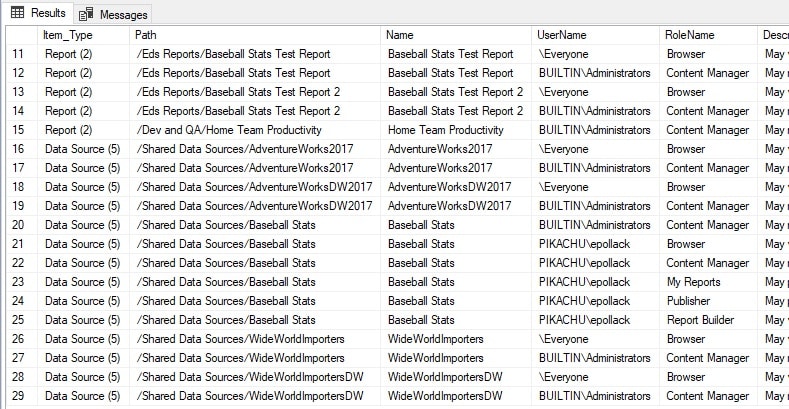
The results show an extensive list of who has access to what:

If this list is too long, then it can be pared down to specific objects, users, or types of objects. The table dbo.Roles contains all possible roles that may be assigned to a user in SSRS. The table dbo.Users contains a row per user, which will include some internal users, as well as any added by an administrator. dbo.policyuserrole links users to permissions and catalog items

And more!

There are more tables available in the ReportServer database that can be interrogated to learn about how SSRS is configured and used. For example, favorites are stored in dbo.Favorites and provide a simple linking table between catalog items and users. The following query returns a basic list with this information:

SELECT
        Catalog.Path,
        Catalog.Name,
        Users.UserName
FROM dbo.Favorites
INNER JOIN dbo.Users
ON Users.UserID = Favorites.UserID
INNER JOIN dbo.Catalog
ON Catalog.ItemID = Favorites.ItemID;

The results (all of one row) are as follows:

While it could be interesting to explore every table in the ReportServer database, there is more value here in discussing how and why SSRS data could be changed.

Modifying ReportServer Data

Before discussing how to make changes to ReportServer data, I will iterate again the critical warning from earlier: This is undocumented and not supported by Microsoft. Please back up the ReportServer database before making any changes and be sure to thoroughly QA any changes to ensure they had the intended effect.

With that stark warning out of the way, the first question to answer is: “Why would we even want to do this?” The simplest answer is that SSRS provides no UI for mass-editing entities. If an employee leaves the organization or if there are any significant changes to reporting structures, having to manually update tens, hundreds, or even thousands of entries via the SSRS UI is a recipe for insanity. While a report or subscription that belongs to a disabled user does not afford that user any special access (as they are disabled), most organizations do not want to leave terminated employee accounts associated with anything, as a matter of course.

The primary reason why anyone would issue an UPDATE, INSERT, or DELETE operation against any table in the ReportServer database is to avoid the need to spend hours clicking within the confines of the SSRS web portal. Consider the simple scenario of an administrator leaving an organization. They were configured as the owner on some reports. Without knowing up-front which reports they owned, there is both a challenge of identifying them and then updating them. The following steps can be taken to identify these subscriptions and then update them:

Identify the user in question:

SELECT
        *
FROM dbo.Users
WHERE UserName = 'PIKACHU\epollack';

The results return a single row that identifies a user:

With the user in question identified, subscriptions can be searched specifically for that user as the owner:

SELECT
        *
FROM dbo.Subscriptions
INNER JOIN dbo.Catalog
ON Catalog.ItemID = Subscriptions.Report_OID
AND Catalog.Type = 2
INNER JOIN dbo.Users
ON Subscriptions.OwnerID = Users.UserID
WHERE Subscriptions.OwnerID = '70B6C1EE-89EF-46B1-ABD5-7AA345CAB4BC';

This returns two rows. From here, if they appear valid, they can then be updated like this:

UPDATE Subscriptions
        SET OwnerID = 'F20FC133-9E68-4A6E-938A-B891E8C5020D'
FROM dbo.Subscriptions
INNER JOIN dbo.Catalog
ON Catalog.ItemID = Subscriptions.Report_OID
AND Catalog.Type = 2
INNER JOIN dbo.Users
ON Subscriptions.OwnerID = Users.UserID
WHERE Subscriptions.OwnerID = '70B6C1EE-89EF-46B1-ABD5-7AA345CAB4BC';

Subqueries could be used to reduce the number of queries needed to locate the correct OwnerID values, but the basic principle remains the same. Unlike the system tables in most places in SQL Server, these can be freely modified with few restrictions. While it is possible to enter the wrong value for a column, foreign keys do provide quite a bit of relational integrity within this database. Most tables are keyed to parent tables and would prevent an administrator from entering nonsense values for columns that contain IDs, such as UserID, ItemID, or RoleID.

Similarly, if there were a set of old reports that are no longer needed, it is possible to delete them via the UI, but this would become cumbersome if there were a large number of reports. An easier solution is to delete them via a query:

DELETE Catalog
FROM dbo.Catalog
WHERE Catalog.Path LIKE '/Dev and QA%';

This would delete any catalog items with a specific root path. Executing this DELETE statement results in a foreign key violation as a favorite exists for one of the reports. Therefore, it is necessary to delete the favorites first:

DELETE Favorites
FROM dbo.Catalog
INNER JOIN dbo.Favorites
ON Favorites.ItemID = Catalog.ItemID
WHERE Catalog.Path LIKE '/Dev and QA%';

Once complete, the remaining catalog items can be deleted. Note that in a different database with different report data, there may be more dependencies to deal with before a report, folder, or data source can be deleted. Generally speaking, deleting data directly from the ReportServer database is most efficient when done en masse. It is unlikely to save time if there is only one report to remove. For that scenario, deleting it via the UI is simpler and would likely be faster.

Some other common examples of scenarios when modifying data in the ReportServer database can be a big time-saver:

  • A manager has left the organization, and their subscriptions should be redirected to a new user.
  • Report builder permissions need to be revoked for a large set of reports for a set of users.
  • Report descriptions on all reports need to be appended with some security-related statements.
  • The execution log is quite large and requires regular archival to prevent it from becoming too bloated.

Many other use-cases exist, but these highlight a handful of reasons that an administrator may wish to directly modify data within the ReportServer database.

Insights from the SSRS Database

The entirety of a SQL Server Reporting Services server is encapsulated within the ReportServer database. It can be freely queried, alerted on, and metrics crunched on how SSRS is being used. Tables within this database can also be modified when organizational needs arise that would otherwise be time-consuming or error-prone to do manually.

While the contents of this database are mostly not documented by Microsoft, we can (with a healthy dose of caution) use it to improve SSRS processes by reporting on failed reports, mass-applying security policies, making changes to commonly modified fields, or otherwise preventing the need to perform time-consuming tasks regularly by hand.

This article should serve as a diving board for learning more about how SQL Server Reporting Services operates, and then, using that expanded knowledge, to improve the maintainability of data sources, reports, users, and other commonly referenced entities within SSRS.

References

The following are some references that may assist in researching and using data in the ReportServer database:

Enumerations for the UserType and LoginType within the Users table:
UserType Enum (Microsoft.SqlServer.Management.Smo) | Microsoft Docs

LoginType Enum (Microsoft.SqlServer.Management.Smo) | Microsoft Docs

Details about predefined roles in SSRS:
Role definitions – predefined roles – SQL Server Reporting Services (SSRS) | Microsoft Docs


The post Insights from the SSRS database appeared first on Simple Talk.


from Simple Talk https://ift.tt/75sZOht
via
Wednesday, May 11, 2022

Introduction to artificial intelligence

Artificial intelligence (AI) is the ability of machines to replicate or enhance human intellect, such as reasoning and learning from experience. Artificial intelligence has been used in computer programs for years, but it is now applied to many other products and services. For example, some digital cameras can determine what objects are present in an image using artificial intelligence software. In addition, experts predict many more innovative uses for artificial intelligence in the future, including smart electric grids.

AI uses techniques from probability theory, economics, and algorithm design to solve practical problems. In addition, the AI field draws upon computer science, mathematics, psychology, and linguistics. Computer science provides tools for designing and building algorithms, while mathematics offers tools for modeling and solving the resulting optimization problems.

Although the concept of AI has been around since the 19th century, when Alan Turing first proposed an “imitation game” to assess machine intelligence, it only became feasible to achieve in recent decades due to the increased availability of computing power and data to train AI systems.

To understand the idea behind AI, you should think about what distinguishes human intelligence from that of other creatures – our ability to learn from experiences and apply these lessons to new situations. We can do this because of our advanced brainpower; we have more neurons than any animal species.

Today’s computers don’t match the human biological neural network – not even close. But they have one significant advantage over us: their ability to analyze vast amounts of data and experiences much faster than humans could ever hope.

AI lets you focus on the most critical tasks and make better decisions based on acquired data related to a use case. It can be used for complex tasks, such as predicting maintenance requirements, detecting credit card fraud, and finding the best route for a delivery truck. In other words, AI can automate many business processes leaving you to concentrate on your core business.

Research in the field is concerned with producing machines to automate tasks requiring intelligent behavior. Examples include control, planning and scheduling, the ability to answer diagnostic and consumer questions, handwriting, natural language processing and perception, speech recognition, and the ability to move and manipulate objects.

History of AI and how it has progressed over the years

With so much attention on modern artificial intelligence, it is easy to forget that the field is not brand new. AI has had a number of different periods, distinguished by whether the focus was on proving logical theorems or trying to mimic human thought via neurology.

Artificial intelligence dates back to the late 1940s when computer pioneers like Alan Turing and John von Neumann first started examining how machines could “think.” However, a significant milestone in AI occurred in 1956 when researchers proved that a machine could solve any problem if it were allowed to use an unlimited amount of memory. The result was a program called the General Problem Solver (GPS).
Over the next two decades, research efforts focused on applying artificial intelligence to real-world problems. This development led to expert systems, which allow machines to learn from experience and make predictions based on gathered data. Expert systems aren’t as complex as human brains, but they can be trained to identify patterns and make decisions based on that data. They’re commonly used in medicine and manufacturing today.

A second major milestone came in 1965 with the development of programs like Shakey the robot and ELIZA, which automated simple conversations between humans and machines. These early programs paved the way for more advanced speech recognition technology, eventually leading to Siri and Alexa.

The initial surge of excitement around artificial intelligence lasted about ten years. It led to significant advances in programming language design, theorem proving, and robotics. But it also provoked a backlash against over-hyped claims that had been made for the field, and funding was cut back sharply around 1974.

After a decade without much progress, interest revived in the late 1980s. This revival was primarily driven by reports that machines were becoming better than humans at “narrow” tasks like playing checkers or chess and advances in computer vision and speech recognition. This time, the emphasis was on building systems that could understand and learn from real-world data with less human intervention.

These developments continued slowly until 1992, when interest began to increase again. First, technological advances in computing power and information storage helped boost interest in research on artificial intelligence. Then, in the mid-1990s, another major boom was driven by considerable advances in computer hardware that had taken place since the early 1980s. The result has been dramatic improvements in performance on several significant benchmark problems, such as image recognition, where machines are now almost as good as humans at some tasks.

The early years of the 21st century were a period of significant progress in artificial intelligence. The first major advance was the development of the self-learning neural network. By 2001, its performance had already surpassed human beings in many specific areas, such as object classification and machine translation. Over the next few years, researchers improved its performance across a range of tasks, thanks to improvements in the underlying technologies.

The second significant advancement in this period was the development of generative model-based reinforcement learning algorithms. Generative models can generate novel examples from a given class, which helps learn complex behaviors from very little data. For example, they can be used to learn how to control a car from only 20 minutes of driving experience.

In addition to these two advances, there have been several other significant developments in AI over the past decade. There has been an increasing emphasis on using deep neural networks for computer vision tasks, such as object recognition and scene understanding. There has also been an increased focus on using machine learning tools for natural language processing tasks such as information extraction and question answering. Finally, there has been a growing interest in using these same tools for speech recognition tasks like automatic speech recognition (ASR) and speaker identification (SID).

Different fields under AI to clear common misconceptions

Artificial Intelligence is the most trending field of computer science. However, with all the new technology and research, it’s growing so fast that it can be confusing to understand what is what. Furthermore, there are many different fields within AI, each one having its specific algorithms. Therefore, it’s essential to know that AI is not a single field but a combination of various fields.

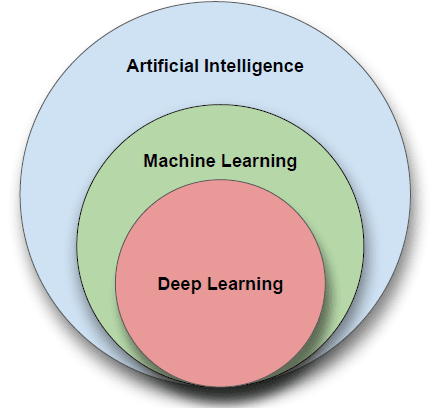
Artificial Intelligence (AI) is the general term for being able to make computers do things that require intelligence if done by humans. AI can be broken down into two major fields, Machine Learning (ML) and Neural Networks (NN). Both are subfields under Artificial Intelligence, and each one has its methods and algorithms to help solve problems.

An image showing 3 circles. Deep Learning is the innermost circle. Outside of that is Machine Learning., and the largest circle encompassing the others is Artificial Intelligence t

Machine learning

Machine Learning (ML) makes computers learn from data and experience to improve their performance on some tasks or decision-making processes. ML uses statistics and probability theory for this purpose. Machine learning uses algorithms to parse data, learn from it, and make determinations without explicit programming. Machine learning algorithms are often categorized as supervised or unsupervised. Supervised algorithms can apply what has been learned in the past to new data sets; unsupervised algorithms can draw inferences from datasets. Machine learning algorithms are designed to strive to establish linear and non-linear relationships in a given set of data. This feat is achieved by statistical methods used to train the algorithm to classify or predict from a dataset.

Deep learning

Deep learning is a subset of machine learning that uses multi-layered artificial neural networks to deliver state-of-the-art accuracy in object detection, speech recognition and language translation. Deep learning is a crucial technology behind driverless cars and enables the machine analysis of large amounts of complex data — for example, recognizing the faces of people who appear in an image or video.

Neural networks

Neural networks are inspired by biological neurons in the human brain and are composed of layers of connected nodes called “neurons” that contain mathematical functions to process incoming data and predict an output value. Artificial neural network learns by example, similarly to how humans learn from our parents, teachers, and peers. They consist of at least three layers: an input layer, hidden layers, and an output layer. Each layer contains nodes (also known as neurons) which have weighted inputs that compute the output.

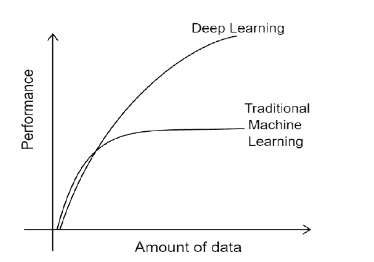
A image showing a graph. Y axis is performance, X axis is the amount of data. The Deep Learning curve continues to go up with more data which Traditional machine learning plateaus.

The performance of traditional machine learning models plateau and throwing any more data doesn’t help improve the performance. Deep learning models continue to improve in performance with more data.

These fields have different algorithms, depending on the use case. For example, we have decision trees, random forests, boosting, support vector machines (SVM), k-nearest neighbors (kNN), and others for machine learning. For neural networks, we have convolutional neural networks (CNNs), recurrent neural networks (RNNs), long short-term memory networks (LSTMs), and more.

However, classifying AI according to its strength and capabilities would mean further subdividing it into “narrow AI” and “general AI.” Narrow AI is about getting machines to do one task really well, like image recognition or playing chess. General AI means devices that can do everything humans can do and more. Today’s research focuses on narrow AI, but many researchers would like machine learning to eventually achieve general AI.

How AI stands out in different industries.

AI is a booming technology that the global community has accepted. It has been revolutionizing the industry from various sectors for quite some time. It is a comprehensive technology that is being applied in almost every industry. This section discusses how AI is impacting service delivery in various sectors.

Fully self-driving cars are now a reality. Tesla is the first company to make a car with all of the sensors, cameras, and software needed for a computer to drive itself from start to finish. Trucks may be the next primary target for autonomy: self-driving trucks will enormously impact road safety and infrastructure and save companies money by reducing labor costs.

A few other industries are also implementing AI. For example, in finance, AI helps with forecasting and supports hedge-fund investment decisions. Predictive analytics (or forecasting) applies artificial intelligence using machine learning and statistical techniques to make predictions about future events based on previous data. For example, you can use forecasting to predict product sales, customer demand, or even stock prices. One popular example of predictive analytics is Amazon’s product recommendations engine (also known as “Customers who bought this item also bought”). It uses past purchase data from millions of customers to recommend products based on the users’ preferences.

In healthcare, AI is helping doctors to diagnose diseases by gathering data from health records, scanning reports, and medical images. This helps doctors to make faster diagnoses and guide the patient for further tests or prescribe medications. In addition, AI can be used in the treatment process by monitoring patients and alerting their doctors when something goes wrong. According to Forbes, AI will save over 7 million lives in 2035.

In retail, AI does everything from stock management to customer service chatbots. As a result, many businesses are taking advantage of AI to improve productivity, efficiency, and accuracy. In addition, companies find new ways to use AI to make life easier for their customers and employees, from product design to customer service.

The current state of AI-based software systems.

The recent advancements in AI have led to the emergence of a new type of system called Generative Adversarial Networks (GANs), which generate realistic images, text, or audio. Due to their remarkable capabilities, some people are concerned that this technology could replace humans in the future.

GANs are just one example of how AI is changing our lives. This section explores more current AI examples and its applications in software systems such as GPT3, DALL.E, and virtual reality/augmented reality (VR/AR).

AI-based software systems are comprised of many layers such as foundational models, advanced algorithms, and automated reasoning tools. Some of the most popular AI-based systems that use these layers include GPT3, DALL.E, AlphaGo, RoBERTa, and many others.

DALL.E and GPT3 are large-scale models that have achieved remarkable results in computer vision and natural language processing (NLP).

The GPT3 model is an NLP model based on a deep learning algorithm called transformers. It was trained on a corpus of text from Common Crawl and published in 2020. GPT3 uses a large dataset trained in the English language to produce outputs based on the inputted information. The model can be trained to perform any task imaginable, from generating text to solving math problems. Also, we can use GPT3 to generate text, translate between languages, answer questions about images, and more.

The DALL.E model is an image generator based on a deep learning algorithm called variational autoencoders (VAEs). Similarly, DALL.E can be trained using an image dataset to produce images based on the inputted text descriptions. It was trained on datasets such as ImageNet and published in 2021. We can use DALL.E to generate images that match captions or URLs given by users. These models have been developed by OpenAI, which has close ties to the US government and military-industrial complex (MIC).

DeepMind created AlphaGo as a program that would play the ancient game Go without anyone’s help. The game is similar to chess but much more complex due to its simple rules and many possible moves per turn. AlphaGo used reinforcement learning to learn how to play the game better over time by playing against itself repeatedly until it mastered every possible situation that could occur in a game of Go with 100% accuracy.

RoBERTa is an algorithm from Facebook AI Research (FAIR) that uses deep learning techniques to solve problems in natural language processing (NLP), such as sentence classification or machine translation.

The Future of AI. What to expect from AI in the next few years or decades

Artificial intelligence has come a long way, but it’s about to make a huge leap. Artificial general intelligence (AGI), the kind of AI capable of doing any intellectual task that a human being can do, is still a ways off, but we’re already starting to see plenty of progress in other areas of AI. Here’s what you can expect soon:

Artificial Intelligence will make more jobs obsolete as it takes over more and more tasks

The reason why is simple: if you can replace one person with an AGI system, you don’t need one computer to do the work – you can spread it out across thousands or millions of computers. That’s only possible because a general AI system can learn from past experiences and improve itself, meaning that it doesn’t have to be reprogrammed for every new task. In fact, there’s no reason why an AGI system would need humans at all – once it learns enough, it could design its own machines or find ways to automate entire industries.

The advent of AI is transforming the business landscape and changing people’s lives for the better. In the coming years, most industries will see a significant transformation due to new-age technologies like cloud computing, Internet of Things (IoT), and Big Data Analytics. All these factors profoundly influence how businesses operate today and are also finding applications in other areas like military, healthcare, and infrastructure development.

To build an engaging metaverse that appeals to millions of users who want to learn, create, and inhabit virtual worlds, AI must be used to enable realistic simulations of the real world. People need to feel immersed in the environments they participate in. AI is helping to achieve this reality by making objects look more realistic and enabling computer vision so users can interact with simulated objects using their body movements.

Concerns surrounding the advancement and usage of AI

AI is a very powerful idea, but it’s not magic. The key thing to remember about AI is that it learns from data. The model and algorithm underneath are only as good as the data put into them. This means that data availability, bias, improper labeling, and privacy issues can all significantly impact the performance of an AI model.

Data availability and quality are critical for training an AI system. Some of the biggest concerns surrounding AI today relate to potentially biased datasets that may produce unsatisfactory results or exacerbate gender/racial biases within AI systems. When we research different types of machine learning models, we find that certain models are more susceptible to bias than others. For example, when using deep learning models (e.g., neural networks), the training process can introduce bias into the model if a biased dataset is used during training.

However, other machine learning models (e.g., random forests) can be less sensitive to the bias in the data during training. For example, if a dataset contains information about many different variables but only one variable is used to make decisions (e.g., gender), this model will tend to be more biased toward that variable than random forests that consider all variables equally weighted by default.

Other concerns need to be taken into account with the advancement and usage of AI. These include data availability, computational power, and privacy, such as health data. People’s data is needed to develop models, but how do we get such data given how protected health data needs to be.

As artificial intelligence becomes more common, it’s only natural that there are increasing requirements for processing power. As a result, AI researchers use supercomputers to develop algorithms and models on a massive and complex scale.

This is especially true of deep learning, a type of machine learning that uses algorithms to recognize patterns in large data sets like images or sound. The main issue with DL is that it requires enormous computational power. To train a neural network using DL, you need to feed vast amounts of data into the system — for example, thousands or millions of pictures — and then let it figure out how to tell one from another on its own. This training process is complex and laborious, but it is also computationally expensive. Model development can take days or even weeks on a single high-end GPU or CPU capable of delivering lots of computational power. To make matters worse, once you train the model, you need a supercomputer to execute the model at full capacity. Google’s investments in TPUs (Tensor Processing Units) attempt to solve this problem using state-of-the-art hardware technology.

Another source of concern in the development of AI is how automated systems will ultimately be used. For example, should we consider holding corporations responsible for the actions of intelligent machines they develop? Or should we consider holding machine developers accountable for their work?

Conclusion

Artificial intelligence (AI) is the intelligence of machines and the branch of computer science that aims to create it. AI is today’s dominant technology and will continue to be a significant factor in various industries for years to come. As AI systems become more advanced, they are not only poised to disrupt multiple industries with their impact but also raise concerns about how we should handle such incredible power.

This field has evolved a great deal over the years. It has gone from being a subject of popular science fiction to a significant part of our lives today. By examining AI from its past, it is possible to better understand its present and predict its future, as we have done in this article.


The post Introduction to artificial intelligence appeared first on Simple Talk.


from Simple Talk https://ift.tt/Twkd7XJ
via