Wednesday, June 7, 2023

Unmasking SQL Server Dynamic Data Masking – Part 2 – Setting up Masking

This is the second part of a series on SQL Server Dynamic Data masking. The first part in the series was a brief introduction to dynamic data masking, including use cases.

The focus of this blog will is setting up masking and some base examples.

Configuring Masking

Masking data is a straightforward process. Choose the table and columns to be masked, decide on the appearance of the mask, execute the masking script, and verify the results. Masking data also assumes some foundational setup tasks have been done and minimal best practices are being followed. Users that need to retrieve data that has been masked only need minimal viable security (generally SELECT privileges), no table ownership or dbo rights. If the user owns the table or has dbo rights, the data isn’t masked for them.

Simplicity is important with security design and implementation. Simple design doesn’t imply only using the default database roles or assigning the same security to each user. Applied simplicity is like Occam’s Razor for security. It is the most straight forward security design that will support your known current and future security needs.

A simple security design is easy to maintain, and the security of each user is clear. This relates directly to dynamic data masking. Table selection for masking is an important task and involves working closely with the business. Data shouldn’t be restricted via masking unless necessary.

Remember, masking isn’t a method to implement general security, it is a supplement to existing security and a way to expose additional data in a relatively safe manner that users couldn’t ordinarily access. The most sensitive data shouldn’t be exposed even with masking, so items like social security numbers, tax IDs, etc. should still only be exposed via masking with extreme caution and to the most trusted users, if at all.

Mask Appearance

Choosing the appearance of the mask is also a business decision that can be guided by the architecture. Selecting a standard for patterns on your project is recommended. Consistency makes it easier for users to interpret the data they are seeing, knowing that data is masked, and it also speeds the development process since the mask doesn’t need to be determined for each column, just each column type.

From a technical perspective the appearance doesn’t impact functionality. General guidelines for masks would be to choose something that is not a default for your unmasked columns or a mask that has meaning in your organization.

Preparation

The examples in this series are based on the WideWorldImporters database, that is the current standard demo database from Microsoft. More information about how to acquire that database as well as to initialize

Script Creation

Adding masking to an existing table follows the standard alter syntax.

USE WideWorldImporters
GO
/*
* Add masking to sales.Customers.CreditLimit column.
* This is the syntax for a manual ALTER statement
*/
ALTER TABLE Sales.Customers
ALTER COLUMN CreditLimit
ADD MASKED WITH (FUNCTION = 'default()')
GO

If you add masking to the column in your create script the syntax is very similar to that of a constraint. If you are in a devops environment with continuous deployment, near continuous deployment, or just automated deployments, this is likely the syntax needed.

USE WideWorldImporters
GO
/*
* Add masking to sales.Customers.CreditLimit column
* during table creation.
* This is the syntax for a devops environment using
* SSDT/sqlpackage.exe or other automated deployment.
*
* Note that previous examples add masking to 
* additional columns.
* Each column needs to have masking functionality added
* in a devops environment using declarative coding.
* 
*/
CREATE TABLE Sales.Customers(
        CustomerID int NOT NULL 
       CONSTRAINT PK_Sales_Customers PRIMARY KEY CLUSTERED 
        ,CustomerName nvarchar(100) 
          MASKED WITH (FUNCTION = 'default()') NOT NULL
        ,BillToCustomerID int NOT NULL
        ,CustomerCategoryID int NOT NULL
-- <columns skipped for size>
        ,LastEditedBy int NOT NULL
        ,ValidFrom datetime2(7) NOT NULL
        ,ValidTo datetime2(7) NOT NULL
);

Limitations

Some column types and columns used in temporal tables can’t be masked. Microsoft documentation includes columns encrypted with Always Encrypted, filestream columns, COLUMN_SET or columns part of a column set, columns used in Polybase, and computed columns (but the referenced column can be masked).

Although not listed by the documentation, period columns for system-versioned temporal tables can’t be masked and there are exceptions to the computed columns. For example:

--Show default mask for date 
ALTER TABLE Application.People 
   ALTER COLUMN ValidFrom 
    ADD MASKED WITH (FUNCTION = 'default()');

Trying this will cause the following error to be raised:

Msg 13599, Level 16, State 1, Line 5
Period column 'ValidFrom' in a system-versioned temporal table cannot be altered.

Computed columns can’t be masked directly, but the referenced columns can be masked and that will flow through to the computed column. The order that computed columns and masked columns are added to the table are important and will determine if the column can actually be masked.

The following shows that the referenced columns can’t be masked after the computed column is created.

--Example showing computed columns can't be masked
--and columns used by computed columns cant be masked
--after the table is created
USE WideWorldImporters;
GO
--Computed column
ALTER TABLE Application.People
ALTER COLUMN SearchName
ADD MASKED WITH (FUNCTION = 'default()');
GO
--Column referenced by computed column
ALTER TABLE Application.People
ALTER COLUMN PreferredName
ADD MASKED WITH (FUNCTION = 'default()');
GO

This returns:

Msg 4928, Level 16, State 1, Line 8
Cannot alter column 'SearchName' because it is 'COMPUTED'.

Msg 5074, Level 16, State 1, Line 14
The column 'SearchName' is dependent on column 'PreferredName'.

Msg 4922, Level 16, State 9, Line 14
ALTER TABLE ALTER COLUMN PreferredName failed because one or more objects access this column.

The easiest solution for this is to create the table with masking enabled in the CREATE TABLE statement. Then add the computed column later via an ALTER statement, but this solution won’t work for temporal tables.

Msg 13724, Level 16, State 1, Line 62
System-versioned table schema modification failed because adding computed columns while system-versioning is ON is not supported.

Adding the masked columns to the computed column referenced columns at the time of creation is successful.

CREATE TABLE [Application].[PeopleV2](
  [PersonID] [int] 
    MASKED WITH (FUNCTION = 'default()') NOT NULL,
  [FullName] [nvarchar](50) 
    MASKED WITH (FUNCTION = 'default()') NOT NULL,
  [PreferredName] [nvarchar](50) 
    MASKED WITH (FUNCTION = 'default()') NOT NULL ,
   SearchName AS (concat([PreferredName],N' ',[FullName])) 
     PERSISTED NOT NULL,
   [IsPermittedToLogon] [bit] NOT NULL,
   [LogonName] [nvarchar](50) 
      MASKED WITH (FUNCTION = 'default()') NULL,
   [IsExternalLogonProvider] [bit] NOT NULL,
   [HashedPassword] [varbinary](max) 
      MASKED WITH (FUNCTION = 'default()') NULL,
   [IsSystemUser] [bit] NOT NULL,
   [IsEmployee] [bit] NOT NULL,
   [IsSalesperson] [bit] NOT NULL,
   [UserPreferences] [nvarchar](max) NULL,
   [PhoneNumber] [nvarchar](20) NULL,
   [FaxNumber] [nvarchar](20) NULL,
   [EmailAddress] [nvarchar](256) NULL,
   [Photo] [varbinary](max) NULL,
   [CustomFields] [nvarchar](max) NULL,
   [OtherLanguages]  AS 
        (json_query([CustomFields],N'$.OtherLanguages')),
   [LastEditedBy] [int] NOT NULL,
   [ValidFrom] [datetime2](7) 
        GENERATED ALWAYS AS ROW START NOT NULL,
   [ValidTo] [datetime2](7) 
        GENERATED ALWAYS AS ROW END NOT NULL,
    CONSTRAINT [PK_Application_PeopleV2] 
        PRIMARY KEY CLUSTERED 
(
        [PersonID] ASC
),
PERIOD FOR SYSTEM_TIME ([ValidFrom], [ValidTo])
);
WITH (
SYSTEM_VERSIONING = ON (HISTORY_TABLE = [Application].[People_ArchiveV2])
);
GO

This will execute without error. Note that since altering the table to add masking isn’t possible, so if you want to add it you will need to create a new temporal table and move the history. More about this can be found in this blog about changing temporal history.

Verification

After masking has been implemented verification and testing follows. Verification, or a smoke test, will require a user with limited access. A user without a login is a good choice for this verification and can be safely use in production environments. If your test team isn’t familiar with this technique or their testing tools don’t support this scenario, an actual login and user account can be created. If there is a use case for unmasked data, testing this scenario is warranted. Special attention should be paid to intersections of additional security. Row Level Security (RLS), user roles, group assigned security should all have separate test cases.

In comparison to RLS, which requires an access predicate and a security policy, a single statement is required for data masking. Users with UNMASK, ALTER permission or dbo permission will view unmasked data, other users will see the mask which is the default of 0. The basic select statement returns the following.

Note that the sample code contains the EXECUTE AS statement, which runs the query as the MaskedReader database user. This is the user setup previously in the sample without unmasking privileges. To use the EXECUTE AS statement, you must run the query with a user that has IMPERSONATE rights. If your current login doesn’t have proper permission, you will get the message “Cannot execute as the database principal because the principal “MaskedUser” does not exist, this type of principal cannot be impersonated, or you do not have permission.”. Full documentation on the statement is available here: https://learn.microsoft.com/en-us/sql/t-sql/statements/execute-as-transact-sql?view=sql-server-ver16

USE WideWorldImporters
GO
EXECUTE AS USER = 'MaskedReader'
GO
SELECT
        CustomerID
        ,CustomerName
        ,CreditLimit
FROM sales.Customers
WHERE CreditLimit IS NOT NULL;
GO
REVERT;
GO

Looking at the returned data, all of the CreditLimit values will appear to be 0.
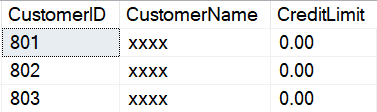
It is interesting to note that NULL columns return without a mask as NULL. This piece of information may be valuable in some scenarios, so understand that it works in this way.

Setup in Azure

Microsoft Azure SQL Database includes the option to mask columns via the GUI. This can be useful for test cases or smaller companies wanting to try out masking. I am a strong advocate of automated deployments, multiple environments for testing and development, and repeatability of deployments, so this wouldn’t be my first choice. It can be a quick way to test masking and is useful for administrators not familiar with SQL Server.

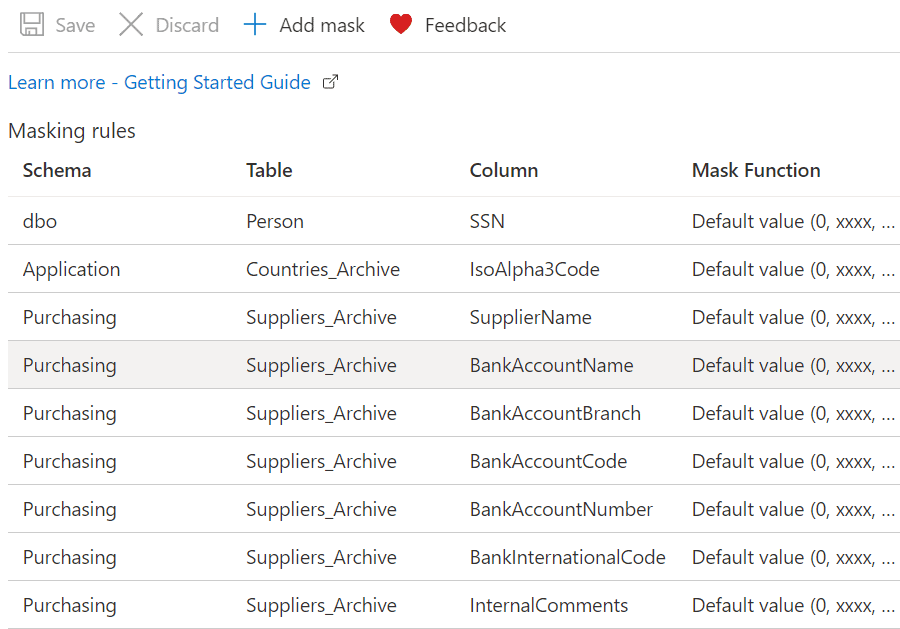
In Azure, the overview for the database shows that Dynamic Data Masking is configured. If you click into the masking box, the columns that are masked are shown. You also get the option to configure additional columns with masking.
This shows the columns configured with the setup scripts for this article, plus the SSN column created and masked during one of the examples in this article.
Scrolling down further shows columns not masked, but recommended for consideration for masking. The default mask can be added by simply clicking the button to the left of the column. The column to be masked then moves to the previous list, Masking rules, and will be added once the Save button is pressed. If more control is wanted, click the “Add mask” button at the top of the screen.

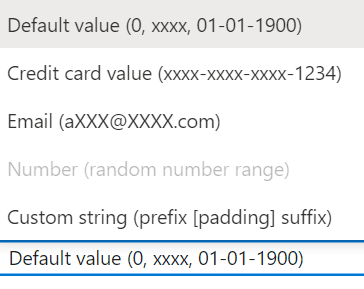
This opens a new window allowing you to select the schema, table, column, and specific mask to apply.
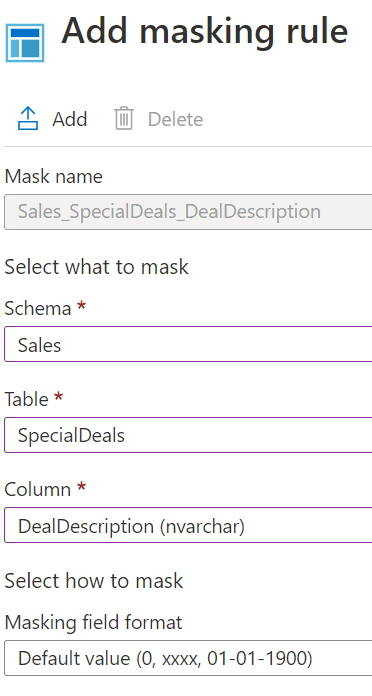
The column then shows up in the Masking rules table. It also needs to be saved before it is applied to the table.
Remember to script out the table definition and add the masking definition to your database project if you use automated deployments with SSDT. The column definition will look similar to the following when scripted.

[DealDescription] [nvarchar](30) 
     MASKED WITH (FUNCTION = 'default()') NOT NULL,

Masking can be removed in a similar fashion in Azure. Select the masked column, select the Delete button, and save the changes. The same rule applies here for DevOps environments, the column should also be removed from the table script.

Testing

Testing will involve your regular process and full verification with your test team. Testing stories should include all tables with masking, all masked columns, masked users and users with elevated authority. If you have other layers of security, such as RLS, it is recommended to test the intersection of masking with those layers.

Consistency and the ability to recreate tests is an important aspect of testing. If your team uses an automated test suite, masking should be part of those tests. Test scripts can include simple SELECT statements and execute as a specific user account. The setup section shows creating a user without a login. Users like this can be created for testing. They are relatively safe even in production since the user changing context needs the impersonation privilege.

USE WideWorldImporters;
GO
EXECUTE AS USER = 'MaskedReader';
GO
SELECT
        CountryID
        ,CountryName
        ,IsoAlpha3Code
FROM Application.Countries
WHERE CountryName IN ('Armenia','Bahrain','Belize');
GO
REVERT;
GO
EXECUTE AS USER = 'UnmaskedReader';
GO
SELECT
        CountryID
        ,CountryName
        ,IsoAlpha3Code
FROM Application.Countries
WHERE CountryName IN ('Armenia','Bahrain','Belize');
GO
REVERT;
GO

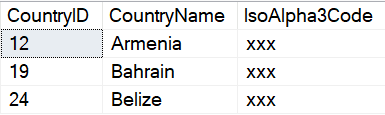
Resultset with a non-privileged user.
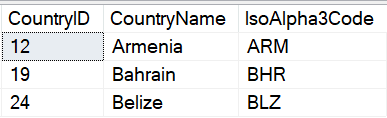
Resultset using a privileged user.
The test team can also use the Azure dashboard to verify masking options if they have the proper authorization to view the database there. If they can’t access the database view the dashboard, they can use SSMS and SQL scripts to verify the table definition and the metadata. This will be dependent on the skills of the test team, but exploratory scripts presented later in this article can be used by the team to validate masked columns and the mask used. Scripts can also be used to validate unmasking privileges for users.

/*
* The following can be used to validate masking security for users
* It requires a basic understanding of the security structure
* used by the application and database.
* It can be expanded for SQL Server 2022 to include column level masking.
*/
SELECT
        @@SERVERNAME    COLLATE Latin1_General_100_CI_AS  ServerName
        ,DB_NAME()      COLLATE Latin1_General_100_CI_AS  DatabaseName
        ,SU.name        COLLATE Latin1_General_100_CI_AS  UserName
        ,SR.name        COLLATE Latin1_General_100_CI_AS  RoleName
        ,'Database role' COLLATE Latin1_General_100_CI_AS SecurityType
FROM sys.database_role_members DRM
        INNER JOIN sys.sysusers SU
                ON DRM.member_principal_id = SU.uid
        INNER JOIN sys.sysusers SR
                ON DRM.role_principal_id = SR.uid
wHERE SR.name IN ('db_owner')
UNION
SELECT
        @@SERVERNAME    COLLATE Latin1_General_100_CI_AS  ServerName
        ,'master'       COLLATE Latin1_General_100_CI_AS  DatabaseName
        ,SP.name        COLLATE Latin1_General_100_CI_AS  LoginName
        ,ROL.name       COLLATE Latin1_General_100_CI_AS  RoleName
        ,'Server role'  COLLATE Latin1_General_100_CI_AS  SecurityType
FROM master.sys.server_role_members SRM
        INNER JOIN master.sys.server_principals SP
                ON SRM.member_principal_id = SP.principal_id
        INNER JOIN master.sys.server_principals ROL
                ON SRM.role_principal_id = ROL.principal_id
WHERE ROL.name          IN ('sysadmin')
UNION
SELECT
        @@SERVERNAME    COLLATE Latin1_General_100_CI_AS ServerName
        ,db_name()      COLLATE Latin1_General_100_CI_AS DatabaseName
        ,SUGR.name      COLLATE Latin1_General_100_CI_AS UserName
        ,DP.permission_name     COLLATE Latin1_General_100_CI_AS RoleName
        ,'Database permission'  COLLATE Latin1_General_100_CI_AS SecurityType
FROM sys.database_permissions DP
        INNER JOIN sys.sysusers SUGR
                ON DP.grantee_principal_id = SUGR.uid
WHERE DP.permission_name        IN 
   ('ALTER ANY MASK','CONTROL','UNMASK')

Testers, and administrators, can use the output from a script like the above to validate masking. The script can be modified to include column level unmasking for SQL Server 2022. It is a general pattern to assign security at a group level, so be sure to include that in your test plans.
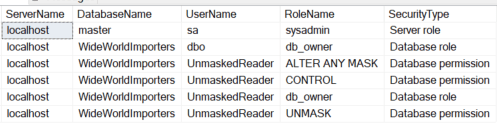
 

Masking Data

In this section I will demonstrate how masks look by default, and then what you can alter them to look like using a custom mask.

Default Masks

Default masks by type follow. Other preconfigured masks include email, random, custom, and datetime. The mask displayed is a purely aesthetic preference. It has no impact on performance, security, or storage.

In all of the examples so far, I have set the mask to DEFAULT. These are the default values for the basic datatypes:

Data type

Default mask

Date

01.01.1900

String

XXXX

Numeric

0

Binary

0

Datetime (SQL 2022)

01.23.2023 (depends on datepart masked)


In the next code, I will add a few more masks to the data:

--Show default mask for string
ALTER TABLE Application.People
ALTER COLUMN LogonName
ADD MASKED WITH (FUNCTION = 'default()');
GO
--Show default mask for numeric
ALTER TABLE Application.People
ALTER COLUMN PersonID
ADD MASKED WITH (FUNCTION = 'default()');
GO
--Show default mask for date
ALTER TABLE Purchasing.PurchaseOrders
ALTER COLUMN OrderDate
ADD MASKED WITH (FUNCTION = 'default()');
GO
--Show default mask for binary
ALTER TABLE Application.People
ALTER COLUMN HashedPassword
ADD MASKED WITH (FUNCTION = 'default()');
GO

Specialized Masks

Specialized masks can be used for any column type. This is very similar to application front end development. A hard-coded character can be used, a different date format, random values or a custom string. Most common formats are represented in the specialized masks available in SQL.


Basic default masks, random mask, custom string and the new datetime mask are shown below. Note that the datetime mask is new to SQL 2022 and will only work in that engine or Azure SQL.

--Show default EMAIL mask
ALTER TABLE Application.People
ALTER COLUMN EmailAddress
ADD MASKED WITH (FUNCTION = 'email()');
GO
--Random mask
ALTER TABLE Purchasing.PurchaseOrders
ALTER COLUMN SupplierID
ADD MASKED WITH (FUNCTION = 'random(1,100)');
GO
--Custom string
ALTER TABLE Application.People
ALTER COLUMN PhoneNumber
ADD MASKED WITH (FUNCTION = 'partial(6,"555-555",1)');
GO
--Datetime (SQL Server 2022 functionality)
ALTER TABLE Purchasing.PurchaseOrders
ALTER COLUMN ExpectedDeliveryDate
ADD MASKED WITH (FUNCTION = 'datetime("M")');
GO

Sample output from default masks created above.

EXECUTE AS USER = 'MaskedReader';
GO
SELECT TOP 100
        AP.PersonID
        ,AP.LogonName
        ,AP.HashedPassword
        ,AP.EmailAddress
        ,AP.PhoneNumber
        ,PO.OrderDate
        ,PO.SupplierID
        ,PO.ExpectedDeliveryDate
FROM Application.People AP
        INNER JOIN Purchasing.PurchaseOrders PO
                ON AP.PersonID          = PO.LastEditedBy;
GO
REVERT;
GO

The output from this code shows you the various masks in use:
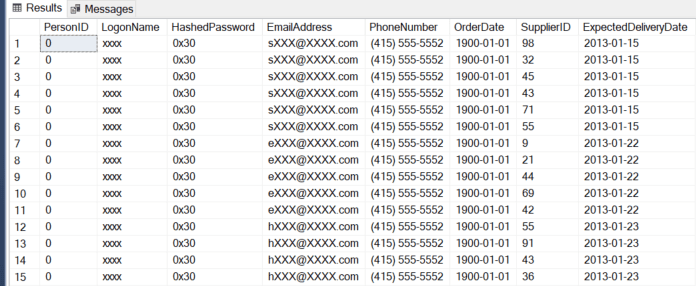
Note that the above example shows the PersonID getting masked in the base table. This type of masking gap will be explored in later sections, but you wouldn’t perform masking like this without masking all references to the column also. The PersonID can be determined by joining to another table via a foreign key and looking at the referencing column.

Joining to Data

When a primary key / unique constraint is masked, it can still be used for the join column. The key for this is to remember to mask every child table that references the masked column. Without masking on both tables, there is no need to unmask data and no concerns with malicious unmasking, the unmasking is already done by the database developer. If the child table isn’t masked, this is a glaring gap in the masking strategy. There is a long-standing debate on the use of natural keys for a primary key versus artificial keys. This is a clear reason to use artificial keys. The use of masking implies that there is some implicit knowledge in the column value, so an artificial key (identity or GUID), removes that implicit knowledge.

The following example shows an example of masking a primary key column but not the corresponding child table. The child data can be used to unmask the parent data, so design your masking carefully.

USE WideWorldImporters;
GO
CREATE TABLE dbo.KeyExample (
        CountryCode     nvarchar(3) 
       MASKED WITH (FUNCTION = 'default()') NOT NULL 
       CONSTRAINT PK_dboKeyExample PRIMARY KEY CLUSTERED
)
CREATE TABLE dbo.LookupExample (
        LookupExampleID int      NOT NULL       
        CONSTRAINT PK_dboLookupExample PRIMARY KEY 
               CLUSTERED         identity
        ,SomeValue int  NOT NULL
        ,CountryCode    nvarchar(3) NOT NULL    
        CONSTRAINT FK_dboLookupExample_dboKeyExample    
        FOREIGN KEY REFERENCES dbo.KeyExample(CountryCode)
);
GO
--Execute as a user that can view unmasked data
--Current user has dbo rights
INSERT INTO dbo.KeyExample (
        CountryCode
)
SELECT
        IsoAlpha3Code
FROM Application.Countries
ORDER BY IsoAlpha3Code;
--Uses the TABLESAMPLE keyword to return semi-random rows
--Very efficient but will not return an exact number of rows
INSERT INTO dbo.LookupExample (
        SomeValue
        ,CountryCode
)
SELECT
        --Psuedo-random numbers. Each value will differ by row. 
        --RAND() function will return same value for each row.
        CONVERT(INT,CONVERT(VARBINARY,NEWID())) SomeValue
        ,IsoAlpha3Code
FROM Application.Countries
TABLESAMPLE(10 ROWS);
EXECUTE AS USER = 'MaskedReader';
GO
--Select from the masked column and the unmasked column
--You wouldn't normally repeat the columns, but this shows
--the gap in masking
SELECT
        KE.CountryCode
        ,LE.LookupExampleID
        ,LE.SomeValue
        ,LE.CountryCode
FROM dbo.KeyExample KE
        INNER JOIN dbo.LookupExample LE
                ON KE.CountryCode = LE.CountryCode;
GO
REVERT;
GO
--Cleanup
--Drop this first or drop the foreign key before the 
--parent table
DROP TABLE IF EXISTS dbo.LookupExample
GO
DROP TABLE IF EXISTS dbo.KeyExample
GO

Output from the above script shows the masked and unmasked values. If the masked data was treated as if it were the value of the mask, you would end up with many many rows returned because every row would match the other.
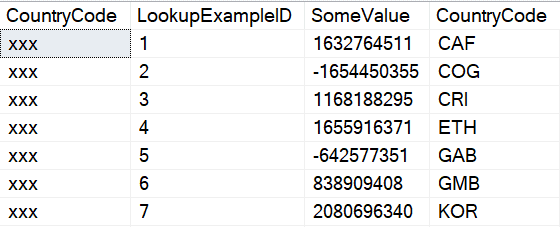
 

Moving masked data to a new table

SQL includes many methods to move data, modify data, merge data, and extract data. Basic CRUD (CReate, Update, and Delete) functionality. Masking data does not limit that functionality, but it does introduce some caveats.

If a user without authorization to view unmasked data tries to move that data, in any way, the data moved will still be masked, in fact, it will be permanently obfuscated in the destination. If you can only view masked data and you perform a SELECT INTO, the new table that you create will only contain masked data. If you perform an INSERT or an UPDATE to a different or new table, those impacted columns will contain masked data. Anything else would completely compromise the intention of masking the data.

Users with authorization to view unmasked data can perform all of these operations and retain the original, unmasked data. If a transactional, user application contains masked data, the INSERT and UPDATE operations will need to be performed by a user with the correct authorization.

USE WideWorldImporters;
GO
EXECUTE AS USER = 'MaskedReader';
GO
--MaskedReader only able to see masked data
SELECT
        CustomeriD
        ,CustomerName
FROM Sales.Customers;
--Insert data from the base table into #Customer
SELECT 
        CustomerID
        ,CustomerName
INTO #Customer
FROM Sales.Customers;
--Validate that the data is still masked
SELECT
        CustomerID
        ,CustomerName
FROM #Customer;
--Revert back to dbo (or current user)
REVERT;
GO
--Run as a user that is able to see masked data
--Same dataset as MaskedReader (due to RLS for MaskedReader)
--Notice that CustomerName is unmasked
SELECT
        CustomerID
        ,CustomerName
FROM Sales.Customers
WHERE CustomerID IN (74,84,116,431,454,488,560,821,1050,1051);
--Temp table created by MaskedReader
--Data in the table is masked since the user that 
--created the table could only view a masked version of CustomerName
SELECT
        CustomerID
        ,CustomerName
FROM #Customer;
DROP TABLE #Customer;
GO

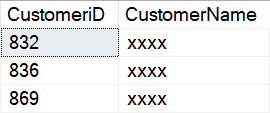
The masked user only sees the masked version of the CustomerName column.
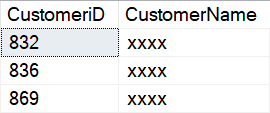
 

The data is still masked when it is inserted into a new table, in this instance, the temp table #Customer.
 

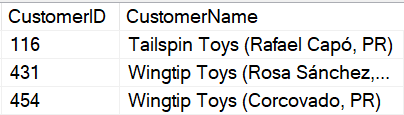
A privileged account is able to see CustomerName, but notice that the temp table created by the MaskedReader account only contains masked data.
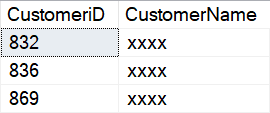
In the new table, #Customer, the data is permanently obfuscated, even with a privileged account.
If a user without authorization to see masked data also has rights to update that masked data, the base data is not obfuscated. It is correct at the physical level, but masked users, even the user that inserts or updates the data, is not able to see the unmasked version of the data.

USE WideWorldImporters;
GO
--Show the unmodified version of Sales.Customers
--For an ID that is available to MaskedReader via RLS
--CustomerName = 'Tailspin Toys (Indios, PR)'
--Run as dbo / privileged account
SELECT
        CustomerID
        ,CustomerName
FROM Sales.Customers
WHERE CustomerID = 74;
GO
--Allow MaskedReader to update the Sales.Customers table
--Note that due to RLS, even with UPDATE rights 
--on the table, the account can only update rows 
--available via RLS
GRANT UPDATE ON Sales.Customers TO MaskedReader;
GO
--Run as MaskedReader
EXECUTE AS USER = 'MaskedReader';
GO
--Update CustomerName
--The column is masked for this user
UPDATE Sales.Customers
SET CustomerName = 'Update for masked user'
WHERE CustomerID =74;
GO
--Even though the user just updated the column, 
--it is still masked
SELECT
        CustomerID
        ,CustomerName
FROM Sales.Customers
WHERE CustomerID = 74;
GO
--Revert back to dbo
REVERT;
GO
--Remove UPDATE rights
REVOKE UPDATE ON Sales.Customers TO MaskedReader;
GO
--Show the column when queried by a privileged user
--Note that the column is the original text - not a masked text
SELECT
        CustomerID
        ,CustomerName
FROM Sales.Customers
WHERE CustomerID = 74;
GO
--Reset the CustomerName to the original value
UPDATE Sales.Customers
SET CustomerName = 'Tailspin Toys (Indios, PR)'
WHERE CustomerID = 74;
GO

The first dataset returned by that batch of statements shows the unmodified version of the CustomerName for CustomerID 74, when run with a privileged account.

The second dataset shows the CustomerName after the MaskedReader has updated the value. Even though the user updated the column, that user is not able to see the unmasked value.
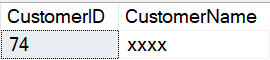
The final dataset shows output when a privileged user accesses the data.

 

Allowing access to data

There are several ways to allow access to masked data. The most straightforward path is granting a user UNMASK rights to a table. This can also be done by granting the user ALTER to the table, or to the schema. The ALTER ANY MASK permission also grants this right but wouldn’t be used for most users. Some scenarios require the ability for users to temporarily unmask data. Even if a user doesn’t have the ability to unmask the data, it can be displayed in a query by using the EXECUTE AS command utilizing a user with the correct access. This must be done in the context of a stored procedure or by a user with the proper rights.

Performance

Dynamic data masking has no discernable notice on performance. Masking is performed in the data engine and only has to modify data as it is output. While queries are running in the engine, there is no impact to the data. It doesn’t impact the query plan, indexes, statistics, storage on the page, standard security, or RLS.

The only potential impact happens during output when masking security is verified and the column output is obfuscated.


Coded Alternatives to Dynamic Data Masking

There are several alternatives to dynamic data masking that can be implemented on the database tier. As mentioned previously, masking is available in almost all front-end application languages. If users aren’t allowed to hit data directly, masking can still be used to control what is returned to the user. This can be helpful for reporting scenarios.

Views

Dynamic data masking works without modification in views. Reporting scenarios or other use cases where default masking behavior is desired. Additional custom scenarios are also supported by using views.

A common scenario in reporting or even transactional systems is excluding sensitive data by only allowing access in a view, and not including certain columns. In the following example, the masked columns can remain masked or masking can be removed. If the data is not available to users, and they don’t have direct access to the database, the data will not be presented.

USE WideWorldImporters;
GO
CREATE OR ALTER VIEW dbo.vw_CustomerCity
AS
SELECT
        CustomerID
        ,CityName
FROM sales.Customers C
        INNER JOIN Application.Cities CTY
                ON C.DeliveryCityID             = CTY.CityID;
GO
EXECUTE AS USER = 'MaskedReader';
GO
SELECT *
FROM dbo.vw_CustomerCity;
GO
REVERT;
GO


The output for this view is the same for every user since the masked column, CustomerName, is not presented in the view.
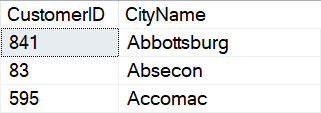
Data can also be masked directly in the view without using dynamic data masking by partially masking the data in the view. This is similar to dynamic data masking but it applies to every user hitting the view. In the following example, every user will receive a masked version of the CustomerName column. The rows returned will differ based on their RLS security.

USE WideWorldImporters;
GO
ALTER TABLE sales.Customers
ALTER COLUMN CustomerName 
DROP MASKED;
GO
CREATE OR ALTER VIEW dbo.vw_CustomerName
AS
SELECT
        CustomerID
        ,LEFT(CustomerName,1) + N'xxx' CustomerName
        ,CityName
FROM sales.Customers C
        INNER JOIN Application.Cities CTY
                ON C.DeliveryCityID             = CTY.CityID;
GO

Selecting from the view with the restricted user account shows fewer rows, with masking applied.

USE WideWorldImporters;
GO
EXECUTE AS USER = 'MaskedReader';
GO
SELECT
        CustomerID
        ,CustomerName
        ,CityName
FROM dbo.vw_CustomerName
ORDER BY 
        CustomerName
        ,CityName;
GO
REVERT;
GO

This returns the following (abbreviated for space) dataset:
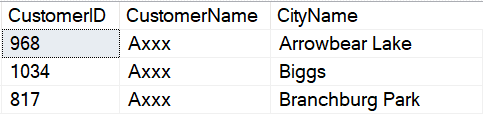
Selecting from the view using the less restricted user account returns more rows, but the CustomerName is still restricted.

USE WideWorldImporters;
GO
EXECUTE AS USER = 'UnmaskedReader';
GO
SELECT
        CustomerID
        ,CustomerName
        ,CityName
FROM dbo.vw_CustomerName
ORDER BY 
        CustomerName
        ,CityName;
GO
REVERT;
GO

As shown by the output, all users are returned the obfuscated CustomerName when the view is used.
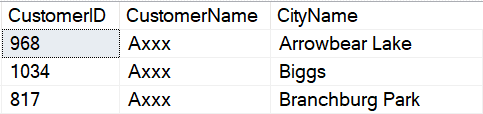
 

Reenable masking on the Sales.Customers.CustomerName column.

USE WideWorldImporters;
GO
ALTER TABLE sales.Customers
ALTER COLUMN CustomerName
ADD MASKED WITH (FUNCTION = 'default()');
GO

One of the disadvantages of custom masking in views is the loss of much of the functionality afforded by dynamic data masking. The ORDER BY statement in the SELECT applies to the masked data, not the base, unmasked data. Other functionality such as using the column for joins or functions is also lost or severely restricted. This still may fit the need of projects depending on the design patterns. It also simplifies implementation. It also assumes that the users don’t have access to the base table, Sales.Customers, if they shouldn’t have access to the masked column. If the purpose of masking is to prevent data from appearing in reports, it would also suit that need.

Stored Procedures

Stored procedures have added functionality available to work with dynamic data masking. Adding some additional checks to a stored procedure allows the user security to be changed dynamically, by using EXECUTE AS USER. There are multiple ways security for a user can be created and verified. In the following example, a new user role is created in the database, AllowUnmasking, and the MaskedReader user is added to this role.

USE WideWorldImporters;
GO
--Create a role for unmasking
CREATE ROLE AllowUnmasking AUTHORIZATION dbo;
GO
--Add the MaskedReader to the new role
ALTER ROLE AllowUnmasking ADD MEMBER MaskedReader;
GO
CREATE OR ALTER PROCEDURE dbo.prcSalesCustomers_SELECT
WITH EXECUTE AS OWNER 
--Execute as owner, dbo, so EXECUTE AS USER can 
--be called in the procedure
AS
SET NOCOUNT ON;
--Find the original user executing the stored procedure.
--Store the value in the @User variable
DECLARE @User nvarchar(255);
EXEC AS CALLER;
SELECT @User = USER_NAME();
REVERT;
--Check if the calling user is a member of the 
--AllowUnmasking role defined earlier
--If it is a member, execute the SELECT as UnmaskedReader
--In a production scenario, you may want to create a 
--different account
--if RLS is present or additional security is needed.
IF (SELECT IS_ROLEMEMBER('AllowUnmasking',@User)) = 1 
BEGIN
        EXECUTE AS USER = 'UnmaskedReader';
END
ELSE
BEGIN
        --Execute as the original calling user if 
     --they are not a member of the AllowUnmasking role, 
     --reverting back to default behavior.
        --This could also use  EXECUTE AS USER = 'MaskedReader'
        EXECUTE AS USER = @User
END
SELECT
        C.CustomerID
        ,C.CustomerName
        ,CTY.CityName
FROM sales.Customers C
        INNER JOIN Application.Cities CTY
                ON C.DeliveryCityID             = CTY.CityID
ORDER BY
        CustomerName
        ,CityName;
--Revert back to the calling user
REVERT;
GO
GRANT EXEC ON dbo.prcSalesCustomers_SELECT TO MaskedReader;
GO

Executing as a user that would normally have masked data, but is setup with the AllowUnmasking role returns unmasked data from the stored procedure, but not when accessing the table directly.

USE WideWorldImporters;
GO
EXECUTE AS USER = 'MaskedReader';
EXEC dbo.prcSalesCustomers_SELECT;
GO
SELECT
        C.CustomerID
        ,C.CustomerName
        ,CTY.CityName
FROM sales.Customers C
        INNER JOIN Application.Cities CTY
                ON C.DeliveryCityID             = CTY.CityID;
REVERT;
GO

Output from the stored procedure shows the full CustomerName. Access to a stored procedure can be limited in many ways. The access can be controlled by an API layer or a report layer, schema level access can be granted or denied, the individual stored procedure can be limited, and additional lookups can be done in the stored procedure itself to determine if the user can be unmasked or not. In this example, any user calling the procedure is checked against the role AllowUnmasking to determine how the data is presented.

Even though the user is part of the AllowUnmasking role in this example, direct access to the data is not allowed, as shown int the output for the direct query.
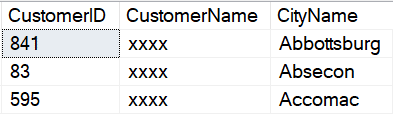
 

Summary

SQL Server Dynamic Data Masking can be implemented using repeatable scripts and automated via standard dev-ops deployments or it can be configured manually via the GUI. Some alternatives to dynamic data masking were presenting, including using a standard UI lay, a view layer, or stored procedures. Future sections included side channel attacks, mitigations to those attacks and other considerations for implementation.

The post Unmasking SQL Server Dynamic Data Masking – Part 2 – Setting up Masking appeared first on Simple Talk.


from Simple Talk https://ift.tt/kexabpA
via

Tuesday, June 6, 2023

Power BI Connections Management

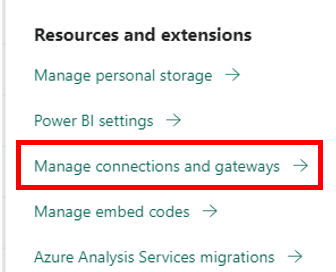
Some time between January and now, a new preview feature was included in Power BI Portal. It’s a new Manage Connections and Gateway window, still in preview. We can access this option on the Settings button.

Interface gráfica do usuário, Texto, Aplicativo Descrição gerada automaticamente

In the past, the connections were related to on-premises data gateways. For each gateway we could create many connections and manage who would be the users with permissions to re-use these connections.

This is a separation of responsibilities: A Power BI Administrator, or gateway administrator, can be the responsible to create and manage the connections, while Power BI developers can use the connections without knowing the details about the connectivity.

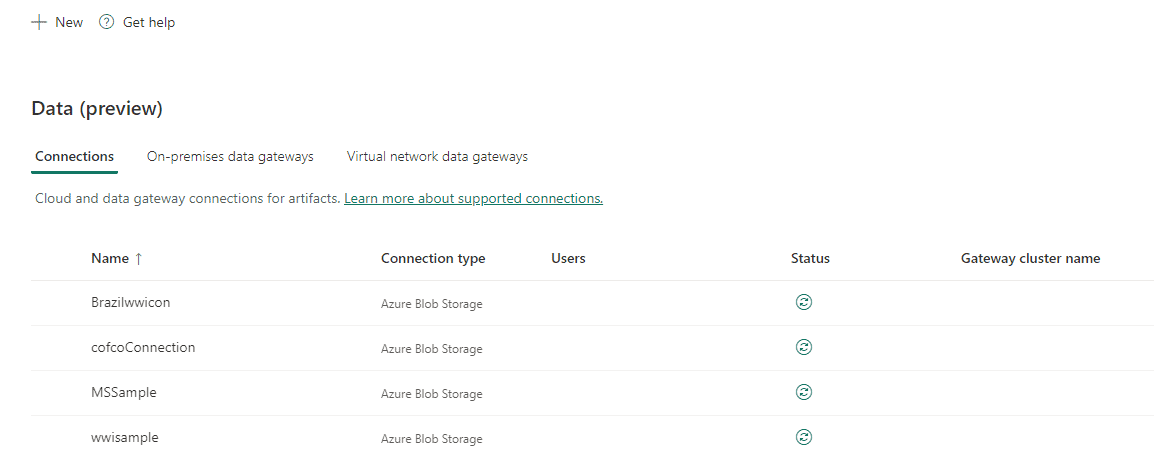
The cloud brought the need of the Virtual network data gateways, which I explained in another article. The connections can be linked to an on-premises data gateway, a VNet data gateway or can also be a direct connection to a cloud resource.

Considering this evolution, the new Connections Management window allow us to manage the connections by themselves, independent of the gateways.

Interface gráfica do usuário, Texto Descrição gerada automaticamente

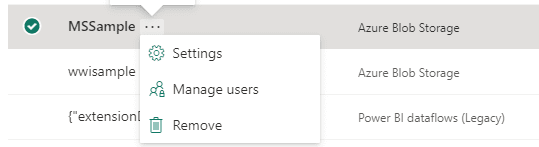
Each connection has an action button which allow us to manage the access to the connection (Manage Users), change the connection configuration (Settings) or remove the connection.

Interface gráfica do usuário, Aplicativo Descrição gerada automaticamente

Interface gráfica do usuário, Texto, Aplicativo, Email Descrição gerada automaticamente

Imagine creating 30 reports over the same connection. If you need to move the data source to a new place, you can reconfigure the connection one single time on the portal and all the reports will access the data from the new location.

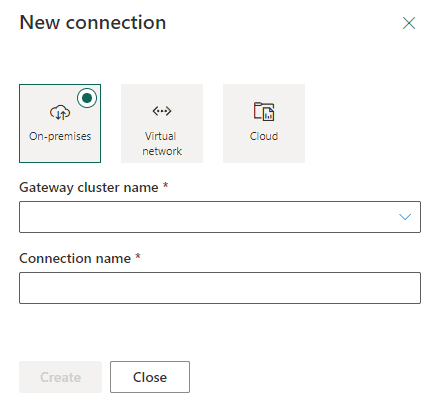
If we click the button New we can create a new connection. We can choose if the connection will be linked with an on-premises data gateway, a VNET Gateway or if it will be a connection directly to a cloud resource.

Interface gráfica do usuário, Aplicativo Descrição gerada automaticamente

Limitations of the Preview

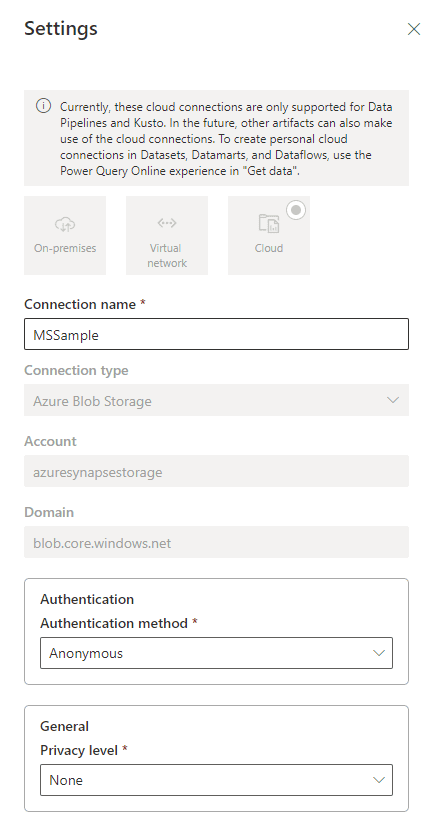
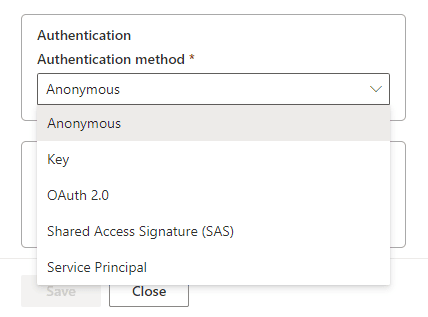
The connection configuration is limited at the moment: We can’t change the connection location, such as the address of the storage account, but we can change the authentication.

Interface gráfica do usuário, Texto, Aplicativo, chat ou mensagem de texto Descrição gerada automaticamente

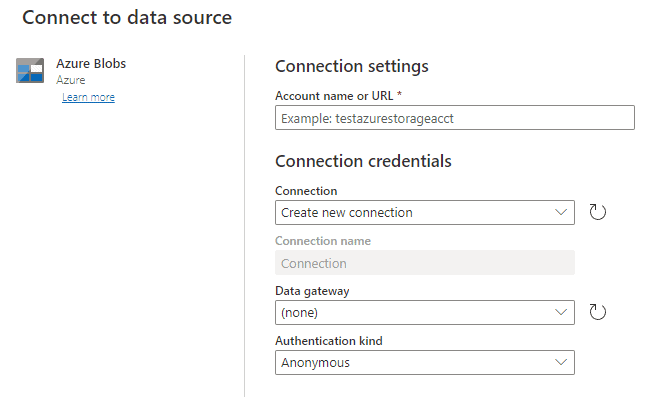
We can use existing connections or create new ones in Microsoft Fabric. In Datamarts or Dataflows we can only create new connections, but not use existing ones. On the other hand, in Power BI Desktop we can’t create or use the connections at the moment.

Interface gráfica do usuário, Texto, Aplicativo Descrição gerada automaticamente

Conclusion

This feature is still limited, but it’s an important backbone service in Microsoft Fabric/Power BI environment which is related with many more resources in the entire Microsoft Fabric ecosystem.

The post Power BI Connections Management appeared first on Simple Talk.


from Simple Talk https://ift.tt/0aBfY8G
via

Monday, June 5, 2023

Why Test-Driven Development? (Part 1)

Software development is a very tough discipline. Robert Martin (better known as Uncle Bob) holds that software development is the toughest discipline because never before in human history was there an expectation to deal with such insane levels of details. Software development is so tough that it even created the movement called Extreme Programming (XP). We’re talking extreme levels of focus and hard work needed to produce quality software.

Since the core activity in software development is the activity of programming, what is the main challenge we’re faced with when attempting to program computers? Whenever we sit down to write some code, we are faced with two equally demanding challenges:

  1. We are focused on writing the code that will behave as expected.
  2. We are focused on writing the code that will be well structured.

It turns out that holding both expectations in our head at the same time tends to produce a lot of confusion. Trying to focus on two things at the same time is often a recipe for producing substandard material.

Is there a way to fix this impasse? Yes, there is a way – it was proposed by Kent Beck in the 1990s with his formulation of the Extreme Programming discipline. Kent proposed a different approach to writing programs by segregating the above two activities. This way of writing programs consists of first focusing on the activities that will produce code that behaves as expected. During this first phase, we neglect to focus on the quality of the code structure. In other words, we just write the code that comes easy to us. Meaning, it’s okay during this phase to break many rules and produce code that will make many professionals cringe and frown upon. That first pass of writing code (the first draft) is sloppy and messy; and that’s okay. We are asked to give ourselves permission to be sloppy at this juncture. Our aim at this point is single-minded – create code that will behave as expected.

And now for the crucial question: how do we know that the sloppy code we just wrote behaves as intended? We could manually verify the behaviour of the newly created code. But that would be very wasteful. Hey, here’s an idea – since we are very good at automating processes, why don’t we investigate automating our own development process? Instead of doing tedious, repeatable chores manually, why don’t we offload those chores to the machines?

What repeatable manual chores am I referring to here? I’m mostly thinking about the following scenario: we make a diff (a change) to the source code with the intention to get it to produce some desired behavior. We save those changes, and then embark on performing the following manual steps:

  1. Compile the code
  2. Build the app
  3. Configure the app
  4. Run the app
  5. Navigate to the login page on the app
  6. Log in with special credentials that simulate a specific user role
  7. Navigate the app to reach the section that is affected by the code change
  8. Enter some test data
  9. Examine the resulting output
  10. Log out and log in again with different credentials that simulate different user role
  11. Repeat steps from 7 to 9

Whew! That’s a lot of manual heavy lifting. Why are we doing things in such a pedestrian way? All the above steps can be easily automated. Saves not only time but also spares us from ‘fat fingers’ mistakes.

So, how do we automate the above chores? Simple – we write some code. But wait a minute – didn’t we just say that writing code is super tough because we are striving to satisfy two incompatible expectations (i.e., the expectation that the code behaves to our satisfaction and the expectation that the code is well structured). Well, in this case, the code we write to automate development chores is a different breed of code. Unlike the implementation/production/shipping code, which must be well-designed and properly structured, the code we write to automate our development activities need not be that fancy.

Rules for automating behavioral expectations

There is an adage in the software development profession: “Functionality is an asset; code is a liability.” That means we want to implement certain functionality, and if we can do it without having to write any code, that would be the most desirable outcome. However, oftentimes it is not possible to implement new functionality without writing some code, so a compromise seems unavoidable.

Functionality is what we call system behavior. Once implemented, the system behaves in certain automated fashion. While developing the system, we strive to make the system behave in the expected way(s).

To keep expectations about behavior separated from expectations about the code structure, we must write the expectation first. Let’s illustrate with a simple example. Suppose we are developing a tip calculator and we are expecting it to calculate tip percentages correctly. We can say “given an order total of $100.00, when the service was good, add $15.00 to the total to produce the grand total of $115.00”. That expectation stipulates that the system will calculate a 15% tip for a good service.

Okay, but how do we automate that expectation? We do it by writing a test. The test will first arrange for the preconditions by declaring the order total to be $100.00 and the service level to be ‘good’. The test will then envision that there is a system in place and that the test will be its first client. The test (i.e., the client) will notify the system saying, “here is the order total of $100.00 and the service was good; please calculate the tip and add it to the order total”.

To many software developers, this approach feels a bit odd, a bit backwards. Why are we spending time imagining how we could be interacting with an imaginary system? Isn’t it smarter to first build a system, and only then attempt to interact with it?

The reason we are envisioning how will the client’s interaction go with a not-yet-created system lies in our desire to keep our options open. We prefer to remain flexible. If we were to wait until the system gets built, we’d be coerced into having no choice but to interact with it in ways that may not make much sense to us, the client. The ease of understanding the system and the usability of the system are important aspects of the system design, which is why we are pursuing this train of thought.

So, by following this open-ended approach, we find ourselves in a very flexible position: we can envision any type of interaction with the nascent “tip calculator” system. We could call it directly and synchronously (i.e., blocking); we could try calling it asynchronously; we could even attempt to interact with it by publishing messages and letting the system subscribe to our publishing channel and consume our messages. Sky is the limit.

Once we formulate our first stab at how we would like the client to interact with the system, we can pretend that the interaction happened. The only thing left to do is to verify if the system behaved the way we expect it to behave. In this case, we are expecting the system to behave by returning $115.00 as the order grand total.

Now, in practical terms, this arrangement means that the expected system behaviour will not happen. We can try to run this half-baked test, and it will fail, of course. It cannot succeed for the simple reason that the system it is supposed to interact with does not exist yet.

But this failure is a good thing. It lets us know that our expectation hasn’t been met, and it gives us the impetus to keep going in the attempt to develop a system that satisfies our expectation.

From this little exercise, the most important thing is to focus 100% on our expectation regarding the system behavior. We need not waste any time pondering the implementation of the expected behavior. In other words, we are focused on formulating what is the system supposed to be doing, not on how the system is supposed to be doing it.

Separating the what from the how (separating the intention from the implementation) is a very powerful practice. It lets us focus on one thing at a time, which increases our chances of delivering quality work. Divide and rule is a maxim that is pretty much applicable to all situations.

The next thing to notice in the above exercise is that we are not formulating any conditional logic. The expectation, the test we have laid out above, is proceeding in a straight line. From arranging the preconditions (i.e., “given the order total is $100.00 and the service was good”), to triggering the system behaviour (i.e., sending the message to the yet-to-be-built system), to asserting the produced results (i.e., did the system return $115.00 grand total?). The last part is often referred to as post-condition (or, simply, assertion).

Pay close attention to how nowhere in the flow of the above test do we expect the code to make any branching decisions (in the form of “if this condition, then do that, otherwise do the other thing”). This ground rule is super important. It can be formulated as “never add any conditional logic to your tests!”

Of course, a testing framework itself possesses that branching logic, in the form of “if the expectation has been met, the test passes, otherwise the test fails”. Such branching logic is baked into the assertion statement offered by the testing framework; however, we don’t need to add any further logic to it; it is offered to us for free.

To summarize, two ground rules when automating behavioral expectations are:

  1. Envision what needs to be done, not how it will get done
  2. Avoid implementing any conditional (i.e., branching) logic in the test

How to work on meeting the expectation?

Now that we have crafted the shell of our expectation, how do we fulfill that expectation? In a more technical parlance, how do we make the failing test pass?

The recommended way to do that is to focus on two things:

1. Taking only small steps

2. Taking ordered small steps

The small-steps approach is another unusual aspect of this discipline. Professional software developers sometimes tend to view that approach as being suitable for novices, who are still learning the ropes. Then, once the ramping up process is done, novices graduate to intermediate/senior level and at that point they should dispose of the sheepish small steps and take the coding challenges in bigger strides.

That, however, is not the Test-Driven Development way. In TDD, we really cherish small steps. And by small steps I’d insist we mean micro-steps. Or one micro-step at a time.

Before we take a closer look into why micro-steps are so desirable, let’s have a look at what is meant by a micro-step. The first thing to ask always is: what is the smallest step we can do now? Usually, the smallest step is the simplest step. But that’s not always the case.

In this case, however, the smallest step we could possibly take would be crafting a skeleton of the system we intend to endow with expected behaviour. It could be a module, or a class, or some other construct containing executable code that could be triggered. Usually, such skeleton system can accept some input values and then return some output values.

So, we take our first small step by crafting a class or a module. That class/module can contain a simple function or a method that accepts arguments, or input parameters. For example, it can accept the order total and the service level parameters.

OK, but now that we have a simple system that accepts those values, how can we make that system behave? How can we make it return the expected value (in our case, we’re expecting it to return $115.00). We take the next simplest possible step – we return the hardcoded value. The body of the method remains empty, save for the simple statement:

return 115.00;

And with that simple change, we now have built the system that behaves as expected – it accepts the order total of $100.00 and the service level labeled as ‘good’, and then functions (i.e., behaves) by returning the $115.00 value. In effect, this test now passes! The expectation has been met. We’re done here.

Or are we?

More complex behavior

If every order total was $100.00 and if every service level was ‘good’, we wouldn’t have the need for developing an automated tip calculator app. What happens when, to keep things extremely simple, the order total is still $100.00 but the service level is ‘great’?

In that case, our expectation is that the system should add $20.00 to the order total, producing a grand total of $120.00. We can now write another test that formulates such expectation. When we run that test, it will fail. Why? Because it will send the order total of $100.00 and the service level ‘great’ to the tip calculator, but it will receive back the actual value of $115.00. And because it was expecting the actual value to be $120.00 in case of a great service, the assertion will fail.

How do we make the second test pass? The only way to make it pass is by replacing the hardcoded return value with some processing logic. The processing logic will have to make calculating decisions based on the type of the service. If the service was ‘good’, add 15% to the order total, if the service was great, add 20% to the order total. Both tests now pass.

What happens when we expect the system to calculate the tip for excellent service? We formulate another expectation. We create a new test that expects the actual grand total to be $125.00 given the order total of $100.00 and service level ‘excellent’.

Of course, this new test will fail (as it should). It fails because the system doesn’t know what to return when the service level is ‘excellent’. So, we need to modify our processing code to make it recognize the service level ‘excellent’ and then calculate the appropriate tip and add it to the order total (by applying 25% on the order total).

As should already be obvious from this exercise, we are growing the capabilities of our system in a very gradual, piecemeal fashion. And each step of the way is marked by a failing test that then passes once we make modifications to our shipping code.

It is also worth noting that our progression moves from very concrete code (as in hardcoded value) toward more abstract code (replacing hardcoded value with actual calculations that are performed on demand). We will see that TDD is a discipline that keeps egging us, little by little, away from more concrete code toward more abstract, more generic code.

For now, we have illustrated only one side of the Test-Driven Development process. We have accomplished the first challenge: making the code behave as expected. A bigger, more important side of this process – creating well-structured code — will be discussed in the next article.

Conclusion

The above-described approach to developing software will probably look ridiculous to developers who have never tried it. I know it looked not only ridiculous, but also very stupid to me when I first encountered it back in 2002. I could not believe why would anyone waste time writing more code than is necessary? Why write those executable expectations/tests when all we’re really asked to deliver is the shipping code? Obviously, no customer will ever agree to pay for those tests. Isn’t it logical then to avoid wasting time writing those tests?

Of course, even back then we all agreed that having regression tests is necessary. But those regression tests were to be written after we finish writing the shipping code, not before. Also, traditionally regression tests were the jurisdiction of the testers, or QA, not something software developers were expected to produce.

When it was explained to me that writing the test before we write the code is helping with the code quality, that didn’t make any sense to me either. I was confused – so, if we don’t think developers are capable of writing quality code without tests (which are supposed to drive the code quality), what makes us think that those same developers are suddenly capable of writing quality code in tests? Isn’t that approach just pulling the wool over our eyes? Tests are also code, and if we are doubtful that developers can write quality shipping code, why are we not doubtful that they can write quality test code?

We will clarify that dilemma in the following article. Still, for now, we should review one important aspect of the example we’ve examined so far. By following the simplest TDD practice, we were able to implement tip calculator functionality without ever resorting to any manual steps. None of the 11 steps exposed in the introduction had to be executed. From that, we see that TDD offers full software development process automation.

When making changes to our code, we never have to manually compile, configure, run, log in, navigate, and type some test data to be able to verify if the change works as expected. Instead, we let our tests do all the heavy lifting. Tests are there to eliminate any manual waste; they are fast, reliable, repeatable at will.

Tests are also great for providing many other useful services that enhance the process of software development and ensure higher quality. More on that in the next article.


The post Why Test-Driven Development? (Part 1) appeared first on Simple Talk.


from Simple Talk https://ift.tt/LF9Z5Vj
via

Saturday, June 3, 2023

On Premises vs Cloud

In this blog, we will explore the disparities between on-premises and cloud infrastructures, highlighting their respective benefits and drawbacks.

What is an On-Premises Architecture?

An on-premises data center refers to a physical facility owned and operated by an organization, serving as a central hub for managing and housing its own IT infrastructure. This infrastructure includes servers, networking equipment, storage devices, and other hardware components. Within an on-premises data center, the organization has complete control over the infrastructure, software systems, security measures, and overall management of the data center environment.

Typically, on-premises data centers are located either within the organization’s premises or in a dedicated nearby facility. They are purposefully designed to meet the specific requirements of the organization, allowing for customization to effectively address the organization’s unique IT needs.

Setting up an on-premises IT infrastructure involves establishing a data center, procuring physical hardware and licenses, and installing the necessary software. This process can take weeks or even months for complex architectures. It requires collaboration among different teams, such as Hardware, Networking, and IT Support, to complete the setup. Even after the upfront costs, it may take months for the organization to test whether the infrastructure meets their requirements and performs as expected. If the on-premises infrastructure falls short of the organization’s needs, adjustments may require new hardware and software. This entire process represents a significant upfront cost in terms of both time and money for any organization, resources that could be better utilized focusing on core business functionality.

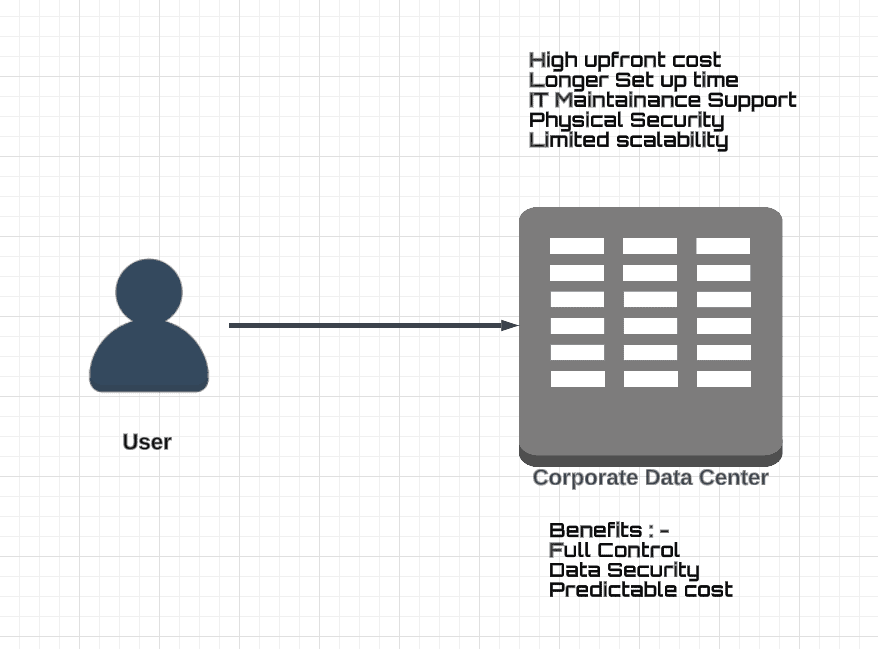
Figure 1 shows a user connecting to an on-prem data center which is self-managed.

A picture containing text, screenshot, diagram, design Description automatically generated

Figure 1: Illustration of a user using on-premises data center.

It is the responsibility of the user or team responsible for managing the infrastructure to ensure that servers are functioning, physically secure, and that software and hardware are regularly maintained and updated. The diagram above highlights certain concerns, including the need for additional personnel for maintenance, high initial costs, and a potentially longer setup process.

On-premises refers to information technology infrastructure hardware and software applications that are hosted on data centers owned/leased by companies. Organizations and businesses have substantial control over the underlying infrastructure.

The key strengths organizations get from on-premises infrastructure are:

  1. Control of hardware and software: Customers exert great control over the hardware and software stacks. Customers can customize their own configurations, upgrades, and system changes.
  2. Fine-grained control in areas of responsibility: Customers have low-level control over governance and regulatory compliance, as well as other areas for which they are solely responsible.
  3. Internet connectivity does not have to be a dependency: An on-premises architecture can be configured so that Internet connectivity does not have to be a requirement for software access. In an on-premises environment, the infrastructure and applications are hosted and managed within the organization’s own physical premises or dedicated data center. The data and services are accessed and operated within the local network, without relying on an external internet connection for their core functionality.
  4. Lower Total Cost of Ownership (TCO): An on-premises architecture can have a lower TCO from a licensing perspective. In an on-premises environment, organizations typically purchase software licenses upfront and own them indefinitely. This means they have the freedom to use the software without ongoing subscription fees or recurring payments. They can negotiate licensing agreements and terms directly with the software vendors, potentially securing better pricing based on their specific needs and usage patterns.
  5. Predictable cost: Organizations have more control over their costs as they make upfront investments in hardware and software. This allows for better cost predictability and the ability to allocate resources according to the organization’s budget and needs.

The on-premises infrastructure does possess a few drawbacks:

  1. Large initial investment: The on-premises infrastructure requires large hardware and software purchases, which represent significant upfront costs. Maintenance, including support and upgrades, represents additional costs.
  2. Longer setup and implementation time: The on-premises infrastructure set-up can take a considerable amount of time for installation, especially for complex systems like a database management system, which typically requires more than just installing a piece of software and letting the users used it.
  3. Responsibility for maintenance: With the on-premises infrastructure, the customer is responsible for maintaining their own server hardware, software, storage, disaster recovery, etc.

What is the Cloud and How Does It Compare to On-Premises Architecture?

The Cloud represents on-demand delivery of IT resources over the Internet. Organizations do not need to manage hardware and software in the Cloud. Instead, customers pay for resources like storage, compute, high availability/disaster recovery, and other services as they use them. Cloud service providers charge customers at well-defined intervals, at a granularity as low as per-second billing for resources. Resources can generally be configured and acquired, configured, and removed easily and quickly (often with a few mouse-clicks), and, hundreds of services are available to customers.

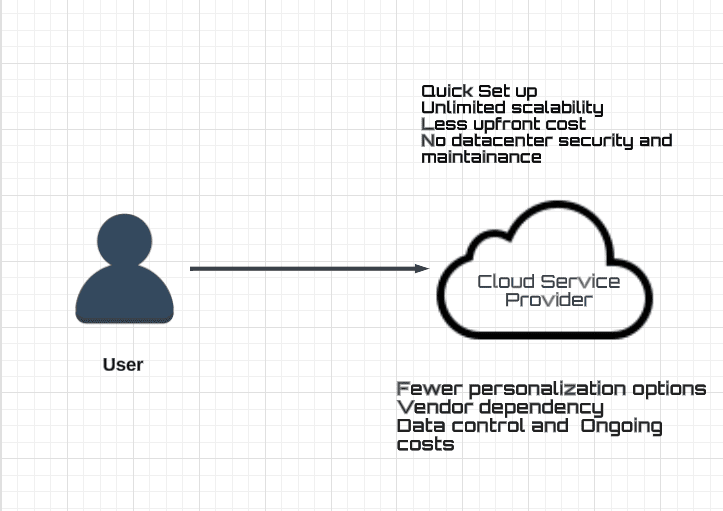
Figure 2 shows a user connecting to a cloud provider.

A diagram of a cloud service provider Description automatically generated with medium confidence

Figure 2: Illustration of a user using cloud services.

The Benefits of Cloud Architecture include

  • Quick deployment: Customers don’t need to provision any hardware, and software can be deployed within minutes. This can drastically reduce time-to-market.
  • Scalability: The biggest advantage of Cloud Computing is that a customer pays only for what they use. In situations where more storage, or greater compute power, is needed, the customer can dynamically and easily scale up their application. In doing so, they pay only for the additional resources used rather than spending money on physical hardware purchases. When the additional resources are no longer needed, the customer can quickly and easily scale down to their normal usage level again.
  • No hardware maintenance: A customer doesn’t need to worry about maintenance of hardware or data center; and physical security is the responsibility of the Cloud provider.
  • Affordable: Cloud providers require no upfront cost. Customers can make regular monthly payments or negotiate a longer-term contract with a Cloud provider to save money and gain more benefits. Customers can start their journey with initial monthly payments and later engage in a longer-term contract when their application is stable, giving them the best of both worlds.
  • Disaster Recovery and Business Continuity: Cloud service providers typically provide reliable disaster recovery and backup solutions. They replicate data across multiple data centers, guaranteeing data resilience and reducing the chances of data loss. This capability allows organizations to swiftly recover from disasters and ensure uninterrupted business operations.
  • Cutting-Edge Technologies: Cloud providers make consistent investments in cutting-edge technologies like artificial intelligence (AI), machine learning (ML), and the Internet of Things (IoT). Through cloud services, organizations can harness the power of these technologies without the requirement of significant infrastructure or specialized expertise in these domains.

The Drawbacks of the Cloud Architecture are:

  • Less customization: Although Cloud providers 100’s of services to choose from and expose many customization options and, customers can apply more fine-grained customizations to their on-premises data centers as compared to Cloud providers. The on-premises model provides greater control over the operating system, software, etc.
  • Long term contracts: Starting with a Cloud provider is often cheaper, but over a long-term period it can be more expensive. This can be due to data transfer costs, moving data in and out of the cloud can be costly, particularly for large volumes of data. After a business has made a commitment to a specific cloud provider, transitioning to an alternative provider can be challenging and may incur considerable expenses and disruptions. As a result, this scenario may result in reduced competition and higher costs over the long run.
  • Connectivity: Using the Cloud requires reliable and sufficient Internet connectivity. Regional, or Internet-wide, Cloud provider outages may adversely affect your productivity.
  • Data Security Concerns: Storing confidential information in the cloud gives rise to apprehensions regarding the security and privacy of data. Organizations must place their trust in the security measures and data handling practices of their chosen cloud service provider. Unauthorized access or breaches in cloud-stored data can lead to significant repercussions.
  • Cost Management: Although cloud architecture provides flexibility and scalability, inadequate management can lead to unforeseen expenses. It is crucial for organizations to closely monitor their usage of cloud resources and optimize their configurations to prevent excessive spending.

Conclusion

While both on-premises and cloud computing offer distinct advantages and disadvantages, I would like to share my perspective on the reasons behind the increasing adoption of cloud computing. The current era is witnessing an unprecedented pace of technological advancement, characterized by the rapid evolution of various technologies. One significant trend in the industry is the increasing adoption of cloud solutions. This shift is primarily motivated by the fact that companies no longer must bear the burden of maintaining specialized expertise. Furthermore, the process of installing software in the cloud is considerably faster compared to the traditional approach of purchasing, installing, and managing costly servers independently.

By embracing cloud solutions, companies can prioritize their core business activities instead of diverting valuable time and resources towards the upkeep of complex infrastructures. Moreover, organizations benefit from the flexibility to easily add or remove resources across different performance classes, enabling swift adjustments to meet changing demands. This eliminates the need for protracted procurement processes that would otherwise consume months of valuable time.

Another advantage lies in the vast array of services offered by cloud service providers. Organizations are not limited to using cloud services solely for storage purposes. Instead, they gain access to a broad range of services spanning numerous domains, expanding their capabilities beyond storage, and empowering them to leverage the full potential of cloud computing.

Overall, the relentless advancement of technology, coupled with the inherent benefits of cloud solutions, has prompted organizations to embrace this paradigm shift. By harnessing the power of the cloud, companies can streamline their operations, focus on core competencies, and avail themselves of a wide array of services to drive innovation and stay competitive in today’s fast-paced digital landscape.


The post On Premises vs Cloud appeared first on Simple Talk.


from Simple Talk https://ift.tt/VoAgae8
via

Thursday, June 1, 2023

SQL Server 2022: Capture SQL Anti-Patterns

 
One of the new Extended Event available in SQL Server 2022 is the query_antipattern. This extended event allows to identify anti-patterns on the SQL queries sent to the server.  An anti-pattern in this case is some code that the SQL Server optimizer can’t do a great job optimizing the code (but cannot correct the issue automatically).
 
This is a very interesting possibility: Including this event in a session allow us to identify potential problems in applications. We can do this in development environments to the the problems earlier in the SDLC (Software Development Life Cycle).  Let’s replicate some examples and check how this works.
 

Requirements

If you want to follow along with the examples, you need to install the sample database WideWorldImporters. You can download it on this link https://github.com/Microsoft/sql-server-samples/releases/tag/wide-world-importers-v1.0
 
After downloading and restoring the database,  you need to create a new index on Sales.Orders using the code below:
USE [WideWorldImporters]
GO

CREATE NONCLUSTERED INDEX [indPurchaseOrder]
  ON [Sales].[Orders] ( [customerpurchaseordernumber] ASC )
GO

Prepare the Extended Events Session

Create the Extended Event Session using the following code. (The Extended Event output will be solely to the ring buffer, which lets you view the data easily in SSMS and is good for quick viewing of extended session output.)
USE master;
GO 

IF EXISTS (SELECT * 
           FROM   sys.dm_xe_sessions 
           WHERE  NAME = 'query_antipattern_xe') 
  BEGIN 
      DROP event session [query_antipattern_xe] ON server; 
  END
GO 

CREATE EVENT SESSION [query_antipattern_xe] ON SERVER  
     ADD EVENT sqlserver.query_antipattern (   
        ACTION(sqlserver.client_app_name,sqlserver.plan_handle, 
               sqlserver.query_hash,sqlserver.query_plan_hash,
               sqlserver.sql_text)
          ) ADD TARGET package0.ring_buffer(SET max_memory=(500)) 
GO
Start the Extended Event Session using the following code:
ALTER EVENT SESSION query_antipattern_xe ON SERVER
STATE = START;
GO
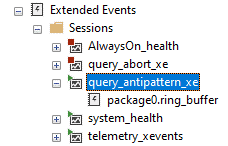
Then verify it is started in management studio:
 
 
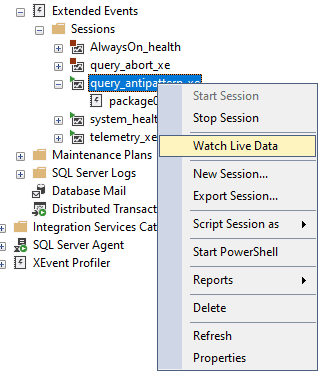
Right-click the session and select the Watch Live Data menu item. This will let you see as new events occur.


Anitpattern #1 – Implicit conversions

One of the biggest silent performance killers in T-SQL code is certain implicit conversions where the comparison cannot be performed in a lossless manner.  For an example, in a new query window, execute the script to cause the first anti-pattern:
USE WideWorldImporters
GO

SELECT *  
FROM    Sales.Orders 
WHERE  CustomerPurchaseOrderNumber=10014;
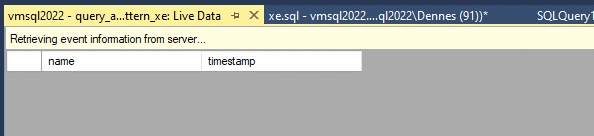
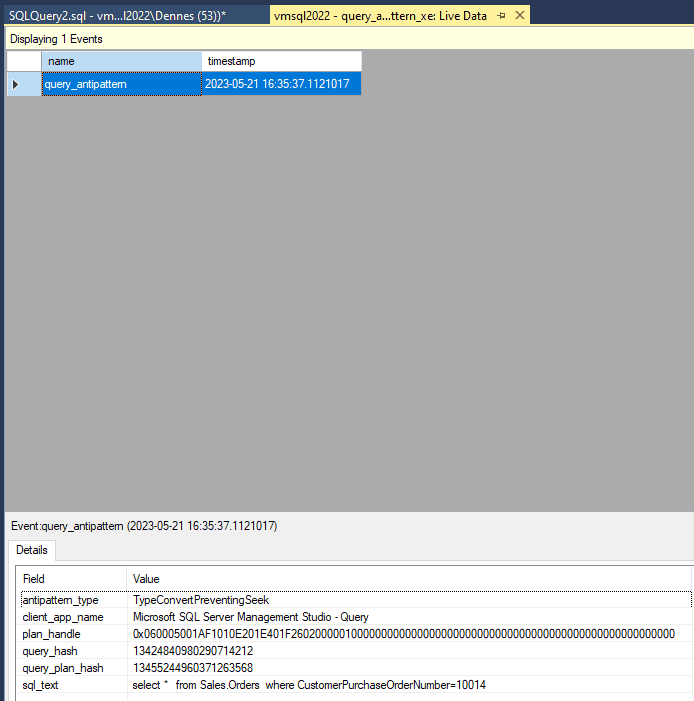
Check the Live Data window to see the anti-pattern capture
 
 
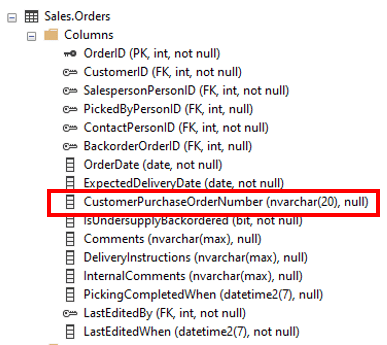
You can see in the antipattern_type row that this is a TypeConvertPreventingSeekevent.  SQL Server is capable of automatically converting data types in a query. The field type is NVARCHAR and the query parameter is INT. Some automatic query conversions prevent the use of index seek, typically where the conversion may be lossless. 
 
 
Because of how conversions work, if you look a the query plan for this query, you will see that the CustomerPurchaseOrderNumber column is converted to an integer for the comparison. Each row has to be converted, so the index cannot be used. Relying on automatic data type conversions in predicates is considered an anti-pattern. If any value in the column was not able to be converted to an INT value, the query would have failed.
 
While it is always a good practice to match your parameter or search criteria to the datatype of your column, this anti-pattern is only captured when it actually prevents the Index Seek. For example, if you changed the predicate to WHERE CustomerPurchaseOrderNumber=CAST('10014' as char(10)); you will still see the implicit conversion, but since the ASCII value can be losslessly changed to a UNICODE value, the index can be used, and no anti-pattern event is raised.
 

Anitpattern #2 – Large IN expressions

To demonstrate this antipattern, I will use the following query that has 150 items in the IN expression of the WHERE clause.

SELECT * 
FROM   Sales.Orders 
WHERE  CustomerPurchaseOrderNumber IN ( 10001,10002,10003,10004,10005,
10006,10007,10008,10009,10010,10011,10012,10013,10014,10015,10016,10017,
10018,10019,10020,10021,10022,10023,10024,10025,10026,10027,10028,10029,
10030,10031,10032,10033,10034,10035,10036,10037,10038,10039,10040,10041,
10042,10043,10044,10045,10046,10047,10048,10049,10050,10051,10052,10053,
10054,10055,10056,10057,10058,10059,10060,10061,10062,10063,10064,10065,
10066,10067,10068,10069,10070,10071,10072,10073,10074,10075,10076,10077,
10078,10079,10080,10081,10082,10083,10084,10085,10086,10087,10088,10089,
10090,10091,10092,10093,10094,10095,10096,10097,10098,10099,10100,10101,
10102,10103,10104,10105,10106,10107,10108,10109,10110,10111,10112,10113,
10114,10115,10116,10117,10118,10119,10120,10121,10122,10123,10124,10125,
10126,10127,10128,10129,10130,10131,10132,10133,10134,10135,10136,10137,
10138,10139,10140,10141,10142,10143,10144,10145,10146,10147,10148,10149,
10150);
Note: this query was created using by taking the following query code:
SELECT * 
FROM   Sales.Orders 
WHERE  CustomerPurchaseOrderNumber IN ( );
And generating the IN expression using 
SELECT STRING_AGG( CustomerPurchaseOrderNumber,',')
FROM ( SELECT DISTINCT TOP 150 CustomerPurchaseOrderNumber
       FROM Sales.Orders) Orders;
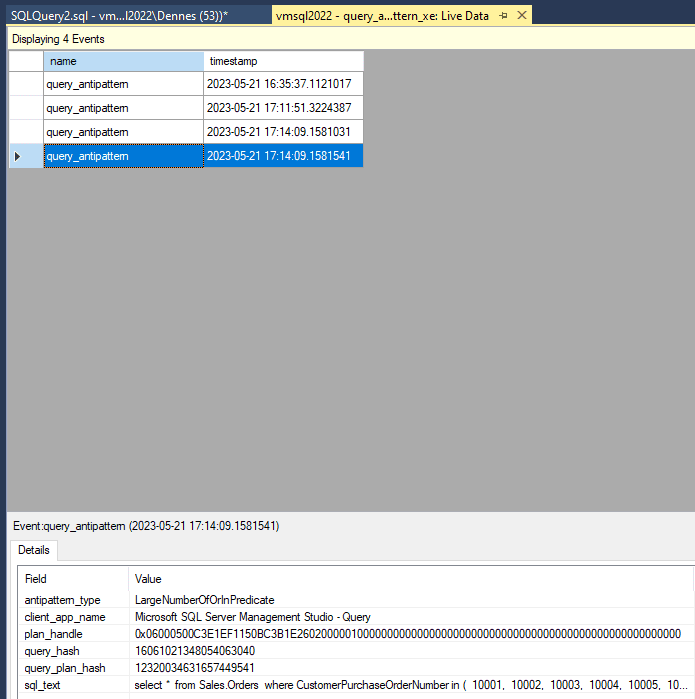
Just paste the output into the parenthesis. Next, select and execute the query. Check the Watch Live Data window and you should see some new activity.
 
 
The Anti-Pattern identified is the LargeNumberOfOrInPredicate. The IN predicate in fact is translated as a series of OR logical conditions which cannot be optimized, resulting in this anti-pattern. Part of why this is noted as an anti-pattern is that the TypeConvertPreventingSeekevent occurs as well because we are again comparing NVARCHAR to INT types. 
 
If you change the IN expression to use a character type (either Unicode or ASCII), you will not get the warning because just like with the previous example, if it has no direct negative on the optimization of the query, it will not raise the event. You can generate the IN expression as Unicode values using the following query:
SELECT STRING_AGG( 'N''' + CustomerPurchaseOrderNumber + '''',',')
FROM ( SELECT DISTINCT TOP 150 CustomerPurchaseOrderNumber
       FROM Sales.Orders) Orders;

Identifying Additional Anti-Patterns

When looking at the output from the Extended Event, the anti-pattern is identified on the antipattern_type field. We can get the possible values of the antipattern_type field from the extended events system tables and in this way identify what are the possible anti-patterns this event can track.
 
Execute the query below:
SELECT map_value 
FROM sys.dm_xe_map_values 
WHERE name = N'query_antipattern_type';
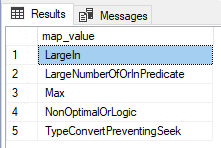
This returns:
 
 
Let’s analyze the result of the query for what the other types of anti-patters might be::
  • TypeConvertPreventingSeek and LargeNumberOfOrInPredicate: These are the two anti-patterns we tested
  • LargeIn: The name explains a lot, but when executing a query with a lot of values in anIN expression, the anti-pattern identified is the LargeNumberOfOrInPredicate. It’s not clear what makes the LargeIn to be identified.
  • Max and NonOptimalOrLogic : There is not enough documentation about these two.

Azure SQL Databases

This extended event is also available in Azure SQL Databases. You can read more about how to capture this event on this link https://www.red-gate.com/simple-talk/blogs/azure-sql-extended-events-and-the-use-of-slash/

Conclusion

This extended event has a considerable potential and we should enable it in SQL Servers 2022. However, the anti-patterns identified are still limited and lacking documentation, we should follow the evolution of this event on future SQL Server cumulative updates.
 
One additional thing to note. this can be a very noisy event, especially if you have these events occuring frequently in your application for one, but simple queries of the system views may also cause events to fire. For example, Aaron Bertrand notes in his T-SQL Tuesday Blog from Septemever 2022 that SELECT * FROM sys.database_principals; will cause an implicit conversion (Query_Antipattern_Type: TypeConvertPreventingSeek) event to occur. Aaron provides some advice on how to set up your events that can help mitigate the noisiness.


The post SQL Server 2022: Capture SQL Anti-Patterns appeared first on Simple Talk.


from Simple Talk https://ift.tt/X4uF8EA
via

Wednesday, May 31, 2023

The Importance of Tact

The concept of tact is simple. Telling people truths, often harsh truths, without making it seem harsh. Hopefully, it is clear that being truthful is one of the more essential things in life. As a person in technology (and certainly as an editor), we often need to be honest when the truth hurts a bit more than average.

For example, consider the security manager dealing with one of their coworkers who just clicked on a phishing link that caused the company to lose an hour of data (or day or week.) Without more information, it seems clear that the coworker should be escorted off the premises. Well, at least after listening to a 20-hour rant that would take this blog post from a general audience rating to something far closer than a full-on mature rating.

With these extreme consequences in mind, the next step is determining who this security lecture will be directed at. A recent hire, a company veteran, the CIO, maybe even the company’s owner. How you handle this situation requires knowledge of the audience and shovelfuls of tact based on who the perpetrator turns out to be. You probably can’t terminate the owner, but if you are not tactful enough in handling that situation, whoever replaces you will probably be quite tactful when helping you carry your personal effects to the car.

Most of the time, the need is more subtle than this. You might be leading a code review, a design meeting, or tech editing a piece of writing. Letting others know their shortcomings and failures in a way that informs them without crushing them is a delicate balance. For example, coaching a 10-year-old football team (no matter what you think of when you hear football) is far different than coaching a professional team. Even though it is essentially the same game, the necessary skills to be a coach are very different.

On the other hand, there is one person in this world you should not be tactful with. If you want to pause to think of all the funny answers, the webpage will wait as long as you need. Unfortunately, this person who needs the least tact is often the one you are most tactful with, trying to make this person feel better about everything they do.

The person you be the least tactful with is yourself.

If telling your company owner that they were the cause of a million dollars worth of data damage because they clicked on a link that was supposed to help out their private life is hard… telling yourself the same thing is almost impossible. Oh, I was distracted. I thought that was an actual link… everything except that you messed up, and it is your fault, and you must do better.

Most of us have lied to ourselves for so long about so many things we don’t even know the truth. Some of us hold ourselves in such high regard we can’t even see our limitations. Reminding yourself that you aren’t able to do something is one of the most brutal truths we need to tell ourselves.

The post The Importance of Tact appeared first on Simple Talk.


from Simple Talk https://ift.tt/md1ibpP
via