Monday, June 23, 2025

TOP 7 REAL TIME SSIS Scenarios with solutions

 ### **Real-Time Scenarios in SSIS with Solutions**  


SSIS (SQL Server Integration Services) is widely used for **ETL (Extract, Transform, Load)** processes. Below are some **real-world SSIS challenges** and their solutions.  


---


## **1. Scenario: Slow Data Load from Source to Destination**  

### **Problem:**  

- A large dataset (millions of rows) is taking too long to load.  

- The package fails due to timeouts.  


### **Solutions:**  

✔ **Use Batch Processing** – Split data into smaller chunks (e.g., 10,000 rows per batch).  

✔ **Optimize Destination Settings** –  

   - Use **Table Lock** for bulk inserts.  

   - Set **Batch Size = 10,000** in the OLE DB Destination.  

✔ **Increase Buffer Size** – Adjust **DefaultBufferMaxRows** and **DefaultBufferSize** in Data Flow properties.  

✔ **Use Fast Load Option** – Enable **"Fast Load"** in OLE DB Destination.  


---


## **2. Scenario: Handling Flat File Import Errors**  

### **Problem:**  

- A CSV file has missing columns, wrong data types, or corrupt rows.  

- The package fails and stops processing.  


### **Solutions:**  

✔ **Use Error Outputs** – Redirect bad rows to an error log table.  

✔ **Data Conversion Task** – Explicitly convert columns before loading.  

✔ **Flat File Source Error Handling** –  

   - Set **"Ignore truncation errors"** if needed.  

   - Use a **Script Component** to validate data before loading.  


---


## **3. Scenario: Dynamic File Import (Changing File Names)**  

### **Problem:**  

- Need to import files with names like `Sales_20240623.csv`, `Sales_20240624.csv`, etc.  

- Hardcoding filenames is not scalable.  


### **Solutions:**  

✔ **Use Variables & Expressions** –  

   - Set a variable like `User::FileName = "Sales_" + (DT_STR, 8, 1252)GETDATE() + ".csv"`  

   - Use **Expressions** in the **Flat File Connection Manager** to dynamically set the file path.  

✔ **Foreach Loop Container** – Loop through all files in a folder.  


Sunday, June 22, 2025

SQL SERVER TOP 50 INTERVIEW QUESTION AND ANSWERS

 # 50 SQL Server Interview Questions with Answers


## Basic SQL Server Questions


1. **What is SQL Server?**

   - SQL Server is a relational database management system (RDBMS) developed by Microsoft that supports transaction processing, business intelligence, and analytics applications.


2. **What are the different editions of SQL Server?**

   - Enterprise, Standard, Web, Developer, and Express editions.


3. **What is the difference between clustered and non-clustered indexes?**

   - A clustered index determines the physical order of data in a table (only one per table). A non-clustered index is a separate structure that points to the data (multiple allowed per table).


4. **What is a primary key?**

   - A primary key is a column or set of columns that uniquely identifies each row in a table and cannot contain NULL values.


5. **What is a foreign key?**

   - A foreign key is a column or set of columns that establishes a relationship between data in two tables, enforcing referential integrity.


## Intermediate SQL Server Questions


6. **What is the difference between DELETE, TRUNCATE, and DROP?**

   - DELETE removes rows one at a time with logging, TRUNCATE removes all rows quickly without logging individual row deletions, DROP removes the entire table structure.

Tuesday, January 23, 2024

Querying MongoDB Documents

MongoDB provides an efficient environment for storing document data at scale. However, most of your interactions with MongoDB will not be related to storing data but rather to querying data. The better you understand how to retrieve the data you need, the more effectively you can interact with MongoDB and support your data-driven applications.

To help you get started, this article introduces you to various ways you can query document data in a MongoDB database. I demonstrate how to use both MongoDB Shell and the MongoDB Compass GUI when interacting with your collection data.

Keep in mind, however, that building MongoDB queries is an extensive and many-faceted topic, one that can easily justify multiple articles (if not a book or two). In this article, I introduce you to the basics, with the goal of helping you create a foundation on which you can continue to build. The better you understand the concepts presented here, the more easily you’ll be able to move onto more advanced topics.

Note: For the examples in this article, I used MongoDB Atlas and MongoDB Compass. The last section of this article—“Appendix: Preparing your MongoDB environment”—provides information about how to set up your environment and includes a link to a .json file that you’ll need to download if you want to try out these examples for yourself.

Friday, January 19, 2024

The Importance of Retention

It is always an afterthought. New objects are created that start off small and current. New feature development takes over and the recently architected data structures become old news. Over time, data grows and suddenly a previously small table contains millions or billions of rows.

Is all that data necessary? How long should it be retained for? If there is no answer to this question, then the actuality may be “Forever”, or more honestly “No one knows for sure.”

Retention takes on many forms and this article dives into ways in which data can be managed over time to ensure that it is fast, accurate, and readily available.

Note: the code for this article can be found here.

The Common Scenario

A new feature has been added and it requires verbose logging, which will provide troubleshooting information, as well as useful usage data that can be crunched in the future. The following is how this table might look:

CREATE TABLE dbo.OrderChangeLog
(       OrderChangeLogID INT NOT NULL IDENTITY(1,1) 
        CONSTRAINT PK_OrderChangeLog PRIMARY KEY CLUSTERED,
        OrderID INT NOT NULL,
        CustomerID INT NOT NULL,
        ModifiedDateTime DATETIME NOT NULL,
        ModifiedByPersonID INT NOT NULL,
        ChangeRequestAPIDetails VARCHAR(MAX) NOT NULL,
        BatchNumber INT NOT NULL,
        ColumnChanged VARCHAR(128) NOT NULL,
        OldValue VARCHAR(MAX) NULL,
        NewValue VARCHAR(MAX) NULL
);

If you have ever worked with a log table, then some of this will no doubt look familiar. Alongside some basic information as to who made the change and when, there is extensive detail documenting exactly what happened and why. Given that there are three strings of MAX length, a row could conceivably be quite large.

Wednesday, January 17, 2024

Fabric and Self-Service: Control who can use

We can say Fabric is the evolution of the Power BI environment.

Power BI is a self-service environment, and so is Fabric. This allows the implementation of very interesting architectures, which will be the subject of future videos and articles.

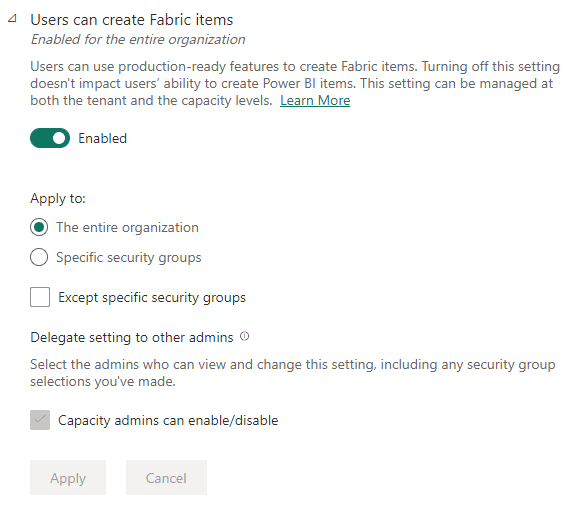
However, it’s not something free-and-easy, and it shouldn’t be. Using Fabric Admin Portal (or Power BI Admin Portal? It’s starting to be confusing) you can control who will have access to create Fabric objects.

A screenshot of a screen Description automatically generated

We have the following possibilities:

  • Leave it enable for the entire organization. It will become free-and-easy, I don’t recommend.
  • Specify the groups which can create Fabric objects
  • Specify groups which can’t create fabric objects

In general, the best option is to define “who can”, instead of “who can’t”. I would love to hear about exception scenarios for this.

Fabric is integrated with Azure Active Directory (ops… Entra IDs). In this way this permission control integrates with your organization permissions and you can define which teams can create Fabric objects by creating Entra groups (Active Directory groups).

The fact this ability fits with perfection on the purposes of a Data Mesh implementation is a subject for future articles and videos


Tuesday, January 16, 2024

Working on Technology Off the Clock

I have always spent time learning relational databases on my own, non-work time. As the years have passed, I have spent less of my own free time on technical learning and writing for many reasons, but still, I spend plenty of my own time learning about the database technology that Codd started.

While I never actually kept count, I have spent at least thousands of hours blogging, writing books, learning, and just playing around with SQL Server features to figure out how they work. I have also worked with some very competent people who only spent 40 hours a week working with the same technology.

I am not here to bash those making a great living just working at your day job. In some ways, this blog is more here to celebrate those who do a great job just during their day job. Over the years, I have written many blogs about What Counts for a DBA. In those years, I probably came across as thinking you were total slackers. It was what I knew and what I loved. All of the people I knew who were great were doing the same things.

In my early years, I spent just unthinkable amounts of time writing/learning. My first book took 20 hours or more each week for almost a year. I bought a very early smartphone to do a solid part of the writing on the go. (I still do this to this day, though the phone I am writing on now has many more temptations than the old green screen Palm device did!) I wrote at my daughter’s sports events, doctor’s visits, concerts, and even once while working the PowerPoint for a wedding. Sleep was commonly joked about but rarely done to any satisfactory level.

Making Accessibility Part of the Design Process – Part 2

We live in the height of the digital age, where the digital space has become a thriving community, with every person craving a great yet personalized experience. In this era, there is one centralized truth with undeniable clarity: Accessibility is no longer a mere option; it is the cornerstone that will lead to the creation of a truly welcoming community.

In this second part of our series on accessibility design, we will discuss essential topics that lie at the heart of crafting accessible digital environments. We’ll begin by throwing more light on three of the five fundamental visual patterns vital to your designs:

  • Color Contrasting
  • Font Sizing
  • Labelling and Iconography

As we explore accessibility, it’s essential to recognize that it isn’t limited to addressing the needs of individuals with disabilities; it’s about shaping a digital terrain where everyone thrives. It’s about breaking barriers and creating an online environment that empowers and enriches the lives of all individuals.

It’s important to note that certain sections of our discussion may pose a challenge, as we discuss the intricate process of creating accessible web pages and applications. While there may not be actual lines of code within the document, our primary focus is on unraveling the fundamental concepts that drive web development.

So, whether you’re here to satisfy your curiosity, deepen your tech knowledge, or champion digital inclusivity, you’re in the right place.