Wednesday, August 31, 2022

Into the unknown, sort of

Over half of my life ago, I was looking for a job. I had written a bunch of triggers and stored procedures at my first job, but I was relatively green. I had just (barely) gotten my degree in Computer Science, and was looking to get out of Cleveland, TN. I checked around and found a headhunter that found me a couple of opportunities.  One was in downtown Atlanta, Georgia. The other was in Virginia Beach, Virginia. Considering traffic in Atlanta and my, at the time, complete fear of driving in heavy traffic… amongst other reasons… I opted for Virginia Beach.  If you want to know where, it isn’t hard to find, I’ve never made it a secret…

I am not going to say that every minute of every day I worked in Virginia Beach was awesome. They have traffic there, they have hurricanes, and I have coworkers there that are human beings. But over the years I worked there, I have honestly loved everyone I worked with and many of the things we have accomplished. It is very hard to say such things about any other job I have had, though to be fair that is a pretty low number of locations. After working there for five years, it was time to try a new location. 

A coworker of mine called me up about working for a startup in Nashville, Tennessee which delivered Internet to schools. I got to work with different data, different concepts, but just as I have for 25 years, I was working with SQL Server designing Databases and writing T-SQL code. After around 4 years there, I was laid off (which was mostly sad only because I missed the day when the FBI came in and carted off materials. It wasn’t like it was anything sinister, more improper influencing kind of stuff. In fact the company still exists in a slightly different form doing a subset of what we did 15 years ago. I even just read today that the company merged with another in the past few months). 

As I was looking for a job to replace that one, my old company was in the process of setting up a location in Nashville as a disaster recovery\call center site.  I went back and managed their call center equipment for a few years until they could fill out a complete staff. If you are reading this, you probably can guess this is NOT my first, second, or third love in life or even technology.  

After proper call center/hardware management was hired, I went back to my real love database design and implementation. I started working with a team back in Virginia Beach exclusively and was more or less telecommuting from a different office space. Due to the traffic in Nashville, I gradually introduced my company to the actual concept of telecommuting. It was not accepted with open arms. For several years I did this and was kind of the only one. It was a nightmare at times, because if you have ever joined a meeting where you are the only one remote, it is a pain. But the times, they were changing. Even pre-pandemic, they started hiring people to work from anywhere. So much so that a coworker just moved out of country one day, I don’t even think he told our manager first. 

Over the years, I have only considered changing jobs a few times. I have always had a very short list of places I would consider changing jobs to. Very short. One company on that list had a job I had always wanted, called me and basically said “You have the job” and then interviewed me and said “You have the job” and then I didn’t hear back for a few weeks instead of a few days. They had changed their mind due to a reduction in telecommuting and I wasn’t moving that far away from my aging mother. Kind of funny at this point. 

A few months ago, I learned of a job with one of the other companies on my short list that I had lightly coveted when the previous person took it. This person decide to move on, and t he rest is history (which will probably show up in later blogs!) 24 years and just over 9 months of employment later… I am saying goodbye. It is sad. I am leaving a family behind to deal with 20+ years of code I wrote. Some utilities are from my first stint there over 20 years ago which I still occasionally had to update. 

 But it is time and the new journey is going to be incredible. My next position will be using the other skill I employ more than any other. (And I am not talking about theme park photography). Where am I heading? A place we all know and love. More on that in my next blog.

The post Into the unknown, sort of appeared first on Simple Talk.


from Simple Talk https://ift.tt/dnJgFTB
via

Tuesday, August 30, 2022

.NET App Services: Containers or not containers, that’s the question

The app services in the title can be function apps, web apps or more. We can deploy the app services on the native app service environment provided by Microsoft or using containers.

What’s the different between using the native environment or using containers?

The differences aren’t many and it’s not easy to identify when it’s better to use the native environment or when its’s better to user containers.

There are two main differences we can identify:

  • The cold startup time is better using the native environment than using a container
  • We need to manage all the patches to a custom container, in the opposite to the native environment. Microsoft manages the patches to the native environment.

These doesn’t appear to be very critical decision points on most situations. But let’s dig further and add more variables.

Certificates and Containers

We can choose to use a Linux container or use a Windows container. There are some differences according to our choice. A few weeks ago, I stumbled upon one of the difference.

In some applications, we may need to insert a certificate inside the container.  WEBSITE_LOAD_CERTIFICATES is a special configuration we can use for this. This configuration makes the app service insert the certificate inside the container.

In windows containers, the app service installs the certificate inside the windows certificate storage and the certificate is recognized by the applications in the container.

On the other hand, if the container uses linux, the certificate is copied to one folder in a DER format. Most of the times the application will need to read the certificate from the file system and use it by code. This would require code change, usually this is not good.

These links contain explanations about this configuration and code to read the certificate from the file system in a Linux container:

https://docs.microsoft.com/en-us/azure/app-service/configure-ssl-certificate-in-code

https://stackoverflow.com/questions/55599001/azure-function-key-vault-reference-for-certificates

Security Scans

This happened to me some weeks ago. A security code scan tool started to complain about one dll: Microsoft.AspNetCore.Http.dll version 2.1.0.

You can find more about this issue on the following links:
https://github.com/dotnet/announcements/issues/165
https://nvd.nist.gov/vuln/detail/CVE-2020-1045#match-6013238

This assembly is a reference included in the package Microsoft.NET.Sdk.Functions . More than that, it’s part of the .NET Core Framework. How to solve a security problema like this?

It’s usual to find security problems with frameworks such as .NET Core. The framework is always evolving. You can check the framework versions and the security patches published on the following links:
https://dotnet.microsoft.com/en-us/download/dotnet/3.1
https://dotnet.microsoft.com/en-us/download/dotnet/6.0

The solution to the security problem is to update the .NET Core framework on the execution machine.

There are some details capable to make anyone confused. When the .NET project is compiled, the assemblies are inserted in the BIN folder. The version of the Microsoft.AspNetCore.Http.dll is the bad version, 2.1.0, even if the .NET Core framework on the machine is updated. How could this be possible?

We can even think further: if the assembly is in the BIN folder, this means a devOps pipeline would pack and deploy this assembly. How the update on the .NET Core framework would solve this?

The explanation is simple: Framework assemblies in the BIN folder are ignored, and the app uses the .NET Core assemblies.

Checking .NET Version in an App Service

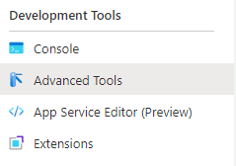
App Services have the Advanced Tools. On the left menu, you under Developer Tools, you can click Advanced Tools and click the link Go on the page which will appear in the middle.

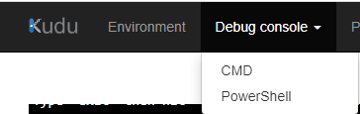
This will open an advanced development environment. On this environment, click  Debug Console on the top menu and choose a CMD console or Powershell console. Both can be used.

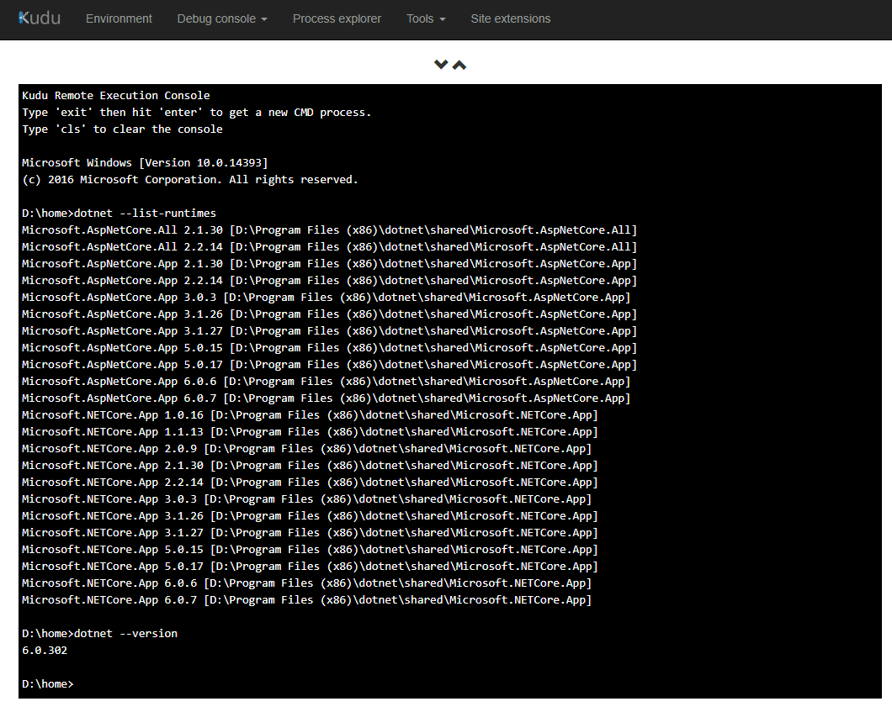
Once on the console, you can use one or both of the following statements:

dotnet –version

dotnet –list-runtimes

The first one will tell you the .NET version. You can use the .NET download pages (links above) to confirm your environment is up-to-date with the latest .NET version.

The 2nd one will tell you the exactly version of the main core libraries. The security report usualy will contain exactly the library versions you should have to be safe and you will be able to confirm you have them.


Security Scans Impact on App Service Containers

If you deploy your app service on the native environment, the app service will make updates to the .NET Core regularly. Microsoft deploys new fixes to the app service environment in 1 or 2 weeks after they are available.

However, if you deploy your app service as a container, it’s your responsibility to make updates to the container. You will be the responsible to create an automated flow in your devOps environment to identify new security features to the environment, update the container image and deploy it again regularly, avoiding down time.

Conclusion

Innitialy the requirement to manage the updates to the app service containers may appear a small difference, but when we check the security updates and the need to create an automated process to apply these security updates to the containers images we end up finding a very good reason to avoid deploying containers to app services and stick to the native environment.

If something changes later, it’s easy to deploy the application to a container when needed.


The post .NET App Services: Containers or not containers, that’s the question appeared first on Simple Talk.


from Simple Talk https://ift.tt/jERYbow
via

Thursday, August 4, 2022

Technology is hard

I book my travel almost exclusively through a single airline and its affiliates. There are a lot of reasons for this, but the big one is status. And no, not so I get upgrades (although they are very nice), but so when things go wrong, I have a hotline to getting them fixed. However, I don’t want to talk about that today, I want to talk technology. See, my airline’s web site won’t run properly on my work laptop.

And works everywhere else.

Oh, I’ve tried it all. Changed the location on my VPN. Turned off my VPN. Browser A. Browser B. Browser C (even though I vowed I’d never install that junk ever again). Heck, off-brand Browser D. Uninstall the VPN. Reset the internet connection. Tether from the phone. Install updates. Get on the phone with tech support. Clear the browser cache (like going to a different browser doesn’t obviate the need for this one, but, hey) and the history.

Yet, if I walk three feet to my personal laptop, it works fine. My wife doesn’t have a problem. I can log in from my phone. My children’s laptops also connect. Nope. It’s just the one laptop.

After all that, you know the one thing I have learned?

Technology is hard.

I mean think about it. We have these web pages that work, almost, for everyone, almost, all the time, almost. Yeah, I know, joking. However, they really do work, and for huge swaths of the populace, despite all the wild variation on technologies employed. Yet, when things go south, very tiny as in my case, or huge when systems are hacked or experience internally generated outages, they go very badly wrong. Recovery is hard. Troubleshooting, extremely difficult, even if you have the skill (and too many do not), takes forever. All of it hurting our organizations and causing pain for ourselves.

We are in a position where we’re working miracles, but it’s all with some pretty brittle tech because, frankly, this stuff isn’t easy.

Now, I need to grab my other laptop so I can book a trip.

Commentary Competition

Enjoyed the topic? Have a relevant anecdote? Disagree with the author? Leave your two cents on this post in the comments below, and our favourite response will win a $50 Amazon gift card. The competition closes two weeks from the date of publication, and the winner will be announced in the next Simple Talk newsletter.

The post Technology is hard appeared first on Simple Talk.


from Simple Talk https://ift.tt/fTzNqXb
via

Monday, July 25, 2022

Creating Azure Policy to setup Virtual Machine Auto-Shutdown

 The Auto-Shutdown policy is another important policy to ensure our virtual machines don’t expend more than what we planned for them. If we have a time window to use the virtual machines, the auto-shutdown policy can deactivate them at the right time.

We need to discover the deep internal details about the auto-shutdown configuration before creating the policy. The method we can use is to set this configuration and export the virtual machine as a template. We change the configuration to on and off, export and check the difference.

After testing the export template you will discover that Azure creates an object of type Microsoft.DevTestLab/schedules when the auto-shutdown configuration is defined. Azure creates this object the first time we enable the auto-shutdown configuration. However, when we disable it, Azure doesn’t drop the object, it only disables it. Azure enables the existing object again when the auto-shutdown configuration.

Schedules and Properties

We need to check the Microsoft.DevTestLab/schedules. We will test the property targetResourceId to ensure the schedule belongs to the correct machine machine and the status property to check if the schedule object is enabled or not.

The policy require us to use the full name of the fields. The documentation about the full name of the fields is not always available. It’s a challenge to find them. After a lot of research, I discovered the full name of the fields:

Status: Microsoft.DevTestLab/schedules/status

TargetRersourceId: Microsoft.DevTestLab/schedules/targetResourceId

A few weeks ago I wrote about parameterizing Azure policies. We can apply the same concepts to the auto-shutdown policy. The local IT teams will choose to enable the auto-shutdown configuration automatically or only audit when the configuration is enabled or not. The policy will allow them to choose between AuditIfNotExists or DeployIfNotExists

The policy will be like this:

{
     "parameters": {
          "effect": {
            "type": "String",
            "metadata": {
              "displayName": "Effect",
              "description": "Enable or disable the execution of the policy"
            },
            "allowedValues": [
              "DeployIfNotExists",
              "auditIfNotExists",
              "Disabled"
            ],
            "defaultValue": "DeployIfNotExists"
          }
     },
     "policyRule": {
       "if": {
         "allOf": [
           {
             "field": "type",
             "equals": "Microsoft.Compute/virtualMachines"
           }
         ]
       },
       "then": {
         "effect": "[parameters('effect')]",
         "details": {
           "type": "microsoft.devtestlab/schedules",
           "roleDefinitionIds": [
             "/providers/Microsoft.Authorization/roleDefinitions/9980e02c-c2be-4d73-94e8-173b1dc7cf3c"
           ],
           "existenceCondition": {
             "allOf": [
               {
                 "field": "Microsoft.DevTestLab/schedules/targetResourceId",
                 "equals": "[field('id')]"
               },
               {
                 "field": "Microsoft.DevTestLab/schedules/status",
                 "equals": "Enabled"
               }
             ]
           },
           "deployment": {
             "properties": {
               "mode": "incremental",
               "name": "Default",
               "template": {
                 "$schema": "https://schema.management.azure.com/schemas/2019-04-01/deploymentTemplate.json#",
                 "contentVersion": "1.0.0.0",
                 "parameters": {
                   "vmName": {
                     "defaultValue": "devMaltaStation",
                     "type": "String"
                   }
                 },
                 "variables": {
                   "rId": "[resourceId('Microsoft.Compute/virtualMachines', parameters('vmName'))]",
                   "schName": "[concat('shutdown-computevm-',parameters('vmName'))]"
                 },
                 "resources": [
                   {
                     "type": "Microsoft.DevTestLab/schedules",
                     "apiVersion": "2018-09-15",
                     "name": "[variables('schName')]",
                     "location": "northeurope",
                     "properties": {
                       "status": "Enabled",
                       "taskType": "ComputeVmShutdownTask",
                       "dailyRecurrence": {
                         "time": "0000"
                       },
                       "timeZoneId": "Central European Standard Time",
                       "notificationSettings": {
                         "status": "Disabled",
                         "timeInMinutes": 30,
                         "notificationLocale": "en"
                       },
                       "targetResourceId": "[variables('rId')]"
                     }
                   }
                 ]
               },
               "parameters": {
                 "vmName": {
                   "value": "[field('name')]"
                 }
               }
             }
           }
         }
       }
     }
}

Once created and assigned, you can check the policy to verify the result or apply remediation. I wrote a bit about this on the blog about evaluating Azure Policy tenant-wide


Summary

The auto-shutdown policy is one more important policy we should use in our Azure environment. Making it as a parameterized policy is one additional benefit for our environment.


The post Creating Azure Policy to setup Virtual Machine Auto-Shutdown appeared first on Simple Talk.


from Simple Talk https://ift.tt/V16GfHL
via

Friday, July 15, 2022

Let’s talk about salary

Said no manager ever.

Money is the one thing every candidate at any job interview is advised never to mention. The salary on offer for the role is treated almost like a *dirty secret. Job advertisements only reveal a band or range, which makes sense to a certain extent, given that the candidate may be placed at any point within that band, depending on experience and qualifications. However, in places like Germany, jobs are advertised without a hint of what the monetary compensation will be. You could be applying to a role at anything from 50% less to 40% more than your current salary, you’d never know. Not even after the interviews, because, well, see *above. In short, you never know what you’re getting until HR get back to you with an actual offer.
What’s worse, your current salary plays a critical role in setting your future salary. Even after having cleared several hoops and umpteen rounds of interviews, discussions, and negotiations, having had your qualifications thoroughly scrutinised and references painstakingly checked, having been deemed to be the best person for the job, leaving behind all competition, you must
still reckon with The HR Policy, which insists on anchoring you to your past income and decrees a cap on your compensation. It’s not just a line in the sand; it is a veritable canyon that cannot be crossed.

Just imagine it. Some statement written in some document by some person somewhere has the power to determine your earning potential, your career path, your future life. You will never meet that person, you will never even set eyes on that document, but it will hold you down “in your place,” where you belong.

A job is a business transaction: the employee gives hours of their life and skills to further the business of the employer, while the employer compensates them for it with a salary. A job may be made pleasant if one enjoys one’s work; otherwise, it is nothing more than a way to earn money to live. It is the main Return on Investment for an employee. Then why are employees advised never to ask about salaries in job interviews? Why wouldn’t you want to know the most important thing that’s in it for you? Why is salary such a taboo topic? Who has decided that it is a subject that must never be raised lest the candidate be seen as some kind of money-grabbing mercenary lacking commitment?

Let us change the paradigm. Let us agree that asking about money in an interview is not wrong. It is not disrespectful. It is not greedy. It has nothing to do with commitment, engagement, or loyalty. It is simply a basic Right and one which companies must embrace as openly as they
do other things: things that fetch more PR brownie points, like Diversity, Equality, and Sustainability.

Make Money Normal Again.

Commentary Competition

Enjoyed the topic? Have a relevant anecdote? Disagree with the author? Leave your two cents on this post in the comments below, and our favourite response will win a $50 Amazon gift card. The competition closes two weeks from the date of publication, and the winner will be announced in the next Simple Talk newsletter.

The post Let’s talk about salary appeared first on Simple Talk.


from Simple Talk https://ift.tt/KkvZ52U
via

Monday, July 4, 2022

What’s new in T-SQL in SQL Server 2022

There are many new features in SQL Server 2022. In relation to T-SQL querying, there are a few as well and they usually are left for last in face of many other new optimization features.

Sample scenario

These samples are built on the AdventureWorksDW2019 database installed in a SQL Server 2022 CTP 2.

Date_Bucket

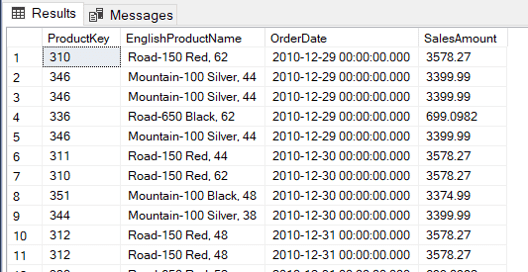
Let’s first consider a sample query. The following query shows information about internet sales and products.

SELECT p.productkey,
       englishproductname,
       orderdate,
       salesamount
FROM   dimproduct p
       INNER JOIN factinternetsales fi
               ON p.productkey = fi.productkey 


The Date_Bucket function, as the name implies, calculates date buckets of one specific size. Given a date and the bucket size, the function will return the start date of the bucket containing the date.

This is very useful to classify the facts in our data in groups according a date bucket. For example, we can create 2 weeks bucket, 2 months bucket and so on. The date bucket function is useful for grouping on these scenarios.

For example, based on the query above, let’s create a 1 week date bucket to group the product sales.

SELECT p.productkey,
       englishproductname,
       Date_bucket(week, 1, orderdate) week,
       Sum(salesamount)                AS SalesTotal
FROM   dimproduct p
       INNER JOIN factinternetsales fi
               ON p.productkey = fi.productkey
GROUP  BY p.productkey,
          englishproductname,
          Date_bucket(week, 1, orderdate)
ORDER  BY productkey,
          week 

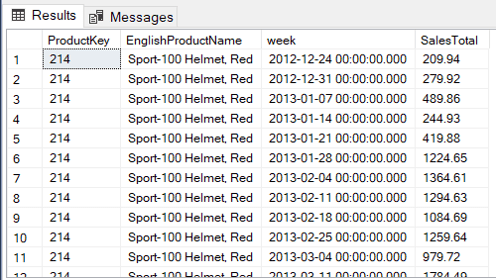
If we change the size of the bucket to 2 weeks, instead of one, you may notice on the following image the dates organized for each two weeks.

The calculation of the buckets needs a starting point. This is an optional parameter. When we don’t specify the starting point, the calculation starts on 01/01/1900. That’s how it was calculates on the previous two queries.

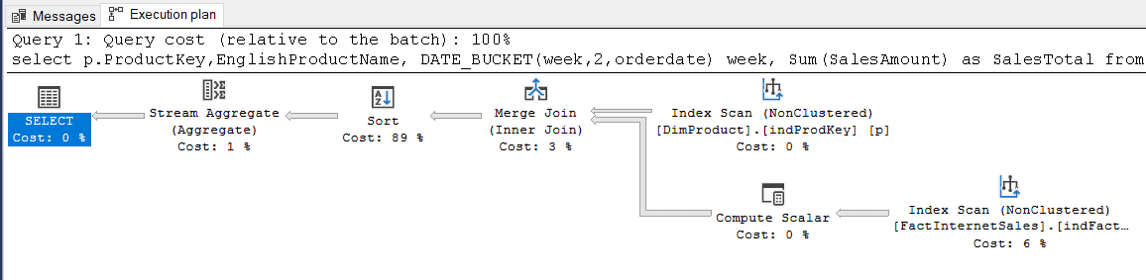
There is no surprise the Date_Bucket expression is not a SARG. As you may notice on the execution plan below, the index operations are all SCAN.


The query plan complains about some missing indexes. Let’s create them first and analyse the impact of Date_bucket isolated from other needs in the query.

CREATE INDEX indprodkey
  ON dimproduct(productkey)

CREATE INDEX indfactprodkey
  ON factinternetsales(productkey)
  include (orderdate, salesamount) 

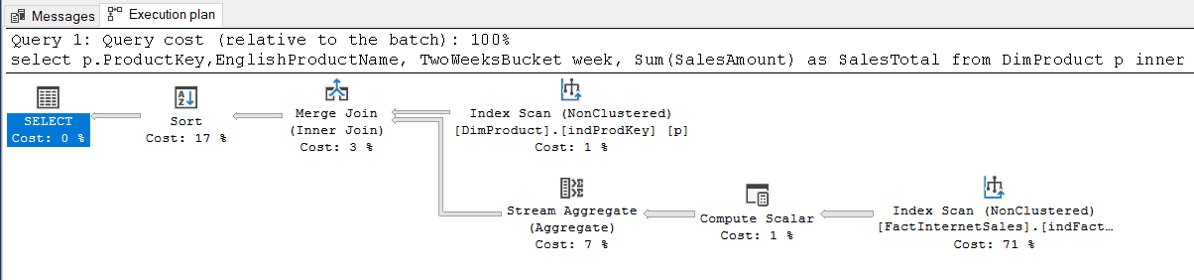
After these indexes are created, the query plan will be like this one below:


Let’s execute the follow statements followed by the query execution to get a clean statistics. Don’t do this in a production environment.

SET statistics time ON
SET statistics io ON

DBCC freeproccache

DBCC dropcleanbuffers 

SQL Server parse and compile time:
CPU time = 0 ms, elapsed time = 55 ms.
(3959 rows affected)
Table ‘Worktable’. Scan count 0, logical reads 0, physical reads 0, page server reads 0, read-ahead reads 0, page server read-ahead reads 0, lob logical reads 0, lob physical reads 0, lob page server reads 0, lob read-ahead reads 0, lob page server read-ahead reads 0.
Table ‘FactInternetSales’. Scan count 1, logical reads 345, physical reads 0, page server reads 0, read-ahead reads 344, page server read-ahead reads 0, lob logical reads 0, lob physical reads 0, lob page server reads 0, lob read-ahead reads 0, lob page server read-ahead reads 0.
Table ‘DimProduct’. Scan count 1, logical reads 6, physical reads 1, page server reads 0, read-ahead reads 11, page server read-ahead reads 0, lob logical reads 0, lob physical reads 0, lob page server reads 0, lob read-ahead reads 0, lob page server read-ahead reads 0.
SQL Server Execution Times:
CPU time = 47 ms, elapsed time = 112 ms.

There are two solutions to improve the performance with the Date_Bucket function:

  • If the Buckets match with information in a date dimension, using the date dimension instead of date_bucket will perform better. Leaves the date_bucket function for buckets which don’t match with information in the date dimension.
  • If the bucket is used very often, create a calculated field and uses it in an index.

Considering the indexes we created before, the code to create and use the calculated field will be like this:

ALTER TABLE factinternetsales
  ADD twoweeksbucket
       AS Date_bucket(week, 2, orderdate) persisted
go

DROP INDEX factinternetsales.indfactprodkey
go

CREATE INDEX indfactprodkey
  ON factinternetsales(productkey, twoweeksbucket)
  include (salesamount)
go 

The new query will need to use the calculated field. The new query plan changes the location of the stream aggregate and the cost of the SORT is very reduced. We need to check the statistics and time to compare the new query with the old one.

SELECT p.productkey,
       englishproductname,
       twoweeksbucket   week,
       Sum(salesamount) AS SalesTotal
FROM   dimproduct p
       INNER JOIN factinternetsales fi
               ON p.productkey = fi.productkey
GROUP  BY p.productkey,
          englishproductname,
          twoweeksbucket
ORDER  BY productkey,
          week 

SQL Server parse and compile time:
CPU time = 31 ms, elapsed time = 64 ms.
(3959 rows affected)
Table ‘Worktable’. Scan count 0, logical reads 0, physical reads 0, page server reads 0, read-ahead reads 0, page server read-ahead reads 0, lob logical reads 0, lob physical reads 0, lob page server reads 0, lob read-ahead reads 0, lob page server read-ahead reads 0.
Table ‘FactInternetSales’. Scan count 1, logical reads 405, physical reads 0, page server reads 0, read-ahead reads 409, page server read-ahead reads 0, lob logical reads 0, lob physical reads 0, lob page server reads 0, lob read-ahead reads 0, lob page server read-ahead reads 0.
Table ‘DimProduct’. Scan count 1, logical reads 6, physical reads 1, page server reads 0, read-ahead reads 11, page server read-ahead reads 0, lob logical reads 0, lob physical reads 0, lob page server reads 0, lob read-ahead reads 0, lob page server read-ahead reads 0.
SQL Server Execution Times:
CPU time = 15 ms, elapsed time = 68 ms.

The CPU time and Elapsed Time improved a lot from the original query.

You can read more about Date_Bucket here

Window Expression

The window functions and OVER expressions are present since SQL Server 2018. Now we have a new expression to make it easier to write these queries.

The OVER expression allows us to retrieve detail data about the rows and aggregated data at the same time.

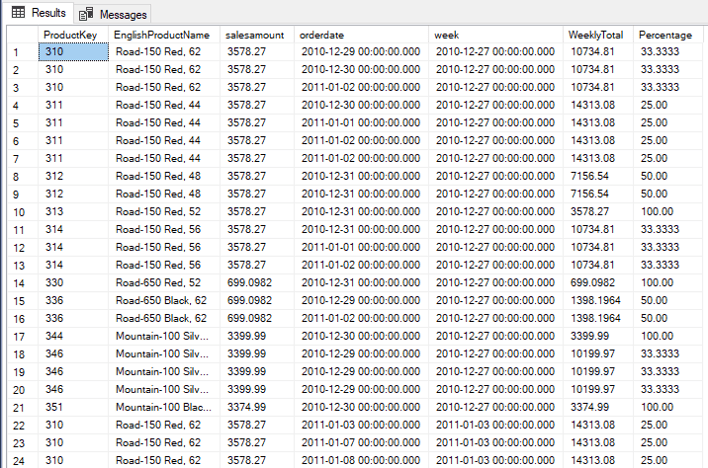
For example, considering the previous example using date_bucket, we can bring the details of each transaction and the total of the week bucket. We also can make a percentage calculation comparing each transaction with the bucket’s total

The query will be like this:

SELECT p.productkey,
       englishproductname,
       salesamount,
       orderdate,
       Date_bucket(week, 1, orderdate) week,
       Sum(salesamount)
         OVER (
           partition BY p.productkey, Date_bucket(week, 1, orderdate))
       WeeklyTotal,
       100 * salesamount / Sum(salesamount)
                             OVER (
                               partition BY p.productkey, Date_bucket(week, 1,
                             orderdate)) Percentage
FROM   dimproduct p
       INNER JOIN factinternetsales fi
               ON p.productkey = fi.productkey
ORDER  BY week,
          productkey,
          orderdate 


The new WINDOW expression allows us to simplify the query by writing the WINDOW expression once, in the end of the query, and referencing it where it’s needed, even more than once.

Using the WINDOW expression, the query will be like this:

SELECT     p.productkey,
           englishproductname,
           salesamount,
           orderdate,
           Date_bucket(week,1,orderdate)                 week,
           sum(salesamount) OVER win                     weeklytotal,
           100 * salesamount / sum(salesamount) OVER win percentage
FROM       dimproduct p
INNER JOIN factinternetsales fi
ON         p.productkey=fi.productkey window win AS (partition BY p.productkey, date_bucket(week,1,orderdate))
ORDER BY   week,
           productkey,
           orderdate


The queries will have the same execution plan, the new syntax will not affect the execution, it will only make them easier to read.

You can read more about the window exprpession here: https://docs.microsoft.com/en-us/sql/t-sql/queries/select-window-transact-sql?WT.mc_id=DP-MVP-4014132&view=sql-server-ver16 

LEAST and GREATEST function

These new functions are used to find the smallest and biggest value in a set of values. They are not intended to be used in a set of records, for this we have the MAX and MIN aggregation functions. LEAST and GREATEST are intended to be used in a set of values, for example, a set of fields.

Let’s build one useful example for these functions. We can use the PIVOT statement in SQL Server to transform a rows into columns, comparing the sales of the products in a single quarter, for example.

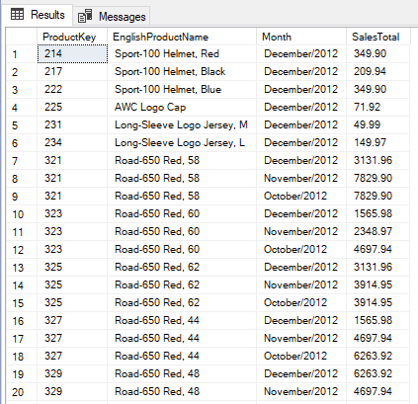
A regular query without using the PIVOT would be like this:

SELECT p.productkey,
       englishproductname,
       englishmonthname + ‘/’
       + CONVERT(VARCHAR, calendaryear) AS Month,
       Sum(salesamount)                 SalesTotal
FROM   factinternetsales fi
       INNER JOIN dimproduct p
               ON fi.productkey = p.productkey
       INNER JOIN dimdate d
               ON fi.orderdatekey = d.datekey
WHERE  d.calendaryear = 2012
       AND d.calendarquarter = 4
GROUP  BY p.productkey,
          englishproductname,
          calendaryear,
          englishmonthname 

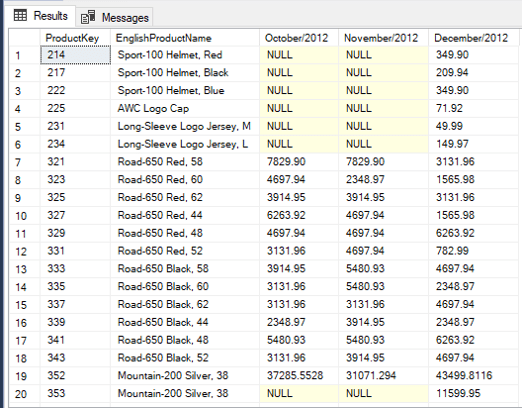
Using the PIVOT on this query we can turn the months into columns:

SELECT productkey,
       englishproductname,
       [october/2012],
       [november/2012],
       [december/2012]
FROM   (SELECT p.productkey,
               englishproductname,
               englishmonthname + ‘/’
               + CONVERT(VARCHAR, calendaryear) AS Month,
               Sum(salesamount)                 SalesTotal
        FROM   factinternetsales fi
               INNER JOIN dimproduct p
                       ON fi.productkey = p.productkey
               INNER JOIN dimdate d
                       ON fi.orderdatekey = d.datekey
        WHERE  d.calendaryear = 2012
               AND d.calendarquarter = 4
        GROUP  BY p.productkey,
                  englishproductname,
                  calendaryear,
                  englishmonthname) AS sales
       PIVOT ( Sum(salestotal)
             FOR month IN ([October/2012],
                           [November/2012],
                           [December/2012]) ) AS pivottable 

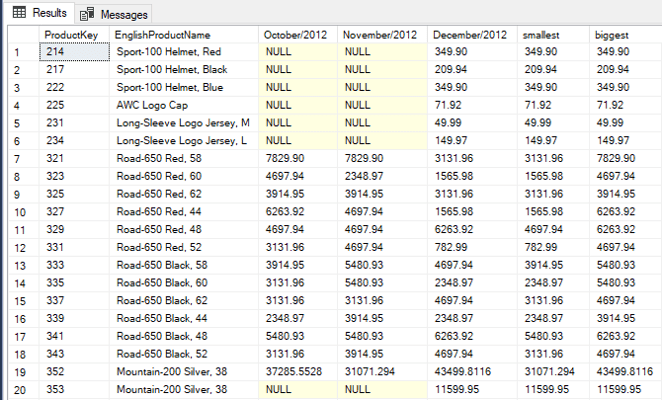
This is a great example to use LEAST and GREATEST to find the smallest and biggest values in a quarter:

SELECT productkey,
       englishproductname,
       [october/2012],
       [november/2012],
       [december/2012],
       Least([october/2012], [november/2012], [december/2012])    smallest,
       Greatest([october/2012], [november/2012], [december/2012]) biggest
FROM   (SELECT p.productkey,
               englishproductname,
               englishmonthname + ‘/’
               + CONVERT(VARCHAR, calendaryear) AS Month,
               Sum(salesamount)                 SalesTotal
        FROM   factinternetsales fi
               INNER JOIN dimproduct p
                       ON fi.productkey = p.productkey
               INNER JOIN dimdate d
                       ON fi.orderdatekey = d.datekey
        WHERE  d.calendaryear = 2012
               AND d.calendarquarter = 4
        GROUP  BY p.productkey,
                  englishproductname,
                  calendaryear,
                  englishmonthname) AS sales
       PIVOT ( Sum(salestotal)
             FOR month IN ([October/2012],
                           [November/2012],
                           [December/2012]) ) AS pivottable 


Summary

These are only 3 of the interesting T-SQL improvements in SQL Server 2022


The post What’s new in T-SQL in SQL Server 2022 appeared first on Simple Talk.


from Simple Talk https://ift.tt/NL1F4HA
via

Saturday, July 2, 2022

Boost productivity with ‘Solution Summary’ cards

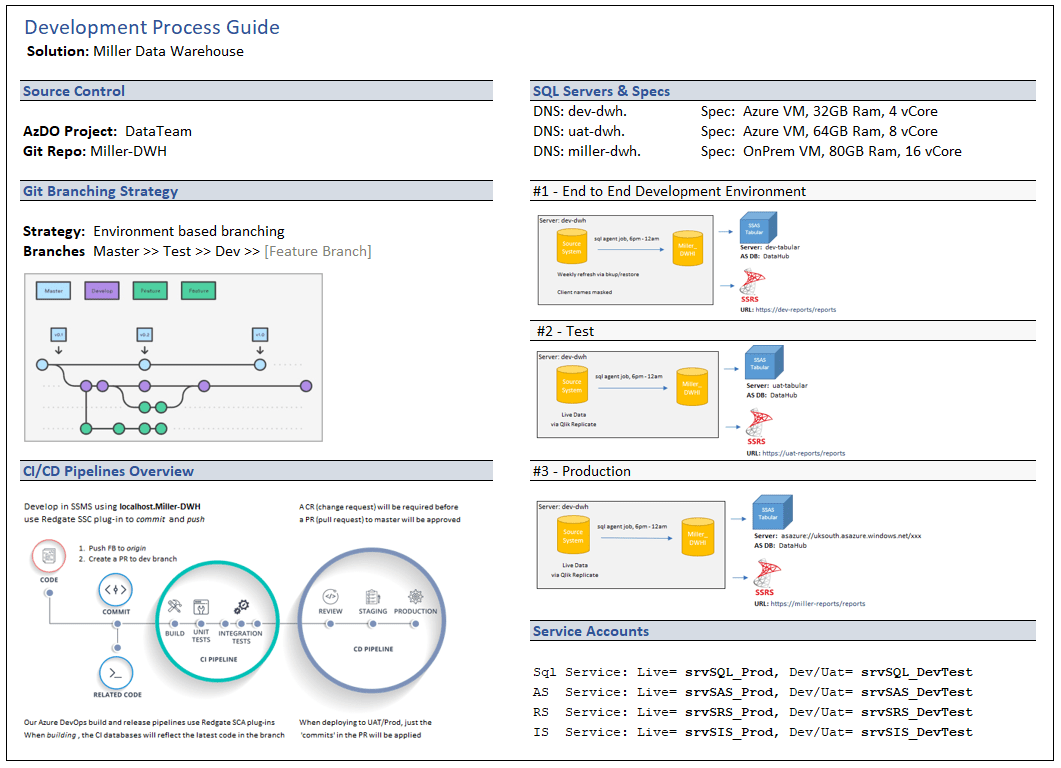
Solution Summary cards are the name I have given to simple 1-page documents we provide to developers to get up-to-speed on a particular solution.

The primary use-case for these cards is to provide better on-boarding for new team members.

An additional benefit is that crafting these short summaries forces people to review how your teams are working and you will often start seeing areas which would benefit from standardization or simplification.   

An example of one these cards, in this case for a simple Data Warehouse implementation, can be seen below:

These cards are not intended to replace full technical guides, but to just capture the essential information that you would often need at a glance and prevent scrolling back and forth through larger documents.

Boost productivity by reducing ‘cognitive load’

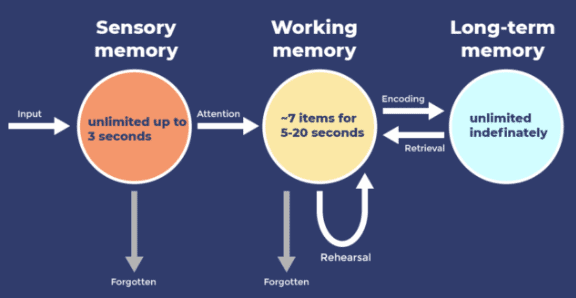
Cognitive load relates to the amount of information your brain can use to figure stuff out.  Since your working memory has a very limited capacity, we should avoid overloading it with unnecessary information.

How working memory fits into the overall cognitive process can be seen in this Information Processing Model.

Developers want to focus on solving real-problems, for real-people, in the real-world.  All the ‘other stuff’ we contend with is just a distraction.

Having to fill up the brain’s mental model with unnecessary information will drain the energy and productivity of your teams. 

For example, we are able to use our cognitive faculties more efficiently if we know we can quickly reference (instead of memorizing) the following information

  • Where do I commit or deploy code?
  • What happens when I commit?
  • How up to date is the data in each environment?
  • Which downstream systems will be affected by my changes?

Even without these cards, after a while, people will learn all the server details, processes and nuances – but it comes at a cost in the form of a lot of wasted effort.

Summary

This is not a revolutionary new idea, however, I wanted to share an example of what I do in case it inspires others.

For this work, understanding cognitive load helped me to find the balance between detail and usability. 

There are 3 types of cognitive load and the ultimate goal of these ‘cards’ is to reduce extraneous load.

  1. Intrinsic Load      – i.e. The SQL skills required to solve the problem
  2. Extraneous Load – i.e. Unnecessary distraction such as a requirement buried within a long chain of emails
  3. Germane Load     – i.e. The load required to take information from working memory into long term memory

If you would like to know more, I found the following two resources informative:

YouTube: Hacking Your Head: Managing Information Overload, by Jo Pearce.

Article:  https://www.gerardfriel.com/instructional-design/cognitive-load-theory/

The post Boost productivity with ‘Solution Summary’ cards appeared first on Simple Talk.


from Simple Talk https://ift.tt/tB6h12i
via