Thursday, February 9, 2023

How to ask for programming help

Over the past 25 years, I have answered a lot of programming questions in online forums, from co-workers, and from friends. It has been a while since I had been around forums, but I recently decided it was time to get back to what started me in the SQL community: answering questions. Not only is it complementary to my current job as Simple-Talk editor, it is really a great joy to be able to help other people with their problems. It is also educational to see the kinds of things other people are going through before you also go through them.

Sometimes you know the answer right away, but sometimes the question is a challenge (these are actually my favorite.) At times I have spent hours on a question, trying to figure out a solution that works, and then writing up the answer to post back. Along the way I am learning something new and (assuming I figured out a correct answer,) the question poster usually learns something too. I mean, I have been wrong a few times, at least.

Note: One of the reasons it was my starting point in the community was the lack of pressure. You are not the only one answering questions, and if you get it wrong, typically someone will tell you as you will for others. The pressure to be right every time or answer every question is rarely overwhelming/

However, there is one main issue that happens all too often. It is the same issue that has clearly been going on for the 25 years since I started answering questions. Poor question asking skills.

My example story is going to be data centric, but if follows for pretty much any programming question.

The ask

Very often a person asks a question something like this:

“If I have rows in a table, how do I sum them up?”

Can one guess what you mean? In this case, probably. But just as often the question will not make a whole lot of sense without context. Maybe the business problem is not the typical, simple, straightforward question. Maybe because the poster didn’t think about what everyone looking at will need.

Ideally, in addition to your description of your problem if you add more details like:

“If I have rows in a table, how do I sum them up? For example, say I have the following rows in a table:

SampleId

Amount

1

10.00

2

10.00

3

10.00

4

10.00

5

10.00

6

10.00

7

10.00

8

10.00

The output I would like to get is something like:

TotalAmount

80.00

Here is the code to build the sample table I have been building with. I am working with SQL Server 2022, Developer Edition.

CREATE TABLE #Sample (
SampleId INT NOT NULL PRIMARY KEY,
Amount   NUMERIC(10,2) NOT NULL
);
INSERT INTO #Sample
(
    SampleId,
    Amount
)
VALUES
(1, 10),(2, 10),(3, 10),(4, 10),
(5, 10),(6, 10),(7, 10),(8, 10);
-- DROP TABLE IF EXISTS #Sample;

Executing @@version returns:

Microsoft SQL Server 2022 (RTM) - 16.0.1000.6 (X64) Oct 8 2022 05:58:25 Copyright (C) 2022 Microsoft Corporation Developer Edition (64-bit) on Windows 10 Pro 10.0 <X64> (Build 22621: )

By taking these extra few minutes, you have provided people who want to help you with the infrastructure to get that done. The person helping knows what RDBMS you are using and can have the same code you have tried.

The responder now just has to paste that code into a window, run it and write the query:

SELECT SUM(Amount) AS TotalAmount
FROM  #Sample;

And now your problem is solved.

The reality

It isn’t always this easy to formulate questions. When I ask a question, I always forget something. For example, the one I forget very often is to include the exact version of database system I am using. This isn’t needed every time, but it never hurts.

When asking about performance problems, you may not reasonably be able to send enough sample data to reproduce every problem, but share as much as you can. The query or explain plan, row counts, table structures with indexes, etc. In your initial question, provide everything you can reasonably provide. It isn’t horrible for someone to need more than you provide, unless you provide nothing.

In cases where you simply have to include lots of data, it is best to generate that data in a repeatable manner if possible. This is how I ended up writing this blog about generating repeatable test sets, so I could send a question to someone helping me out with a pretty complex graph query. I needed to generate hundreds of thousands of rows, and creating a random set of data that is quite large and repeatable was necessary. Making a backup available somewhere that feels safe can work, too.

The fact is, if you want someone to help you with your coding issues, you need to provide as much detail as you can. You are literally asking them for free consulting. If you ask a vague question, you are more than likely going to get back terrible or annoyed answers. It is never promising when all of the replies start “I think I might know what you are asking.”

The concern

Privacy. So far, I have exhorted you to share as much as possible. Be careful to avoid including real data or sharing backups, no matter how much you feel like you have anonymized your data. Unless you are sending it specifically to a known entity in a safe manner, any slip could be disastrous!

Making your test and development data that you work with have a similar profile as your real data is a good idea. It is nice when doing many types of testing that you have a copy of your production data to do final testing (for example to let user view their data, to support a production issue, or even to compare results in QA testing to a production report.).

But just like unit tests, most of the time when asking for help, unless you are asking for help with specific values, using simple amounts like the $10 amounts I used in my example are fine. I know having to make up data can make the process of building a sample data set harder, but it is clearly essential that nothing you post can be deciphered to be real data.

This isn’t always just making sure that names have been anonymized. While in most cases, clearing out names and addresses (including email and phone) is probably enough, I would suggest that you consider any real data to have meaning.

Be aware of whether your table designs can be shared as well. You may not be allowed to share the structures on the internet as well. Plus, your tables probably contain a lot more detail that you will need for more examples.

I know you might be thinking “This sounds like a lot. Maybe I should just stick to the simple question?” but that is not my point at all. In reality, what I am saying is that building your example data set will help people answer your questions fast (and a lot of times that might be you once you have simplified the problem down to just the data that is needed to answer your question and knowing what the output should look like.

The result

Give people willing to give you free help all the details you can get. When choosing questions to answer, it is easy to say, “nah!” and move on to the next question when you see a question with no details. If you provide sample data and expected results with your question, people will be racing to answer your question and you will likely get multiple answers to choose from.


The post How to ask for programming help appeared first on Simple Talk.


from Simple Talk https://ift.tt/zlyYiMx
via

Firebase and Supabase: Key differences you need to know

The tools classified as “Realtime Backend / API“, or tools that can rapidly process an API call and in this case, store data, include Firebase and Supabase. Firebase is a NoSQL database, while Supabase is a relational database. The Firestore database, which lets you store “documents,” is the core of Firebase. These are collections of key-value pairs where different sub-value documents may be present.

Since two documents in a collection don’t have to share the same structure, document-based storage is ideal for unstructured data. On the other hand, Supabase offers a relational database management system called PostgreSQL rather than being designed around a document-based data store.

The type of software you’re constructing determines which database is best for your project. 

Firebase

James Tamplin and Andrew Lee founded Firebase in 2011, and Google bought the technology in 2014. It is a thorough mobile and web development platform which offers many tools and services for creating, releasing, and maintaining high-quality apps. It includes a serverless platform for developing and deploying cloud functions, a set of machine learning tools and services, a cloud-hosted NoSQL database for storing and syncing data in real-time, tools for implementing authentication and authorization, a static web hosting service, and a serverless platform.

Firebase is made simple to use and integrates with several different frameworks for creating apps, including Android, iOS, Web, Unity, and more. As a result, it is a well-liked option for programmers creating mobile and web applications, particularly for those who wish to swiftly prototype and refine their ideas. 

Features of firebase

Firebase offers features that enable developers to build, test, and deploy apps confidently. Whether you’re a seasoned developer or just starting, Firebase is a powerful and flexible platform that can help you bring your app ideas to life.

  • Real-time database: this is a feature of Firebase that allows you to store and sync data with a NoSQL cloud database. It is designed to provide real-time data synchronization across multiple clients and devices. One of the main benefits of using a real-time database is that it allows you to build collaborative apps that can be used by multiple users simultaneously. When one user updates the data in the database, the changes are automatically synced with all connected clients, ensuring that everyone has access to the most up-to-date information. 

Here is an example of how you might use the real-time database in a collaborative app:

Imagine you are building a group chat app for a team of coworkers. You can use the real-time database to store the chat messages and synchronize them in real time across all connected devices. When one team member sends a message, the message is immediately added to the database and synced with all other devices, allowing all team members to see the message in real time.

Here is an example of how you might structure the data in the real-time database for a group chat app:

messages: {
  message1: {
   sender: "Alice",
   message: "Hey, how's it going?",
   timestamp: 1623478213
  },
message2: {
    sender: "Bob",
    message: "I'm doing well, thanks for asking!",
    timestamp: 1623478218
  },
message3: {
    sender: "Charlie",
    message: "I'm also doing well. Let's get back to work!",
    timestamp: 1623478221
  }
}

In this example, the messages are stored in a root node called “messages”. Each message is stored as a child node with a unique key (e.g. “message1”, “message2”, etc.). The data for each message includes the sender’s name, the message text, and a timestamp.

The real-time database is a NoSQL database, which stores data as a collection of key-value pairs. You can use the Firebase JavaScript SDK to read and write data to the database in real time.

  • Authentication: Firebase Authentication is a feature that allows you to add user authentication to your app easily. It provides several methods for authenticating users, including email and password, phone number, and popular third-party providers like Google, Facebook, and Twitter. 
  • The primary purpose of authentication is to verify the identity of a user. When users log into your app, they provide their credentials (such as their email and password) to Firebase Authentication. If the credentials are valid, Firebase grants the user access to your app and generates a unique authentication token that can be used to identify the user in future requests.
  • Here is an example of how you can use Firebase’s authentication feature in your app:
// Import the Firebase Authentication library
import * as firebase from 'firebase/app';
import 'firebase/auth';
// Initialize the Firebase app
firebase.initializeApp({
  apiKey: '<your-api-key>',
  authDomain: '<your-auth-domain>',
  // ...
});
// Get a reference to the Firebase Auth service
const auth = firebase.auth();
// Sign up a new user with an email and password
auth.createUserWithEmailAndPassword('user@example.com', 'password')
  .then((user) => {
    // User was successfully created, you can now log them in
    return auth.signInWithEmailAndPassword('user@example.com', 
                                                   'password');
  })
  .then((user) => {
   // User is now signed in
  })
  .catch((error) => {
   // An error occurred, handle it here
  });

This code uses the createUserWithEmailAndPassword method to sign up a new user with an email and password, and the signInWithEmailAndPassword method to then sign in.

One of the main benefits of using Firebase Authentication is that it takes care of all the complex backend logic and server-side authentication tasks, allowing you to focus on building your app. It also provides several security features to protect against common attacks, such as password hashing, brute force protection, and email verification. Firebase Authentication can be used in various applications, including web apps, mobile apps, and server-side applications. In addition, it provides SDKs for multiple platforms, including JavaScript, Android, iOS, and Flutter, so you can easily integrate them into your app regardless of your platform.

  • Storage: Firebase Storage is a feature that allows you to store and manage user-generated files in the cloud, such as images, audio, and video. It provides a secure and scalable solution for storing and accessing user files and integrates seamlessly with other Firebase services. One of the primary benefits of using Firebase Storage is that it handles all the complex backend tasks related to file storage, such as uploading, downloading, and deleting files, allowing you to focus on building your app. It also provides security features to protect against common attacks, such as request signing and access controls.
  • Hosting: Firebase Hosting is a feature that allows you to host static assets (such as HTML, CSS, JavaScript, and media files) and deploy them to a global content delivery network (CDN). It provides fast and secure hosting for your web apps, with features such as SSL support, custom domains, and content caching. One of the main benefits of using Firebase Hosting is that it is easy to set up and use and integrates seamlessly with other Firebase services such as Firebase Cloud Functions and Firebase Realtime Database. It also provides automatic scaling and high availability, so you don’t have to worry about managing your servers or dealing with downtime.
  • Analytics: Firebase Analytics is a free app measurement solution that provides insight into app usage and user engagement. It is a part of the Firebase suite of tools offered by Google that helps developers build, improve, and grow their apps. Firebase Analytics provides valuable information about how users interact with an app, including data on user behavior, demographics, and device characteristics. This information can help developers understand how their app is being used and identify areas for improvement. In addition, Firebase Analytics integrates with other Firebase features, such as Firebase Crashlytics, which allows developers to find and fix issues in their apps, and Firebase Predictions, which uses machine learning to predict user behavior and help developers target their efforts.
  • Cloud functions: Firebase Cloud Functions is a serverless platform that allows developers to run backend code in response to events triggered by Firebase features or HTTP requests. It is a part of the Firebase suite of tools offered by Google that helps developers build, improve, and grow their apps. Cloud Functions enables developers to extend the functionality of their Firebase apps without the need to manage servers or infrastructure. This makes it easy to build and deploy backend logic for functions such as responding to real-time database updates, sending notifications, or integrating with other services. Cloud Functions is built on top of Google Cloud Functions; a serverless compute platform that executes code in response to events or HTTP requests. This means that developers can use Cloud Functions to leverage the scalability and reliability of Google’s infrastructure to run their backend code.
  • Machine Learning: Firebase offers several machine learning-based features as part of its suite of tools for app developers. These features use machine learning algorithms to analyze data and make predictions or recommendations based on that data.
    One of the machine learning features offered by Firebase is Firebase Predictions, which uses machine learning to analyze user behavior and predict which users are likely to perform specific actions, such as making a purchase or uninstalling an app. Developers can use this information to target their efforts and improve their app’s performance.

    Another machine learning feature Firebase offers is Firebase ML Kit, which provides a set of pre-trained machine learning models that developers can use to add machine learning functionality to their apps. This includes text recognition, face detection, and object detection.

  • Remote configuration: Remote Config is a feature of the Firebase suite of tools that allows developers to dynamically change the behavior and appearance of their apps without requiring an app update. It is beneficial for A/B testing and for making changes to an app based on user behavior or other data. Using Firebase Remote Config, developers can create and manage different versions of their app’s configuration, which defines the behaviou and appearance of the app. They can then use the Firebase console or the Firebase API to remotely update their app’s configuration, allowing them to make changes to the app in real time.

    Firebase Remote Config makes it easy for developers to experiment with different configurations and see how they impact user behavior. It also allows them to quickly roll out new features or changes to their app without releasing a new version of the app.

  • Crashlytics: This real-time crash reporting service is part of the Firebase suite of tools offered by Google. It helps developers identify, prioritize, and fix stability issues in their apps. Crashlytics automatically collects and organizes crash reports from users of an app, providing detailed information about the circumstances that led to the crash. This includes information about the device, operating system, and the state of the app at the time of the crash.

    Crashlytics also provides analytics on the frequency and impact of crashes, allowing developers to prioritize the most severe issues and fix them quickly. It also integrates with other Firebase features, such as Firebase Crashlytics Beta, which will enable developers to test their app with a small group of users before releasing it to the public.

Pros and cons of using Firebase

There are some advantages and disadvantages of using Firebase which are listed and explained below.

Pros:

The number of businesses developing Firebase mobile apps has exponentially increased over the past few years. It is due to the many benefits of developing mobile apps with Firebase, including:

  • Real-time database: Firebase provides a real-time database that enables programmers to store and sync information in real time between various devices. Building collaborative apps, like social media or messaging, can benefit from this.
  • Serverless backend: Backend services offered by Firebase, such as Cloud Functions and Firebase Hosting, enable developers to design and deploy their applications without having to worry about maintaining infrastructure or servers. As a result, developing and scaling apps is made simpler and more affordable.
  • App analytics: Firebase offers in-depth analytics on user behaviour and usage, which can help developers better understand how their apps are being used and spot opportunities for improvement.
  • User authentication: Firebase provides a variety of mechanisms, including support for social networking, phone, email, and password login. As a result, adding a user authentication to apps is made simple for developers.
  • Machine learning: Developers may include machine learning capabilities into their projects using Firebase’s many machine learning-based services, such as Firebase Predictions and Firebase ML Kit.
  • Cross-platform compatibility: Firebase enables developers to create apps on various platforms, including Android, iOS, and the web.
  • Support from the community: Firebase has a sizable and vibrant developer community, meaning platform users may access a lot of information and assistance.

Cons:

These are some of the drawbacks that come with using Firebase.

  • Limited querying options: Firebase doesn’t have a filter for capabilities and uses Realtime Database as its primary store. Your entire database becomes a massive JSON file because Firebase employs the JSON file format. Relationships between various data files cannot be introduced when a database exists as a single file. As a result, you can run up to one key search at a time. However, users or stored files cannot be queried or listed in Firebase.
  • Limited control: Since Firebase is a managed service, developers have little power over the infrastructure that lies beneath their applications. This may be a disadvantage for developers who require greater control over their environment.
  • Google dependence: Because Firebase is a Google product, developers must rely on Google’s infrastructure and support. Developers who desire greater independence or are worried about vendor lock-in may find this a source of concern.
  • Cost: Despite having a free tier, Firebase can get pricey as an app gains popularity and users. The costs of adopting Firebase must be carefully weighed against those of alternative solutions by developers.
  • Complexity: A developer unfamiliar with Firebase may find the platform’s extensive features and service offering intimidating. Learning how to use all the features efficiently can take some time.

Supabase

Supabase is an open-source alternative to Firebase that provides various tools and services for building and deploying web and mobile apps. It is designed to be an easy-to-use, scalable, and secure platform for building modern apps.

Supabase offers a real-time database that allows developers to store and sync data across multiple devices in real-time, like Firebase. It also provides various backend services, including a serverless platform for running functions and hosting static assets.

In addition to these core features, Supabase provides tools for user authentication, app analytics, and machine learning. It supports a range of platforms, including web, Android, and iOS, and is designed to be easy to integrate with other tools and services.

Supabase is a comprehensive platform for building and deploying modern apps that offers many of the same features as Firebase, but with an open-source twist.

Features of Supabase

Supabase which we know as the open-source platform is built on top of PostgreSQL. Offers numerous features like automatic API generation using REST, and encourages the use of open-source tools and libraries. More of these features are explained below.

  • Real-time database: A real-time database is a database that is designed to allow real-time processing and immediate access to data as it is updated. This is in contrast to a traditional database, which may have a delay in updating data and may not allow real-time access to the most recent data. One example of a real-time database is Supabase, a cloud-based database that allows developers to build real-time applications using a PostgreSQL database.

Here’s an example of how you might use the real-time database feature of Supabase in a Next.js application:

  • First, you would set up a Supabase project and create a database with the desired tables and columns.
  • Next, you would install the Supabase client library in your Next.js project and authenticate with your Supabase project.
  • Then, you would use the Supabase client to subscribe to real-time updates for a particular table in the database. For example, you might use the following code to subscribe to real-time updates for a “customers” table:
const { realtime } = require('@supabase/supabase-js')

realtime.on('customers', (event) => {
   if (event.type === 'INSERT') {
     console.log(`A new customer was added: 
                           ${event.new_val.name}`)
 }
})
  • Whenever a new record is added to the “customers” table, the realtime.on() callback function will be triggered, and the event will be logged to the console.

In this way, you can use the real-time database feature of Supabase to build applications that are responsive to updates in the database and provide a seamless experience for users.

  • Authentication: Authentication is a feature that allows users to log in to a web or mobile application securely. It typically involves verifying a user’s identity using a combination of a username or email address and a password. Supabase is a real-time database platform that includes built-in support for authentication. This means that you can easily implement authentication for your web or mobile app using Supabase without setting up and managing your authentication server.
  • Supabase offers many authentication methods, including email/password, Google, and GitHub. In addition, the Supabase API can create new users, log in to existing users, and manage user accounts.

    Here is an example of how you can use Supabase’s authentication feature in your app:


import * as supabase from '@supabase/supabase-js';

// Initialize the Supabase client
const supabaseClient = supabase.fromEnv();

// Get a reference to the Supabase auth service
const auth = supabaseClient.auth;

// Sign up a new user with an email and password
  auth.signup('user@example.com', 'password')
  .then((response) => {
   // User was successfully created, you can now log them in
   return auth.login('user@example.com', 'password');
  })
 .then((response) => {
    // User is now logged in
  })
  .catch((error) => {
    // An error occurred, handle it here
  });

This code uses the signup method to sign up a new user with an email and password, and the login method to log the user in. Both methods return a promise that resolves with a response object on success or rejects with an error on failure.

Supabase’s authentication feature also provides other useful methods for managing users and sessions, such as logout to log out a user, password.reset to reset a user’s password, and me to get the current user’s profile.


With Supabase’s authentication feature, you can focus on building your app rather than worrying about the complexities of implementing and maintaining your authentication system. This can save you time and resources and allow you to get your app up and running more quickly.

  • Storage: Supabase has built-in support for storage, and storage is a feature that allows you to store and manage data in a web or mobile application. This can include user data, application settings, and other types of data needed to run the app. This means you can use Supabase to store and manage data for your web or mobile app without setting up and managing your storage infrastructure.

    Supabase offers a variety of storage options, including a SQL database, a file storage system, and a key-value store. The Supabase API can store, retrieve, and manage data in these different storage systems. With Supabase’s storage feature, you can easily store and manage data for your app and take advantage of Supabase’s real-time capabilities to update and sync data across multiple devices in real-time. This can save you time and resources and allow you to build more powerful and efficient apps.

  • API generation: API generation is a feature that allows you to generate a web API for your database automatically. A web API is a set of rules and standards for accessing a web-based software application or tool. It provides a way for different software systems to communicate with each other over the internet. With Supabase’s API generation feature, you can easily create a web API for your database by simply defining your database schema and relationships. Supabase will automatically generate the API endpoints and documentation for you, allowing you to access and manipulate your data using standard HTTP requests. This can save you time and resources and enable you to integrate your database with other software systems and applications easily. It can also make it easier for you to build web or mobile apps that use your database by providing a convenient and well-documented way to access and manipulate your data.
  • Deployment: Deployment is the process of making an app or service available to users. This typically involves uploading the app or service to a server or hosting platform and configuring it to be accessible over the internet. With Supabase’s deployment feature, you can deploy your app or service to the cloud with just a few clicks using the Supabase dashboard or command-line interface. Supabase will handle all of the underlying infrastructure and configuration for you, making it easy for you to focus on building and maintaining your app. This can save you time and resources and allow you to get your app or service up and running more quickly. It can also make it easier for you to scale and manage your app or service by providing a convenient and reliable way to deploy and host it in the cloud.
  • Collaboration: Supabase’s collaboration features make it easy to share access to your database and API with your team and collaborate on real-time changes and updates. Supabase also provides tools for version control, code review, and team communication, making it easy for you to work together and stay organized. It can help you build better software by enabling you to take advantage of your team’s collective knowledge and expertise.
  • Documentation: Supabase is a real-time database platform that includes built-in support for documentation. This means you can easily use Supabase to generate and maintain documentation for your app or service. With Supabase’s documentation features, you can automatically generate API documentation for your database and API using the Supabase API. Supabase also provides tools for creating and organizing other types of documentation, such as user guides and technical specifications. This can save you time and resources and make it easier to document your app or service. It can also help you to build better software by providing precise and comprehensive documentation that is easy for users and developers to understand.
  • Open-source: Supabase is a database platform built on top of open-source technologies. This means that you can use Supabase to take advantage of the benefits of open-source software, such as the ability to access and modify the source code and the support of a large and active community of developers. With Supabase, you can use open-source tools and libraries to build your app or service and leverage the knowledge and expertise of the open-source community to help you along the way. Supabase also actively contributes to and supports open-source projects and encourages using open-source technologies in its platform. You can take advantage of the power and flexibility of open-source software and build better software by leveraging the collective knowledge and expertise of the open-source community.

Pros and cons of using Supabase

Here are some of the edges and drawbacks of using Supabase:

Pros:

The advantages are stated below.

  • Supabase has real-time capabilities that let you update and sync data between various devices. Building responsive and engaging apps may benefit from this.
  • Built-in support for authentication and storage is provided by Supabase, making it simple to integrate these features into your project without having to set up and maintain your infrastructure.
  • To save time and effort building your API code, Supabase can automatically generate a web API for your database.
  • Supabase makes it simple to quickly upload your app or service to the cloud with simple deployment.
  • Version control, code reviews, and team communication are just a few of the collaboration capabilities offered by Supabase.
  • To make it simpler to document your app or service, Supabase can automatically produce API documentation for your database and API.
  • You may quickly and easily generate a REST API for your PostgreSQL database using Supabase.
  • Supabase can be self-hosted.

Cons:

Outlined below are the disadvantages of using Supabase.

  • Supabase only supports PostgreSQL databases now; therefore, it might not be appropriate for projects that call for other database systems.
  • Supabase only supports PostgreSQL databases now; therefore, it might not be appropriate for projects that call for other database systems.
  • It has limited hosting options, and since Supabase only supports cloud deployment, it might not be appropriate for applications that call for on-site hosting.
  • Supabase offers a free plan, but the subscription plans can be fairly pricey compared to other database platforms.
  • Supabase has a steep learning curve, making it difficult for developers who are unfamiliar with the platform to use it.
  • Supabase is a very new platform; as a result, it has a smaller community and fewer resources than some well-known database platforms. As a result, it could be harder to get support and assistance when needed.

 Comparing Firebase and Supabase

In this section I will give brief differences between the two database systems.

Similarities:

A better database developer experience is the foundation of both Firebase and Supabase. With both platforms, you can start a new project in your browser without downloading any additional software or tools to your computer. In addition, both systems provide a useful dashboard UI that allows you to debug your data in real time. This feature is beneficial for quick iterations during development.

Firebase and Supabase have significantly invested in client-side libraries, enabling direct client-to-database communication. Firebase and Supabase have isomorphic clients that may be used on the client and server in a node.js environment. In addition, Firebase has its Firebase Javascript SDK.

Differences:

Here are some of the differences between Firebase and Supabase.

Database support:

  • Firebase offers NoSQL databases, including Firestore (a document-oriented database) and the Realtime Database (a real-time, cloud-hosted, NoSQL database). Firestore is a NoSQL document database that stores data as collections of documents, JSON-like objects with a flexible, hierarchical structure. This makes storing and retrieving data easy but can make it more challenging to perform complex queries and transactions.
  • Supabase supports PostgreSQL databases. PostgreSQL is a powerful, open-source, object-relational database system. It offers many features and capabilities, including support for complex queries, transactions, and data types.


Deployment:

  • Firebase is hosted on Google Cloud, making it easy to deploy your app or service to the cloud with just a few clicks. You can also use Cloud Functions for Firebase to run serverless code responding to events triggered by Firebase services or HTTP requests.
  • Supabase is hosted on Amazon Web Serviceshttps://aws.amazon.com/(AWS), making it easy to deploy your app or service to the cloud with just a few clicks.

API generation:

  • Firebase can automatically generate APIs for its databases and other services using either REST or GraphQL. This can save you the time and effort of writing your API code, for example, using the Firebase Realtime Database API to read and write data to the Realtime Database using standard HTTP requests. You can also use the Firestore API to read and write data to Firestore using REST or GraphQL.
  • Supabase can also automatically generate APIs for your database using REST. This can save you the time and effort of writing your API code and provide you with a well-documented and easy-to-use API for accessing and manipulating your data.

Hosting options:

  • In addition to cloud hosting, Firebase also offers on-premises hosting options through Cloud Functions for Firebase. This allows you to run serverless code responding to events triggered by Firebase services or HTTP requests without managing your infrastructure.
  • Supabase currently only offers cloud hosting and does not have on-premises hosting.

Community:

  • Firebase is a more established platform than Supabase, and it has a larger and more active community. Many resources are available for Firebase, including comprehensive documentation, third-party tutorials and articles, and a vibrant community of developers who contribute to and support the platform.
  • Supabase is a relatively new platform, and it has a smaller and growing community. There is still a good amount of documentation available for Supabase and many third-party tutorials and articles. However, the community is smaller and more active than Firebase.

Open-source:

  • Firebase is not an open-source platform. It is owned and operated by Google, and the source code for the platform is not available for users to view or modify.
  • Supabase, on the other hand, is an open-source platform. The source code for Supabase is available for users to view and modify, and the platform encourages open-source tools and libraries. This can make it easier for users to customize and extend Supabase to meet their specific needs and allow them to contribute back to the platform’s development. The open-source nature of Supabase can be an advantage for developers who value transparency and flexibility and want more control over the tools and technologies they use. It can also make it easier for developers to collaborate and contribute to the platform and encourage the growth and development of the Supabase community.

Here is a summarized, tabular comparison of some of the differences between Firebase and Supabase:

Feature

Firebase

Supabase

Database support

NoSQL (Firestore, Realtime Database)

PostgreSQL

API generation

Automatic (REST, GraphQL)

Automatic (REST)

Deployment

Cloud (Google Cloud)

Cloud (AWS)

Hosting options

Cloud, on-premises (Cloud Functions)

Cloud

Pricing

Free, pay-as-you-go

Free, paid plans

Community

Large, active

Small, growing

Open source

No

Yes

Comparison of pricing and scalability of Firebase and Supabase

Pricing:

  • Firebase offers a free plan and paid plans that are charged on a pay-as-you-go basis. The free program includes many of the basic features of Firebase, including the Realtime Database, Firestore, and Cloud Functions.
  • The paid plans offer additional features and higher quotas and are priced based on usage. For example, the Blaze plan allows you to pay for only what you use and scales automatically to meet your needs.
  • Supabase also offers a free plan and paid plans with additional features and higher quotas. The free plan includes many of the basic features of Supabase, including the SQL database, file storage, and automatic API generation.
  • The paid plans are priced based on the number of users, database size, and other factors.

Scalability:

  • Both Firebase and Supabase are designed to scale automatically to meet the needs of your app or service.
  • Firebase uses Google Cloud infrastructure, designed to handle high traffic and data volume levels. It also uses automatic sharding to distribute data across multiple servers and can scale up or down as needed to meet your demands.
  • Supabase also uses cloud infrastructure (AWS) to handle high traffic and data volume levels and can scale up or down as needed to meet your demands. It also uses automatic sharding to distribute data across multiple servers.

Conclusion

Firebase and Supabase are powerful platforms that can be used to build and deploy many applications and services. They offer similar features, including real-time capabilities, built-in authentication and storage, automatic API generation, and easy deployment, etc.

Ultimately, the choice between Firebase and Supabase will depend on your specific needs and requirements. Both platforms offer a range of powerful features and capabilities and can be excellent choices for different projects. It’s important to carefully evaluate each platform’s features and capabilities to determine which is the best fit for your project.


The post Firebase and Supabase: Key differences you need to know appeared first on Simple Talk.


from Simple Talk https://ift.tt/QEzBjRa
via

Tuesday, February 7, 2023

Using TOP clause in a SELECT statement

This article is part of Greg Larsen's continuing series on Learning T-SQL. To see all 9 items in the series, click here.

TOP Clause Syntax

The syntax for the top clause is simple and is shown in Figure 1.

TOP (<expression>) [PERCENT]  
    [ WITH TIES ]--

Figure 1: Syntax for TOP Clause

Where:

expression – an expression that identifies the number of rows to be returned. The expression equates to a float when the PERCENT option is used, otherwise it equates to a bigint.

PERCENT – When this keyword is included a percentage of rows is returned instead of specific number of rows.

WITH TIES – This is an optional parameter, but when specified two or more rows will be returned when they have the same value as the last limiting value in an ordered set. The ORDER BY clause needs to be included when the WITH TIES option is used. Using this option might mean more rows than the evaluated expression could be returned.

This article will only discuss using the TOP clause in a SELECT statement. The TOP clause can also be used in UPDATE, INSERT, DELETE and MERGE statements and in those cases will control the number of rows modified or removed. For complete syntax and use of the TOP clause refer to the Microsoft documentation.

Sample data

The sample data for all examples in this article will be based off a table named dbo.Inventory, that is created in the tempdb database. That table is created and populated with data using the code in Listing 1.

-- Create Sample Data
USE tempdb;
GO 

CREATE TABLE dbo.Inventory(
        ID int IDENTITY(1,1) NOT NULL,
        ProductName varchar(50) NULL,
        Quantity int NULL,
        Price money NULL,
        PriceChangeDate datetime NULL
)  
GO

INSERT INTO dbo.Inventory VALUES 
('Hammer',10,12.99,SYSDATETIME()),
('8 mm socket',5,3.99,SYSDATETIME()), 
('7 mm socket',5,3.99,SYSDATETIME()), 
('9 mm socket',5,3.99,SYSDATETIME()), 
('6 mm socket',5,3.59,SYSDATETIME()), 
('Flat head #3',15,3.99,SYSDATETIME()), 
('Flat head #1', 15,2.99,SYSDATETIME()), 
('Flat head #2',15,3.59,SYSDATETIME());
GO

Listing 1: Creating and populating dbo.Inventory table with data

The dbo.Inventory table contains different types of tools. In the sections that follow, this table will be used to show how the TOP clause works, when used in a SELECT statement. If you’d like to follow along and run the examples found in this article then you can use the code in Listing 1 to create the dbo.Inventory table in the tempdb database on one of your test instances of SQL Server.

Simple TOP Clause

The most simple and common use of the TOP clause is to bring back a specific number of rows. The code in Listing 2 shows how to use the simple TOP clause to bring back 5 rows from the dbo.Inventory table.

USE tempdb;
GO

SELECT TOP (5) * 
FROM dbo.Inventory;
GO

Listing 2: Returning 5 unsorted rows using the TOP clause

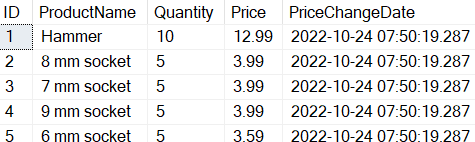
When Listing 2 is execute the results in Report 1 are produced. (Without an ORDER BY clause, it is possible for the output to include 5 different rows, but in such a small set that you just created, it is not likely. Variations in output are typically noticed when there is more processing involved.)

Report 1: Results when Listing 2 is executed

Report 1 shows the 5 rows returned from the dbo.Inventory table when Listing 2 is executed. These rows are considered unsorted because no ORDER BY clause was specified on the SELECT statement.

To return the first 5 dbo.Inventory rows based the sort order of ProductName column the code in Listing 3 can be run.

USE tempdb;
GO

SELECT TOP (5) * 
FROM dbo.Inventory
ORDER BY ProductName;
GO

Listing 3: Returning 5 rows from a sorted set of rows

When the code in Listing 3 is run the results in Report 2 are displayed.

Table Description automatically generated with low confidence

Report 2: Results when Listing 3 is executed.

When the ORDER BY clause is included, SQL Server first sorts the results set before determining which rows to return. By reviewing the output in Report 3, you can see that SQL Server returned 5 rows, and each row is sorted based on the ProductName column.

In the examples so far, the number of rows returned has been based on a hard coded value. In this case the value was “5”. The number of rows return doesn’t need to be hard coded, it can also be based on a variable.

Using a variable in the TOP clause

There are times when you might want the number of rows returned from a specific query to be based on a variable. By doing this the number of rows returned could be different each time a specific query is executed. To demonstrate I’ll use the stored procedure creating in Listing 4.

USE tempdb;
GO

CREATE PROCEDURE dbo.Get_TopX (@TopX int)
AS
  SELECT TOP (@TopX) * 
  FROM dbo.Inventory;
GO

EXEC dbo.Get_TopX @TopX = 2;

Listing 4: Store Procedure to return the number of rows based on variable

In Listing 4 the stored procedure dbo.Get_TopX was created. This procedure requires a parameter named @TopX to be passed when this stored procedure is executed. This variable is used to identify the number of rows the TOP clause will return when the store procedure is executed. When the EXEC statement in Listing 4 is run the results in Report 3 is produced.

Table Description automatically generated

Report 3: Results when stored procedure dbo.Get_TopX in Listing 4.

A different number of rows can be returned by just passing a different value for the input parameter for the dbo.Get_TopX stored procedure. I’ll leave it up to you to test returning different numbers of rows by passing different parameter values to the dbo.Get_TopX stored procedure.

A couple of quick notes. The TOP clause value may not be negative, or an error will be returned. If the value is 0, then 0 rows will be returned.

Additionally, you can use an expression in the TOP clause. Change the previous procedure to TOP (@TopX -1) and when the parameter value is 2, one row will be output.

Returning a Percentage of rows using TOP clause

All the TOP clause examples so far have returned a specific number of rows from the record set, based on the number identified in the TOP clause. The TOP clause also supports returning a percentage of the rows from the result set, instead of a specific number of rows. To show how to return a percentage of rows review the SELECT statement in Listing 5.

USE tempdb;
GO

SELECT TOP (50) PERCENT *
FROM dbo.Inventory
WHERE ProductName like '% mm %';
GO

Listing 5: Returning a percentage of rows using TOP clause.

The results when the code in Listing 5 is executed is show in Report 4.

Table Description automatically generated

Report 4: Results when the code in Listing 5 is executed.

The SELECT statement in Listing 5 only returned 2 rows, which is exactly 50 percent of the metric socket tools stored in the dbo.Inventory table.

When using the PERCENT option of the TOP clause, the calculated number of rows returned could produce a fractional value. When a fractional number is calculated SQL Server rounds up to the next integer value to determine the number of rows to return. To demonstrate this, consider the code in Listing 6.

USE tempdb;
GO

SELECT TOP (51) PERCENT * 
FROM dbo.Inventory
WHERE ProductName like '%socket%';
GO

Listing 6: Returning 51 PERCENT of the rows.

When the code in Listing 6 is run the results in Report 5 is produced.

A screenshot of a computer Description automatically generated with medium confidence

Report 5: Results when Listing 6 is produced.

When SQL Server processes the code in Listing 5, it finds that 4 rows that have name “socket” in the ProductName. 51 percent of the 4 rows found produces the fractional value 2.04. Because SQL Server cannot bring back fractional rows, the value 2.04 is round up to the next integer value, which is why 3 rows were returned when Listing 6 is executed.

Using the WITH TIES option

The TOP clause also has a WITH TIES option. This option is useful to return all the rows that have the same value as the last row. By last row, I mean the row number that is equal to the number used in the TOP clause. When the WITH TIES option is used the statement must also include an ORDER BY clause, otherwise the following error will occur:

Msg 1062, Level 15, State 1, Line 78

The TOP N WITH TIES clause is not allowed without a corresponding ORDER BY clause.

To show how to bring back ties consider the two SELECT statements in Listing 7.

USE tempdb;
GO

SELECT TOP (2) WITH TIES * 
FROM dbo.Inventory
WHERE Price < 3.60
ORDER BY Price;
GO

SELECT TOP (2) * 
FROM dbo.Inventory
WHERE Price < 3.60
ORDER BY Price;
GO

Listing 7: Using the WITH TIES options

When the code in Listing 7 is executed, the first SELECT statement returns the rows shown in Report 6 and the second SELECT statement generates the rows in Report 7.

Table Description automatically generated

Report 6: Rows returned when the WITH TIES options is used

Table Description automatically generated with medium confidence

Report 7: Rows returned when the WITH TIES option is not used

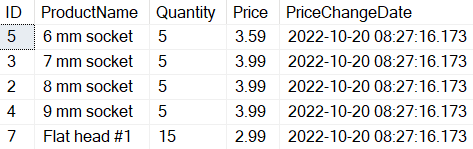
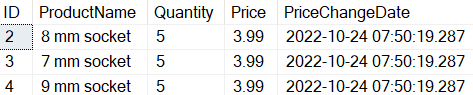
Both SELECT statements in Listing 7 use the same TOP (2) clause. The only difference between the two SELECT statements is the first one uses the WITH TIES option, whereas the second one doesn’t use this option. By reviewing the output in Report 6 and 7 you can see the WITH TIES options produced 3 rows, whereas the SELECT statement without this additional option only returns 2 rows. The WITH TIES options brought back the third row in Listing 6 because that row had the same value for the Price column as the second row (or last rows based on the TOP clause number).

Logical processing of TOP and ORDER BY clauses

There are times when you might get some unexpected results due to the logical processing order of a TOP and ORDER BY clauses. These unexpected results can occur when the TOP clause used in conjunction which the UNION, UNION ALL, EXCEPT and INTERSECT operators. To demonstrate this, the code in Listing 8 will be run. This code uses the UNION operation.

USE tempdb;
GO

SELECT TOP(1) * FROM dbo.Inventory
WHERE ProductName like 'Flat head%'   
UNION  
SELECT TOP(1) * FROM dbo.Inventory 
WHERE ProductName like '%socket%'  
ORDER BY Price ASC; 
GO

Listing 8: UNION query

The intent of the code in Listing 8 is to find the least expensive “Flat head” and “socket” products. When the code in Listing 8 is run the output in Report 8 is created.

Table Description automatically generated with medium confidence

Report 8: Results when Listing 8 is run

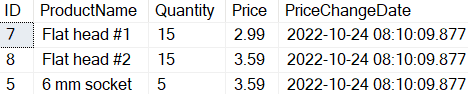
The code in Listing 8 didn’t display the least expensive “Flat head” or “socket” products. The reason this occurred was because the ORDER BY clause was processed after the two SELECT statement where run and the UNION operation was performed.

Because both SELECT statements returned an unorder set, the TOP (1) clause just returned first row from those unordered sets. Which in this case was not the least expensive item. To correctly return the least expensive item for each SELECT statement the ORDER BY clause needs to be processed prior to the TOP clause, in each SELECT statement. To correctly identify the least expensive “Flat head” and “socket” tools the code in Listing 9 can be used .

USE tempdb;
GO

SELECT * FROM 
   (SELECT TOP(1) * FROM dbo.Inventory
    WHERE ProductName like 'Flat head%'
    ORDER BY Price ASC) AS Flat_Head
UNION  
SELECT * FROM
   (SELECT TOP(1) * FROM dbo.Inventory
    WHERE ProductName like '%socket%'
    ORDER BY Price ASC) AS MM;
GO

Listing 9: Correctly finding the least expensive items

When the code in Listing 9 is executed the results in Report 9 are displayed.

Table Description automatically generated

Report 9: Results when Listing 9 is executed.

By placing an ORDER BY clause on the SELECT statement of each subquery, along with the TOP clause, the results will first be sorted, prior to selecting the TOP (1) record, from each SELECT statement. By having the records sorted the correct inexpensive item for each type of product is selected.

Using the TOP clause in a SELECT statement

The TOP clause can be used to limit the number of rows returned from a SELECT statement. The number of rows returned can be an exact number, or a percentage of rows. The WITH TIES options can be used to bring back more rows than what is specified in the TOP clause, when the last row returned has multiple rows with the same value. If the rows returned need to be selected based on a specific sort order, then an ORDER BY clause to be included. The examples in this article only covered using the TOP clause in a SELECT statement. The TOP clause can also be used in an INSERT, UPDATE, DELETE or MERGE statement. For more information about using the TOP clause refer to the Microsoft documentation.


The post Using TOP clause in a SELECT statement appeared first on Simple Talk.


from Simple Talk https://ift.tt/q2LDPnE
via

Monday, February 6, 2023

3 Keys Areas to Drive Digital Transformation

Originally published on 21 August 2020 as “Understanding digital transformation & how it transcends to driving organizational growth“, edited by Louis Davidson including updated references.

IDC report forecasts that global spending on enterprise applications will rise from $279.6 billion in 2022 to 385.2 billion in 2025. Nearly all of this will be in public cloud services and related infrastructure. All these numbers indicate a continued strong surge in cloud and intelligent digital technology adoption as more and more companies embrace digital transformation to become agile and stay market relevant.

In this article, I want to look at three key areas that need to be considered to make

digital transformation occur:

  1. As a Response to Current Changes
  2. In Preparation for Future changes
  3. To Enhance the Human Experience

Responding to current changes by leveraging digital technologies

As a first step, IT and business goals need to align to channel resources into the creation of digital products and experiences which can drive growth in current markets and products. From an organizational perspective, the focus is to transform to optimize operations and enhance customer-centricity alongside the goals of managing risk and increasing revenues.

To do this, the organization needs to identify and re-define relevant business processes which can deliver desired outcomes leveraging digital technologies:

  • Customer centricity and experience
  • – By creating innovative solutions that deliver unique experiences focusing on personalization, convenience, and ease of doing transactions, along with meeting the required privacy demands. For example, Netflix, Amazon & Spotify’s predictive hyper-personalized experience embedded in their recommendation systems is a classic case of delivering customer delight and unique experience customized to each individual customer.
  • Real time analytics –
  • The ability to get analytics on actions almost as they occur provides immense potential to respond to changes, prepare for the unexpected, make smarter decisions, and optimize operations\tasks reducing cycle time, and allowing innovation with agility & speed. IoT sensors and devices are driving the case for real time actionable insights through streaming analytics.
  • Predictive analytics
  • – The ability to predict future outcomes and prescribe what needs to be done in supply chain, cyber security and disaster management as early as possible can turn into a game changing competitive advantage. For example, in the oil and gas industry, predictive analytics is helping companies improve operational efficiency by proactive predictive maintenance, demand forecasting, energy trading, risk management and optimization.
  • Robotic process automation (RPA) –
  • Automated shared services, augmented intelligence and smart automation are great ways to put digital technologies to drive operational efficiency, cost reduction, revenue growth and competitiveness. Returns processing is a common use case for RPA that we have all experienced. RPA helps companies manage returned products by automating manual tasks such as receipt of return confirmation, inventory updates, billing system updates and issuing payment adjustment to the customer.

Preparing for future changes by building innovative solutions and leveraging digital technologies

The

quest for creating newer innovative business models to thrive in today’s digital world is a major challenge for executives. The value proposition of newer business models, the required core competencies, and skillsets, forging strategic partnerships, understanding market forces, generating shareholder value along with providing tangible benefits to target customers is easier said than done.

So, how does an organization decide on which newer business models are promising for future revenue growth? Well, the answer is “it depends” and varies from company to company. However, reimagining business models can be done in following ways:

  • Venture into new markets and industry
  • – Look at your products, core assets, technological capabilities, data, customers, and intellectual property that you have built in previous years. Explore options and decipher opportunities to leverage these assets to enter or disrupt other industries who may/may not be part of your existing value chain. Disrupt entire value chain by thinking out of the box and reshaping the way your products and services reach their target audience.
  • Harness the power of your ecosystem –
  • Collaborating and integrating with other businesses in your ecosystem to provide a seamless experience to common customers. Community based sharing of underutilized resources in peer networks is another innovative way to redefine business models using digital platforms and technologies. The use case will differ from organization to organization but the potential to deliver newer innovative solutions without boundaries can surely disrupt the isolated players.
  • Use the
  • power of your online community
  • – Monetize the power of your online community of users and customers by mining their opinions, deriving insights, driving member engagement for research initiatives for third party organizations. As a bonus, you may also drive open innovation initiatives to find newer business models, and use cases from the larger community. For example, Facebook uses hackathons to generate newer ideas and fosters a product innovation centered culture built on open innovation inside and outside the company. Another example is SAP Ariba network, where buyers and sellers collaborate and discuss new business opportunities.
  • Outcome based business models –
  • Create and repurpose your business model on the final tangible outcome that your organization delivers instead of mere products and services. Build capabilities to position your business as an enabler of the larger outcome and not just the product or service sold. For example, Zipcar provides on demand IoT enabled cars and trucks. Customers pay for subscription which includes gas, insurance and on demand access to cars and trucks. Their outcome-based business model uses IoT sensors to drive innovation in car rental business.

Enhancing the human experience and capabilities in all spheres of business

Enhancing human experience and capabilities in all spheres of business, is indeed the most important part of the digital transformation narrative. If a change isn’t enhancing the customer experience or complementing employee expertise it may not be transformative in the true sense. It is not just these digital intelligence technologies alone that propel organizations to true transformation, but it is their interaction with humans which deem these emerging technologies game changing and revolutionary. As organizations deploy more digital technologies like machine learning, cloud, security, analytics and IoT; the workforce will need re-skilling and retooling to bridge the skill gap and drive employee engagement.

So, now that we know how we can achieve digital transformation leveraging digital technologies in current business scenario and how to create newer business models, now the question arises- what can we do to ensure the digital technology enhances the human experience?

To answer this, we need to look at intelligent process automation, use of AI in automating mundane repetitive tasks and channel employees’ time and effort in more value adding, productive tasks. Not only automation, but intelligent technologies such as intelligent analytics, IoT, voice enabled devices, virtual reality, smart wearables, integrated workflows, collaboration platforms will enable faster decision making and more transparency. And in turn drive employee reskilling and which will enhance employee engagement and productivity. Look no further than the work being done with ChatGPT to see just how far we have come, and how far we still have to go.

Conclusion

The digital transformation is an amalgamation of all these 3 parts and requires a digital transformation strategy that looks at goals, current situation, business context and chalks out a clear roadmap of how to move forward on all the three frontiers. The possibilities are endless, the opportunities are virtually boundless and perils of lagging behind and failing to leverage these digital technologies are grave.The onus of acting on these key focus areas and making most out of the intelligent digital technologies and redefining markets and industries lies with the executives.

Want to read more thought leadership articles on digital transformation?


The post 3 Keys Areas to Drive Digital Transformation appeared first on Simple Talk.


from Simple Talk https://ift.tt/y51N9BJ
via

Friday, February 3, 2023

PostgreSQL Constraints: Learning PostgreSQL with Grant

PostgreSQL supports constraints much like any other database management system. When you need to ensure certain behaviors of the data, you can put these constraints to work. I’ve already used several of these in creating my sample database (available articles publicly on GitHub, in the CreateDatabase.sql file). I’ll explain those as we go. The constraints supported by PostgreSQL are:

  • Not-Null Constraints
  • Unique Constraints
  • Primary Key
  • Foreign Key
  • Check Constraints
  • Exclusion Constraints

Not-Null Constraints

One way we can ensure that our data is correct is by requiring it in the first place. If you create a table like this:

create table public.example
(ID int,
SomeValue varchar(50));

Because you didn’t define whether or not the columns can, or cannot, accept NULL values, then these will accept NULL values. The thing about NULL is that it’s really useful. Sometimes, people simply don’t have the information to give you, so allowing NULL is a good solution. Other times though, you absolutely need that value to be added to the rows of your table.

Let’s take the radio.radios table from the hamshackradio database as an example:

CREATE TABLE IF NOT EXISTS radio.radios
        (radio_id int CONSTRAINT pkradios 
                  PRIMARY KEY GENERATED ALWAYS AS IDENTITY,
        radio_name varchar(100) NOT NULL,
        manufacturer_id int NOT NULL,
        picture BYTEA NULL,
        connectortype_id int NOT NULL,
        digitalmode_id int NULL
);

Here I’ve used the clause NOT NULL on multiple columns to ensure that they must have information provided. In short, a radio must have a manufacturer (through the manufacturer_id column) and a name (through the radio_name column). Defining them with NOT NULL ensures that they must be filled out. You’ll also note that I use the NULL definition on the picture column. I could simply let the default take charge. For clarity, and to show intention, I use NULL instead.

So now, if I tried to insert data into the radio.radios table like this:

insert into radio.radios (manufacturer_id)
values (2);

I’m going to get a very specific error:

SQL Error [23502]: ERROR: null value in column "radio_name" of relation "radios" violates not-null constraint

Detail: Failing row contains (4, null, 2, null, null, null).

It’s letting me know that I must provide a value for the radio_name column. You should note that I left out another NOT NULL column, connectortype_id. It was not included in the error since no additional checks were made after the first column, radio_name, failed it’s NOT NULL constraint check. If I were to just add the radio_name to the INSERT statement above, I’d get a new error. In short, you have to supply all columns that are marked as NOT NULL, unless those columns have default value defined (we’ll get to defaults in another article).

If I wanted to list all the constraints on a table, I could run a query like this:

select
        c.conname,
        ccu.table_schema,
        ccu.table_name,
        ccu.column_name,
        c.contype,
        pg_get_constraintdef(c.oid)
from
        pg_constraint as c
join pg_namespace as ns on
        ns.oid = c.connamespace
join pg_class as cl on
        c.conrelid = cl.oid
left join information_schema.constraint_column_usage as ccu
                   on
        c.conname = ccu.constraint_name
        and ns.nspname = ccu.constraint_schema
where
        ccu.table_name = 'radios';

Running this query results in the following results:

None of the NOT NULL constraints are listed. While these are considered constraints, they are only defined at the column level and don’t have any other definition outside of that. If you want to see which columns allow NULL values, you can use the following query:

select column_name
from  information_schema.columns
where table_catalog = 'hamshackradio'
  and table_schema = 'radio'
  and table_name = 'radios'
  and is_nullable = 'YES';

This returns the picture and digitalmode_id columns, which, referring back to the DDL of the table, you will see matches.

Unique Constraints

Sometimes a column or set of columns in a table must be unique, that is, not allowing any duplicates. PostgreSQL provides a whole slew of mechanisms for defining a column, or columns, as unique within a table.

First, you can simply define a unique column like this:

CREATE TABLE IF NOT EXISTS public.uniqueval1
        (id int not null,
        myuniquevalue varchar(50) unique);

Now, only unique values will be allowed for the column myuniquevalue. However, an interesting thing has happened. Let’s look at the indexes on this table:

select  i.indexname,
        i.indexdef
from
        pg_indexes as i
where
        i.tablename = 'uniqueval1';

Running this query results in the following:

The way that PostgreSQL satisfies the unique criteria for the column is by creating a unique b-tree index. This is familiar to me as a SQL Server user. The question then becomes, why create a unique constraint at all? Why not just create a unique index? Well, you can truly do it either way. However, the documentation that using the unique constraint implies to the database might be important.

My rule of thumb is that a UNIQUE constraint is there to enforce that the values in a table’s column are different from one another. A unique index is there for performance. This helps to signal to people tuning your database’s queries that the index could be removed without harm, but the constraint is part of the core business rules for the database.

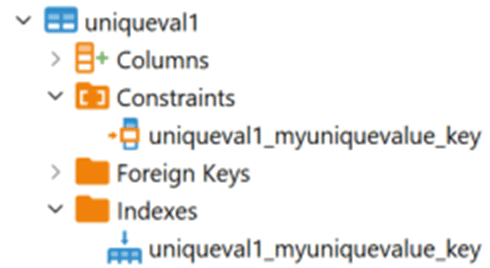
The advantage to the queries that are executed is going to be the same either way. However, it will be marked and listed as a constraint as well as an index:

Graphical user interface, text, application Description automatically generated

You can also do the same thing using a slightly different syntax:

create table if not exists public.uniqueval2
        (id int not null,
        myuniquevalue varchar(50) not null,
        unique(myuniquevalue));

I have a problem with both these default approaches. It results in a default constraint name, and one in which I have no control. This affects the ability to work with your database within a source control system, so I’d change the syntax to this:

create table if not exists public.uniqueval3
        (id int not null,
        myuniquevalue varchar(50) 
             constraint uniqueval3_inameit unique not null);

or

create table if not exists public.uniqueval4
        (id int not null,
        myuniquevalue varchar(50),
        constraint inameit unique(myuniquevalue));

In this manner I get to control the constraint names. If more than one column defines the constraint, you must use that second syntax with the definition as a column constraint.

You can also add a unique constraint to a table using ALTER:

--create a table without a constraint
create table if not exists public.uniqueval5
        (id int not null,
        myuniquevalue varchar(50) null);

--now add the constraint
alter table public.uniqueval5
   add constraint mynewconstraint unique(id, myuniquevalue);

One point that is very important to understand here is how NULL values are handled in PostgreSQL, which may be different from other RDBMS you have worked with. A NULL value is, by definition, unknown. Since two unknown values do not equal each other, you can have, by default, multiple NULL values in your “unique” set of rows. Let’s see this in action:

create table if not exists public.nullnotunique
        (id int not null,
        nonuniqueval varchar(50) constraint notunique unique null
);

insert into public.nullnotunique(id,nonuniqueval)
values (1, null), (2,null), (3, 'one');

This will run without error because the NULL values are not duplicates per the definition. You can change this behavior if you are using PostgreSQL 15 or later by using unique nulls not distinct:

create table if not exists public.nullunique
        (id int not null,
        uniqueval varchar(50)
 constraint nowunique unique nulls not distinct null);

insert into public.nullunique (id,uniqueval)
values (1, null), (2, null), (3, 'one');

Now when this query runs, you’ll immediately get an error:

SQL Error [23505]: ERROR: duplicate key value violates unique constraint "nowunique"

Detail: Key (uniqueval)=(null) already exists.

With the table definition changed using NULLS NOT DISTINCT, you now get one NULL row, and any subsequent NULL values are recognized as duplicates. You can specify the default behavior using NULLS DISTINCT.

For earlier versions, you might need to try other less straightforward solutions. For example, in the 14.5 version server I have for testing, I could add a computed column that takes the NULL value and makes it not NULL value.

ComputedUniqueeval varchar(50) GENERATED ALWAYS AS 
                  (case when uniqueval is null 
                          then 'impossible value' 
                   else uniqueval END) STORED
);

Then add a filtered index on the computed column:

CREATE UNIQUE INDEX uniqueval_notnull_idx 
       ON public.nullunique (ComputedUniqueeval)
       WHERE uniqueval IS NULL;

Of course, this is wasted space for the duplicated column and the extra index, plus the need to find an impossible value for uniqueval (and probably add a constraint to make sure that it is truly impossible.) However, almost always, implementation cost and complexity are going to be less important than data quality.

Primary Key Constraints

A primary key constraint is effectively the same as a unique constraint, with a few minor, but important differences. It’s going to be enforced by a unique index in the same manner and can be references by a foreign key constraint (which will be covered later in this article.) However, the primary key constraint is typically the columns used in a foreign key relationship, and the columns of a primary key may not allow NULL values. (Even if you define a primary key column as NULL it will be changed to NOT NULL as long as no data already exists.)

While you could dispense with the need for a primary key and simply define your key as a unique constraint or index, clarity is so important when it comes to code. Defining your structures appropriately to properly communicate how your database is designed and how it should be used. More about this in the foreign key section.

The syntax to create a primary key is very similar to creating a unique constraint:

create table if not exists public.pkexample
(id int primary key not null,
somevalue varchar(50));

As before though, this will result in a default name being created, so it’s better to do something like this:

CREATE TABLE IF NOT EXISTS radio.radios
        (radio_id int CONSTRAINT pkradios PRIMARY KEY 
                               GENERATED ALWAYS AS IDENTITY,
        radio_name varchar(100) NOT NULL,
        manufacturer_id int NOT NULL,
        picture BYTEA NULL,
        connectortype_id int NOT NULL,
        digitalmode_id int NULL);

This will create a primary key named pkradios. You’ll also note I used an IDENTITY value here to ensure that this is a self-generating value as data gets added to the table.

As with the unique constraint examples above, you can define the primary key as a column definition. You must use that syntax if you have more than one column. You can also ALTER a table to add a primary key constraint. Other than that, the behavior of a primary key is basically identical to the unique constraint. I would still always use the primary key definition, if for no other reason, as a means of documentation.

One very interesting thing about creating primary key constraints is that if the values you are defining as the PRIMARY KEY allow NULL values, the PostgreSQL engine will attempt to fix that for you. For example, consider the following table:

create table if not exists public.badpkexample
(id int null,
somevalue varchar(50));

Check the results of the following metadata query:

select is_nullable
from   information_schema.columns
where table_schema = 'public'
and   table_name = 'badpkexample'
and   column_name = 'id';

This will return YES. Meaning the column allows NULL values. After you add the following constraint:

alter table public.badpkexample
  add constraint PKbadpkexample
     primary key (id);

Query the metadata again and it will return NO. It has changed the column to no longer allow NULL values. If there was already data in the id column that contained NULL values, you would receive the following error message:

ERROR: column "id" of relation "badpkexample" contains null values

SQL state: 23502

Foreign Key Constraints

One of the key concepts behind a relational database is to relate one table to another in order to create meaning. Foreign keys define and control the referential integrity from one table to another. In my sample database, I have a table for radios and one for radio manufacturers. The foreign key definition between the two looks like this:

ALTER TABLE radio.radios
ADD foreign key (manufacturer_id) 
            references radio.manufacturers;

The primary key in radio.manufacturers consists of the manufacturer_id column. I have that same column with a matching data type in radio.radios. That allows me to create the foreign key between the two tables. You’ll note that while both tables are involved, we’re only altering the one table to add the constraint.

With the foreign key in place, I can only add manufacturer_id values to the radio.radios table where the radios.manufacturers contains that value in the primary key. Further, because of the constraint in place, I can’t delete the row with that value in the radio.manufacturers table (more on that below). This is how the foreign key constraint helps to ensure data integrity.

The way I defined the constraint in the text, it’s going to generate a default name. I can control the name by modifying the code.

alter table radio.radios drop constraint radios_manufacturer_id_fkey;

alter table radio.radios 
   add constraint radios_fk_manufacturer 
       foreign key (manufacturer_id) 
           references radio.manufacturers;

I can also add a foreign key as part of the table definition:

create table if not exists radio.radios
   (radio_id int constraint pkradios primary key
                         generated always as identity,
        radio_name varchar(100) not null,
        manufacturer_id int not null,
        picture BYTEA null,
        connectortype_id int not null,
        digitalmode_id int null,
        constraint radios_fk_manufacturer3
       foreign key (manufacturer_id)
           references radio.manufacturers 
);

The default behavior is for the foreign key to be checked when a row is deleted in the referenced table. If values exist, the delete is stopped. You can take direct control over this behavior and change it. For example, you can change when inside transaction process the check is made. Normally it’s made later in the process, but you can set it to happen first by using the ON DELETE RESTRICT option:

create table if not exists radio.radios
(
   radio_id int constraint pkradios primary key 
                             generated always as identity,
   radio_name varchar(100) not null,
   manufacturer_id int not null,
   picture BYTEA null,
   connectortype_id int not null,
   digitalmode_id int null,
   constraint radios_fk_manufacturer3 foreign key 
                                     (manufacturer_id) 
   references radio.manufacturers ON DELETE RESTRICT
);

That changes the default behavior. You can also command the default behavior by using the syntax ON DELETE NO ACTION, but I think that’s both wordy and unclear. Better to just use the default syntax. Let me take a moment to walk you through this diagram outlining this DELETE behavior:

So the default behavior is to find the rows to be deleted, delete them, then validate that there are no matching rows in any related tables. This is how SQL Server works as well. However, you can change where that check occurs by issuing the DELETE RESTRICT to the definition. In this case, before the transaction processing starts, you get a check to validate that no foreign key violation will occur.

All this may feel like semantics, but, there is an additional behavior that you can add to your transactions within PostgreSQL. There are quite few details to this behavior, but I’ll summarize it here. You can directly affect when some constraints, specifically UNIQUE, PRIMARY KEY, foreign key (REFERENCES) and EXCLUDE, are evaluated in an individual transaction. The default for these constraints is as outlined in each section. But you can defer all of them until later in the transaction. However, some foreign key constraints may be more likely to be violated. Those you can control through this setting, forcing them to be evaluated earlier in a transaction, saving unnecessary processing and rollbacks. Conversely, you can make all constraint checks immediate. By the way, NULL and CHECK constraints are always immediate.

We can also make it so that when a row in the radio.manufacturers table gets deleted, all associated radios also get deleted:

create table if not exists radio.radios
        (radio_id int constraint pkradios primary key 
                                generated always as identity,
        radio_name varchar(100) not null,
        manufacturer_id int not null,
        picture BYTEA null,
        connectortype_id int not null,
        digitalmode_id int null,
        constraint radios_fk_manufacturer foreign key 
            (manufacturer_id) 
      references radio.manufacturers on delete cascade 
        );

This is what CASCADE will do. However, there are implications here that are important. The radio.radios table is also referenced as a foreign key. If we start trying to delete rows from the radios table, it will fail because of those other foreign key constraints. Unless we also make all them CASCADE as well. However, at that point, you can get some pretty drastic behavioral issues within your database as locks are held while all the various tables go through their cascading deletes. Generally, this isn’t considered a good way to set things up.

For the most part, databases I have created have all used identifier values that cannot be changed, so I have rarely used the following settings, but PostgreSQL has some additional options for ON DELETE that could be helpful in some cases.

You can define ON DELETE SET NULL. This will change the column from whatever value it had, to a NULL value. Of course, the column must allow NULL values. You can also define ON DELETE SET DEFAULT. Then, whatever the default value of the column is (we have yet to cover defaults), it will be substituted for the deleted value. Once again though, that default value must meet fundamental referential integrity requirements, meaning, it has to be a value in the primary key of the radio.manufacturers table in our example.

Note: You can define a foreign key constraint that references a UNIQUE constraint, but there is one major caveat. NULL values in a column will guarantee that a match is made. As I will demonstrate in the Check Constraints section, constraints fail on a false condition, not a NULL (which any NULL value compared to another will cause)

Check Constraints

The check constraint is used to allow you to define your own data integrity rules for values in a row. It could be anything from the values in a column can only contain numbers greater than 100 to calculations between columns. The key is that all checks are made upon the insertion of a row, or on any subsequent updates, and can only access columns and values in the same row.

To take an example, in the United States the lowest possible frequency I can use as an amateur radio operator is 135.7kHz and the highest is 1300MHz or 1300000kHz. So, in my radio.bands table where I’m tracking frequencies, I could define a constraint for the frequency_start_khz column like this:

alter table radio.bands 
add constraint minfrequency 
    check (frequency_start_khz >= 135.7);

Now I can’t accidentally add a value that is actually below my possible operating range.

To see an example of columns interacting, I should make sure that the frequency_start_khz is always below the frequency_end_khz that define the range of the band:

ALTER TABLE radio.bands
ADD CONSTRAINT startlessthanend 
     CHECK (frequency_start_khz < frequency_end_khz);

And I wanted to, I could make these into a single check:

alter table radio.bands 
add constraint allinone 
     check (frequency_start_khz < frequency_end_khz 
            and frequency_start_khz > 135.7);

It’s really a question of deciding how you want to use your checks. I’d probably keep them separate because it makes for easier understanding of what each constraint is doing.

As with the other constraint examples throughout the chapter, you can also make the constraint a part of the table definition:

CREATE TABLE IF NOT EXISTS radio.bands
(
 band_id int CONSTRAINT pkbands PRIMARY KEY 
                         GENERATED ALWAYS AS IDENTITY,
 band_name varchar(100) NOT NULL,
 frequency_start_khz numeric(9,2) NOT null 
     CONSTRAINT minfrequency check (frequency_start_khz >135.7),
 frequency_end_khz numeric(9,2) NOT NULL,
 country_id int NOT NULL
);

As before, if I didn’t include a constraint name, one will be generated for me.

One thing to note about NULL values and constraints. Constraints operate slightly different from WHERE clauses. In a WHERE clause, a row is returned when a TRUE output comes. 1=1 returns TRUE, 1=2 returns FALSE, but 1=NULL is UNKNOWN. Only the TRUE value will return results. In constraints, the data fails the constraint only on a FALSE comparison.

For example, consider the following object.

create table public.nullconstraintcheck
(
      id    int not null,
      value int NULL
);

Then you add a CHECK constraint requiring the column value to be 1.

alter table public.nullconstraintcheck
  add constraint valueEquals1 
     check (value = 1);

It seems pretty clear which of these two following INSERT statement queries will work and which will fail.:

insert into public.nullconstraintcheck(id, value)
values (1,1); 
insert into public.nullconstraintcheck(id, value)
values (2,2);

The second will fail with the following error message:

ERROR: new row for relation "nullconstraintcheck" violates check constraint "valueequals1"

DETAIL: Failing row contains (2,2).

Note that if you run them both in the same batch, no rows will be added to the table. The following statement, however, will succeed because NULL = 1 is UNKNOWN, not FALSE.

insert into public.nullconstraintcheck(id, value)
values (3,NULL);

If you need a constraint to consider NULL values in the criteria, you need to explicitly include an IS NULL expression or something similar. If you wanted to eliminate NULL values in some conditions, you need to explicitly state IS NOT NULL. For example, I will change the constraint to allow NULL values when the value of id is less than 5, but not allow NULL values 5 and up.

alter table public.nullconstraintcheck
     drop constraint valueEquals1;
alter table public.nullconstraintcheck
  add constraint valueEquals1 
      check ((value is not null and value = 1)
             OR (id < 5 and value = 1));

Now you can see when you execute the following statements:

insert into public.nullconstraintcheck(id,value)
values (4,NULL);
insert into public.nullconstraintcheck(id,value)
values (5,NULL);

The first will succeed, but the second one will not.

ERROR: new row for relation "nullconstraintcheck" violates check constraint "valueequals1"

DETAIL: Failing row contains (5, null).

I very much suggest that you test constraints thoroughly, especially when any referenced column allows NULL values.

Exclusion Constraints

An exclusion constraint is a bit like a unique constraint, but it’s different. Basically an exclusion constraint guarantees that if any two rows are compared, using the expressions defined in the constraint, that not all comparisons will return TRUE, at least one has to return FALSE or NULL. The idea is to get to a place where you can define more complex constraints across multiple columns in a table.

Let’s note right up front, if the columns you’re comparing are using only equality operators, then the exclusion constraint is exactly the same as a unique constraint. So, the idea here is that when you have a more complex comparison than straight equality, but you still want unique data based on the comparison, whatever it may be, you’ll be using an exclusion constraint.

Before you try to create exclusion constraints, be aware that there limits on the data types that can be used. If you’re interested in dates, text, stuff like that as things that may limit a row, which is very standard, you need to run one command first:

CREATE EXTENSION btree_gist;

This allows you to put constraints on standard scalar data types as opposed to arrays, geometry, and other more complex types. In this series of articles, I have tried to stick to what is strictly “in the box” in terms of PostgreSQL functionality, meaning, no extensions, and this does violate that goal. See, there are simply tons of extensions. Some, like btree_gist, are free and fairly fundamental to some behaviors. Others cost money, but add amazing behaviors. I’m currently trying to learn the core of PostgreSQL, not all possible extensions. However, constraints on standard data types is very likely, so I’ve gone ahead and broke my own rule in this instance.

With that in place, if we take the logging.logs table:

CREATE TABLE IF NOT EXISTS logging.logs
(log_id int CONSTRAINT pklogs PRIMARY KEY 
                          GENERATED ALWAYS AS IDENTITY,
log_date timestamptz  NOT NULL,
log_callsign text,
log_location point NOT NULL);

I’m going to define a constraint where the log_date, log_callsign can be the same, as long as the log_location changes. This would be useful for a contest like Parks on the Air where you can talk to the same people, but your location has to change, meaning, you’re in a different park. That constraint would be defined like this:

alter table logging.logs
add constraint uniquecontact exclude
using gist (log_date with =,
        log_callsign  with =,
log_location with ~=);

I can then add some data to the table:

INSERT INTO logging.logs
(log_date,log_callsign,log_location)
VALUES
('12/21/2022','KC1KCE','35.952, -96.152'),
('12/21/2022','KC1KCE','35.957, -96.127');

And that’s going to work fine. Even though the log_date and the log_callsign are the same, the log_location is different. If I then try to add this:

INSERT INTO logging.logs
(log_date,log_callsign,log_location)
VALUES
('12/21/2022','KC1KCE','35.952, -96.152');

I will get the following error:

SQL Error [23P01]: ERROR: conflicting key value violates exclusion constraint "uniquecontact"

Detail: Key (log_date, log_callsign, log_location)=(2022-12-21 00:00:00-06, KC1KCE, (35.952,-96.152)) conflicts with existing key (log_date, log_callsign, log_location)=(2022-12-21 00:00:00-06, KC1KCE, (35.952,-96.152)).

While you can get into some complex stuff with this constraint, it’s worth noting that the exclusion constraint isn’t the greatest performing constraint. Where possible, it’s recommended to use unique constraints if you can since they will perform better. However, when you have specific requirements, the exclusion constraint can make things better.

Conclusion

Those are all the constraint types within PostgreSQL. You should absolutely take advantage of these to ensure that your data is as clean as possible. Functionally, if you’re used to another RDBMS like SQL Server, most of these constraints are going to be very familiar, as are the behaviors of the constraints. A few things like the ability to control how NULL values are resolved in a unique constraint, or the very concept of exclusion constraints will be new. Overall though, I’m impressed with the functionality that is possible with the constraints in PostgreSQL.


The post PostgreSQL Constraints: Learning PostgreSQL with Grant appeared first on Simple Talk.


from Simple Talk https://ift.tt/wEkr3oi
via