Showing posts with label msbi tutorial. Show all posts

Monday, December 5, 2016

SSIS variable interview question

What are variables and what is variable scope?

variables are extremely important and are widely used in an SSIS package.A variable is used to store values. A variable is a named object that stores one or more values and can be referenced by various SSIS components throughout the package’s execution.here are basically two types of variables, System Variable (like ErrorCode, ErrorDescription, PackageName etc) whose values you can use but cannot change and User Variable which you create, assign values and read as needed. A variable can hold a value of the data type you have chosen when you defined the variable.


Realtime scenario for ssis variable:

We have created a SSIS Package that takes the files from Source Folder and move them to Archive Folder. While it move them, It also add Time Stamp to file. Here is the blog post for the Package  .In this post we want to watch the values of the variables at run time. This can be helpful when we are getting some errors and we are not sure if the value of variables are changed while executing SSIS Package Or our expressions are evaluated correctly that we have written on one or more variables. By looking at the value of variables, It will help us to debug our package.

Solution:

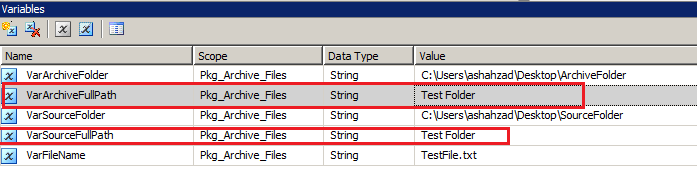
We will be using Break Point in SSIS Package to view variable values at run time. Here are the variable I have used in package. I have changed the values for VarArchiveFullPath and VarSourceFullPath variables.
Expressions are written on these variable those should evaluate at run time and change the values of these variable.
Step 1: 
Right Click on File System Task and go to Edit Breakpoints


Step 2: 
Choose the Break Condition.

Step 3:
Execute your SSIS Package
Step 4:
To view the values of your variable Go to Debug--> Windows--> Locals

Let's see the values of variables win Locals window
We can see that the values are changed according to the expression and we can debug if these values are correct according to our expectations, if not then we can go back to expressions and change them. 

Copy All Tables from IBM DB2 schema to SQL Server

I am trying to come up with the best and most efficient way to copy more than 700+ tables from an IBM DB2 iSeries schema to SQL Server. I have tried the followings:

1. I have exported all the 700+ tables into csv files but I am not able to upload them all in one batch to SQL. I can upload one table at time but it too time consuming

2. Created SSIS package to directly copy table form IBM to SQL but that's gain working for only one table at a time

Any recommendations as what tool(s) or methods to use for copying/uploading multiple tables from IBM to SQL?

ANS:
If you create a table that lists all the tables/files to be imported, and a script that takes a filename and imports the file (possibly with BULK INSERT), you could run multiple copies of that script to do parallel imports.  A flag bit in the table could be used to mark which tables have been chosen by one of the script copies.

Sunday, August 28, 2016

Conditional Split Transformation in SSIS

Conditional Split Transformation in SSIS:

Why Conditional Split Transformation Task is Use ?
Conditional Split Transformation task use when want to direct subsets of data to different locations, such as sending centrally collected data to appropriate branches or within the dataflow when we want to apply different business rules to certain subsets of the data, before merging this Dataset.
    This is most useful transformation in Data Flow Task where we can traverse through different condition.
In Conditional Split Transformation incoming data can be split into multiple outputs as per the conditions specified. It has a default output too that handles all the rows that do not match to any conditions
How Conditional Split Transformation Task is look like ?
image_thumb44_thumb_thumb
Features of Conditional Split Transformation Task
When we need to perform one to many operation we often use conditional transformation
Lets consider we need to perform various operation in same database
image
How to use Conditional Split Transformation Task ? and Demonstration of using Conditional Split Transformation Task ?
This is as simple as derived column transformation which have already discuss ..
Just drag out this task from Data Flow Tasks
image
Once we are ready to use we can configure as shown in following diagram
image
Various Properties For each Conditional Split Transformation Task ?
Following are various properties for Split Transformation
image
Reference link For Conditional Split Transformation Task

For Each Loop Container in SSIS

For Each Loop Container in SSIS:

Why For Each Loop Container Task is Use ?
  • For Each Loop container is falls under container and looping tasks
  • Use containers like the For Each Loop and For Loop to execute a set of tasks multiple times.
  • For example, you can loop over all the tables in a database, performing a standard set of operations like updating index statistics.
  • In short when we have to iteratively execute set of task we will insert all those task under For Loop Container and set the values accordingly
  • The for each loop container acts as a repeating control flow in a package. Its operations are similar to work of For each keyword in any advanced programming language. We have a definite type of enumerator for each type of objects.
  • Loop implementation in the For Each Loop Container is similar to the Foreach looping concept in various programming languages.
The Foreach Loop container defines a repeating control flow in a package. The loop implementation is similar to Foreach looping structure in programming languages. In a package, looping is enabled by using a Foreach enumerator. The Foreach Loop container repeats the control flow for each member of a specified enumerator.
Enumerator is nothing but an iterator where an object that enables a programmer to traverse a container
SQL Server Integration Services provides the following enumerator types:
  1. Foreach File Enumerator: It enumerates files in a folder. The plus point here is it can traverse through subfolders also.
  2. Foreach Item Enumerator: It enumerates items in a collection. Like enumerating rows and columns in an Excel sheet.
  3. Foreach ADO Enumerator: Useful for enumerating rows in tables.
  4. Foreach ADO.NET Schema Rowset Enumerator: To enumerate through schema information about a data source. For example, to get list of tables in a database.
  5. Foreach From Variable Enumerator: Used to enumerate through the object contained in a variable. (if the object is enumerable)
  6. Foreach NodeList Enumerator: Used to enumerate the result set of an XML Path Language (XPath) expression.
  7. Foreach SMO Enumerator: It enumerates through SQL Server Management Objects (SMO) objects.
How For Each Loop Container Task is look like ?
This is Second task in tab itself !!
image
Drag this out in your development plane
image
Features of For Each Loop Container Task
The following diagram shows a Foreach Loop container that has a File System task. The Foreach loop uses the Foreach File enumerator, and the File System task is configured to copy a file. If the folder that the enumerator specifies contains four files, the loop repeats four times and copies four files.

ssis,ssrs,ssqs engines

ssis,ssrs,ssqs engines:

Speaking about Microsoft Business Intelligence stack i.e. SSIS / SSAS / SSRS, there are different engines associated with each services. If you are ignorant about these engines, you probably are not fit to design the architecture of your solution using the respective services. The major engines that comes into consideration when you are using MS BI stack are as below:


1) SSIS Runtime Engine - This engine takes care of the administration and execution section of SSIS. In a developer language, I would consider it a Control Flow + SSMS of SSIS.


2) SSIS Data Flow Engine - This engine can be considered as the Buffer Manager of SSIS in-memory architecture.


3) SSAS Formula Engine - The engine takes care of resolving the retrieval of members on any axis of an MDX query. Tuning the performance of this engine has much to do with MDX tuning.


4) SSAS Storage Engine - This engine can be considered as the Data Manager of SSAS, which decides what data needs to be fetched from where. If you trouble Formula Engine, there is a good possibility that this would cascade to Storage Engine, which directly deals with aggregations.


5) SSRS Service Endpoint - This cannot be technically considered as an engine, as most people would argue that rendering / authentication / processing are engines, but I consider these as extensions rather than engines. This endpoint takes care of the administration part of SSRS. Anything that you can do with Reports Manager is a virtue of this endpoint.


6) SSRS Execution Endpoint - This is the endpoint that one would like to award the medal of being an engine. This endpoint takes care of executing the report right from processing the RDL till rendering the report.


You can read more about each of these in MSDN as well as different books and blogs. But until you thoroughly understand the function of these engines and you are designing the architecture, I am of the opinion that one should not feel confident about the architecture design.

SSIS Balanced Data Distributor transform

SSIS Balanced Data Distributor

Transform:

Microsoft download center has a new download available that would be of interest to many SSIS professionals. Its a new transform named Balanced Data Distributor transform, which takes a single input and distributes the incoming rows to one or more outputs uniformly via multithreading. Below mentioned is the description of this transform as mentioned on the download page:

"Microsoft® SSIS Balanced Data Distributor (BDD) is a new SSIS transform. This transform takes a single input and distributes the incoming rows to one or more outputs uniformly via multithreading. The transform takes one pipeline buffer worth of rows at a time and moves it to the next output in a round robin fashion. It’s balanced and synchronous so if one of the downstream transforms or destinations is slower than the others, the rest of the pipeline will stall so this transform works best if all of the outputs have identical transforms and destinations. The intention of BDD is to improve performance via multi-threading. Several characteristics of the scenarios BDD applies to: 1) the destinations would be uniform, or at least be of the same type. 2) the input is faster than the output, for example, reading from flat file to OleDB. "
Considering the test performed on this transform, from the results it seems that performance of this transform is a little better over other transforms like Script and Conditional Split. But it should also be taken into consideration that this transform buffer by buffer to its output ends, and the other two checks the data based on the specified logic and then divides the data. Its a nice transform to have in your existing SSIS toolbelt.

The best use of this transform that I can think of is when your input is extremely fast, and you have replicated blocks of logic to keep up the pace with the incoming data flow. In such a case BDD acts as a distributor bridge pumping data to all logic pipelines. But if data is to be dissected conditionally, Conditional Split would be the option again. The speed of distribution harnessed by this transform seems to be due to two reasons: 1) No distribution of data conditionally, just pass buffer by buffer 2) Multithreading architecture.

Certain curious questions the my mind raises are:

1) Denali is already in CTP mode and more CTPs are expected to come. Then why this transform has been released separately at this time and so silently?

2) Will this transform be a regular transform available with Denali, or would it remain a mysterious separated out transform?

3) This transform is available only for SSIS 2008 and SSIS 2008 R2, not SSIS 2005. Why ? Actually it's SSIS 2005 that needs more help with transforms like this, where it would be a value addition to customers who have already made investments in SSIS 2005 !

Let's look forward to the next CTP of Denali to checkout whether this transform would have a seat in SSIS Denali.